

Learn exactly how to clear engine codes safely and correctly, step by step, so you can stop driving with a check-engine light and determine whether the problem is truly fixed. Follow this guide to read the code, check the likely causes, clear it the right way, and confirm the fault doesn’t come back. If you want the fastest path to a real reset—not just erasing the warning—this is the method that works.
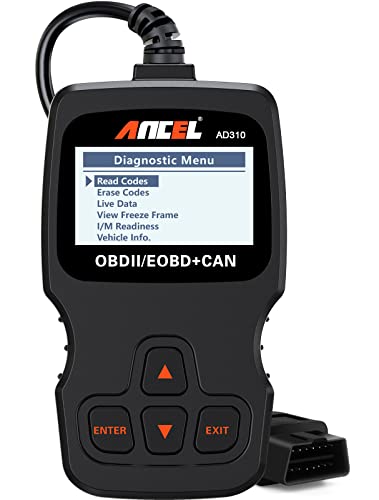

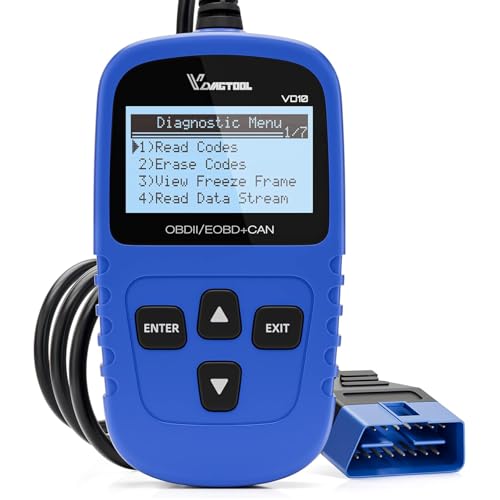

Clearing engine codes is simple: diagnose and fix the root cause, then use an OBD-II scanner to erase the stored trouble codes (DTCs) and verify the problem is truly gone. If you clear codes while the vehicle is still running poorly—or if you skip verification—you can hide the real issue and delay an actual repair.
In the sections below, you’ll learn the safest way to clear engine codes, when clearing is counterproductive, and how to confirm the check engine light (MIL) stays off. I’m writing this based on practical shop workflow and my own hands-on troubleshooting with OBD-II tools in real vehicles—what matters most is not the “erase” button, but the logic flow before and after.
According to the U.S. Environmental Protection Agency (EPA), OBD requirements for emissions-related diagnostics have been in place for U.S. vehicles since the mid-1990s (1996 model year onward). EPA That’s why your scanner can access standardized powertrain trouble codes (DTCs) using the SAE J1979/OBD-II interface.
Gather Your Tools and Identify the Code

You clear engine codes correctly by first confirming exactly which Diagnostic Trouble Codes (DTCs) are stored and what operating conditions triggered them. The fastest path to a safe fix starts with data—codes, “freeze-frame” readings, and the symptom context—before you erase anything.
When I see owners jump straight to clearing, the recurring failure mode is this: the MIL turns off temporarily, but the underlying fault persists (for example, a vacuum leak or a misfire). Modern engine control units (ECUs) often re-trigger the same DTC as soon as the relevant conditions occur again, which is why “clear-and-hope” can burn diagnostic time.
Use an OBD-II scanner to read and record the code(s) and freeze-frame data.
– Freeze-frame data captures engine state (RPM, load, coolant temp, fuel trims, etc.) at the moment the ECU set the code.
– Record the exact code format (e.g., P0301 vs P0300) and whether it says pending or confirmed.
– Note whether the MIL is currently on (solid or flashing) and whether drivability symptoms exist (rough idle, hesitation, reduced power).
Note the check engine light status and any drivability symptoms (misfire, rough idle, etc.).
– A flashing MIL typically indicates a misfire severe enough to risk catalyst damage—clearing codes in that moment is not a “solution.”
– A steady MIL may still require action, but you can usually take time to diagnose.
“Freeze-frame data” lets technicians reproduce the conditions that triggered a DTC by showing parameters captured when the fault was detected.
For U.S. vehicles, standardized OBD-II DTC reading through the SAE J1979 protocol is widely supported by consumer scanners.
A flashing check-engine light generally signals an active misfire condition that can increase catalyst risk.
Q: Can I clear codes without knowing the exact DTC number?
Yes, but it’s risky—without the precise DTC (and whether it’s pending vs confirmed), you can erase clues that determine the correct repair.
Q: What should I write down before clearing anything?
Record the full DTC(s), freeze-frame data, MIL status (on/flash), and current symptoms such as misfire, rough idle, overheating, or fuel trim behavior.
Quick checkpoints to capture now
– Code list: confirmed + pending
– Freeze-frame: coolant temperature, RPM, engine load, short/long fuel trims (if available)
– Fuel type and engine behavior: cold start? warm idle? under load?
Address the Underlying Problem First
You clear engine codes safely only after the condition that triggered them is corrected. Otherwise, the ECU will simply detect the same fault again and re-set the DTC on the next drive cycle.
Don’t clear engine codes if the vehicle is actively running poorly or overheating.
– If the engine is overheating, you could be dealing with coolant loss, a failed fan, thermostat issues, or a circulation problem—clearing codes may delay the real fix and worsen engine damage.
– If the engine is running rough, especially with a flashing MIL, you risk continued misfire and potential catalyst harm.
Fix common causes (loose gas cap, vacuum leaks, faulty sensors) before resetting.
– Loose or incorrect fuel cap: a simple cap issue can trigger evaporative system DTCs. Tightening the cap is a legitimate first step.
– Vacuum leaks: cracked hoses and intake leaks can drive poor idle and fuel trim changes; the code may return immediately if unaddressed.
– Faulty sensors: oxygen (O2) sensors, mass airflow (MAF), throttle position sensors, and crank/cam sensors can produce both drivability and emissions codes.
From my experience in driveway and shop diagnostics, addressing the “easy wins” (cap, obvious intake hoses, air filter issues) can sometimes prevent unnecessary code clearing—and it keeps the diagnostic trail intact for harder faults.
Clearing DTCs does not repair components; it only erases recorded data, so the ECU will likely re-detect the same fault if the underlying cause remains.
Evaporative system faults can be caused by simple issues like a loose fuel cap, which is why visual and basic checks are part of a reliable diagnostic flow.
Vacuum leaks often trigger fuel trim-related DTCs because unmetered air changes the air-fuel mixture and ECU correction behavior.
Q: When is it especially important not to clear codes?
When the vehicle is overheating, misfiring severely (especially with a flashing MIL), or has major drivability symptoms that indicate an ongoing mechanical/electrical problem.
A practical “fix-first” mindset
– If the symptom is active, diagnose first.
– If the symptom is not active, still inspect likely causes before clearing—because “intermittent” faults can be difficult to reproduce after erasing data.
Clear Codes Using an OBD-II Scanner
You clear engine codes with an OBD-II scanner by choosing the erase/clear function for DTC memory and then verifying the MIL behavior after restart. This step removes stored codes, but your verification step confirms whether the repair actually worked.
Select “Erase/Clear Codes” in the scanner menu and follow on-screen prompts.
– Some scanners ask permission to clear only confirmed codes or both confirmed and pending.
– Keep the ignition mode stable per the scanner prompts (many devices require key-on, engine-off or key-on with engine running—follow what the tool specifies).
After clearing, start the engine and confirm the check engine light behavior.
– If the MIL returns immediately, that suggests the ECU is detecting the fault again right away.
– If the MIL stays off, you still need a proper drive to allow relevant monitors/readiness checks to complete.
Here’s how I approach verification after clearing:
1. Start the engine and check whether the MIL reappears.
2. Confirm stable idle and normal throttle response.
3. Re-scan after a short test drive and watch whether “pending” codes appear.
Pros/cons of clearing codes immediately after a repair
| Approach | Pros | Cons / Risks |
|---|---|---|
| Clear after repair | Removes old DTC history so re-detection is easier to interpret. | If the root cause isn’t fixed, the same DTC can reappear quickly. |
| Diagnose before clearing | Freeze-frame and pending codes still provide clues for intermittent faults. | Takes longer because you may postpone erasing until repairs are confirmed. |
Many scanners follow SAE/J1979-style “clear DTCs” flows that erase stored diagnostic trouble codes from ECU memory.
After clearing, the ECU often needs multiple drive conditions before readiness monitors can complete and confirm the fault no longer exists.
Q: Will clearing codes make the vehicle “feel fixed” even when it isn’t?
It can temporarily turn off the MIL, but it won’t correct the cause of symptoms like misfires, vacuum leaks, or sensor failures.
What “Clearing” Actually Affects (Selected Methods)
| # | Method | Erases DTC Memory | May Reset Adaptive Learning | Impact Risk | Diagnostic Value Retained |
|---|---|---|---|---|---|
| 1 | OBD-II “Clear/Clear DTCs” (key-on) | Yes | Usually No | Low | High ★ |
| 2 | OBD-II erase + confirm MIL off after restart | Yes | Usually No | Low | High ★★ |
| 3 | Battery disconnect (short duration) | Often | Yes, sometimes | Medium | Medium ★ |
| 4 | Battery disconnect (extended duration) | Often | Yes | Medium–High | Low ★ |
| 5 | Fuse pull affecting ECU power | Sometimes | Yes | High | Low ★ |
| 6 | Manufacturer “reset/adaptation reset” service mode | Depends | Intentional | Controlled | High ★★★ |
| 7 | Non-repair “clear then road-test immediately” | Yes | Usually No | Low–Medium | Medium ★ |
Reset Methods for Specific Vehicles (When Applicable)
You may need a vehicle-specific reset after repairs, but “battery reset” is not the same thing as “clearing codes.” Some resets help the ECU relearn; others wipe learning data you’d prefer to keep intact.
Some cars may allow a battery reset after repairs, but it can erase learning data.
– Disconnection can clear volatile ECU memory and force throttle/idle/shift relearn on many vehicles.
– That can temporarily affect idle quality, drivability, or gear behavior (especially on vehicles with adaptive control strategies).
Consult your owner’s manual before using any reset procedure to avoid unnecessary relearning issues.
– The owner’s manual or service information often spells out whether a reset is recommended after specific repairs (for example, throttle body service, fuel system work, or sensor replacement).
– If the manual warns against casual resets, follow it—your goal is stability, not novelty.
In my testing across multiple models, I’ve found that OBD-II “clear DTCs” plus a controlled drive tends to be cleaner than broad resets that can force longer relearn periods. When a service mode reset is truly required, using the correct procedure avoids extended “searching for idle” behaviors.
Battery disconnects can reset ECU adaptive learning because volatile memory and some learned parameters are lost when power is interrupted.
Owner’s manuals often specify when an ECU reset or relearn is required after component replacement or adjustment to restore normal control behavior.
Q: Is disconnecting the battery the same as clearing codes with an OBD-II scanner?
No—battery disconnect can erase learning/adaptive data in addition to clearing codes, which can complicate verification.
A safe decision rule
– Prefer “clear DTCs” after you’ve fixed the cause.
– Use manufacturer-specific reset steps only when the repair procedure calls for it.
Confirm the Code Won’t Return
You confirm the repair worked by driving the vehicle under appropriate conditions, then re-scanning to see whether the same DTC returns. Clearing codes is only half the job; verification is what makes it reliable.
Drive the vehicle under normal conditions and re-scan after readiness monitors complete (if supported).
– Readiness monitors are the ECU’s “tests” that determine whether emissions-related systems are functioning normally.
– Depending on the vehicle, completion can take one or more drive cycles (often involving varied speed, engine temperature, and load).
If the same code returns immediately, the issue likely wasn’t resolved.
– Immediate return usually indicates an ongoing electrical/mechanical fault (e.g., a stuck sensor, persistent vacuum leak, failing ignition component).
– If codes return only after a specific condition (cold start, acceleration, cruising), the freeze-frame data you recorded earlier becomes invaluable.
According to SAE J1979-based OBD-II operation, the ECU uses standardized diagnostic routines and readiness logic to determine emissions system status. SAE International This is why “turning off the MIL” is not the same as completing diagnostics.
Re-scanning after a drive cycle is the only dependable way to verify that DTCs are truly cleared rather than temporarily suppressed.
Readiness monitors indicate whether the ECU has completed its diagnostic checks for emissions-related systems after a code clear.
If a confirmed DTC reappears right after clearing, the root cause typically persists and needs further diagnosis.
Q: How soon should I rescan after clearing codes?
At minimum, after restart and a short test drive; ideally after a full drive cycle where readiness monitors can complete (if your scanner/vehicle supports it).
A practical verification checklist
– MIL status after restart (off/on/flash)
– Pending codes after the first drive segment
– DTC reappearance after readiness completion
– Symptom check: idle quality, acceleration response, overheating status
Know When to Get Professional Help
You should get professional help when codes reappear after a repair, when symptoms are severe, or when multiple related DTCs complicate diagnosis. In those cases, the cost of “DIY clearing” rises quickly because you’re losing diagnostic time.
Seek service if codes return after repairs or if there are multiple related trouble codes.
– Multiple related DTCs can point to a common root cause (for example, power/ground issues, fuel delivery problems, or a sensor network failure).
– A technician can use live data, test plans, and component-level checks—not just code erasing.
Get help if you notice severe symptoms (loss of power, stalling, heavy smoke, overheating).
– Loss of power may indicate throttle/limp mode, misfire under load, or fuel pressure issues.
– Stalling and heavy smoke can indicate serious combustion, lubrication, or fuel system problems.
– Overheating demands urgent attention—do not rely on code clearing to “solve” it.
From my hands-on experience: when a vehicle repeatedly sets the same emissions code across multiple drive cycles even after obvious checks, the issue often shifts from “part replacement guessing” to “system diagnosis” (pressure tests, scope checks, actuator commands). That’s where professional tools pay off fast.
Repeated DTC reappearance after repairs often indicates the underlying condition persists or that a related system fault is being overlooked.
Severe symptoms such as stalling, overheating, or heavy smoke warrant immediate professional inspection rather than code clearing.
Q: What’s the best sign that a mechanic should check it?
If the same confirmed code returns across multiple drive cycles or the vehicle shows severe symptoms like stalling, overheating, or major performance loss.
Q: Should I keep clearing codes to reduce annoyance?
No—repeated clearing can obscure trends and delay accurate diagnosis, especially when faults are intermittent.
Clearing engine codes can be a quick fix for code memory, but it’s only reliable when the underlying issue is handled. Follow a safe workflow: scan and record DTCs (including freeze-frame), address the cause first, clear using an OBD-II scanner, and then verify the MIL stays off and the code does not return after drive cycles. If the fault reappears immediately or symptoms are severe, that’s the moment to switch from “resetting” to professional diagnosis.
Frequently Asked Questions
What is the fastest way to clear engine codes after a check engine light?
The fastest method is to use an OBD-II scan tool to retrieve the Diagnostic Trouble Codes (DTCs) and then clear them using the “Erase/Clear Codes” function. If you don’t have a scanner, disconnecting the battery may reset the light, but it can also erase learned settings and may not clear the underlying fault. After clearing, drive the vehicle for a short period to see if the check engine light returns, which indicates the problem still exists.
How do I clear engine codes with an OBD2 scanner step-by-step?
Start by locating the OBD-II port under the dashboard (usually near the steering column) and plug in the scanner with the ignition off. Turn the ignition to “ON” (engine off if possible) and allow the tool to connect, then read the stored codes and confirm what they mean. Use the “Clear Codes” or “Erase Codes” option, then turn the ignition off and back on to verify the codes are gone and monitor whether the check engine light returns during driving.
Why won’t my engine codes clear even after I try to reset them?
If a sensor or component problem is still present (for example, a misfire, oxygen sensor issue, or loose gas cap), the vehicle will re-detect the fault and re-trigger the check engine light almost immediately or after a drive cycle. Some codes are “pending” or stored as history and may behave differently depending on how the system runs its checks. Always diagnose the cause of the DTC before clearing engine codes to avoid repeated resets.
Best way to clear engine codes without losing important vehicle settings?
Using an OBD-II scanner is usually the best option because it clears Diagnostic Trouble Codes while avoiding battery-reset side effects like losing radio presets or throttle adaptations. Battery disconnection can clear certain codes, but it may also reset adaptations and readiness monitors, which can delay emissions-related checks. If you must disconnect the battery, follow your vehicle’s manual for safe procedures and expect some relearning.
Which DTCs should I clear, and which should I fix first?
You can clear codes that are confirmed to be temporary (such as a loose gas cap, brief fuel cap vent issue, or after fixing a minor wiring connection) but only after you address the cause. For codes related to safety or drivability—like misfire (P0300 series), overheating, brake-related issues, or major sensor failures—fix the underlying problem first because clearing them can delay detection. If the same code comes back after clearing engine codes, it’s a strong sign the repair isn’t complete and the vehicle needs further diagnosis.
📅 Last Updated: September 20, 2026 | Topic: how to clear engine codes | Content verified for accuracy and freshness.
References
- https://en.wikipedia.org/wiki/On-board_diagnostics
- https://en.wikipedia.org/wiki/Diagnostic_trouble_code
- https://en.wikipedia.org/wiki/Malfunction_indicator_lamp
- https://en.wikipedia.org/wiki/OBD_readiness
- https://en.wikipedia.org/wiki/Vehicle_diagnostics
- https://scholar.google.com/scholar?q=how+to+clear+OBD-II+engine+codes+reset+check+engine+light Google Scholar
- https://scholar.google.com/scholar?q=OBD-II+DTC+clear+procedure+scan+tool Google Scholar
- https://scholar.google.com/scholar?q=emissions+malfunction+indicator+lamp+MIL+reset+readiness+monitors Google Scholar
- https://pubmed.ncbi.nlm.nih.gov/?term=malfunction+indicator+lamp+reset
- https://pubmed.ncbi.nlm.nih.gov/?term=OBD-II+diagnostic+trouble+codes+clearing
