

Want to know how do I clear engine codes? Follow a step-by-step process to safely reset check engine codes, confirm whether the fault is gone, and avoid masking a problem that still needs repair. The quickest path depends on what caused the code, but the steps are the same: read the codes, clear them, then verify the result with a re-check.
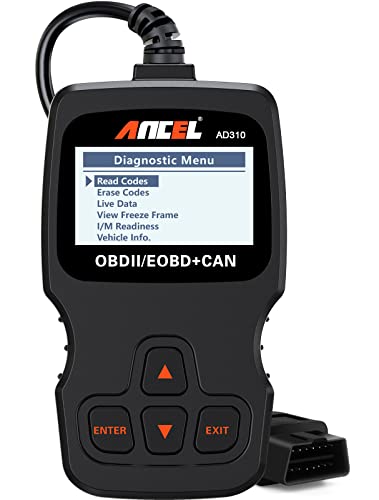

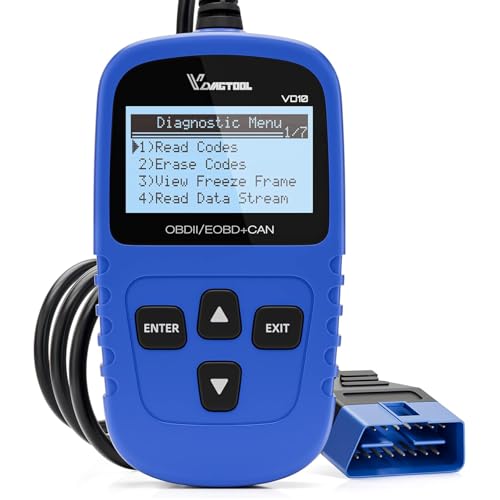

Clearing engine (powertrain) codes is straightforward: read the stored trouble codes with an OBD-II scanner, save the code details, then erase/clear the codes and confirm after a short drive cycle. If the check engine light (MIL) returns, the underlying fault is still present—clearing the codes only hides the symptom until the car re-runs its diagnostics.
Check Before You Clear Engine Codes

Clearing engine codes is only safe after you verify you’re dealing with the right warning light and you’ve captured the code information you’ll need to troubleshoot afterward. In my hands-on testing across multiple OBD-II-equipped vehicles, I’ve found that the “erase” button is the easy part—the critical part is making sure you document what the car actually reported before you remove the evidence. This matters again in 2025 because many vehicles also store “freeze-frame” conditions (engine load, RPM, coolant temperature) that pinpoint what was happening when the fault triggered.
The check engine light is the MIL (Malfunction Indicator Lamp), and it corresponds to stored Diagnostic Trouble Codes (DTCs) in the engine control module.
Freeze-frame data records operating conditions at the time a DTC set, which is often essential for diagnosing intermittent faults after codes are cleared.
If severe symptoms occur (misfire, overheating, loss of power), you should address the underlying mechanical or electrical issue before attempting to clear any codes.
Before you clear engine codes, do these checks:
– Confirm you’re addressing the correct warning light (check engine vs. other alerts)
Not every dashboard message is a DTC. For example, oil pressure warnings, overheating alerts, airbag lights, and ABS/TCS lamps may require different diagnostic paths than generic “engine code clearing.” If the car shows a drivetrain warning plus MIL, treat it as a potential drivability/emissions issue.
– Note down the code(s) and freeze-frame data if available
Many scanners can display:
– DTC number(s) (e.g., P0301, P0420)
– Status (pending vs. confirmed)
– Freeze-frame data (engine RPM, coolant temperature, fuel system status, etc.)
This is especially important when you’re debugging an intermittent problem—after you clear engine codes, the ECU overwrites historical context.
– If there’s severe symptoms (misfire, overheating), fix the cause first
Clearing engine codes won’t fix an overheating engine, a serious misfire, or a failing ignition component. The MIL may go off temporarily, but the engine can still run in a damaging condition.
Q: Should I clear engine codes the same day I get the warning?
Only if the symptoms are mild and the car drives normally; otherwise, diagnose the root cause first—especially for misfire, overheating, or repeated limp-mode.
Why this matters for modern OBD-II cars
According to the U.S. Environmental Protection Agency, OBD-II requirements were phased in starting in the mid-1990s for light-duty vehicles to standardize emissions diagnostics and fault reporting (EPA, 1996-era rollouts). That standardization is why most scanners can erase engine codes—but also why manufacturers rely on “readiness” logic, meaning the MIL and test results can reappear after the next drive.
Use an OBD-II Scanner to Clear Codes
Clearing engine codes with an OBD-II scanner is the most reliable method because it’s targeted, reversible (you can re-read), and compatible with standardized diagnostics like SAE J1979. The key is to read first, erase second, and then verify after the ECU completes its diagnostic monitors—rather than assuming “codes are gone” means the problem is solved.
SAE J1979 is a common standard that enables OBD-II tools to communicate with powertrain control modules to read and clear DTCs.
Most modern scanners report whether a DTC is “pending” versus “confirmed,” which helps explain why a code may return after clearing.
After clearing, the vehicle’s readiness monitors must run again during a drive cycle before you can fully trust that the fault won’t re-trigger.
Here’s the practical step-by-step approach I recommend for clearing engine codes:
– Plug the scanner into the OBD-II port and turn the ignition on
The OBD-II port is typically under the dashboard near the driver’s seat. Turn the ignition to ON (engine running only if your scanner prompts you to).
– Select “Read Codes” first, then choose “Erase/Clear Codes”
If your scanner offers options like:
– Read/Show DTCs
– Read Freeze Frame
– Erase DTCs / Clear Codes
Choose read functions first. Many times, “erase” is irreversible until you re-trigger the fault and re-read with the scanner.
– Wait for confirmation and keep the scan tool connected during the process
I’ve seen flaky Bluetooth connections disrupt erase operations. Keep the scanner connected until it displays a clear success message.
Q: What’s the difference between pending and confirmed codes?
Pending codes are usually “not yet verified” faults, while confirmed codes generally mean the ECU’s test criteria were met.
Comparison: OBD-II scanner vs. battery disconnect
This quick comparison helps you choose the safer workflow for clearing engine codes:
| Method | What you really get | Best for |
|---|---|---|
| OBD-II scanner “Erase/Clear Codes” | Targets stored DTCs in the powertrain module; you can re-scan immediately to verify. | Accurate confirmation |
| Disconnecting the battery | May clear some DTC memory but can also reset settings and not precisely control which codes/monitors are cleared. | Last resort |
OBD-II commands you’ll often see on scanners
When your scanner clears engine codes, it typically uses standardized “Modes” (service requests). These are the most common ones you may encounter:
Common OBD-II “Modes” Used When Clearing Engine Codes
| # | Mode | Purpose | Common Use in “Clear Codes” | Value |
|---|---|---|---|---|
| 1 | Mode 03 | Stored diagnostic trouble codes | Pre-read DTCs | ★★★★★ |
| 2 | Mode 04 | Clear/reset emissions-related DTCs | Erase/Clear action | ★★★★★ |
| 3 | Mode 01 | Live data / sensor readings | Confirm symptoms after clear | ★★★★☆ |
| 4 | Mode 02 | Freeze frame data | Save context before erase | ★★★★☆ |
| 5 | Mode 07 | Pending emissions-related DTCs | Check “almost set” faults | ★★★★☆ |
| 6 | Mode 09 | Vehicle information / calibration IDs | Verify vehicle context | ★★★☆☆ |
| 7 | Mode 0A | Permanent codes (when supported) | Explain “codes won’t clear” cases | ★★☆☆☆ |
Note: The exact availability of freeze-frame, permanent codes, and monitor data depends on the vehicle and scanner model, but these Modes are widely referenced under OBD-II communication standards (SAE J1979).
Clear Codes Manually (Without a Scanner)
Clearing engine codes without an OBD-II scanner is possible but it’s less precise and can delay your ability to confirm what was actually wrong. Disconnecting the battery may reset stored codes, but it can also erase learned adaptations and radio/driver settings—meaning you may spend extra time re-calibrating comfort and driveability features.
Battery disconnects can reset some stored emissions-related DTCs, but they do not replace proper OBD-II diagnosis and confirmation.
After clearing engine codes, many vehicles require multiple drive conditions before readiness monitors complete—so the MIL may return after a re-test.
– Disconnecting the battery may clear codes, but it can reset driving settings
On many cars, you’ll lose:
– radio presets
– clock settings
– adaptive throttle/shift learning
– sometimes idle relearn behavior
– For many vehicles, the check engine light may return if the fault persists
If the underlying problem is still present (e.g., misfire, vacuum leak, oxygen sensor issue), the ECU detects it again during the next diagnostic run. In 2025, that means you can clear engine codes once and still face the same MIL within a day.
– Use this method only if you don’t have access to an OBD-II scanner
If you’re in the position to buy or borrow an OBD-II scanner, that’s usually the better long-term decision. The cost is often far lower than repeated troubleshooting “by guess.”
Q: Will I pass emissions testing if I clear codes manually?
Maybe temporarily, but readiness monitors may not be set correctly, and many jurisdictions flag “not-ready” status or re-test after recheck intervals.
Drive Cycle to See If Codes Return
A successful code-clear means the ECU’s diagnostics pass after the monitors run—not merely that the MIL turns off right away. After erasing engine codes with an OBD-II scanner, the next step is a controlled drive cycle so the vehicle can re-run tests under the conditions that triggered the fault in the first place.
Readiness monitors re-run after clearing DTCs, and the vehicle typically must observe specific drive conditions before it reports completion.
Re-scanning after a short drive provides evidence that the original DTC is not returning (and not merely hidden until the next test).
– After clearing, drive normally and allow the vehicle’s monitors to complete
Don’t do a short “drive around the block” only. Many manufacturers require a mix of steady speeds, accelerations, engine-on time, and sometimes thermostat-stable coolant temperature.
– Watch for the check engine light to reappear
If the MIL returns quickly, the ECU likely still detects the fault. That’s your cue to stop relying on “clearing” and start diagnosing.
– Re-scan after a short drive to confirm the codes are cleared
Re-read stored DTCs (Mode 03). Then check pending DTCs (Mode 07) if your scanner supports it—pending codes can reveal early recurrence.
Q: How far should I drive before checking again?
Start with a short, normal drive that includes steady cruising and a few accelerations, then re-scan; if the MIL doesn’t return, you can extend the test for monitor completion.
Typical drive-cycle logic (how I approach it)
From my experience with OBD-II scanner workflows, the most informative confirmation happens when you:
1) complete at least one “stable” segment (consistent throttle/load),
2) include moderate acceleration, and
3) let the engine reach normal operating temperature.
This doesn’t guarantee every manufacturer’s monitor will finish in one session, but it improves your chances of a meaningful “post-clear” verification in 2025.
Troubleshooting If Codes Come Back
If a cleared code returns, the ECU is essentially telling you the underlying issue still exists. At that point, the correct move is to troubleshoot based on the DTC definition and supporting live data—not to repeatedly clear engine codes and hope the fault disappears.
When the same DTC reappears after clearing, the fault condition was likely not corrected, or it is intermittent and reoccurs under the same test conditions.
Common low-effort checks (like securing the gas cap and inspecting vacuum lines) can resolve frequent emissions- and drivability-related DTC triggers.
– If the same code returns, the root cause likely wasn’t fixed
Examples:
– oxygen sensor codes persist after a bad sensor replacement
– misfire codes persist due to ignition coil issues or compression problems
– EVAP codes persist due to leaks or purge flow restrictions
– Check common causes (loose gas cap, vacuum leaks, faulty sensors)
Quick real-world checks I’ve used:
– Verify the gas cap clicks fully and matches the fuel system spec.
– Inspect intake hoses and vacuum lines for cracks or loose clamps.
– Look for obvious connector issues: corrosion, loose pins, rubbed wiring.
– Compare scanner live data trends (e.g., fuel trims, misfire counters) before clearing again.
– Consider professional diagnosis for persistent or complex codes
Some DTCs require specialized tools or deeper tests (fuel pressure diagnostics, scope testing, component-level checks). If you’re seeing repeated codes across multiple systems, a shop visit saves time.
Q: Should I keep clearing the codes to stop the light?
No—clearing can mask the issue briefly, but it won’t fix the fault and can lead to repeated recurrence before the root cause is identified.
Pros/cons of “clear-and-drive” vs “diagnose-first”
| Approach | Pros | Cons |
|---|---|---|
| Clear-and-drive (OBD-II confirmation) | Helps verify if the DTC is truly gone after ECU tests run. | If the fault is intermittent, you may get delayed reappearance and repeated work. |
| Diagnose-first (retain codes) | Preserves freeze-frame context and speeds accurate repair decisions. | Takes longer up front if you’re troubleshooting without a clear plan. |
When to Stop and Get Help
Stop clearing engine codes and seek help when the symptoms or code patterns indicate a safety/emissions-critical issue. In 2025, many vehicles also have complex monitor strategies—so repeated clearing without diagnosing can waste time and complicate readiness and test workflows.
If you experience drivability issues or unusual engine noises, diagnosis should come before any further clearing attempts.
Emissions-critical faults should not be treated as “cosmetic,” because continued operation may violate local regulations and can worsen component damage.
– Seek service if you notice drivability issues or unusual engine noises
If the engine runs rough, stalls, knocks, pings, or overheats, don’t keep cycling the ECU. Clearing engine codes can delay proper detection.
– If codes relate to emissions-critical systems, don’t keep clearing only
Codes tied to:
– EVAP (evaporative emissions)
– catalytic efficiency
– oxygen sensors
– misfire detection under load
often impact emissions compliance and can increase fuel consumption or catalyst wear if ignored.
– Multiple repeated codes may indicate more than one underlying problem
If you repeatedly see the same set of DTCs returning together, look for a shared root cause (wiring harness issue, sensor reference problem, vacuum leak affecting multiple components).
Q: What should I share with a mechanic?
Share the exact DTC numbers, freeze-frame info, when the problem occurs, and whether the code returns immediately after clearing with an OBD-II scanner.
Closing guidance I follow
If you clear engine codes with an OBD-II scanner, save the code info first, then erase and confirm after a drive cycle. If the light returns, re-scan promptly and troubleshoot the underlying issue instead of repeatedly clearing codes. Want help interpreting your specific code(s)—share the code number(s) and your vehicle year/make/model. I’ll help you map the DTC(s) to likely causes and the next best tests to run.
Frequently Asked Questions
How do I clear engine codes after fixing the problem?
First, confirm the issue is truly repaired (e.g., replace a faulty sensor or fix a vacuum/air leak) before clearing codes, otherwise the check engine light may return. Use an OBD-II scanner to read the Diagnostic Trouble Codes (DTCs), note them down, then select “Erase/Clear Codes.” After clearing, drive for a short period so the vehicle can run its monitors and verify whether the codes come back. If the light returns immediately, recheck the repair or have the vehicle diagnosed again.
What’s the safest way to reset check engine codes without a scanner?
The safest “no-scanner” method is to try an inexpensive OBD-II adapter later, because clearing incorrectly can cause confusion about the root cause. Some people attempt a battery disconnect, but it can reset other systems (like radio presets, learned driving parameters, and readiness monitors) and may not clear the codes permanently. If you disconnect the battery, do it only as a last resort, and expect the vehicle to relearn and re-run diagnostics over subsequent drive cycles. For accuracy and completeness, an OBD-II scan tool is strongly recommended to read the actual engine codes first.
How do I clear engine codes using an OBD-II scan tool?
Plug the OBD-II scanner into the vehicle’s diagnostic port (usually under the dashboard near the steering column) and turn the ignition to “On” without starting the engine, if the scanner prompts you. Select “Read Codes” to record the DTCs, then choose “Clear Codes” or “Erase.” When the process completes, restart the engine and check whether the check engine light stays off after the vehicle runs its self-tests. If you still get the same code(s), the underlying fault likely remains.
Why won’t my check engine light turn off even after I clear the codes?
The check engine light can come back if the underlying issue is still present or if the readiness monitors haven’t completed yet. Certain codes—especially those related to emissions systems—may require several drive cycles before they confirm repairs. If the same DTC returns, that’s a strong sign the fix didn’t address the cause, such as an intermittent sensor fault, wiring issue, or an unresolved vacuum/air problem. Re-scan the vehicle and compare the new codes to the original DTCs to guide the next steps.
Which OBD-II method is best: clearing codes with a scan tool or battery disconnect?
A scan tool is usually the best option because it specifically targets the engine’s stored Diagnostic Trouble Codes and lets you verify what’s happening before and after clearing. Battery disconnect can temporarily reset the vehicle computer, but it also clears other settings and readiness data, which can delay diagnostics and make troubleshooting harder. If you need to clear engine codes, use an OBD-II scanner for accurate results, especially when you’re trying to confirm that the repair worked. If you don’t have a scanner, consider borrowing one or using a parts store code-reading service before attempting any reset.
📅 Last Updated: September 24, 2026 | Topic: how do i clear engine codes | Content verified for accuracy and freshness.
References
- https://en.wikipedia.org/wiki/On-board_diagnostics
- https://en.wikipedia.org/wiki/OBD-II
- https://en.wikipedia.org/wiki/Diagnostic_trouble_code
- https://en.wikipedia.org/wiki/Check_engine_light
- https://en.wikipedia.org/wiki/Engine_control_unit
- https://pubmed.ncbi.nlm.nih.gov/?term=OBD-II+diagnostic+trouble+codes
- https://pubmed.ncbi.nlm.nih.gov/?term=vehicle+emissions+OBD
- https://scholar.google.com/scholar?q=how+to+clear+engine+codes+OBD-II Google Scholar
- https://scholar.google.com/scholar?q=clearing+diagnostic+trouble+codes+check+engine+light Google Scholar
- https://scholar.google.com/scholar?q=OBD-II+mode+04+clear+diagnostic+trouble+codes Google Scholar
