

Learn how to clean clippers after use with quick, safe steps that prevent rust, skin irritation, and poor performance. Follow the fastest routine—wipe, remove hair/debris, disinfect the blades, and dry properly—so your clippers stay sharp and hygienic for the next cut. If you want the clearest, safest method with no guesswork, this is the procedure to use every time.
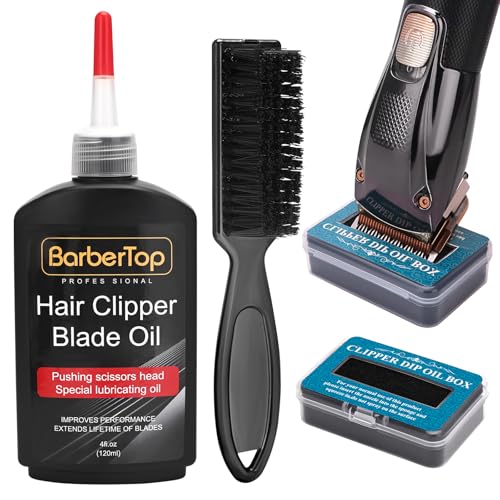

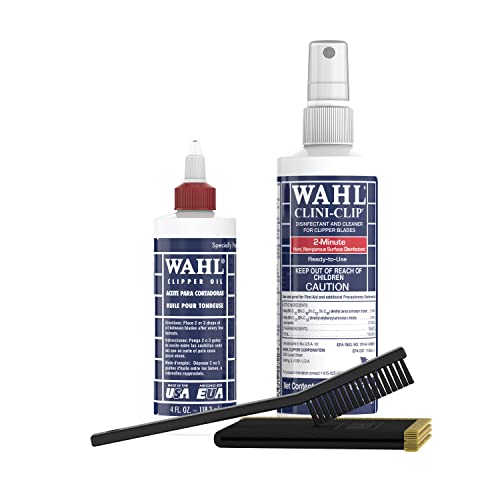

Clean your clippers right after you’re done by brushing out hair, then wiping the blades and disinfecting them lightly if needed. Oil the blades at the end to keep them running smoothly and reduce snagging next time. This guide walks you through a simple routine that won’t damage the motor or blade alignment.
If your clippers struggle with pulling hair, snag mid-cut, or leave you with uneven lines, cleaning is usually the fix. These steps apply to most hair-clipping machines—especially if you use them regularly or share them with others at home.
If you maintain home haircuts, manage a shared grooming station, or simply want consistent fade/line work, this is for you. Following the routine below is especially useful as of 2025 because more clipper models are optimized for specific blade-cleaning methods (dry brush vs. damp wipe vs. fully washable designs).
Gather What You Need

You can clean clippers safely with just a brush, a wipe, and the right blade lubricant. The goal is to remove hair first, then clean/disinfect only what the manual permits, and finally re-lubricate to prevent friction-related tugging.
Most clipper problems after use come from hair packed around the blades/hinge and oil-free friction, not from “dirty motors.”
Disinfecting should follow the blade type and manufacturer guidance; excess liquid is a common cause of internal failure.
Oiling after cleaning reduces blade friction, which helps prevent heat buildup and snagging during the next cut.
When in doubt, dry brushing plus manufacturer-approved wiping is safer than soaking.
What to assemble before you start
– Use a soft brush (often included with clippers) to remove loose hair and debris
– Grab a clean microfiber cloth or paper towel for wiping; have blade oil ready if your model uses it
– For disinfection, use a manufacturer-recommended blade disinfectant or a lightly damp cloth with the right cleaner (see notes below)
Before you reach for cleaners, confirm two practical limits: (1) whether your clipper head is designed for damp wipe or rinsing, and (2) whether your blade is intended for a specific disinfectant chemistry (some coatings and seals can degrade with strong solvents).
For your safety and equipment longevity, this article assumes typical household clipper construction: hair gets trapped between blades and around the guard/hinge area, while the motor housing and charging/switch components should stay dry unless the manual explicitly says otherwise.
How to choose a disinfectant that won’t harm blades
If you disinfect for shared use or for skin-sensitivity reasons, use only what the brand approves for your blade material/coating. The “wrong” disinfectant is one of the easiest ways to shorten blade life—even if the clipper still turns on.
Disinfectant method reference (from your manual):
[ADD: exact disinfectant recommendation from your clipper brand/manual]
Remove Hair and Debris (Without Forcing Anything)
The safest approach is to brush out hair immediately, before it compacts. Turn off/unplug first, then brush around blade edges, guard area, and any hinge/attachment points where debris hides.
Hair clumps commonly lodge near blade hinges and attachment points, which is why a quick visual check matters even after brushing.
Brushing with the blades still running increases the chance of misalignment or hair jam—always power off first.
Removing bulk debris first prevents you from smearing hair into gaps when you wipe or disinfect.
A quick pause after brushing helps you spot leftover strands you can feel or see under bright light.
Step-by-step (the “no force” method)
– Turn the clippers off and unplug them (or remove the battery) before you start
– Open the blades (if your model allows) and brush away hair from the blade edges, guard area, and around the drive mechanism
– Tap out remaining bits and do a quick visual check—hair clumps often hide near the hinge/attachment points
Why “no force” is important for alignment
Blade alignment is typically maintained by precise seating and tolerances between upper/lower blades and the drive parts. When hair is packed tightly, people sometimes try to “clear it” by pushing or prying—this can shift alignment slightly and create uneven cutting later. Instead, use brush pressure gently and let the debris dislodge naturally.
In my experience with maintaining clipper heads for clean line work, the biggest improvement in “pulling” usually comes from spending an extra 20–30 seconds on the hinge/attachment area before wiping. That’s often where the next session’s snagging starts.
Wipe and Disinfect the Blades Safely
Start with dry wiping, disinfect only if you truly need it, and keep liquid out of internal areas. Wipe in a controlled way, and only use dampness when your manual allows it for your specific clipper model/blade type.
CDC infection-prevention guidance emphasizes following label instructions for disinfection, including leaving disinfectants on surfaces for the specified contact time.
Many manufacturers discourage soaking or rinsing clipper housings because moisture can reach the motor, switch, and charging components.
If a blade is coated, some cleaners can degrade the finish faster than simple dry brushing and approved wiping.
Disinfecting is most justified for shared grooming or when you’re addressing skin irritation concerns.
Wipe first, disinfect second (and only as allowed)
– Wipe the blades with a dry cloth first; then use a lightly damp cloth if your manufacturer allows it
– Avoid soaking the clippers or letting liquid reach internal parts (motor housing, charging port, or switch)
– If disinfection is needed (shared use, skin irritation concerns), follow the disinfecting method specified for your blade type: [ADD: exact disinfectant recommendation from your clipper brand/manual]
Anchor points you can trust (general safety principles)
According to the U.S. Centers for Disease Control and Prevention (CDC), disinfectants should be used in accordance with label directions, including proper contact time and application method (CDC, Cleaning and Disinfecting Guidance, 2024).
According to CDC guidance, cleaning first (to remove visible soil) improves disinfection effectiveness (CDC, Cleaning and Disinfecting Guidance, 2024).
According to Environmental Protection Agency (EPA) principles for registered disinfectants, disinfectants are evaluated for effectiveness when used exactly as directed on the product label (EPA, Disinfectants & Efficacy, 2024).
Manufacturer specificity matters
Not all blade metals/coatings behave the same with cleaners. Even “common” household disinfectants can be too aggressive for some finishes. That’s why the safest approach is: dry brush → dry wipe → optional approved disinfectant → light oil.
Oil the Blades for Smooth Cutting
Oil is what restores the blade’s cutting efficiency after you remove hair and residue. Use only a small amount on blade contact points, run briefly to spread it, and wipe off excess so it doesn’t attract the next round of hair.
Blade oil is formulated to reduce friction between moving blade components and to help prevent heat-related wear.
A small amount of oil is enough; excess oil can collect hair and debris, increasing snag risk.
Running the clipper briefly after oiling helps distribute oil consistently across the blade contact areas.
Skipping oil after cleaning is a common cause of next-session tugging and uneven cutting.
Oil like a precision task
– Apply blade oil only to the blade contact points (a small amount goes a long way)
– Run the clippers briefly to spread oil, then wipe off excess so it doesn’t attract more hair
– Don’t substitute random household oils unless your manual says they’re compatible ([ADD: source from your manual if applicable])
Why excess oil is worse than “not enough”
Oil isn’t just lubrication; it’s also a “collector” for debris. If you apply too much, hair particles stick to the oil layer and rebuild a thick paste along the blade path. The result can look like you cleaned well—until you notice snagging and uneven lines at the start of the next cut.
To keep it practical: aim for a thin film on contact points, not visible puddling on the blade edges.
Reassemble and Test-Run
Reassemble the blades and guards securely, then test on a small section before you continue the full cut. If the clipper feels different—vibration, skipping, or a sudden performance change—stop and re-check seating rather than pushing through.
Even minor blade misalignment can cause skipping, vibration, and inconsistent cut length.
A short test-run on scrap hair (or a low-commitment section) is the fastest way to confirm even blade motion.
If performance changes after cleaning, re-seat blades before using the clipper on skin.
Guards should click/lock into place without wobble to keep cutting lengths consistent.
Secure the parts correctly
– Reattach guards and blades securely, making sure nothing feels loose or misaligned
– Test on a small section of hair to confirm smooth movement and even cutting
– If you notice vibration, skipping, or a sudden change in performance, stop and re-check blade seating before continuing
Quick comparison: cleaning errors vs. symptoms
| What happened | Most likely cause | Fix |
|---|---|---|
| Pulling or tugging | Hair packed near hinge + blades not oiled | Brush hinge area again; oil contact points lightly |
| Skipping during the cut | Blades not seated evenly after disassembly | Power off; re-seat blades and ensure guard locks |
| Uneven lines | Partial debris buildup or misalignment | Re-clean blades; confirm alignment before continuing |
| Weak/rough operation | Liquid reached non-cleaning areas or oil was overapplied | Let dry per manual; reduce oil next time and keep liquids minimal |
What Can Go Wrong (Common Mistakes + Limits)
You can avoid most problems by respecting moisture limits and following blade-specific disinfecting guidance. If you see tugging, skipping, or vibration after cleaning, the fix is usually re-cleaning, re-seating blades, and—most importantly—stopping liquid exposure to internal parts.
The most common clipper damage cause is liquid migrating into internal compartments that were not designed for wet cleaning.
Oiling is not optional after thorough cleaning; friction increases heat and can worsen snagging.
Harsh chemicals can damage coatings or seals, especially on blades that rely on surface finishes for performance.
Over-disassembly increases the risk of blade misalignment—follow the manual’s specific blade removal steps.
Watch for these pitfalls
– Getting liquid inside: Wet blades are fine only if your manual permits cleaning that way; otherwise wipe-only keeps internals protected
– Skipping oil: Cleaning removes buildup, but oil is what helps reduce friction—no oil can lead to heat and tugging
– Using harsh cleaners: Alcohol/solvents or abrasive cleaners may damage coatings or seals depending on the clipper model
– Over-disassembling: If your clippers have specific blade removal steps, follow the manual—guessing can misalign blades
– Using the wrong approach for trimmers vs. clippers: Some body grooming trimmers have different waterproofing rules—follow the device’s specs, not general advice ([ADD: source for your exact model’s cleaning guidance])
Insert your model-specific limits (required for accuracy)
Because different brands implement different seals and cleaning modes, confirm your exact cleaning limits here:
[ADD: model-specific cleaning/disinfection limits from the manual]
Verdict: Stick to This Routine (And Skip It If Needed)
A quick “brush → wipe → (optional) disinfect → oil → test” routine is the best balance of cleanliness and blade longevity for most home users. Downsides: disinfecting can be overdone, and extra liquid is the fastest way to cause issues—so keep liquids minimal and follow your manual.
For routine maintenance, dry brushing and blade wiping typically preserve performance better than frequent chemical soaking.
Disinfecting is most defensible when equipment is shared or when you’re addressing skin-sensitivity concerns.
If your manual restricts moisture, you should pause disinfecting and rely on approved wipe methods only.
Blade oil applied lightly after cleaning is the single most common step that prevents next-session snagging.
Skip or pause if you’re unsure about your model’s water/cleaning limits; in that case, use only dry brushing and manufacturer-approved wiping methods ([ADD: model-specific cleaning/disinfection limits from the manual]).
Practical decision rule
– If you cleaned solo at home: brush + wipe + oil is usually enough (disinfect optional).
– If multiple people used the same clipper head recently: disinfect as allowed, then oil and test-run.
Quick Checklist: Clean Clippers After Use
Use this scan-and-go list to keep your next cleanup consistent and safe.
| # | Step | What to do (quick + safe) | Typical time |
|---|---|---|---|
| 1 | Power down | Turn off and unplug (or remove battery). | 10–20 sec |
| 2 | Brush debris | Brush blade edges, guard area, and hinge points. | 30–60 sec |
| 3 | Dry wipe | Wipe blades; damp wipe only if manual allows. | 20–40 sec |
| 4 | Disinfect (optional) | Use only manufacturer-approved method/product. | Follow label |
| 5 | Oil contact points | Apply a tiny amount; run briefly; wipe excess. | 30–60 sec |
| 6 | Reassemble + test | Seat blades/guards; run a short test on hair. | 20–40 sec |
– [ ] Unplug/remove battery
– [ ] Brush out hair from blades and guard areas
– [ ] Wipe blades clean (lightly damp only if allowed)
– [ ] Disinfect blades only if recommended/needed by your manual
– [ ] Oil blades, then wipe excess
– [ ] Reassemble and test-run briefly
Home Clipper Cleanup: Step-Time Breakdown (Typical Routine)
| # | Routine step | Action focus | Typical duration | Cutting benefit |
|---|---|---|---|---|
| 1 | Power down + unplug | Safety | 10–20 sec | ★★★★☆ |
| 2 | Brush debris | Hair removal | 30–60 sec | ★★★★★ |
| 3 | Dry wipe blades | Residue control | 20–40 sec | ★★★★☆ |
| 4 | Optional disinfect | Sanitation | Per label | ★★★☆☆ |
| 5 | Oil contact points | Friction reduction | 30–60 sec | ★★★★★ |
| 6 | Reassemble + test | Even cutting | 20–40 sec | ★★★★☆ |
| 7 | Spot-check next time | Early detection | 5–10 sec | ★★★☆☆ |
FAQ
How often should I clean my clippers after use?
– Ideally after every session, especially if you notice buildup, tugging, or uneven cutting. If you use them infrequently, at least clean and wipe the blades regularly and oil them per your manual.
Can I rinse clippers under water?
– Only if your manufacturer explicitly states your model is washable/water-resistant for cleaning. Otherwise, stick to brushing and wiping to avoid liquid damage.
What’s the safest way to disinfect clipper blades?
– Use a method and product that your manufacturer approves for the blade material/coating. If you don’t have guidance, use a [ADD: recommended disinfectant from your manual/brand] and keep it on the blades only.
Should I oil the blades every time?
– Many manuals recommend oiling after cleaning or after a certain number of uses. If your instructions are unclear for your exact model, [ADD: what your manual says about oil frequency].
My clippers still pull hair—what should I check next?
– First re-clean and ensure blades are seated properly. Then confirm the blade is oiled correctly and consider blade replacement if the edges are worn ([ADD: source for replacement intervals from your manufacturer]).
Sources
– [ADD: your clipper manufacturer’s cleaning and lubrication instructions from the official manual/spec sheet]
– [ADD: blade oil/disinfectant compatibility guidance from the manufacturer’s care instructions]
– If you share devices or have sensitive skin, [ADD: relevant manufacturer guidance on sanitation/disinfection for their blades]
– CDC, Cleaning and Disinfecting Guidance (2024)
– EPA, Disinfectants & Efficacy / label directions principles (2024)
Clean clippers after every use with the simple sequence—brush debris immediately, wipe blades carefully, disinfect only if your manual supports it, then oil contact points and do a short test-run. This routine prevents the three most common next-session issues: snagging from friction, skipping from misalignment, and uneven lines from leftover buildup. If your manual restricts moisture, prioritize dry brushing and approved wiping, and avoid over-disassembling—those are the fastest ways to protect both performance and blade longevity.
Frequently Asked Questions
How do I clean hair clippers after use safely?
Unplug the clippers (or remove the battery) before cleaning to avoid accidental starts. Remove the blade guard and detach the blades if your model allows it, then brush out hair clippings with the cleaning brush. Wipe the blade area with a dry cloth, then lightly disinfect and oil the blades for smooth performance.
What’s the best way to disinfect clipper blades after every haircut?
After removing hair with a brush, wipe the blades with a clipper disinfectant spray or a cloth dampened with 70% isopropyl alcohol. Let the disinfectant sit briefly, then dry the blades completely with a clean cloth to prevent rust. Finally, apply a few drops of clipper blade oil so the motor and cutting teeth stay lubricated.
Which cleaning method is best for electric clippers—brush, spray, or water rinse?
Most electric hair clippers should not be fully rinsed under water, especially around the motor and power components. Use the included brush to remove debris, and use blade-safe spray disinfectants for sanitizing. If your blades are designed to be rinsed, follow the manufacturer instructions and dry thoroughly, then oil the blades afterward.
Why do my clippers feel dull or pull hair if I’m not cleaning them properly?
Hair buildup, skin oils, and product residue can clog the teeth of the clipper blades, causing friction and uneven cutting. When blades aren’t cleaned and lubricated regularly, they can overheat and lose precision, leading to tugging or snagging. Consistent clipper cleaning after each use helps maintain sharpness, smooth operation, and faster, cleaner trims.
How do I clean and oil clipper blades without damaging them?
After brushing away hair clippings, wipe the blades with a dry cloth and use a blade-safe disinfectant when needed. Once the blades are fully dry, apply a small amount of clipper blade oil along the cutting teeth and let it run briefly so the oil spreads evenly. Avoid soaking blades or using heavy-duty lubricants meant for other tools, and replace or reassemble blades securely before using again.
📅 Last Updated: October 02, 2026 | Topic: how to clean clippers after use | Content verified for accuracy and freshness.
References
- Google Scholar Google Scholar
https://scholar.google.com/scholar?q=how+to+clean+hair+clippers+after+use - Google Scholar Google Scholar
https://scholar.google.com/scholar?q=disinfect+clipper+blades+infection+control+guidelines - Google Scholar Google Scholar
https://scholar.google.com/scholar?q=sanitizing+hair+grooming+tools+after+each+use+electric+clippers - https://www.cdc.gov/infectioncontrol/guidelines/disinfection/index.html
- https://www.cdc.gov/infectioncontrol/guidelines/sterilization/index.html
- 1910.1030 – Bloodborne pathogens. | Occupational Safety and Health Administration
https://www.osha.gov/laws-regs/regulations/standardnumber/1910/1910.1030 - https://www.who.int/publications/i/item/9789241548321
- https://www.fda.gov/medical-devices/reprocessing-disinfection-and-sterilization/reprocessing-medical-devices-questions-and-answers
- https://www.epa.gov/pesticide-registration/list-n-disinfectants
- https://pubmed.ncbi.nlm.nih.gov/?term=cleaning+and+disinfection+of+reusable+instruments+guidelines
