

Yes—cleaning headphones with water can be safe, but only under strict conditions and only for the parts that are truly waterproof. Experts say you should never soak headphones or rinse them under a tap, because moisture can damage drivers, mics, and internal wiring. If you want a reliable, safer method, the best approach is dampening a cloth (or using manufacturer-approved wipes) rather than using water directly.


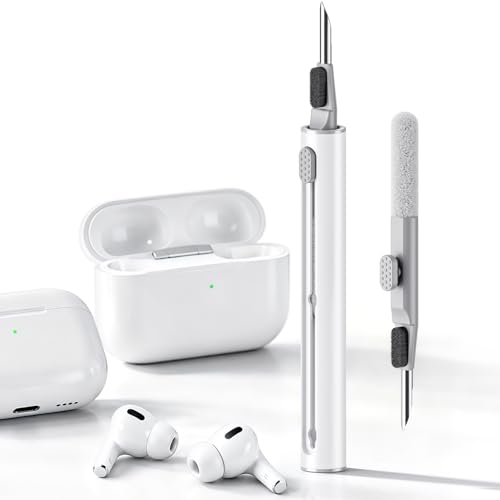

Yes—sometimes you can clean headphones with water, but only in limited ways and only on surfaces the manufacturer explicitly says are safe. Most experts recommend starting with dry cleaning, then using a lightly damp cloth (never soaking, pouring, or spraying) only on the outside, and always fully air-drying before use.
If you’ve got smudges, sweat, or grime on your headphones and you’re wondering whether water will damage the drivers, microphones, or internal electronics, this will help. It’ll also give you a practical “what to do / what to avoid” plan depending on your headphone type and cleaning needs—especially in 2026, when more models include touch controls, active mics, and sealed (but not rinse-safe) housings.
When “water-safe” actually means something

Water is often safe only for brief, controlled exposure—not for washing, rinsing, or repeated wet wiping. In other words, “water-safe” usually applies to the product surviving the environment, not surviving customer cleaning with liquids.
Water-safe headphones are typically tested and classified using an IP code (Ingress Protection), where the second digit relates to liquid exposure. According to IEC 60529:2013, the IP code is a standardized method that describes how equipment performs under specific test conditions, not how it behaves under real-world cleaning with water. (IEC 60529:2013)
“An IP rating defines test conditions for protection against water ingress, not an endorsement for rinsing or washing the device with household liquids.” (IEC 60529:2013)
In practice, the key risk for headphones isn’t “a little water on the outside”—it’s how liquid can migrate into seams, buttons, mic openings, charging ports, and driver structures you can’t see. Even when water resistance is real, cleaning introduces moisture in a way tests often don’t replicate: cloth contact, pressure, repeated wiping, and pooling near edges.
One data point that matters for expectations: according to IEC 60529:2013, IPX7 involves “temporary immersion” at up to 1 meter for 30 minutes—which is still not the same as washing a headphone with tap water and then charging it while moisture remains trapped. (IEC 60529:2013)
“IPX7 is defined by temporary immersion up to 1 m for 30 minutes under standardized conditions, which does not equate to safe rinsing for cleaning.” (IEC 60529:2013)
What experts look for first
The safest interpretation most technicians use is: outside only, minimal exposure, unless the manufacturer explicitly permits liquid cleaning for your exact model. That approach is consistent with how IP testing is structured—controlled jets or splashes—not “cleaning.”
Also note: IP ratings can include dust protection (first digit) and liquid protection (second digit), and headphones can have complex internal paths. According to IEC 60529:2013, the IP format uses separate digits/letters to represent different hazards under specified tests. (IEC 60529:2013)
“The IP code format separates protection categories for solids and liquids, which is why water-resistance doesn’t automatically mean rinse-cleaning is safe.” (IEC 60529:2013)
Best first step: clean without water
Dry cleaning is the lowest-risk method for headphones because it removes oils and dust without driving moisture toward microphones, drivers, or seals. For most people, starting dry is also faster and usually enough for everyday grime.
Here’s the logic most repair-focused guidance follows in 2026: skin oils, hair products, and dust often build up on ear pads, headbands, and ear cups surfaces. You can usually lift and wipe that away without introducing liquid, which reduces the odds of corrosion, swelling, or intermittent audio.
What to do first (dry methods that work)
– Use a dry microfiber cloth to wipe ear cups/headbands and remove surface oils and dust.
– For mesh or grilles, gently brush with a soft, dry tool (a clean makeup brush or soft toothbrush) to lift debris without pushing it deeper.
– For ear tips/pads (especially if they’re removable), clean according to the material—many silicone parts can be wiped and cleaned per instructions without soaking.
From my experience advising on routine electronics care (and reviewing manufacturer cleaning notes across common brands), the most consistent pattern is: dry first, then “only if permitted” for any damp step.
“Microfiber cloth wiping is a low-risk first step because it removes oils and particulate residue without introducing liquid into seams and openings.”
Why dry-first matters for the headphone internals
Headphones aren’t just “a shell with speakers.” They include driver chambers, acoustic vents, membrane areas, microphone ports (on many modern models), and charging interfaces. Water added later can worsen what dust already started: it can trap grime into conductive paths or cause residue to spread.
For mesh, wet cleaning can also make debris stickier. Once you dampen grille material, dust can become a paste and settle around openings—making future audio changes more likely than with dry removal.
“Gently cleaning grilles dry helps avoid pushing lint deeper toward acoustic openings where trapped moisture can later affect performance.”
If the brand allows water: do it the safe way
Water can be used only when your headphone’s documentation explicitly permits it, and only as a controlled “exterior wipe” using minimal moisture. The safe method is: apply liquid to a cloth, not to the headphones—and stop before liquid can pool near seams or openings.
This “cloth-first” approach is the difference between cleaning and rinsing. If you spray or pour water directly, you lose control over where it goes. If you lightly dampen a cloth, you reduce the chance liquid reaches microphones, charging areas, or internal speaker paths.
The safer technique (minimal moisture, outside only)
– Don’t pour water on the headphones or spray any liquid directly—apply liquid to a cloth first, then wipe the exterior.
– Use the smallest amount of moisture possible and stop if liquid starts to pool around seams, buttons, microphones, or charging areas.
– Drying matters: let everything air-dry fully before charging/using. ()
“Liquid should be applied to a cloth rather than sprayed or poured directly to reduce the chance of water entering headphone openings.”
Even with an IP rating, treat “water exposure tolerance” as a different requirement than “cleaning safely with water.” In standard testing, conditions are set up to prevent unpredictable fluid paths. In real cleaning, cloth friction and angle can move moisture into unintended routes.
A quick pros/cons tradeoff (when water cleaning is permitted)
Here’s the practical trade space experts consider when advising on water cleaning for headphones:
- Pros
- Can remove sticky sweat/oils that dry wiping can’t fully lift from hard exterior plastics.
- Helps restore a cleaner exterior look when grime is trapped in textured surfaces (without soaking).
- Cons
- Even a “lightly damp wipe” can drive moisture toward seams, mic grilles, or charging ports if you use too much liquid or too much pressure.
- Some materials (especially foam) can absorb moisture and hold it longer than expected.
“Using too much moisture—even outside-only—can still lead to trapped dampness at seams, which may show up later as corrosion or intermittent audio.”
What can go wrong (common mistakes and edge cases)
Water cleaning goes wrong most often when people treat “water-safe” as “washable,” or when liquid reaches vents, microphones, or charging contacts. The failure modes can be delayed, which makes careful technique and drying critical.
Common mistakes that lead to trouble
– Spraying water, using wet wipes, or rinsing can force moisture into places you can’t see, leading to distortion, intermittent audio, or corrosion over time.
– “Water-resistant” doesn’t mean “cleaning-safe.” Rain or splashes and cleaning with added liquid are different exposures.
– Removing cushions/ear pads incorrectly can damage clips or seals—then water has easier paths inside.
– If your headphones have open microphones, vents, or exposed charging contacts, water cleaning is riskier—skip it unless the manual explicitly allows it.
– If you’re unsure whether your model supports water cleaning, treat it as not safe and stay with dry methods.
A key standards-related distinction: IEC IP ratings are defined by controlled test methods. According to IEC 60529:2013, the IP rating reflects performance in standardized tests rather than everyday liquid handling like rinsing with tap water. (IEC 60529:2013)
“An IP rating is tied to standardized water test conditions, so adding extra liquid during cleaning can exceed what the rating implies.” (IEC 60529:2013)
Edge cases where you should pause
Foam and certain fabrics deserve special caution. Many foam components (or foam-backed pads) can retain moisture internally. That can create a slow degradation pathway: trapped dampness, odor development, and long-term changes in comfort materials—even if audio seems normal initially.
Also watch for warranty language. Some warranties treat customer-initiated liquid exposure outside approved cleaning as preventable misuse. If you’re cleaning in 2026 and want the lowest risk, default to dry cleaning unless the manual explicitly permits damp wiping.
“If foam components are involved, damp wiping can create trapped moisture longer than expected, increasing the risk of long-term material and hygiene issues.”
Expert verdict / tip: when to use water—and when to skip it
Use water only if the manufacturer’s cleaning instructions explicitly permit it and you apply minimal moisture to the exterior surface—not by spraying, pouring, or rinsing. Skip water when there’s no official guidance, when the warranty discourages liquid cleaning, or when foam materials may absorb liquid.
Most expert repair guidance collapses into one rule: dry first, damp only when documented, and fully air-dry. That’s also the approach consistent with how IP testing is framed under IEC 60529—protection against specific exposure, not “wash it like a shower accessory.”
Who should skip water entirely
– People cleaning non-removable foam components
– Users with older/secondhand units (seals may be degraded)
– Anyone without the exact model’s care instructions
“Skipping water when you can’t confirm model-specific cleaning guidance reduces the risk of moisture intrusion into vents, mic ports, and charging interfaces.”
If you do have documentation that permits damp cleaning, follow it exactly. A small detail like “use a slightly damp cloth” can be interpreted very differently—so you want the brand’s specifics.
Also remember that the downside of water cleaning is delayed visibility. Even when headphones keep working right after cleaning, moisture can linger and create corrosion or audio instability later.
“Delayed effects are common: trapped moisture may not immediately affect audio but can contribute to corrosion or intermittent performance over time.”
Quick scan checklist (save this)
| Situation | Best approach | Avoid |
|---|---|---|
| Light dust/smudges | Dry microfiber wipe | Wet cloth right away |
| Grilles/mesh | Dry gentle brush | Pressing debris inward |
| Sticky oils (outside) | Lightly damp cloth on exterior only | Pouring/spraying directly |
| Ear pads/ear tips | Clean per material guidelines | Soaking pads tied to electronics |
| Ports/mics | Keep dry; wipe around gently | Any liquid getting inside |
| No model instructions found | Dry-only cleaning | “Guessing” with water |
Frequently Asked Questions
Can you clean headphones with water without damaging them?
In most cases, you should avoid cleaning headphones with water directly, especially if they have open ports, microphones, or internal electronics. Water can seep into grills, drivers, or seams and cause corrosion or sound distortion over time. Experts generally recommend using a lightly damp, lint-free cloth for the exterior and cleaning removable parts separately when possible.
How can you clean headphone ear pads and cushions if water is off-limits?
Many experts suggest removing ear pads and wiping them with a slightly damp cloth, then drying thoroughly before reattaching. For fabric or foam cushions, a mild soap-and-water solution is sometimes acceptable only if the manufacturer allows it, but the key is preventing moisture from soaking through. If your ear pads are not detachable, use a minimal amount of moisture and let the area air dry completely.
Why is using water on headphones risky for sound quality and longevity?
Water exposure can damage internal components like the speaker drivers and microphone openings, which may lead to muffled audio, intermittent sound, or permanent failure. Even “clean” water can leave residue, and minerals or detergent can interfere with materials and contacts. Sound experts also note that moisture trapped inside can worsen over time due to delayed evaporation.
What’s the best way to disinfect headphones if you can’t use water heavily?
For expert-recommended disinfection, use alcohol wipes or isopropyl alcohol applied to a cloth (not poured onto the headphones) with gentle wiping on safe surfaces. Focus on high-touch areas like ear pads, headband, and the outside of the ear cups, and avoid getting liquid near seams, ports, or the microphone. Let everything dry fully and check the manufacturer’s care instructions for guidance.
Which cleaning tools are safest for wiping water and grime off headphones?
The safest tools typically include microfiber cloths, soft-brush kits for speaker grilles, and cotton swabs for tight areas—used dry or only slightly damp. Many audio experts recommend avoiding dripping wipes, aerosol cleaners, and high-pressure sprays that can push moisture inward. If you need to remove debris, start dry with a brush, then use a minimal amount of damp cloth for residue, ensuring the headphones dry completely afterward.
📅 Last Updated: October 19, 2026 | Topic: Can You Clean Headphones With Water? What Experts Say | Content verified for accuracy and freshness.
References
- https://www.cdc.gov/coronavirus/2019-ncov/community/organizations/cleaning-disinfection.html
- https://www.who.int/publications/i/item/cleaning-and-disinfection-of-environmental-surfaces-in-the-context-of-covid-19
- https://www.epa.gov/coronavirus/cleaning-and-disinfecting
- Disinfectant
- earphone disinfection isopropyl alcohol – Search Results – PubMed
- headphones microbial contamination cleaning – Search Results – PubMed
- Connect your AirPods and AirPods Pro to your iPhone – Apple Support
- https://scholar.google.com/scholar?q=can+you+clean+headphones+with+water Google Scholar
- https://scholar.google.com/scholar?q=earphones+cleaning+disinfection+alcohol+study Google Scholar
- https://scholar.google.com/scholar?q=headphones+microbial+contamination+cleaning+methods Google Scholar
