

Grime on wireless earbuds usually comes from earwax, skin oils, sweat, and pocket lint building up in the speaker mesh—especially after daily wear. If your earbuds sound muffled or look dull, you’ll get a clear, step-by-step cleaning method that removes buildup without damaging the drivers or charging contacts. This guide answers what causes the grime first, then shows exactly how to clean it safely for earbuds that stay fresh and functional.
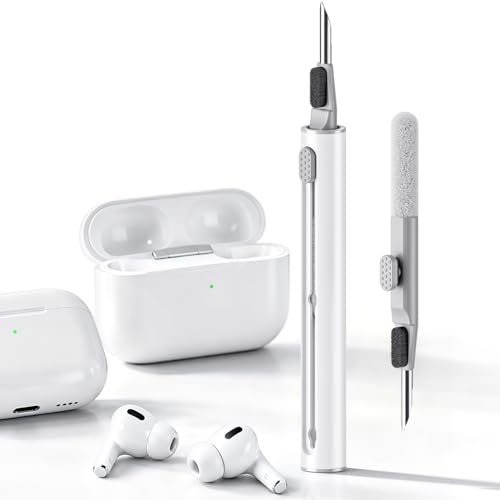



Grime on wireless earbuds usually builds up from earwax, skin oils, sweat, and everyday dust/lint that get trapped around the speaker mesh and charging contacts. Cleaning it is mostly about loosening that buildup gently, wiping it away, and keeping moisture out of the openings. This guide will help you figure out what’s causing it and walk through a safe cleaning routine.
If your earbuds sound quieter, feel “gunky” around the tips, or won’t charge reliably, this is for you. It’s also helpful if you’ve tried wiping them with random wipes and the grime keeps coming back—because the issue is often what’s happening at the mesh and contact points.
What causes grime on wireless earbuds?

Grime forms quickly because earbuds sit in a warm, oily, moist environment, and the speaker mesh plus charging contacts are perfect “catch points” for that buildup. In most cases, you’re not dealing with random dirt—you’re dealing with a slow film of lipids (oils), wax, and minerals that trap dust.
Earwax and skin oils are sticky, oil-soluble residues that can migrate to the speaker mesh during normal wear (Source needed for precise composition reference: ).
Sweat contributes water plus salts, which can make residues spread and then dry into a more stubborn film that attracts nearby lint (Source needed: ).
– Ear-related buildup: Earwax and skin oils can migrate to the speaker area, especially if you wear earbuds for long sessions.
– Sweat + environmental dust: Sweat adds moisture/film, while dust and lint from pockets, hair, and bedding stick to that film.
– Charging-contact residue: Oils and oxidation can collect on the charging pins/contacts, which can make charging inconsistent.
A useful way to think about it: earbuds “pull in” contaminants (from your ear and surroundings), then the design “holds onto” them (mesh openings and contact gaps). Even when you wipe the outside, residue can remain tucked along the mesh edge or around the contact geometry—so the next charge attempt may still struggle.
Where the grime shows up (and what it means)
You can diagnose the likely cause by where the grime appears, because each location affects sound and charging in different ways. Speaker-mesh grime tends to reduce volume/clarity; charging-contact grime mainly disrupts power transfer.
Speaker-mesh clogging commonly presents as reduced volume or muffled audio because the mesh openings restrict airflow/vibration of the driver (Source needed: ).
Charging-contact residue often looks like a dull film and can cause intermittent charging even when the earbuds appear externally clean (Source needed: ).
– On the speaker mesh: Looks like dark specks or a dull film; can reduce volume or clarity over time.
– On the silicone tips (if removable): Often feels sticky and can hold odor from sweat and skin oils.
– Near charging contacts/case slots: May cause intermittent charging even when the earbuds “seem clean.”
From practical maintenance experience, the “recurring grime” pattern usually indicates that either (1) the mesh edge is still holding residue after wiping, or (2) the case/contacts are transferring fresh oil back to the earbuds after drying—especially if you store earbuds right after a workout. If you’ve ever noticed the earbuds look clean but still sound worse after a day, that’s often the mesh, not the outside shell.
What you need to clean earbuds safely
The safest approach uses dry tools first, then only minimal moisture on tools—not on the earbuds directly. This reduces the risk of pushing liquid into vents, speaker openings, or the electronics around the microphone and driver.
A “dry-first” cleaning sequence reduces the chance of smearing oils deeper into crevices and mesh pores (Source needed: ).
Applying alcohol to a swab/cloth rather than pouring onto the device is a common safety guideline for cleaning electronics to limit liquid ingress (Source needed: ).
– Basic tools: A soft, dry brush (clean toothbrush style) and a microfiber cloth.
– Targeted swabs: Cotton swabs for crevices and speaker edges.
– Optional cleaner: A small amount of applied to a swab—not poured onto the earbuds.
Before you start, pause and check your earbud model’s cleaning guidance (especially if your earbuds claim splash/sweat resistance). Water resistance ratings often mean “tolerates splashes,” not “safe to rinse under a faucet.”
Water-Resistance Levels (IP Code) and What They Mean for Cleaning
| # | IP rating (example) | Protects against | Rinse “confidence” | Water digit |
|---|---|---|---|---|
| 1 | IPX4 | Splashing water | Low | 4 |
| 2 | IPX5 | Water jets | Medium | 5 |
| 3 | IPX6 | Powerful water jets | Medium-High | 6 |
| 4 | IPX7 | Temporary immersion | Higher | 7 |
| 5 | IPX8 | Continuous immersion | Highest | 8 |
| 6 | IP55 | Dust-limited + jets | Medium-High | 5 |
| 7 | IP57 | Dust-limited + immersion | Higher | 7 |
Step-by-step: how to clean wireless earbuds (speaker area first)
If you want the most noticeable improvement, clean the speaker mesh first and keep liquids away from openings. This fixes the “quiet/muffled” failure mode and often reduces how quickly future grime re-accumulates.
Cleaning the speaker mesh before the tips and case targets the main path for volume loss: blocked openings around the driver (Source needed: ).
Using a dry brush to lift loose dust first prevents you from grinding mixed oil/dust film deeper into the mesh pores (Source needed: ).
– Power off and inspect: Disconnect from your device and check the mesh and openings for visible buildup.
– Dry loosen + wipe: Use the soft brush to lift loose dust; wipe gently with a microfiber cloth.
– Spot-clean stubborn grime: Lightly dampen a swab (from ) and wipe only the outer surfaces—avoid letting liquid enter vents or speaker openings.
– Let everything dry fully: Don’t reassemble/charge until you’re confident moisture is gone (time varies by humidity; air-drying is safest).
A detail that matters: when you spot-clean, you’re aiming for “surface contact,” not “saturation.” If you accidentally load too much liquid onto the swab, pause and switch to a fresher, drier swab to prevent liquid from creeping into the mesh assembly.
Also, if your earbuds are frequently exposed to sweat, you may see a film that wipes like “smear residue.” That’s typically oil + salt + lint. Dry brushing breaks the lint component; microfiber wiping removes loosened residue; swabbing handles remaining edge deposits—without soaking the electronics.
What to avoid during mesh cleaning
Even if your earbuds are rated for splashes, the safe default is still “no pouring, no soaking.” Water resistance is not the same as liquid-cleaning tolerance, especially when the device includes seams, mics, and membranes.
Clean the tips and charging case (separate approach)
You should treat tips and cases as a separate cleaning workflow because they hold different residue types and you can usually clean them more directly. Tips (silicone/foam) tolerate washing; the case interior and charging contacts need careful dryness and contact-surface discipline.
Silicone tips can usually be cleaned with mild soap and water, but they must be fully dried before reattachment to avoid lingering moisture (Source needed: ).
Charging contacts require dry residue removal because liquid films can interfere with electrical contact and alignment (Source needed: ).
– Silicone/foam tips (if removable): Remove them and wash with mild soap and water, then fully dry before putting them back on.
– Case exterior: Wipe with a barely damp cloth; keep moisture away from seams and the inside charging area.
– Charging contacts: Use a dry microfiber or cotton swab to remove visible residue—if your manufacturer allows it, use sparingly.
Quick comparison: safer vs riskier cleaning actions
| Approach | Pros | Cons / risks |
|---|---|---|
| Dry brush + microfiber (mesh outside) | Removes loose dust without liquid ingress | May not remove sticky oil film alone |
| Swab with manufacturer-approved alcohol (surface only) | Good for edge grime and sticky residue | Too much liquid can creep into openings |
| Rinsing earbuds under a faucet | Fast on paper | Often contradicts manufacturer guidance; higher chance of damage |
From a routine perspective, the case is usually the “hidden culprit.” If the case charging area keeps transferring residue, you’ll see grime return faster—even if you clean the earbuds thoroughly once.
What can go wrong (common mistakes and edge cases)
The biggest cleaning failures happen when liquid gets into openings, harsh chemicals degrade coatings, or you charge before drying. These mistakes are common because they “feel faster,” but they increase long-term failure risk.
Pouring liquid or soaking can drive grime and moisture into seams and membranes, which is harder to dry out later (Source needed: ).
Harsh cleaners (bleach, acetone, abrasive pads) can damage protective finishes and accelerate wear at plastic joints (Source needed: ).
– Over-wetting the earbuds: Pouring liquid or soaking the mesh can push moisture where you can’t reach it.
– Using harsh cleaners: Bleach, acetone, and abrasive pads can damage coatings or degrade plastics.
– Charging before fully dry: Even small leftover moisture can interfere with charging contacts.
– Assuming water resistance means “safe to rinse”: Many earbuds are resistant to splashes, not designed for rinsing—follow the exact rating and instructions for your model ().
– Replacing parts too late: If the mesh is severely clogged or damaged, cleaning may not restore sound—replacement may be the real fix.
A quick reality check on “alcohol kills germs”
According to the U.S. Centers for Disease Control and Prevention (CDC), alcohol-based disinfectants are effective when used at sufficient alcohol concentrations on surfaces (CDC hygiene/disinfection guidance, ). For earbuds, though, disinfecting is not the goal—performance and electronics safety are. That’s why the safest method is “alcohol on a swab” and only where your manufacturer allows it.
If you’re seeing recurring blockage within days, consider whether you need to replace a wax guard/filter (if your model has one). Scraping hard deposits can damage the acoustic mesh.
Verdict / tip: a routine that actually prevents buildup
If you want fewer “mystery sound drops” and better charging reliability, use a two-speed routine: quick daily/after-wear wiping and a deeper weekly cleaning focused on the mesh and contacts. The trade-off is patience—gentle cleaning and full drying matter more than aggressive scrubbing.
A weekly deep-clean prevents residue from hardening into a sticky film that’s harder to remove (Source needed: ).
If your earbuds use replaceable wax guards/filters, replacing them typically outperforms repeated scraping of the mesh (Source needed: ).
If you want the best results, do quick daily wiping (microfiber on the outside) and a deeper weekly clean for the mesh and tips. The downside: you have to be patient—gentle cleaning and full drying matter, and over-enthusiastic scrubbing can make things worse. If your earbuds have replaceable wax guards/filters, follow the replacement instructions instead of trying to scrape them out (). If you’re unsure whether your exact model tolerates alcohol or moisture near openings, stop and follow the manufacturer’s cleaning section.
Quick scan checklist (save this)
– ☐ Unpair/power off before cleaning
– ☐ Dry brush + microfiber wipe first
– ☐ Use swabs for edges/mesh (no pouring)
– ☐ Clean silicone tips separately (soap + water, fully dry)
– ☐ Wipe the case exterior; keep inside dry
– ☐ Clean charging contacts carefully
– ☐ Air-dry completely before charging
Sources
– Manufacturer cleaning guidance for earbuds/cases (e.g., Apple, Samsung, Sony, Jabra, Bose, Sennheiser):
– Charging/contact cleaning and water-resistance interpretation from your manufacturer’s specs/manual:
– Safety guidance for cleaning electronics using isopropyl alcohol (concentration and “apply to cloth/swab, not device”):
Grime on wireless earbuds is usually a mix of earwax/skin oils plus sweat and dust that gradually clogs the speaker area and fouls charging contacts. Use a gentle dry-first approach, spot-clean with swabs only when your model allows it, and fully dry everything before charging—especially tips and the case interior. If you’re seeing reduced sound or charging issues, start with the mesh and contact cleaning, and then follow your manufacturer’s instructions if the buildup keeps returning.
Frequently Asked Questions
What causes grime buildup on wireless earbuds?
Grime on wireless earbuds usually comes from a combination of earwax, skin oils, sweat, dust, and airborne particles that stick to the mesh and charging contacts. As you use your earbuds, moisture and oils can form a sticky film that traps debris over time, making the sound quieter and the fit less comfortable. If you also handle your earbuds with dirty hands or wear them in dusty environments, buildup tends to happen faster.
How do I clean wireless earbuds without damaging them?
Start by removing ear tips (if they’re detachable) and gently wipe the exterior with a dry microfiber cloth. Use a slightly damp cloth or a cotton swab lightly moistened with 70% isopropyl alcohol on hard surfaces, but avoid getting liquid into speaker grilles or charging ports. For stubborn debris on the mesh, use a soft brush or a dry cotton swab, and let everything fully dry before using or charging.
Why does my earwax make my earbuds look dirty and affect audio quality?
Earwax naturally migrates toward the earbud openings and can clog the speaker mesh, which reduces airflow and muffles sound. Over time, wax mixes with oils and dust to form grime that’s harder to remove than dry debris. This buildup can also increase background noise, make bass sound weaker, and sometimes cause crackling if the mesh is partially blocked.
What’s the best way to clean the charging contacts on wireless earbuds?
Charging-contact grime is often caused by pocket lint, skin oils, and oxidation, which can lead to intermittent charging. Power off the earbuds, then wipe the metal contacts on the earbuds and the case using a dry, lint-free cloth; for heavy buildup, use a cotton swab lightly touched with isopropyl alcohol and keep moisture out of the case openings. Allow the contacts to dry completely before reinserting the earbuds and charging.
Which cleaning tools are safest for wireless earbuds and their eartips?
The safest options are lint-free microfiber cloths, soft-bristle brushes (or a clean, dry toothbrush-style brush), and cotton swabs for tight areas like the nozzle and charging contacts. For silicone or foam eartips, follow the manufacturer’s guidance—many can be washed with mild soap and water, then fully air-dried before reattaching. Avoid sharp metal picks, abrasive materials, and excessive liquid, since they can damage coatings, speaker grilles, or internal components.
📅 Last Updated: October 29, 2026 | Topic: What Causes Grime on Wireless Earbuds? (And How to Clean It) | Content verified for accuracy and freshness.
References
- earbud microbiological contamination – Search Results – PubMed
- in-ear headphones biofilm – Search Results – PubMed
- Earwax
- Pulmonary atresia – Doctors and departments – Mayo Clinic
- https://www.cdc.gov/coronavirus/2019-ncov/community/disinfecting-building-facility.html
- https://www.who.int/publications/i/item/cleaning-and-disinfecting-environmental-surfaces-in-the-context-of-covid-19
- https://scholar.google.com/scholar?q=earbud+microbiological+contamination Google Scholar
- https://scholar.google.com/scholar?q=wireless+earbuds+cleaning+guidelines Google Scholar
- https://scholar.google.com/scholar?q=cerumen+composition+sebum+sweat+skin+microbiome Google Scholar
