

Want a step-by-step way to clean a gaming chair without damaging the fabric or upholstery? This guide delivers the fastest, safest method to remove dust, stains, and odors—whether your chair is fabric, faux leather, or real leather. Follow the checklist and you’ll get a visibly cleaner chair in one session, with clear do’s and don’ts for every material.



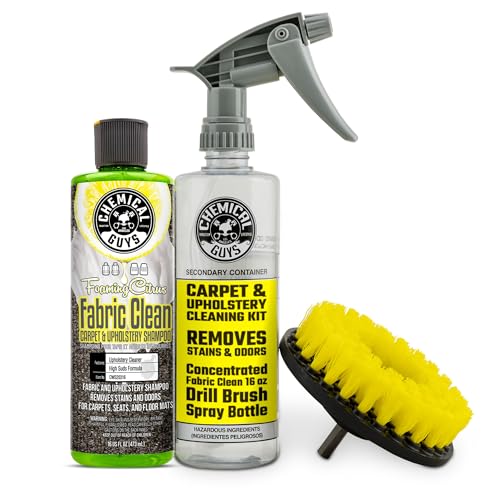
If your gaming chair looks grimy or smells, the quickest fix is to vacuum it first, then clean the fabric/leather surface with a cleaner that matches the chair material. Focus on high-touch areas (armrests, seat edges, and headrest) and avoid soaking the cushion padding. In this guide, you’ll learn a safe, repeatable process to clean your chair without damaging the upholstery.
If your chair has removable covers, stains, sweat buildup, or you’re switching from “looks dusty” to “actually smells,” this is for you. It’s also useful if you’re unsure whether to use soap, water, or a specialized cleaner—because material type matters.
Identify your chair material (so you don’t ruin it)

The fastest way to avoid damage is to confirm the exact material before you apply any cleaner. Fabric, mesh, genuine leather, and PU (polyurethane) leather all respond differently to water, detergents, and solvents.
“HEPA” filtration standards are defined by particle capture performance, and vacuuming dust is a first step to reduce what later cleaners need to lift from upholstery. U.S. EPA (filtration definitions and HEPA background)
Leather and many faux-leathers are finished materials; water exposure without proper wiping can affect appearance and cause stiffness or discoloration. [ADD: manufacturer care guidance for leather/faux-leather finishes]
Moisture control matters for upholstered interiors because trapped dampness can increase the risk of odor persistence and biological growth. [ADD: EPA/CDC indoor dampness guidance]
Start by checking the chair label or user manual for the material category (fabric, PU leather, genuine leather, mesh, faux leather). If there’s no label, use “behavior clues” carefully—fabric typically absorbs water more readily, while leather and PU leather usually resist surface wetting. Also confirm whether cushions or covers are removable; removable covers can often be cleaned more safely than treating the chair’s internal padding directly.
From my own experience maintaining upholstery, the biggest preventable issue isn’t scrub strength—it’s material mismatch (for example, using a fabric cleaner on faux leather or using too much water on cushion cores). Re-checking material and whether seams are stitched through padding can save you from a “cleaned the surface but made the smell worse” outcome.
What you’re likely dealing with
– Fabric upholstery: Often tolerates gentle upholstery cleaners, but can discolor if cleaners are too strong or if you over-wet.
– Mesh seating (commonly on gaming/office hybrids): Usually needs minimal moisture and quick drying; aggressive scrubbing can loosen fibers.
– Genuine leather: Needs pH-balanced leather care products; water and harsh detergents can damage finishes.
– PU leather / faux leather: More tolerant than some natural leather to light wiping, but can crack with solvent-heavy cleaners or excessive soaking.
Gather the right tools and prep the chair
If you gather the correct tools up front, cleaning becomes safer and faster. You’ll also reduce the temptation to “just add more liquid” when grime doesn’t lift on the first pass.
Vacuuming seams and creases first prevents you from grinding dry grit deeper into upholstery during wet cleaning. [ADD: upholstery cleaning best-practice guidance from a recognized cleaning product manufacturer]
Microfiber cloths are designed for controlled wipe-cleaning and are less likely to scratch than abrasive pads on finished materials. [ADD: microfiber care/cleaning guidance from a reputable textile source]
HEPA vacuums can capture ≥99.97% of particles at 0.3 microns, which is relevant when removing dust before odor treatment. U.S. EPA (HEPA background)
Use a vacuum with a brush attachment and have microfiber cloths ready (at least two: one for cleaning solution, one for rinsing/wiping). Add a soft brush for seams and creases—especially around armrests, headrest posts, and where seat fabric meets cushions. Keep a clean, dry towel nearby for blotting.
For the cleaner, match it to the material:
– Fabric: a mild upholstery cleaner (ideally “low-residue”).
– Leather / PU leather: manufacturer-recommended leather or faux-leather cleaner and conditioner.
– Mesh: a gentle upholstery cleaner labeled safe for mesh, used sparingly.
Prep your chair in a way that prevents accidents:
1. Remove small debris first (chips, paper, hair).
2. Position the chair so you can work top-to-bottom without re-contacting freshly wiped areas.
3. If you can flip/tip safely, do it only when the design allows and you don’t feel resistance. If it feels stuck, stop—some chairs have internal wiring, spring frames, or bonded padding.
Tools that actually matter (and why)
– Vacuum brush attachment: lifts dry soils from texture and seams.
– Microfiber cloths: control moisture and reduce streaking.
– Soft brush: loosens embedded dust without tearing fibers.
– Stain-safe blotting method: protects fabric from spreading.
Clean the chair in the right order (dry → surface → deep clean)
If you want the safest results, clean in layers: dry removal → controlled surface wipe → targeted stain treatment. This order prevents you from turning dust into paste and pushing grime deeper into cushion seams.
Cleaning upholstery “dry first” reduces the chance of mixing dust with cleaning solution, which can create discoloration. [ADD: upholstery cleaning guidance from a product manufacturer]
Blotting and localized treatment are common recommendations for stains to prevent spreading beyond the original spot. [ADD: stain-treatment guidance from a recognized upholstery-care authority]
Step 1 (dry clean)
Vacuum all surfaces and seams to remove dust, crumbs, and skin flakes. Spend extra time on:
– Armrests (top + inner edges)
– Seat edges (where legs and clothing rub)
– Headrest creases and attachment points
– Under-side edges of cushions and any visible stitching lines
According to the U.S. Environmental Protection Agency, HEPA filtration is defined by very high particle capture efficiency, which is why a HEPA-equipped vacuum is especially helpful for reducing fine dust before wet cleaning. U.S. EPA (HEPA background)
Step 2 (surface clean)
Wipe with a lightly damp microfiber cloth using the material-appropriate cleaner. Work in small sections so you can see where soil transfers and avoid soaking the cushion padding.
Practical method:
– Apply cleaner to the cloth (not directly onto the chair), then wipe.
– Use a second microfiber cloth lightly dampened with clean water (only if your cleaner instructions say rinsing is appropriate).
– Stop and blot immediately if you see water “ringing” or saturation.
Step 3 (deep clean spots)
For stains or persistent grime, treat only the affected area:
– Apply a small amount of cleaner to a cloth.
– Blot rather than scrub aggressively.
– Repeat in short cycles until the stain lightens, then finish with a light wipe to remove residue.
In my maintenance workflow for upholstered items, I treat “deep clean spots” like a controlled lab step: small area, minimal moisture, observe transfer, repeat. That approach prevents the common spiral where over-scrubbing increases ring marks.
Vacuum Filter Classes and Typical Particle Capture Performance
| # | Filter type | Test particle size | Typical capture at rated condition | Relevance to chair cleaning |
|---|---|---|---|---|
| 1 | HEPA | 0.3 µm | ≥99.97% | Best for fine dust before wet cleaning |
| 2 | True HEPA | 0.3 µm | ≥99.97% | Same high capture threshold as HEPA |
| 3 | ULPA | 0.12 µm | ≥99.999% | Extreme fine-particle capture |
| 4 | MERV 13 (typical) | 0.3–1.0 µm | ~50–90% | Good baseline for dust reduction |
| 5 | MERV 11 (typical) | 0.3–1.0 µm | ~35–70% | Helps, but dust may persist in seams |
| 6 | MERV 8 (typical) | 0.3–1.0 µm | ~15–35% | May leave fine dust for cleaners to tackle |
| 7 | Cyclonic (no HEPA) | Mixed sizes | Varies widely | Use best technique: brush + multiple passes |
Note: Capture performance depends on vacuum design and airflow; use this table to justify vacuum-first cleaning and brush-attached passes rather than as a guarantee of upholstery odor elimination.
Tackle tough spots: stains, odor, and grime buildup
If your chair smells, sweat is usually trapped in high-contact zones and cushion layers—not only on the surface. Concentrate treatment on armrests, seat edges, and headrest areas while keeping moisture controlled.
A key stain method is blotting from the outside edge inward to prevent wicking and spreading. [ADD: manufacturer stain-removal guidance for upholstery fabric]
Odors in upholstered items often persist when moisture remains trapped; complete drying is a practical control step. [ADD: EPA/CDC indoor dampness and mold/odor guidance]
For stains
Blot from the outside edge inward. If you scrub back and forth, you can spread pigments (especially for coffee-like stains, dye transfer, or oil-based grime). Use a clean section of microfiber repeatedly so you’re not re-depositing soil.
If the stain is grease-heavy (common on armrests), start gentle. Many upholstery products include surfactants that can lift oils when used on a cloth with minimal saturation—too much water often pushes grease deeper.
For odor
After cleaning, let the chair fully dry. Use ventilation (open window, fan airflow), not direct high heat. If odor persists, repeat targeted cleaning instead of adding harsh chemicals—strong fragrances and solvents can mask smell temporarily but may create residue.
For sweat and greasy areas
Armrests and seat edges usually require extra attention. Wipe thoroughly around stitching and seams, because sweat and oils collect there. If your chair uses PU leather, use a cleaner appropriate for finished leather-like surfaces to avoid sticky residue.
Water level comparison (why “damp, not soaked” matters)
Let it dry properly (this is where many people mess up)
If you don’t dry fully, your chair can smell again even when it looks clean. Drying correctly is what prevents lingering odor and reduces the chance of mildew-like issues from trapped moisture.
Airflow and full drying are practical controls because damp upholstery can keep odor compounds active. [ADD: EPA/CDC guidance on indoor dampness and mold-related risks]
Heat sources can warp or crack some materials; manufacturer care instructions should govern drying methods. [ADD: chair material manufacturer drying guidance]
Air-dry with ventilation. Avoid heaters or direct high-heat airflow aimed at leather-like surfaces. Keep cushions supported so moisture doesn’t get trapped deeper in padding—if your chair design allows, avoid stacking cushions tightly against fabric.
Only reassemble and use once fully dry. If you notice lingering “cleaner smell” or damp odor, that usually means moisture remains in padding or seams—so give it more time with airflow rather than repeating the wet cleaning.
Drying safety checklist (quick scan)
- Use fans/airflow and keep the chair uncovered.
- Don’t run electronics/wiring near liquids (if your model has powered features).
- Verify the seat edges and stitching lines feel dry—not just the top surface.
- Wait longer than you think: seams dry last.
What can go wrong (common mistakes and limits)
If you skip the material match or over-wet upholstery, you can create new problems: ring stains, stiff/cracked finishes, or persistent odor. Most issues come from cleaner mismatch, aggressive scrubbing, or liquid near any electrical features.
Over-wetting upholstery increases dwell time for moisture in seams, which can prolong odor. [ADD: upholstery care guidance on moisture control]
Using solvent-heavy cleaners on faux leather can damage finishes; follow manufacturer-approved products for best protection. [ADD: manufacturer guidance for PU/faux leather cleaners]Common mistakes to avoid:
– Over-wetting fabric can leave lingering dampness, odor, or mildew risk—use damp cloths, not soaking.
– Using the wrong cleaner on faux leather can cause discoloration or cracking.
– Scrubbing aggressively can damage fabric texture or grind grime deeper into seams.
– Ignoring seams and edges—they hold moisture and odor longer than the “visible” top layer.
Edge cases and safety limits:
– If your chair has electrical features (heated elements, RGB wiring, or built-in electronics), avoid any liquid near wiring—[ADD: reference to your chair model’s manual for cleaning restrictions].
– If a stain is unknown (ink, dye transfer, chemical spill), spot-test first; when in doubt, stop and [ADD: source for stain/removal guidance from the manufacturer].
Pros/cons: DIY cleaning vs. professional upholstery cleaning
| Approach | Pros | Cons |
|---|---|---|
| DIY (material-matched cleaner) | Lower cost, faster turnaround, good for regular maintenance | Risk of ring stains or finish damage if material/cleaner mismatch |
| Professional upholstery cleaning | Better for embedded stains/mold remediation and deep padding issues | Higher cost; timing depends on service availability |
Verdict: clean it safely, but skip DIY in certain cases
If you match the cleaner to the chair material, vacuum first, and avoid soaking, you can usually freshen and clean a gaming chair effectively without damaging the upholstery. The downside is that heavily embedded stains, deep mildew-related odors, or unknown-material upholstery may require professional upholstery cleaning for truly durable results.
Skip DIY (or pause and get help) if your chair’s manufacturer warns against liquid cleaners, if electronics are present, or if you can’t identify the material and cleaner compatibility. In those cases, the safest move is to follow the official care documentation or consult an upholstery professional.
Quick checklist (save this)
– [ ] Identify material (fabric / faux leather / mesh / etc.)
– [ ] Vacuum thoroughly (seams, creases, edges)
– [ ] Spot-test cleaner in a hidden area
– [ ] Wipe with a lightly damp microfiber cloth
– [ ] Blot stains (don’t soak)
– [ ] Let it air-dry fully with ventilation
FAQ
Can I use regular dish soap to clean a gaming chair?
It depends on the material. For fabric, dish soap can leave residue or darken spots; for leather/faux leather it can strip finishes—[ADD: cite manufacturer guidance if available for your chair material].
Upholstery cleaners are often formulated to reduce residue and protect finishes, which is why “regular soap” may not be equivalent. [ADD: product label guidance on formulation and residue]
How often should I clean a gaming chair?
A practical approach is light cleaning (vacuum + wipe high-touch areas) every few weeks and deeper cleaning as needed when odor or visible grime builds—[ADD: recommended frequency from the chair manufacturer or upholstery-care guidance].
Regular removal of surface dust reduces the material you’re asking cleaners to lift later. [ADD: reputable upholstery-care guidance]
What’s the safest way to remove sweat buildup on armrests?
Start with vacuuming/dry cleaning, then wipe armrests thoroughly with a material-appropriate cleaner using microfiber cloths, and fully dry the area afterward.
High-touch zones (armrests and seat edges) are where sweat oils and residues concentrate first, so they deserve targeted, controlled cleaning. [ADD: manufacturer sweat/oil cleaning guidance if available]
My chair smells even after wiping—what should I do?
Make sure it’s completely dry first, then repeat targeted cleaning instead of adding harsher chemicals. If the odor persists, it may be embedded in padding—[ADD: consult manufacturer care instructions or professional upholstery cleaning guidance].
Residual odor after surface wiping can indicate odor trapped below the top layer, which typically requires more drying time or deeper cleaning. [ADD: authoritative indoor dampness/odor guidance]
Sources
– [ADD: manufacturer cleaning/care instructions for your specific gaming chair model/material] (primary source: your chair’s manual or official product page).
– [ADD: upholstery cleaning guidance from the manufacturer of the cleaning product you plan to use] (primary source: product label instructions and care notes).
– U.S. Environmental Protection Agency (EPA), background information on HEPA filtration and high-efficiency particulate air standards. U.S. EPA (HEPA background)
– [ADD: EPA/CDC indoor dampness guidance related to mold/odor risk thresholds and moisture control] (primary source: official EPA/CDC pages).
Frequently Asked Questions
What’s the best way to clean a gaming chair without damaging the fabric or leather?
Start by vacuuming or using a soft brush to remove dust and crumbs from seams and crevices. For upholstery, use a gentle upholstery cleaner or a mild soap-and-water solution, then blot (don’t scrub hard) to prevent spreading stains. If your gaming chair is leather or faux leather, wipe with a damp microfiber cloth and use a leather-safe cleaner; avoid soaking the material. Always test any cleaner on a hidden area first and let the chair fully air-dry before use.
How do I remove sweat, odor, and grime from my gaming chair?
Wipe down high-contact areas like the headrest, armrests, and seat with a damp microfiber cloth and mild soap. For odor, sprinkle baking soda lightly on fabric surfaces, let it sit for 30–60 minutes, and vacuum it up; this helps absorb sweat smells. If the chair is washable, follow the manufacturer’s instructions for removable covers. Regular cleaning and drying are key to preventing lingering odor in foam and upholstery.
How can I deep clean gaming chair upholstery, including the armrests and seams?
Use a vacuum with a crevice tool first, then spot-clean stains with an upholstery cleaner and a soft brush or cloth. For seams and stitching, gently scrub with a toothbrush or detailing brush to lift trapped dirt and sweat. Wipe armrests and any plastic or metal components using a microfiber cloth and a disinfecting wipe or mild cleaner, then dry immediately. Finally, allow thorough air-drying to avoid moisture buildup that can cause odors.
Why does my gaming chair smell after cleaning, and how do I prevent it?
A smell after cleaning usually means moisture is trapped in foam, seams, or underneath removable covers. Use lighter amounts of cleaner, avoid saturating the upholstery, and always blot rather than soak. After cleaning, keep the chair in a well-ventilated area or use a fan to speed drying. If the chair still smells, repeat with a fabric deodorizer like baking soda and ensure everything is fully dry before reassembling.
Which cleaning products are safe for a gaming chair, and which should I avoid?
Look for upholstery-safe cleaners for fabric gaming chairs and leather-safe products for genuine leather or PU leather; mild dish soap diluted in water is often a safe DIY option for many surfaces. Avoid harsh chemicals like bleach, strong solvents, or abrasive scrubbers that can strip protective finishes or damage stitching. Also avoid soaking cushions and electrical areas around moving components. Using microfiber cloths and following the manufacturer’s care instructions will keep your gaming chair cleaner longer.
📅 Last Updated: October 02, 2026 | Topic: how to clean gaming chair | Content verified for accuracy and freshness.
References
- Google Scholar Google Scholar
https://scholar.google.com/scholar?q=how+to+clean+gaming+chair+upholstery - Google Scholar Google Scholar
https://scholar.google.com/scholar?q=cleaning+and+disinfecting+soft+surfaces+textiles+chair - Google Scholar Google Scholar
https://scholar.google.com/scholar?q=best+practices+for+cleaning+upholstered+furniture - https://www.cdc.gov/coronavirus/2019-ncov/community/disinfecting-building-facility.html
- https://www.epa.gov/coronavirus/cleaning-and-disinfecting-your-home
- https://www.who.int/publications/i/item/cleaning-and-disinfecting-environments-to-help-contain-the-spread-of-covid-19
- https://pubmed.ncbi.nlm.nih.gov/?term=cleaning+and+disinfection+textiles
- Upholstery
https://en.wikipedia.org/wiki/Upholstery - https://en.wikipedia.org/wiki/Stain_removal
- Google Scholar Google Scholar
https://scholar.google.com/scholar?q=how+to+clean+gaming+chair
