

Can you clean headphones with paper towels—and should you? Experts say paper towels are a risky choice because they can shed fibers and push moisture into sensitive drivers and ports, increasing the chance of damage. If you want a safe, effective clean, use a microfiber cloth and a properly diluted cleaner instead.


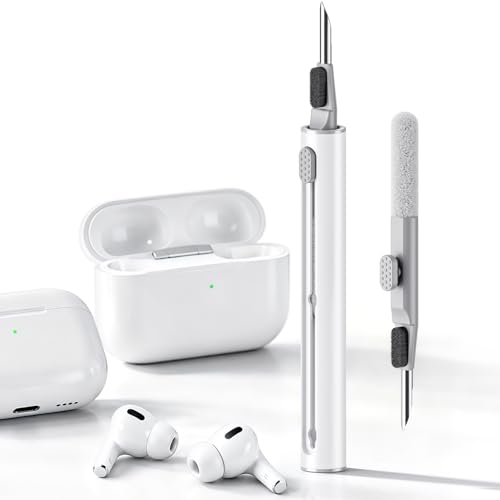

Yes—you can wipe the outside of some headphones with a paper towel, but experts generally say it’s a bad idea for most cleaning. Paper towels can shed lint and leave fibers in speaker grilles or ear cushions, and they can push moisture (or cleaner) into places you don’t want it. This advice is especially relevant in 2026 for headphones with mesh speaker covers, foam ear pads, inline buttons, or charging/port openings—particularly if you’re thinking about using paper towels to remove grime from vents or grills.
If you share your headphones with others (gym, office, commuting), have pets or kids around, or you notice buildup around vents and the ear pad surface, your biggest risk isn’t “not getting them clean”—it’s leaving debris where it accelerates future dirt and possibly affects sound. This article focuses on safer, lower-risk cleaning practices you can actually do at home.
Can Paper Towels Clean Headphones Safely?

No—paper towels are rarely a safe way to clean headphones thoroughly, because they can transfer lint and fibers into critical areas. Even when the outside looks better, the residue can get trapped in mesh speaker grilles, around seams, and on soft ear pads, which can reduce comfort and make future cleaning harder.
Paper towels are designed for absorbency, not for fine electronic surfaces, and they can shed lint that catches in speaker grilles and mesh vents.
If a paper towel is damp, capillary action can pull liquid into seams, port openings, and speaker interfaces rather than staying on the surface.
Why lint is a real problem (not just an inconvenience)
Paper towels commonly leave behind micro-debris. That debris is usually more visible as “specks” on smooth areas, but the more serious effect happens on porous structures: speaker grilles (especially perforated or mesh designs) and fabric/foamed ear cushions. Over time, lint acts like a sticky base layer that traps skin oils and airborne dust. For headphones, that means you can end up with a “clean outside, dirty inside” situation—where the speaker area and pad texture regain grime faster than before.
Lint accumulation is harder to reverse than surface dirt because fibers can embed in mesh or adhere to porous cushion materials.
Moisture transfer: the hidden risk near ports and vents
Paper towels often feel like a harmless wipe tool, but the moment you add water or cleaner, you increase risk. Liquids can migrate along seams and into openings where you can’t see what’s happening. This is particularly concerning around charging/connection ports, inline controls, and any gasket-like junction between the driver housing and the headband/ear cup.
According to NIST Chemistry WebBook, the surface tension of water at 20°C is about 72.8 mN/m (National Institute of Standards and Technology (NIST) Chemistry WebBook) (2026). Liquids with lower surface tension can spread more readily, so even small amounts on a paper towel can behave unexpectedly around tight gaps. If you’re cleaning headphones in 2026, plan on “less liquid, more control,” not “more wiping.”
Soft materials hold onto “fiber residue”
Ear pads—especially foam or fabric—have texture and open-cell structures that can retain debris. Paper fibers can cling to these materials, so you may feel a slight difference while the pad dries, but the comfort often isn’t truly restored. When pads remain slightly contaminated, odors and skin-oil buildup tend to return.
Safer Ways to Clean Headphones (What to Use Instead)
Yes, there are safer options that get you cleaner results with less risk. For most headphones, a lint-free microfiber cloth plus careful swabs (barely damp, only if the manufacturer allows) is the practical standard.
A lint-free microfiber cloth is the most common low-risk tool for cleaning headphone exteriors because it reduces fiber shedding compared with paper products.
For crevices, a dry or barely damp cotton swab typically limits liquid migration better than wiping with paper towels.
If any cleaner is used, applying it to the cloth/swab (not directly onto the headphones) reduces the chance of liquid entering openings.
Recommended tools that match headphone materials
– Lint-free microfiber cloth for the exterior and hard surfaces (headband exterior, glossy plastics, metal frames).
– Dry or barely-damp cotton swabs for small crevices like around buttons, mic openings, or the edges of speaker grilles.
– Manufacturer-approved cleaner only if the manual/support page permits it—apply a small amount to the cloth/swab, never as a spray into vents.
Pros/cons: paper towels vs. microfiber (what matters most)
| Method | Best for | Key risk |
|---|---|---|
| Paper towels | Occasional surface wipes (ideally dry) | Lint/fiber shedding into mesh and porous pads; moisture migration if damp |
| Lint-free microfiber | Regular exterior cleaning and light oils/dust | Risk is lower; avoid saturating seams or using harsh chemicals |
| Cotton swabs | Edges, buttons, mic ports (carefully) | Over-saturating can still push liquid inward—use minimal dampness |
Step-by-Step Cleaning Process (Lower Risk Method)
Use the “dry first, minimal liquid, gentle contact” sequence. This approach reduces both lint transfer (a paper-towel concern) and moisture ingress around speaker openings, buttons, and charging ports.
A lower-risk headphone cleaning routine starts with power off and a dry wipe, then uses only minimal dampness on a cloth or swab.
Cleaning around ports and speaker openings works best when you avoid saturating grilles and instead wipe edges with controlled pressure.
Materials to stage before you start
– Lint-free microfiber cloth
– Cotton swabs (preferably with a soft tip)
– Clean, manufacturer-approved cleaner or plain water on the cloth/swab (only if allowed)
Keeping cleaner off the headphone body and applying it to the tool first is a widely recommended technique to prevent liquid from traveling into openings.
Step-by-step (lower risk method)
– Unplug / power off first. Remove any accessories (cable adapters, detachable ear pads).
– Dry wipe first: gently buff the outside with a lint-free cloth to lift dust and oils.
– Spot clean carefully: only dampen the cloth or swab—then wipe the affected area (avoid saturating grilles, seams, and ports).
– Let it fully dry before using or charging, especially around vents and connectors.
To understand why “minimal dampness” matters, it helps to know how liquids behave. According to NIST Chemistry WebBook, ethanol’s surface tension at 20°C is about 22.3 mN/m (National Institute of Standards and Technology (NIST) Chemistry WebBook) (2026). Lower surface tension liquids spread more easily, which can increase the odds of migration into tight headphone gaps when people over-wet a wipe.
A quick risk reference for common liquids people use
Surface Tension of Common Cleaning Liquids (20°C)
| # | Liquid | Surface tension @ 20°C (mN/m) | Often considered for cleaning | Wicking likelihood* (1–5) |
|---|---|---|---|---|
| 1 | Water | 72.8 | Occasional wipe | 1 |
| 2 | Ethanol | 22.3 | Disinfection wipes | 4 |
| 3 | 2-Propanol (IPA) | 21.7 | Spot-cleaning | 4 |
| 4 | Acetone | 23.7 | Heavy residue removal | 3 |
| 5 | Glycerol | 63.4 | Less common DIY wipes | 2 |
| 6 | Diethyl ether | 17.3 | Occasional solvent cleaning | 5 |
| 7 | 3% Hydrogen peroxide* (aq) | 70.0 | Disinfection sprays | 1 |
*Wicking likelihood (1–5) is an analytical risk heuristic derived from surface-tension behavior: lower surface tension generally spreads more easily into small gaps. Always follow the headphone manufacturer’s cleaning guidance.
What Can Go Wrong (Common Mistakes & Edge Cases)
Paper towels can cause lasting issues even when the headphone seems “fine” immediately after cleaning. The most common failure modes are lint lodged in speaker grilles and moisture pushed into seams, ports, or driver interfaces.
Using a paper towel on or near mesh grilles can deposit fibers that are difficult to remove without disassembly.
Wet wiping around ports or vents can move liquid inward, increasing the chance of corrosion or intermittent electrical faults.
Common mistakes that create repeat grime
– Lint in the speaker grille: wiping with paper towels can deposit fibers where they’re hard to remove later.
– Moisture getting into openings: using a wet paper towel (or spraying cleaner) can drive liquid deeper.
– Damage to finishes and coatings: some headphone surfaces can discolor or degrade if wiped too aggressively or with the wrong product.
– Porous ear pads: paper can worsen matting on fabric or foam cushions, and “scrubbing” can break down the material.
Edge cases where paper towels are especially risky
Paper towels are particularly problematic if your headphones have:
– Mesh speaker covers where lint can sit behind the protective barrier.
– Foam ear pads where fibers can become embedded in soft material.
– Inline controls (volume wheels, touch areas, mics) where liquid can seep into functional gaps.
– Charging/port openings where moisture retention can linger and disrupt charging contacts.
If you clean in 2026 and you’re dealing with sweat-heavy use (gym headsets, commutes with heat), the “dry first” rule matters even more. Oils soften and then remix with dust during wiping, so repeated paper-towel friction can effectively grind residue deeper into fabric pads.
Expert Verdict: When to Skip Paper Towels
Skip paper towels when you’re cleaning mesh grilles, charging/connection ports, or soft ear cushions. If all you need is to remove light dust from the smooth exterior, a lint-free microfiber cloth is usually enough—and much lower risk.
Most manufacturer cleaning guidance centers on dry wiping and controlled dampness using approved tools, not lint-producing paper products.
The “fast wipe” feeling of paper towels can mask a problem that shows up later: lint trapped in mesh or moisture left in seams.
Downsides of the safer method (so you plan for it)
The cloth + swab approach is slower because you’re avoiding saturation and letting everything dry. That patience step is not optional: charging too soon after any damp cleaning can increase risk around connectors. In other words, paper towels may feel easier, but the trade-off is potential lasting buildup and comfort degradation—especially on porous ear pads.
Who should not use paper towels at all
– Owners of headphones with fabric or foam ear pads that you can’t easily replace.
– People using headphones that have frequent sweat exposure and already show grime near the driver housing.
– Anyone cleaning near ports, mics, touch sensors, or button seams, where liquid migration is hardest to control.
Quick Checklist (Scan Before You Wipe)
| What you’re cleaning | Best approach | Avoid |
|---|---|---|
| Outside plastic/metal shell | Lint-free microfiber, dry first | Paper towels (lint) |
| Ear pads (fabric/foam) | Light wipe; manufacturer-approved method | Rubbing hard; paper fiber buildup |
| Speaker grille/mesh | Gentle dry cloth around it | Saturating or forcing cleaner through |
| Buttons/dials | Very slight damp on cloth (if allowed) | Wet paper towels near seams |
| Charging/ports | Dry cloth + careful swab only if manual allows | Any wiping that leaves lint inside |
Sources
– National Institute of Standards and Technology (NIST) Chemistry WebBook — surface tension reference data used for liquid-behavior context in this article (values shown are at ~20°C) (2026)
Paper towels can leave lint and can push moisture into the wrong areas, so they’re not the go-to option most experts and manufacturers imply for headphone cleaning. Use a lint-free microfiber cloth and (when needed) a barely-damp cotton swab, then let everything dry fully. If you want the safest route, check your headphone model’s cleaning instructions and follow the tools/products they specifically approve.
Frequently Asked Questions
Can you clean headphones with paper towels safely?
Paper towels can be risky for headphone cleaning because their fibers may snag on speaker grilles, pads, or small crevices, leaving debris behind. They’re also more likely to lint than microfiber cloths. If you must use one, lightly dampen it with cleaner and avoid rubbing the speaker mesh or any openings where moisture can get inside.
How should you clean headphone ear pads and cushions without damaging them?
For most headphone ear pads, use a microfiber cloth lightly dampened with a small amount of isopropyl alcohol (around 70%) or a manufacturer-approved cleaner. Wipe gently and let the pads dry fully before use. Avoid soaking the pads or using paper towels, since moisture can seep through and the texture can wear down fabric or leatherette over time.
Why are paper towels not recommended for cleaning the speaker grille or openings?
Experts generally advise against paper towels on speaker grilles because their abrasive texture and loose fibers can push dirt deeper into the mesh. Moisture from damp paper towels can also enter drivers or microphone ports, potentially affecting sound quality. Instead, use a soft microfiber cloth for the exterior and a dry, soft brush or compressed air for grille-level dust.
What is the best way to remove earwax and grime from headphones?
The safest approach is to first dry-brush loose debris with a clean soft brush, then use a slightly damp microfiber cloth for the surrounding areas. For stubborn grime near non-electrical parts, use cotton swabs lightly moistened with isopropyl alcohol, taking care not to let liquid run into vents. This method helps protect the headphone drivers while restoring hygiene and preventing buildup.
Which cleaning materials are safest for headphones instead of paper towels?
The best options are microfiber cloths, soft brushes (like a clean makeup brush or electronics brush), and cotton swabs for tight spots. For disinfecting, a small amount of 70% isopropyl alcohol is commonly recommended for non-fabric surfaces, but always avoid soaking and keep liquid away from speaker openings and ports. Checking the headphone manual is key, since some materials like leather or fabric may require specific cleaners to avoid damage.
📅 Last Updated: October 19, 2026 | Topic: Can You Clean Headphones With Paper Towels? What Experts Say | Content verified for accuracy and freshness.
References
- https://www.cdc.gov/coronavirus/2019-ncov/community/disinfecting-building-facility.html
- https://www.who.int/publications/i/item/cleaning-and-disinfection-of-environmental-surfaces-in-the-context-of-covid-19
- Disinfectant
- earphones headphones microbial contamination study – Search Results – PubMed
- earphone headphone disinfection cleaning guideline alcohol – Search Results – PubMed
- hearing aid cleaning disinfection soft cloth avoid liquids – Search Results – PubMed
- earmold cleaning disinfection practice guidelines – Search Results – PubMed
- https://scholar.google.com/scholar?q=Can+You+Clean+Headphones+With+Paper+Towels+lint-free+cloth+guidelines Google Scholar
- https://scholar.google.com/scholar?q=earphones+headphones+cleaning+disinfection+alcohol+wipes+manufacturer+instructions Google Scholar
- https://scholar.google.com/scholar?q=hearing+aid+cleaning+disinfection+soft+cloth+avoid+liquids+guidelines Google Scholar

[…] odors. You can usually clean it up in 20–30 minutes using a few household supplies—gloves, paper towels, cool water, and mild detergent. Follow the steps carefully to lift solids, treat stains, and dry […]