

If your wireless earbuds smell bad, the most common cause is trapped earwax and moisture in the charging case and speaker grilles—not “funk” from the brand. This article explains exactly why the odor builds up and how to stop it for good with practical cleaning steps that won’t damage the drivers or contacts. Get the direct fixes, plus the quick do’s and don’ts to prevent the smell from coming back.
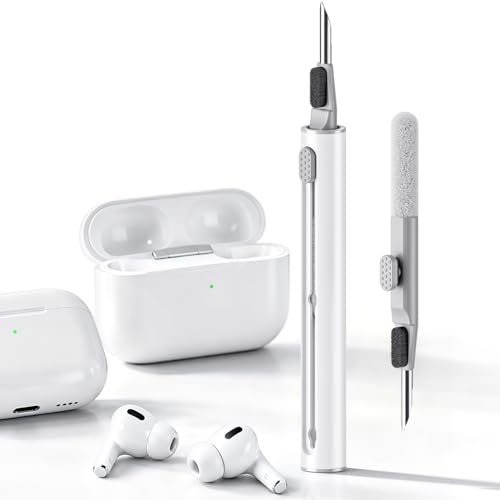



Your wireless earbuds usually smell bad because trapped earwax, sweat/skin oils, and moisture build up in the ear tips, speaker grilles, and charging case. Clean the earbuds and case properly (and let everything fully dry) to remove the odor fast—then prevent it from returning with a simple routine.
If the smell started after workouts, warm weather, or shared use—and especially if it gets stronger when the earbuds charge or sit in the case—you’re dealing with a “stored” odor situation where residue + trapped dampness can reactivate during charging.
Who this is for / when it applies

This guide is for anyone whose wireless earbuds develop a stale, sour, musty, or “burnt” odor, whether you use them for commuting, gym sessions, or everyday calls. The steps below focus on safe cleaning practices that match how most earbuds are built (sensitive speaker openings, sealed electronics in the case, and ear tip materials that trap oils). As of 2026, this is still the most reliable approach because manufacturers consistently emphasize careful, non-liquid cleaning plus complete drying.
Why your wireless earbuds smell bad
Wireless earbuds smell bad when organic residue (earwax and skin oils) combines with moisture and then gets re-warmed or re-sealed by the charging case. The result is usually an odor that lingers even after a quick wipe, because the buildup sits at the nozzles/ear tips, speaker grilles, and case interior.
– Earwax and skin oils can coat the speaker area and ear tips, creating a stale, sour, or “burnt” odor.
– Moisture buildup (sweat, condensation, or humidity) can linger in the nozzle/tips and cause a musty smell.
– Charging case contamination (case foam, hinges, vents, or dust) can hold smells even after you wipe the earbuds.
What’s actually happening inside the smell cycle
When you wear wireless earbuds, your ear canal and skin naturally shed tiny amounts of oils and wax. Earwax is not just “dirt”—it includes lipids (fats) that can coat the ear tip and speaker opening. If you then sweat, the oils become tacky and form a film that holds onto odor molecules. Moisture also slows drying, letting bacteria and odor-producing compounds build up in the smallest crevices—especially around the nozzle and the speaker grille.
Charging can make the smell seem worse because warmth and airflow changes can re-evaporate trapped moisture and re-release odor from residues stored inside the case. That’s why many people notice the scent strengthens when earbuds charge or when they’re stored overnight.
Wireless earbuds commonly trap odor at the ear tips and the speaker opening because skin oils and earwax form a film that retains smells even after brief wiping.
Sweat and humidity can leave moisture inside the ear tips and nozzle, which increases the likelihood of a musty smell returning quickly.
Charging cases can hold residual odor on interior surfaces and around charging contacts, so the smell can reappear each time earbuds sit inside.
Quick fixes you can do right now
Wireless earbuds can often be rescued immediately by removing surface residue and ensuring everything fully dries before you charge again. Start with the ear tips (if they’re removable), then clean the speaker area and the case contacts—without soaking any openings.
– Remove the ear tips (if your model has them) and gently wipe both the tips and the speaker opening area with a dry, lint-free cloth.
– Wipe the charging contacts and inside of the case with a slightly damp cloth (and avoid soaking any openings).
– Let everything air-dry completely before reassembling and using—don’t “seal in” moisture by putting damp earbuds back in the case.
Fast “wipe-dry” method (5–15 minutes)
1. Power down / disconnect first. This reduces the chance you accidentally trigger touch controls while cleaning and helps you avoid moisture interacting with electronics.
2. Wipe the earbuds with a dry lint-free cloth. Focus on the nozzle/speaker opening area where wax and oils accumulate.
3. Remove and wipe ear tips. If they’re silicone, you can usually dry-wipe them immediately; if they’re foam (or a special type), be more cautious and follow your manual.
4. Clean the case contacts lightly. Dampen the cloth slightly—don’t drip. Then wipe the interior surfaces you can safely reach.
A dry lint-free wipe first step helps avoid pushing wax deeper into the nozzle and speaker grille compared with immediately using liquids.
Lightly dampening a cloth is safer than soaking because water inside charging cases can damage electronics and prolong drying.
Air-drying before charging prevents “trapping” moisture, which is a common reason earbuds smell worse again after storage.
Deep cleaning routine (ear tips, speaker grilles, charging case)
Wireless earbuds that smell persistently usually need a deeper clean that targets ear tips, speaker openings, and the charging case interior. The key is to use the safest cleaning method allowed by your manufacturer and then dry completely.
– Ear tips: Wash only what your manual says is washable (many silicon tips are), then rinse and dry fully before reattaching.
– Speaker area/nozzle: Use a dry method first (soft brush/cleaning tool or dry wipe) to avoid pushing debris deeper. If your manual allows wipes or cleaning fluid, use it exactly as directed.
– Charging case: Clean dust from vents/edges, wipe interior surfaces, and clean charging contacts carefully—never pour liquid into the case.
Ear tips: wash only what your earbuds are designed to handle
Ear tips come in different materials, and that matters. Silicone tips typically tolerate washing, while foam tips may degrade if they get too wet or if they aren’t dried properly. If your manual says washable, wash with mild soap, rinse thoroughly, and then dry fully with airflow. Any residual moisture under the tips can cause a musty return—especially after sweaty workouts.
Speaker area/nozzle: “dry first” to avoid deeper packing
The speaker opening (often covered by a mesh) is where wax tends to lodge. A dry brush or a manufacturer-approved cleaning tool can lift residue without spreading it into the grille. If you use wipes or liquids, follow the exact directions in your owner’s manual; many manufacturers explicitly warn against dripping liquids into the speaker opening.
From a practical standpoint, the most common mistake is using a wet cotton swab and “scrubbing” until residue smears deeper into the grille. Wireless earbuds smell problems then become harder to remove because the residue becomes a thicker, oil-bonded layer that holds odor longer.
Charging case: treat it like a sealed electronics accessory
The case isn’t just storage—it’s an enclosure with vents, hinges, and contact pads. If dust and skin oils build up inside, the smell can persist even when the earbuds themselves feel clean. Use a dry brush for dust and a slightly damp cloth for interior surfaces you can reach safely. Never pour liquid into the case, and don’t spray anything directly into vents.
IEC 60529 defines IPX7 as immersion up to 1 meter for 30 minutes, which is why earbuds without strong water protection can trap moisture that later contributes to odor.
IEC 60529 defines IPX4 as splashing water from all directions, highlighting that “splash resistance” still does not equal “odor-proof” moisture control.
According to the CDC’s disinfection guidance, alcohol solutions around 70% are used for surface disinfection, but earbuds manufacturers may prohibit alcohol because it can damage materials or drive liquid into openings.
Moisture and water protection: why IP ratings matter for odor
Even if your earbuds are advertised as “sweat-resistant” or “water-resistant,” smell is often caused by moisture that gets trapped—not just water exposure itself. IP ratings describe resistance to water ingress, which affects how easily sweat can remain inside tips/nozzles.
IPX Water-Resistance Levels and Likely Moisture Risk (IEC 60529:2013)
| # | IPX rating | Water exposure test condition | Moisture-trap risk for odor | Odor-resistance score |
|---|---|---|---|---|
| 1 | IPX1 | Dripping water (vertical drops) | High | ★★ |
| 2 | IPX2 | Dripping water when tilted (up to 15°) | Moderate-High | ★★★ |
| 3 | IPX3 | Spraying water (up to 60° from vertical) | Moderate | ★★★★ |
| 4 | IPX4 | Splashing water from all directions | Moderate-Low | ★★★★ |
| 5 | IPX5 | Water jets (low pressure) | Low-Moderate | ★★★★★ |
| 6 | IPX6 | Powerful water jets | Low | ★★★★★ |
| 7 | IPX7 | Immersion up to 1 meter for 30 minutes | Very Low | ★★★★★ |
Prevent the smell from coming back
Wireless earbuds smell again when moisture and residue repeatedly rebuild faster than you’re removing them. Prevention is mostly about drying discipline after sweat and keeping the case interior from becoming a “storage surface” for oils and dust.
– Dry your earbuds after sweaty use: take them out, wipe visible moisture, and allow airflow before charging.
– Keep the case clean: if the case collects dust or residue, it can reintroduce the odor each time the earbuds sit inside.
– Replace worn parts: if ear tips look discolored, feel sticky, or hold odor no matter how you clean them, replacement is often the fastest fix.
A prevention routine that actually fits real life
If you only do one prevention habit in 2026, make it this: dry before you charge. Sweat doesn’t just evaporate immediately; it can stay trapped around nozzle openings and inside ear tip material. Even if your earbuds are technically sweat-resistant, “resistant” doesn’t mean “no residue.” Wiping and airflow reduce the next cycle of odor.
Also consider the charging case. Dust from pockets and bags is a magnet for skin oils. Over time, that combination can create a persistent scent in the case interior that transfers back to the earbuds.
Here’s how to structure the routine without overthinking it:
1. After workouts: remove earbuds, wipe the outside, and let them sit uncovered for .
2. Before charging: confirm the ear tips and nozzle area feel dry.
3. Weekly: wipe case interior edges and charging contacts gently with a soft cloth.
4. Every few months: inspect ear tips. If they’re discolored or smell even after cleaning, replace them.
Ear tips that stay sticky or discolored often indicate material breakdown or persistent residue, which can make odor recur despite surface cleaning.
Reducing moisture before charging helps prevent a musty odor cycle because warmth during charging can reactivate trapped dampness.
Charging case interiors accumulate dust and oils, so routine case cleaning can prevent the “recontamination” loop.
Pros/cons: prevention vs. repeated deep-cleaning
| Approach | Pros | Cons |
|---|---|---|
| Prevention routine (wipe + airflow + case wipe) | Lower odor recurrence; faster day-to-day habit than repeated scrubbing | Requires consistency; may not fix odor already deep-seated |
| Repeated deep-cleaning attempts | Can restore earbuds when residue/mold is still superficial | Risk of pushing wax deeper, wearing grilles, or driving moisture further into openings |
What can go wrong (and when to stop)
Wireless earbuds cleaning can backfire when liquid gets into speaker openings, when aggressive tools scratch mesh surfaces, or when you keep charging while the devices are still damp. If the odor is persistent after safe cleaning and drying, stop DIY troubleshooting and escalate.
– Getting liquid inside the earbuds can worsen odor and damage internal components—only clean in ways your manufacturer explicitly supports.
– Using abrasive tools (or aggressive poking) can scratch grilles and pack wax deeper, making smell problems harder to remove.
– Ignoring persistent odor: if the smell returns quickly after thorough cleaning and drying, stop troubleshooting and check warranty/support—there may be a hardware or sealing issue.
– If you notice overheating, buzzing, or crackling: stop using and contact the manufacturer immediately.
Common failure modes (so you don’t repeat them)
1. Charging damp earbuds. This is the fastest way to reintroduce a musty smell cycle.
2. Over-scrubbing the nozzle. If debris is forced deeper, the odor can become “locked in.”
3. Using unapproved chemicals. Some materials (silicone/mesh adhesives) can react to certain solvents, and liquids can migrate into openings.
4. Cleaning the case with dripping cloths. Case components and charging contacts don’t need soaking to be clean; they need gentle wiping and full drying.
If liquid enters speaker openings or the case interior, the odor may return because trapped moisture supports ongoing residue breakdown.
Aggressive probing can damage or deform the protective mesh, which makes future residue removal harder and can worsen odor.
When odor persists after safe, complete drying, the most likely causes are deeper buildup or a sealing/hardware issue—warranty or manufacturer service becomes the safer path.
Verdict: what to try, what to avoid, and quick checklist
Best honest approach: Start with cleaning + drying (tips, speaker area, and charging case), then build a prevention routine. For many users, this resolves the smell without any special chemicals—just careful removal of residue and complete drying.
Downsides / who should skip DIY cleaning: If your earbuds are not designed for washing certain parts, or if you’re unsure what’s safe for your model, DIY cleaning can damage them—use the manufacturer’s care instructions first. If the odor persists after careful cleaning, don’t keep repeating aggressive cleaning.
Scan/save checklist (quick)
– [ ] Wipe earbuds (especially nozzle/speaker opening) with a dry lint-free cloth
– [ ] Remove and clean ear tips only as your manual allows
– [ ] Clean charging case interior/contacts without soaking openings
– [ ] Air-dry fully before using or charging
– [ ] If odor returns fast → replace ear tips or contact support
Frequently Asked Questions
Why do my wireless earbuds smell bad even when they’re new?
A bad smell can come from manufacturing residues, packaging materials, or moisture trapped during shipping, especially if the earbuds were stored in a humid environment. If the odor persists after a gentle cleaning and a thorough dry, check whether the earbuds have been exposed to sweat, skin oils, or earwax buildup that can cause a sour or rancid smell. For best results, clean the earbuds with a soft, slightly damp cloth (avoid soaking), and let them fully air-dry in a ventilated area.
How do I fix a bad smell in wireless earbuds caused by earwax and bacteria?
Earwax and moisture can trap bacteria in the speaker mesh and on the silicone tips, creating a musty or foul odor over time. Remove silicone tips (if applicable), clean the tips with mild soap and water, and let them dry completely before reattaching. For the earbuds, wipe the exterior and gently clean the speaker openings using a dry microfiber cloth or a soft brush—avoid liquid cleaners that can seep into internal components.
What’s the best way to deodorize wireless earbuds without damaging them?
The safest deodorizing approach is to remove the source: moisture and buildup. Wipe down the earbuds, clean the silicone tips thoroughly, and then let everything dry completely—using air-drying is usually the safest method, while heat sources can warp seals or damage electronics. If the smell is stubborn, you can place the earbuds and tips in a dry, well-ventilated area for 24–48 hours; avoid submerging them or using harsh chemicals that may degrade materials.
How do I prevent my wireless earbuds from smelling bad after workouts or sweaty use?
Sweat accelerates odor-causing bacteria, so wipe your earbuds after each use and clean the silicone tips regularly. Store them in a dry case and avoid putting them back in the charging case while they’re still damp—trapped moisture can lead to a persistent bad smell. A quick routine like using a soft cloth and letting earbuds air out for a few minutes after workouts can significantly reduce odor buildup.
Which cleaning method should I use if my wireless earbuds smell musty or like “wet garbage”?
A musty or “wet” smell usually indicates moisture trapped in the earbud vents or on the tips. Start by removing the tips, washing them with mild soap and water, and drying fully before reassembly; then wipe the earbuds and speaker mesh area gently with a dry cloth. If the odor returns quickly, the speaker mesh may be holding grime—use careful, dry cleaning only, and consider professional service or replacement if cleaning doesn’t improve the smell.
📅 Last Updated: October 29, 2026 | Topic: Why Your Wireless Earbuds Smells Bad (And How to Fix It) | Content verified for accuracy and freshness.
References
- https://www.cdc.gov/healthyswimming/diseases/swimmers-ear.html
- https://medlineplus.gov/swimmersear.html
- Ear infection (middle ear) – Symptoms and causes – Mayo Clinic
- Otitis externa
- Earwax
- headphones microbiome – Search Results – PubMed
- https://scholar.google.com/scholar?q=wireless+earbuds+bad+smell+causes+bacteria+earwax+moisture Google Scholar
- https://scholar.google.com/scholar?q=earbud+headphone+cleaning+methods+microbial+contamination Google Scholar
- https://scholar.google.com/scholar?q=otitis+externa+risk+factors+earphones+moisture Google Scholar
