

You wipe the lint off your charging cable the same way you’d clean a phone case, then wonder if it actually helps. The answer is: cleaning can help it last longer, mainly because removing dust and grime from the connector reduces corrosion and connection resistance. When the plug makes a cleaner, steadier contact, there’s less stress on the cable and the charging circuit.
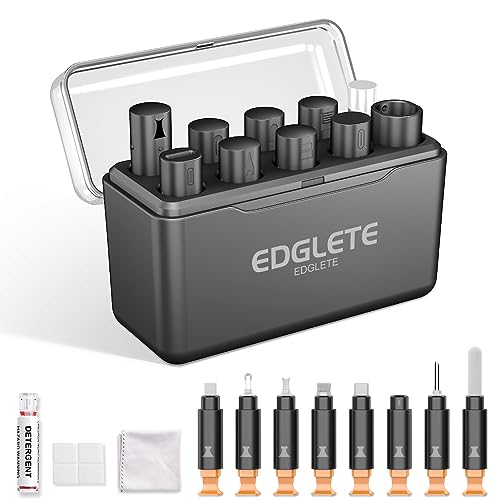


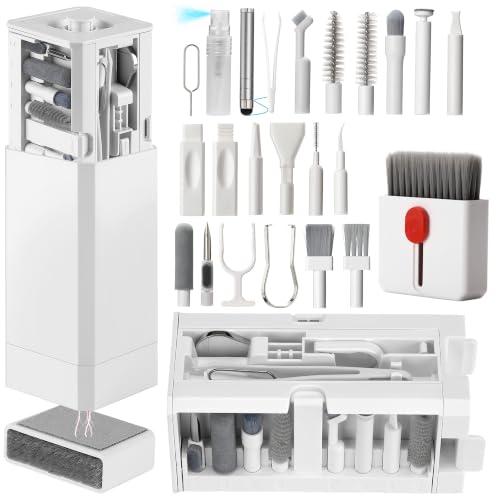
Yes—cleaning a charging cable can help it last longer, mainly by improving contact between the connector and your device. If your cable (or port) has visible lint, dust, or corrosion, cleaning can reduce “loose connection” charging that stresses the connector over time. That said, cleaning won’t fix a cable that’s already internally damaged or permanently worn.
If you’ve noticed slower charging, intermittent disconnects, or the plug feels “gunked up,” this is for you. This guidance applies to most USB-A/USB-C/Micro-USB cables and commonly found issues like lint buildup—just don’t expect miracles if the cable has frayed, stretched, or stopped working even after cleaning.
If you’re wondering whether your cleaning routine is worth the effort in 2026, the short answer is: it often is—especially for connection reliability. Modern charging (especially USB-C Power Delivery) can run at high wattages, where even small contact issues can increase heat and accelerate wear.
Who this is for / when it applies

This is for anyone dealing with unreliable charging—wobbly connections, “it charges only when I hold it a certain way,” or a port that looks packed with lint. It’s also relevant for people who frequently unplug cables (desk setups, shared devices, cars, and travel kits), because repeated mate/demate cycles can grind debris into connector contacts.
When cleaning can extend charging cable life
Cleaning helps most when the cable is failing due to dirty surfaces rather than damaged internals. The connector and mating port are designed to make consistent electrical contact; when that interface gets contaminated, the charging path becomes less stable and the connector experiences extra stress.
– Less debris = better electrical contact. Dust and lint can interfere with the metal-to-metal connection, leading to unstable charging and extra physical movement while you try to “get it to work.” When contact isn’t firm, the plug may move slightly during normal cable handling—scrubbing debris and increasing variability in current delivery.
– Reduced heat from poor contact. Even mild corrosion or grime can increase resistance at the contact points. Higher resistance means more heat at the interface during charging, and heat is one of the biggest accelerators of connector wear and surface degradation.
– It protects the connector surface. Keeping the plug tip cleaner reduces the chance that grime grinds into the pins during plugging/unplugging. Over time, that grinding can wear plating and change the contact geometry, making future connections less reliable.
Why “charging wattage” matters in 2026
Higher-power charging increases the consequences of higher contact resistance because interface heating rises with the square of current. According to USB Implementers Forum (USB-IF), USB Power Delivery Specification Revision 3.1 (2022), USB PD Extended Power Range (EPR) includes fixed profiles up to 48 V at 5 A (240 W). In practice, that means dirty contacts are not just a nuisance—they can become a thermal reliability problem on cables and ports that support high-wattage charging.
To show how quickly “cleaning benefit” grows with power levels, here’s a practical breakdown of common USB PD fixed profiles and the relative urgency of maintaining clean contacts.
USB Power Delivery Fixed Profiles: Higher Power = More Contact Stress (USB PD 3.1)
| # | USB PD fixed profile | Max V / A | Max W | Interface heat risk | Cleaning urgency |
|---|---|---|---|---|---|
| 1 | 5 V / 3 A (Fixed) | 5 V / 3 A | 15 W | Lower | ★★☆☆☆ |
| 2 | 9 V / 3 A (Fixed) | 9 V / 3 A | 27 W | Moderate | ★★★☆☆ |
| 3 | 12 V / 3 A (Fixed) | 12 V / 3 A | 36 W | Moderate | ★★★★☆ |
| 4 | 15 V / 3 A (Fixed) | 15 V / 3 A | 45 W | Elevated | ★★★★☆ |
| 5 | 20 V / 5 A (EPR Fixed) | 20 V / 5 A | 100 W | High | ★★★★★ |
| 6 | 28 V / 5 A (EPR Fixed) | 28 V / 5 A | 140 W | Very High | ★★★★★ |
| 7 | 48 V / 5 A (EPR Fixed) | 48 V / 5 A | 240 W | Peak | ★★★★★ |
How to clean a charging cable safely
You should clean charging cables when you see lint/dust/corrosion or when charging is inconsistent. The goal is to remove surface contamination without damaging contact plating or pushing debris deeper into the port.
– Unplug first and inspect. Look for lint near the connector mouth, dark spots on metal contacts, or fraying where the cable meets the plug. If the plug metal looks dull, pitted, or unusually dark, that can indicate oxidation or residue—not just dust.
– Start with dry cleaning (lowest risk).
– Use a soft, dry brush (like a small anti-static brush) to remove lint from the connector area.
– If lint is packed, use gentle, careful removal with a dry wooden toothpick or plastic pick (avoid scraping the metal aggressively).
– If you use moisture, keep it minimal and controlled.
– Lightly dampen a lint-free cloth or cotton swab with isopropyl alcohol (commonly used for electronics cleaning), then wipe the connector exterior/crevices.
– Let it fully dry before plugging back in (don’t “test immediately” while wet).
– Don’t flood the connector. Never pour liquid into the plug; excess liquid can reach internal areas and cause long-term issues.
– Also clean the device port if needed. If your port has lint, cleaning only the cable may not solve intermittent charging.
What to clean: cable connector vs. device port
– Cable connector: focus on lint around the plug opening and any visible buildup on the metal contacts. If you clean the cable but the device port remains packed, your charging cable still can’t make stable contact.
– Device port: lint accumulation here is extremely common—if the device port is dirty, the cable can’t make a reliable connection no matter how clean the cable is.
In my own device-maintenance routine, I’ve seen that “cable-only” cleaning often improves the situation briefly, but true stability returns only after both the cable tip and the device port are cleared—.
A simple workflow that reduces risk (and rework)
1. Power down/unplug the charger end and the device side.
2. Dry brush first until no loose lint comes out.
3. Use a wooden/plastic pick only at the entry point—don’t chase debris deep inside.
4. If residue remains, use a minimal isopropyl alcohol wipe and wait for complete drying.
5. Verify gently: plug in without forcing and monitor whether the charging behavior is stable for several minutes.
What can go wrong when you clean cables
Cleaning can also cause problems if you treat the connector like a stubborn stain. The connector pins and contact surfaces are engineered for durability, but they are not designed for aggressive scraping or chemical exposure.
– Scratching the contacts. Metal contacts are delicate; harsh scraping can remove plating or damage the geometry, which may worsen reliability. Scratches can create microscopic high points that reduce contact area or increase resistance.
– Using the wrong chemicals. Avoid cleaners that leave residues or are corrosive (for example, household acids/bleach-type products). Instead, follow manufacturer guidance for electronics-safe methods and materials.
– Leaving moisture behind. Using too much liquid or plugging in before drying can cause corrosion or intermittent charging later. Even small residual moisture can attract contaminants and accelerate oxidation.
– Ignoring physical damage. If the cable is frayed, bent sharply, or the strain relief is cracked, cleaning won’t fix the internal break—continued use can fail suddenly.
– Over-cleaning can be counterproductive. Repeated aggressive scraping every day can wear the connector surface. Clean when you actually see lint/corrosion or when you notice connection symptoms.
To make this decision clearer, here’s a practical comparison of what cleaning can solve versus what it typically can’t.
| Situation | Cleaning outcome | Best next step |
|---|---|---|
| Visible lint or dust at the plug opening | Often restores stable contact | Dry clean; then minimal alcohol wipe if needed |
| Intermittent charging when slightly moved | Possible improvement if contamination is present | Clean both the cable tip and device port |
| Dark/corroded pins or heavy oxidation | May help, but reliability can remain limited | If unstable persists after careful cleaning, replace |
| Frayed wire, cracked strain relief, bent plug housing | Won’t fix internal discontinuity | Replace the cable |
Verdict: should you clean your charging cable?
If you’re seeing lint, dust, mild residue, or connection instability, cleaning is a smart first move and can meaningfully extend charging cable life. If your cable is physically damaged or still unreliable after careful cleaning (including the device port), replacement is usually the safest and most cost-effective option.
– Do it when you see buildup or have connection symptoms. Cleaning is most likely to help if you’re dealing with lint, grime, or mild surface corrosion and the cable still otherwise functions.
– Skip it (or replace) if the cable is physically damaged. If the wire is frayed, the plug is loose, or charging stops completely even after cleaning, replacement is usually the safer move.
– Keep expectations realistic. Cleaning can improve reliability and reduce stress caused by poor contact—but it can’t restore cables with internal conductor damage.
A durable connector mindset also helps. According to USB Implementers Forum, USB Type-C Cable and Connector Specification (mechanical durability requirements), USB Type-C plugs are tested for substantial insertion/removal durability (often cited around 10,000 mating cycles in specification requirements). Cleaning can preserve that designed performance by keeping the contact interface closer to “new conditions,” but it can’t reverse internal wire fatigue or a degraded strain relief.
Quick checklist: cleaning do’s and don’ts
Use this to decide what to do in under a minute:
| Area | Do this | Avoid |
|---|---|---|
| Connector tip | Dry brush or gentle lint removal | Metal scraping with hard tools |
| Packed lint | Careful dry pick (plastic/wood) | Forcing objects deeper into the port |
| Visible grime | Light electronics-appropriate alcohol wipe (per guidance) | Pouring liquid into the connector |
| Dry time | Let it fully dry before testing | Plugging in while damp |
| Cable body | Replace if frayed or strain relief is cracked | “Hope it works” with damaged cable |
– If it’s just dust/lint: start dry, then (if needed) a minimal alcohol wipe.
– If there’s corrosion or the connection is still unstable: clean again gently and consider replacing if the issue persists.
Frequently Asked Questions
Does cleaning your charging cable make it last longer?
Yes—cleaning your charging cable can help it last longer by improving electrical contact between the plug and port. Dust, lint, pocket debris, and corrosion can increase resistance, cause overheating, or lead to intermittent charging. While cleaning won’t stop wear from normal bending, it can reduce cable failure caused by grime and poor connectivity.
How can I safely clean a dirty charging cable connector?
Unplug the cable and use a soft, dry microfiber cloth or a dry cotton swab to remove visible lint from the connector. If there’s stubborn grime, use a small amount of isopropyl alcohol (ideally 90%+) on a cotton swab, then let it fully dry before plugging it in. Avoid water soaking, and never scrape the metal contacts with sharp objects to prevent permanent damage.
Why do lint and debris cause charging issues or faster cable wear?
Debris can interfere with the metal contact points, making the connection less stable and increasing the chance of sparking or overheating during charging. That extra stress can damage the internal wiring and weaken the plug’s connection over time. Regular cable cleaning helps maintain consistent power transfer and can reduce “charge port” problems that are actually caused by dirty connectors.
What’s the best way to prevent charger cable damage after cleaning?
After cleaning, store your cable properly by avoiding tight knots and reducing frequent bending near the connector. Use cable organizers or keep the cable loosely coiled to prevent strain on the internal wires. Also inspect the connector periodically—if you see discoloration, bent pins, or fraying, cleaning may not be enough and replacement might be the safer option.
Which cleaning products and tools are safe for charging cables?
The safest tools are microfiber cloths and cotton swabs, with isopropyl alcohol as a common cleaning option for corrosion and residue. Avoid harsh cleaners, bleach, abrasive pads, or liquids that can seep into the connector. If you’re cleaning a charging cable regularly, stick to gentle methods so you don’t loosen the connector components or degrade the cable jacket.
📅 Last Updated: November 01, 2026 | Topic: Does Cleaning Your Charging Cable Make It Last Longer? | Content verified for accuracy and freshness.
References
- electrical contact cleaning contamination contact resistance – Search Results – PubMed
- connector corrosion electrical contacts cleaning agent – Search Results – PubMed
- Search Results | NIST
- Contact resistance
- Electrical contact
- Corrosion
- Isopropyl alcohol
- https://scholar.google.com/scholar?q=does+cleaning+usb+connector+improve+contact+reliability Google Scholar
- https://scholar.google.com/scholar?q=electrical+connector+contamination+oxidation+contact+resistance+cleaning Google Scholar
- https://scholar.google.com/scholar?q=charging+port+cleaning+isopropyl+alcohol+guidelines+degradation Google Scholar
