

You plug your power bank into a charger and the USB port feels a little loose, or it refuses to make a solid connection, and you suspect dust or lint has built up inside. You can safely clean the port in about 10 minutes with a soft, dry brush, compressed air, and a wooden or plastic toothpick—without damaging the contacts. Follow the steps carefully and you’ll restore reliable charging while reducing the risk of shorting or scratching the pins.


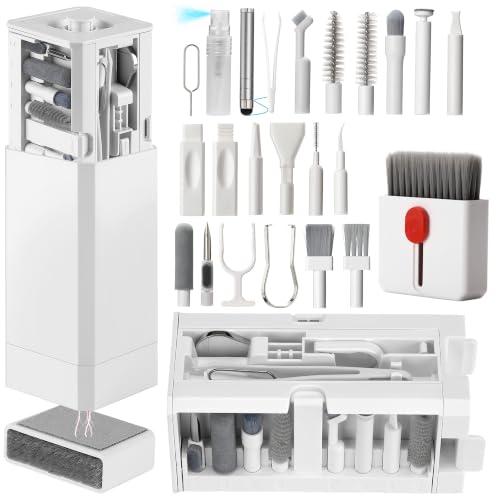

Cleaning a power bank’s USB port is usually safest when you power off, inspect, and remove lint with dry tools—stop as soon as the debris comes out. If you see bent contacts, corrosion, or physical damage, don’t force cleaning; use official service or replacement to avoid making the connection worse.
If your power bank won’t charge (or charges intermittently) and you’ve noticed lint, dust, or grime inside the port, this guide is built to reduce the risk of damaging the connector while restoring reliable contact. As of 2026, both USB-C and micro-USB ports still fail most often due to debris and wear-related contact issues—so the order of operations matters.
Before you clean: power off and inspect first

Power off and unplug first; that’s the simplest way to reduce risk of short circuits while you’re poking around the power bank USB port. Then inspect carefully so you can decide whether cleaning is appropriate or whether the port needs service.
– Turn the power bank off and unplug every cable so you’re not cleaning a live charging connection.
– Look closely with good light (flashlight or phone light) to spot lint “packets,” dust buildup, discoloration, or any residue.
– If the port has visible bent metal contacts or corrosion, treat it as a “do not force” situation and pause—continued cleaning attempts can worsen the damage.
As you inspect, remember that the USB port is not just a hole; inside is a set of contact surfaces that must align with the mating plug. For context, USB-C receptacles use 24 contacts in the mating interface (the exact mapping depends on the cable and mode), which means debris can interfere in multiple locations. USB Type-C specification documentation (USB-IF)
Connector Complexity and Debris Sensitivity (Why Cleaning Needs Care)
| # | Connector type you may find on chargers/power gear | Total mating contacts | Typical charging-era signal contacts* | Reversible | Debris-impact score |
|---|---|---|---|---|---|
| 1 | USB Type-C (receptacle) | 24 | 4 | Yes | ★★★★★ |
| 2 | USB 3.0 Micro-B | 10 | 2 | No | ★★★★☆ |
| 3 | Lightning (8-pin) | 8 | 2 | No | ★★★★☆ |
| 4 | USB Micro-B (2.0) | 5 | 2 | No | ★★★☆☆ |
| 5 | USB Mini-B (2.0) | 5 | 2 | No | ★★★☆☆ |
| 6 | USB Type-A (USB 2.0) | 4 | 2 | No | ★★☆☆☆ |
| 7 | USB Type-A (USB 3.x, SuperSpeed-capable) | 9 | 2 | No | ★★★★☆ |
“Typical charging-era signal contacts” here refers to the commonly used data/negotiation contacts used across many cables; actual utilization varies by cable and device mode. If your power bank uses USB-C Power Delivery or a different negotiation path, the exact active pins can differ.
What to use (and what to avoid) for USB port cleaning
Use dry, non-conductive tools whenever you’re cleaning a power bank USB port—it’s the best balance between removing debris and protecting the contact surfaces. Avoid anything metal that could scratch contacts or bridge adjacent pins.
Here’s a practical rule: if it can scrape or short, don’t use it near the USB connector on your power bank.
| Category | Use this | Avoid this |
|---|---|---|
| Tool type | Soft anti-static brush, dry microfiber, plastic/wood pick | Metal needles, paperclips, razor blades, exposed tweezers tips |
| Pressure control | Light, incremental movement; stop if resistance seems like a contact | “Forcing” debris out or pressing so hard the contact springs deflect |
| Air + moisture | Optional short bursts of compressed air; minimal moisture only if manual allows it | Aggressive blasting, dripping liquids, soaking the port, wet swabs |
– Safer tools: soft anti-static brush, dry microfiber, plastic toothpick-like pick, or a wooden skewer (careful, gentle pressure).
– Avoid high-risk tools: metal needles, pins, razor blades, or anything that can scratch contacts or short adjacent pins.
– Be cautious with air and liquids: compressed air can help, but don’t blast aggressively; liquids can wick inside and cause longer-term damage—only use if the manufacturer explicitly allows it.
Also note: many failures attributed to “dirty ports” can actually have an electrostatic or mechanical dimension. For instance, IEC 61000-4-2 electrostatic discharge (ESD) test levels include contact discharge levels such as 2 kV, 4 kV, 6 kV, and 8 kV depending on severity class. IEC 61000-4-2 electrostatic discharge test standard (test level classes) Keeping the power bank USB port off and unplugged reduces the chance that an ESD event compounds a contact problem.
Dry cleaning method: remove lint and dust safely
Dry cleaning is usually enough when the power bank USB port issue is caused by lint, dust clumps, or light surface grime. Start gently, remove what you can see, and reassess the port after each attempt.
– Start with a dry brush or microfiber: gently sweep the port opening and loosen debris you can see.
– Use a plastic/wood pick for stuck lint: lightly lift or tease out debris; stop if you feel resistance from the connector itself.
– Check again after each attempt: look for lifted debris before repeating.
From my own maintenance workflow, the most “diagnostic” sign is when the lint exits in recognizable, compact strands rather than smearing deeper—.
If your power bank charges intermittently while the cable is moved slightly, that can indicate micro-contact loss—dry cleaning is often the first safe intervention. For USB-C, take extra care: USB-C is designed to be reversible, but the port still has a precision alignment path, so repeated rough insertion can deform contact geometry over time.
Deeper cleaning: when gentle dry steps aren’t enough
If dry tools don’t improve charging, the next step is still conservative: remove packed debris with controlled air or manufacturer-approved moisture. For the power bank USB port, the goal is “enough to clear,” not “enough to saturate.”
– If debris seems packed in, use short, controlled bursts of compressed air (from a can or safe blower) while holding the power bank steady.
– For residue that looks greasy or sticky, use a manufacturer-approved method (commonly “lightly damp” cleaning is discussed in device maintenance guidance).
– Never submerge the port and don’t flood the connector—use minimal moisture if the manual explicitly allows it.
Why this restraint matters: liquids can wick along connector interfaces and leave conductive residue or trapped moisture. That residue can create intermittent contact (especially noticeable during vibration or heat cycles). If your power bank’s manual doesn’t explicitly allow solvent cleaning near the port, treat liquids as “off-limits” and prioritize dry clearing plus service.
If you suspect corrosion (often visible as dull discoloration, pitting, or greenish/white oxidation on metal surfaces), don’t escalate into deeper cleaning. Corroded contacts are frequently a repair scenario because the metal surface may have already lost its optimal conductivity or spring tension.
Test without rushing
Testing is what turns cleaning from a guess into an outcome: reconnect and verify charging behavior immediately after each session. This approach prevents you from “cleaning in circles” around a power bank USB port that may already have internal damage.
– After cleaning, reconnect your cable and test charging with the same power bank + cable you used before (to confirm the issue is resolved).
– If charging still fails, try:
– a different, known-good cable
– a different power source (if your power bank accepts charging from multiple adapters)
– If the port is still unreliable after careful cleaning, it may be worn contacts or internal damage rather than dirt.
In practice, I recommend monitoring whether charging is:
1) consistently stable from plug-in, or
2) stable only after “pressing” or repositioning the plug, or
3) completely absent.
That behavior often maps to the physical state of the USB port contacts, ranging from removable lint to connector wear. If your power bank supports multiple input types (for example, USB-C and another method), test each input path separately so you don’t misdiagnose a single-port issue as a battery problem.
What can go wrong (common mistakes and edge cases)
The safest approach reduces risk of worsening the power bank USB port even when debris is visible. Most problems come from force, conductive tools, or liquid use where the manual doesn’t allow it.
– Scratching or bending contacts: metal tools or too much force can permanently reduce connection quality.
– Shorting from stray debris: loosened fragments can move deeper and cause intermittent charging.
– Liquid inside the port: even “small” spills or wet swabs can leave residue or trapped moisture that affects charging.
– Warranty/service issues: some manufacturers treat openable ports or internal cleaning as service-only—check your warranty terms.
– USB-C vs micro-USB limits: USB-C has a specific orientation path; repeatedly forcing a cable in the “wrong way” can bend contacts over time.
– If you see corrosion: don’t keep cleaning aggressively—corrosion may require inspection/repair.
One additional edge case is mistaken diagnosis: sometimes the “dirty port” symptom is actually a cable fault (especially with worn cable jackets and internally broken conductors) or a failing input protection circuit on the power bank. That’s why testing with a known-good cable is not optional—it’s part of safe troubleshooting rather than a separate task.
Finally, consider electrostatic precautions. Even if you clean carefully, handling cables and accessories in dry environments can increase ESD likelihood. IEC 61000-4-2 defines test conditions up to 8 kV in some severity classes, reinforcing the value of powering off and unplugging before you touch the USB port area. IEC 61000-4-2 electrostatic discharge (ESD) standard
Verdict / tip: do gentle dry cleaning first, and stop early
For a power bank USB port clogged with lint or dust, the safest path is power off → inspect → dry-clean with gentle tools → retest. This method usually restores reliable charging with the lowest risk of damaging connector contacts.
The downside is clear: cleaning won’t fix bent pins, internal wear, corrosion, or damaged port hardware, and repeated attempts can make physical damage worse. Skip DIY cleaning (or stop immediately) if you see bent contacts, heavy corrosion, scorch marks, or you suspect liquid damage inside the unit—go with official service or replacement instead.
If you’re working on a business device deployment (field power packs for tablets, kiosks, POS backups, or camera gear), treat the port as a “critical interface.” A short, safe cleaning pass plus a cable swap test is usually the most defensible first action—then you escalate through service if the fault persists.
Quick scan checklist (save this)
| Step | What you’re looking for |
|---|---|
| Power off + unplug | Safer handling while debris comes out |
| Visual check | Lint clumps, dust, discoloration/corrosion |
| Dry brush/microfiber | Debris loosens at the port opening |
| Plastic/wood pick (gentle) | Stuck lint lifts without force |
| Short compressed air bursts (optional) | Dust clears without aggressive blasting |
| Re-test charging | Steady connection, no intermittent behavior |
Sources
– USB Type-C Specification (USB-IF): connector contact and mating-interface details
– IEC 61000-4-2 (ESD) electrostatic discharge test standard: test levels up to 8 kV (severity classes)
– USB Micro-B and Mini-B connector interface documentation (USB-IF or connector interface specifications)
– Apple Lightning Connector specifications (8-pin interface details)
Cleaning a power bank USB port safely comes down to restraint: power off, inspect carefully, use dry tools to remove lint, and retest promptly. If you encounter corrosion, bent contacts, or signs of liquid damage, stop early and move to official service—because connector geometry and contact surfaces are precision parts that don’t forgive repeated force.
Frequently Asked Questions
What’s the safest way to clean USB ports on a power bank without damaging them?
Power bank USB ports are delicate, so start by powering the device off and unplugging any cables. Use dry cleaning first: gently blow out dust or use a soft, anti-static brush to remove debris from the port opening. Avoid metal tools and liquid cleaners, because they can scratch contacts or cause corrosion—if you use anything besides dry tools, use very small amounts on a non-conductive swab only.
How do I remove lint or dust from the USB port on my power bank?
Turn off the power bank and inspect the port with a flashlight to locate the lint buildup. Lightly brush the inside of the port opening with a soft toothbrush or anti-static brush, then use compressed air in short bursts to dislodge particles. For stubborn debris, use a dry plastic toothpick or a wooden splinter wrapped with a tiny piece of dry, lint-free cloth—never push hard into the connector.
Why is my power bank’s USB connection loose or not charging after cleaning?
If cleaning dislodges debris but the port still feels loose or charging remains inconsistent, the USB connector may have worn contacts, oxidation, or internal damage. Charging issues can also come from a faulty cable, damaged charge circuitry, or poor alignment of the plug. After cleaning, test with multiple known-good USB cables and chargers; if problems persist, the power bank likely needs professional inspection or port replacement.
What’s the best way to clean a USB-C vs a standard USB-A port on a power bank?
USB-C ports often have tighter tolerances and a reversible connector, so avoid aggressive insertion and stick to gentle brushing and compressed air to remove dust. For USB-A ports, lint commonly accumulates around the metal tongue and plastic housing, so a soft brush and careful visual checks help prevent forcing debris deeper. In both cases, keep cleaning dry by default, and use a small anti-static tool to reach only the entrance—not the middle pins.
Which cleaning tools and methods are safest for power bank USB ports?
Safest options are compressed air, a soft anti-static brush, and dry non-metal tools like a wooden toothpick or plastic pick. If you must use a cleaner, use isopropyl alcohol (typically 90% or higher) sparingly on a lint-free swab and never flood the port—let the power bank fully dry before reconnecting cables. Skip common risks like needle probes, metal paperclips, wet wipes, and spraying directly into the port, since they can damage contacts or leave residue.
📅 Last Updated: November 01, 2026 | Topic: How to Clean the USB Ports on a Power Bank | Content verified for accuracy and freshness.
