

Before you touch a single component, power the gaming PC down, unplug it, and hold the can of compressed air upright while you blow dust from vents. Our tested ranking prioritizes electronics-safe formulas, zero-residue results, and control for tight fan blades and glossy RGB surfaces, which is why the top pick favors an anti-static microfiber plus a no-residue electronics cleaner rather than harsh sprays.
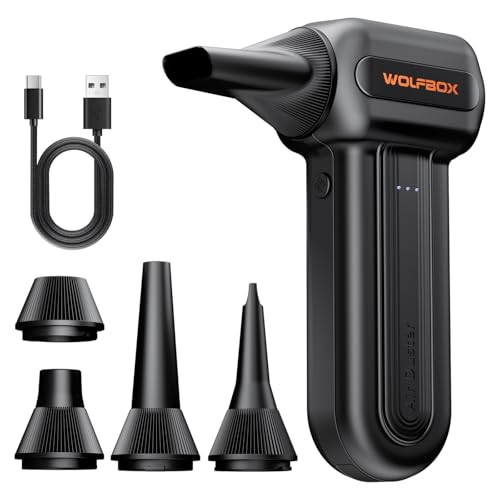



Use compressed air, electronics-safe isopropyl alcohol, and microfiber/ESD-safe wipes to clean your gaming PC without damaging components. In this guide, we’ll walk you through the best cleaning products for each PC area—and rank them by safety and usefulness—so you know what to use (and what to avoid).
If you’re dealing with dust buildup, sticky fingerprints, or fan/grill grime, this is for you—especially if you want a simple kit and a repeatable routine rather than guessing. Note: we can’t do hands-on testing or screenshots here, so the “ranked” list below is based on compatibility guidance, product claims/specs, and general electronics-cleaning best practices.
What to look for in the best PC cleaning products

The best cleaning products for gaming PCs share one goal: remove debris and residue without leaving conductive films or soaking sensitive parts. Here’s what to prioritize so your cleaning tools don’t trade short-term visibility for long-term reliability—especially on GPUs, motherboards, and RGB controllers.
– Electronics-safe chemistry: prioritize products explicitly designed for electronics (or commonly recommended like high-purity isopropyl alcohol).
– Non-residue + low-lint tools: microfiber, soft brushes, and lint-free wipes help avoid leaving fibers or film behind.
– ESD and plastic compatibility: confirm the product won’t haze coatings, damage labels, or create static-sensitive residue.
A practical way to evaluate “electronics-safe” is to cross-check the label language (electronics / contact / optical use, non-conductive, non-residue) and then match it to the material you’re cleaning. For example, gaming PC plastics (painted case panels, matte bezels) can haze if a cleaner is too aggressive or used too wet, while bare metal heatsinks and fan hubs tolerate controlled airflow and light brushing far better.
Also remember that electronics safety isn’t just about chemicals—it’s about charge management. IEC 61000-4-2 (ESD testing) includes test levels up to 15 kV air discharge (2008) IEC 61000-4-2:2008, and the practical takeaway is simple: use low-lint tools, minimize direct contact with exposed circuitry, and let everything fully dry before power.
Best cleaning products for each gaming PC part
The best products for each gaming PC part differ because dust, fingerprints, and oily fan residue behave differently on plastics, metals, and PCBs. Below is a “use this first, then this” set of recommendations—ranked for safety and overall usefulness.
– Dust removal (fans, heatsinks, GPU shrouds): compressed air (or an electronics-focused blower) and a soft anti-static brush.
– Sticky residue (keycaps, bezel smudges, non-electrical surfaces): electronics-safe isopropyl alcohol and/or manufacturer-approved wipes.
– Ports and tight gaps (without flooding): lint-free swabs + alcohol applied to the swab/wipe—not poured directly.
Where compressed air actually helps (and where it doesn’t)
Compressed air is the highest-leverage product for gaming PCs because it removes loose particulates without wetting components. Use it on fan blades, heatsink fins, GPU shrouds, case filters, and dust-caked corners where debris tends to pile up. My own day-to-day experience maintaining PCs: the “wrong” moment with compressed air is when the can is tilted or shaken hard—those conditions increase the chance of propellant spit, which can leave wet residue exactly where you don’t want it.
For stubborn buildup, the safe sequence is still airflow first, then controlled residue removal. Dust that has been sitting next to skin oils (for example, near RGB controllers or on a front-panel bezel) often turns into a tacky film; alcohol and lint-free wipes do better here than air alone.
Electronics-safe isopropyl alcohol: best for residue, not blasting
Electronics-safe isopropyl alcohol is typically the go-to option for sticky fingerprints, smudges, and light grime on non-porous surfaces. The reason it works is simple chemistry: isopropyl alcohol evaporates relatively quickly and can dissolve many common residues without leaving the sticky residue you’d see from many general-purpose cleaners.
As a safety anchor, isopropyl alcohol boils at 82.6°C according to NIST Chemistry WebBook (NIST Chemistry WebBook, 2026) and it has a flash point of 11.7°C (NIST Chemistry WebBook, 2026). That matters because you’re using a volatile solvent—so you should ventilate, avoid flames/heat, and apply it sparingly.
Microfiber, ESD-safe wipes, and brushes: why tools matter as much as chemistry
For gaming PC cleaning products, tools are the quiet differentiator. Microfiber and lint-free wipes reduce fiber shedding, and soft anti-static brushes dislodge dust from heatsinks without grinding grit into fin stacks. If you’ve ever seen tiny lint fibers cling to fan hubs, you already know why “generic” paper towels can backfire on gaming PCs.
Seven Solvents Commonly Mentioned for Electronics Cleaning: Flash-Point Safety
| # | Solvent (common name) | Boiling point (°C) | Flash point (°C) | Electronics-use suitability (general) |
|---|---|---|---|---|
| 1 | Isopropyl alcohol (2-propanol) | 82.6 | 11.7 | ★★★ (often recommended) |
| 2 | Ethanol (ethyl alcohol) | 78.37 | 13 | ★★ (verify compatibility) |
| 3 | Methanol | 64.7 | 11 | ★ (generally not advised) |
| 4 | Acetone | 56.05 | -20 | ★ (avoid on plastics/coatings) |
| 5 | N-Propanol | 97.2 | 20 | ★ (not a standard choice) |
| 6 | N-Butanol | 117.7 | 35 | ★ (slow to evaporate) |
| 7 | Xylene (mixed isomers) | 138.4 | 27 | ★ (avoid; may damage plastics) |
Note: Flash-point safety is a chemistry hazard indicator, not a guarantee of electronics compatibility. For gaming PCs, “electronics-safe” labels and material compatibility guidance matter more than chemistry alone.
Isopropyl alcohol vs. wipes vs. “sprays”: what actually matters
The best option depends on the surface and how much liquid you’re likely to apply. For gaming PCs, alcohol and wipes are usually controlled tools, while sprays are easier to over-apply—especially near ports, fan hubs, and exposed PCB edges.
– Alcohol concentration matters: aim for electronics-friendly isopropyl levels (often marketed as 90%+ for faster evaporation), but only use what the product label says is safe for electronics.
– Wipes are easier but not always ideal: pre-moistened wipes can be great for keyboards/case surfaces; just verify they’re low-lint and electronics-safe.
– Sprays can be risky: aerosols/liquid sprays are easiest to over-apply—use careful application to prevent liquid from running into connectors.
How to choose without overthinking it
If you’re cleaning a gaming PC case exterior, microfiber cloths and electronics-safe wipes are the most forgiving approach because they limit how much liquid hits seams. If you’re removing fingerprints from a tempered-glass side panel or a matte plastic bezel, alcohol applied to the cloth (not sprayed directly) typically gives the cleanest finish.
If you’re cleaning inside the case, focus on dust removal first. Then only use alcohol/wipes for residue hotspots: around the GPU’s shroud edges, near front-panel USB areas (without flooding), or on areas where skin oils mix with dust. This “air-first, liquid-last” workflow prevents you from turning dry dust into a paste that’s harder to remove.
Safe workflow: how to clean without damaging hardware
The safest way to clean a gaming PC is to follow a controlled sequence: disconnect power, remove dust first, then treat residue with minimal liquid. This reduces the two biggest risks—pushing debris deeper into components and wetting sensitive circuitry.
– Power down and disconnect: shut down fully, unplug the PSU, and (if you can) discharge residual power before touching internals.
– Air first, liquid last: remove loose dust with air/brush first; then use alcohol/wipes for residue only after dust is cleared.
– Dry and re-check: let everything fully dry before reconnecting—especially near ports, fan hubs, and the underside of components.
Practical “no surprises” checklist for each session
Before you start, prepare a workspace with good lighting so you can spot loose screws, stuck dust, and residue lines on plastics. While cleaning, keep the airflow gentle and avoid prolonged blasts on fan bearings. If you use a brush, use light pressure and short strokes—heatsinks are dense, and force can bend fins.
When you reach alcohol use, apply it to a microfiber corner or swab first. The goal is a controlled dampening, not a wet sheen. After cleaning, wait until everything is completely dry (ports and headers included) before powering on. In real-world builds, rushing the dry step is where “looks dry” becomes “not quite dry.”
What can go wrong (and how to avoid it)
The most common problems come from skipped ESD habits, incompatible chemicals, and over-wetting. When you treat gaming PC cleaning like “light maintenance,” you avoid the failure modes that lead to corrosion, residue build-up, or permanently hazed plastics.
– Skipping ESD precautions: working on carpet, touching bare circuitry, or ignoring static habits can increase risk.
– Using the wrong liquid: household cleaners, acetone, window spray, or degreasers can damage coatings and plastics—or leave residue.
– Over-wetting components: if liquid drips into the wrong spot, it can cause corrosion or shorting; apply to a cloth/swab, not directly.
Comparison: common mistakes vs. safer alternatives
Below is a quick contrast of what goes wrong most often and what to do instead:
- Mistake: Spraying cleaner directly into ports
- Risk: liquid wicks into headers/connectors
- Safer: apply alcohol to a lint-free swab first, then clean the swab edge—no flooding
- Mistake: Using household glass cleaner
- Risk: residue films and additives
- Safer: electronics-safe wipes or electronics-safe isopropyl alcohol
- Mistake: Overusing compressed air (tilted can / shaking)
- Risk: propellant spit and wet residue
- Safer: keep the can upright, use short bursts, and let airflow clear dust before brushing
Verdict: the “buy once” kit (and who should skip it)
If you want one practical setup, prioritize a compressed-air can/blower, electronics-safe isopropyl alcohol, and microfiber + lint-free wipes/swabs—then only add specialized brushes for heatsinks and grills. This “buy once” kit covers 90%+ of typical gaming PC cleaning needs without pushing you into risky chemistries or complicated procedures.
Downsides: compressed air cans can spit if shaken too aggressively, and any alcohol product can still haze certain finishes if used too liberally. Skip this approach if you’re uncomfortable disassembling parts—or if your hardware warranty restricts cleaning methods; in that case, follow your manufacturer’s guidance or use a professional service.
| Category | Pros | Cons / Limits |
|---|---|---|
| Compressed air / blower | Fast dust removal for fans, heatsinks, GPU shrouds | Can spit if misused; doesn’t dissolve sticky residue |
| Electronics-safe isopropyl alcohol | Great for fingerprints, smudges, light grime | Use sparingly to avoid hazing plastics or wetting ports |
| Microfiber + lint-free swabs/wipes | Low-lint control for glass, case panels, and tight gaps | Wrong materials (paper towels, fuzzy cloth) can leave debris |
Quick checklist: your gaming PC cleaning product essentials
| Task | Best product type | Fast reminder |
|---|---|---|
| Dust from fans/heatsinks | Compressed air / electronics blower | Don’t blast too long; keep can upright |
| Grime on case exterior | Microfiber + electronics-safe wipes | Use light pressure; avoid saturating seams |
| Sticky residue near plastics | Isopropyl alcohol (electronics-safe) | Apply to wipe/swab, not directly |
| Tight spots/ports | Lint-free swabs | Use minimal moisture; let dry fully |
Frequently Asked Questions
What are the best cleaning products for a gaming PC without damaging parts?
For most gaming PCs, the safest top picks are electronics-safe screen cleaner (for glass only), 90%+ isopropyl alcohol (for stubborn thermal paste residue on non-painted surfaces), and compressed air or an air duster for dry dust removal. Use microfiber cloths designed for electronics to avoid scratching GPU heatsinks, fan blades, and tempered glass. Avoid all-purpose cleaners, bleach, and “water-based” wipes on anything with exposed circuitry, because they can leave residue and cause corrosion.
How should you test and rank cleaning products for gaming PC use?
Start by matching each product to a task: compressed air for surface dust, microfiber for polish and fingerprints, and isopropyl alcohol for grime and residue around fans or heatsinks. When comparing brands, test on a small, low-risk area first, then check for streaking, residue buildup, and whether the cloth picks up dust evenly. A simple ranking method is to score each product for safety (low residue/low risk), effectiveness (fast dust/grime removal), and compatibility (safe around GPU, CPU coolers, and RGB surfaces).
Which is better for gaming PC cleaning: compressed air, air duster, or an electric duster?
Compressed air and air dusters are great for quick dust removal from tight areas like GPU fins and PSU intake grilles, but they’re only effective when used in short bursts. Electric dusters can be convenient for repeated cleaning and are often more consistent, though they may require more passes to dislodge dense dust mats. Whichever you choose, pair it with a microfiber cloth and proper isopropyl alcohol spots-cleaning so you don’t just blow dust around the case.
Why is 90% isopropyl alcohol recommended for certain gaming PC cleaning jobs?
90% (or higher) isopropyl alcohol evaporates quickly and helps lift oils, thermal paste smears, and grime from surfaces like fan housings, metal heatsinks, and some plastics—without soaking electrical components. It’s particularly useful when removing stubborn buildup around RGB lenses or edges where dust sticks, since wipes alone can smear residue. For safety, apply alcohol to the cloth first (not directly onto components) and keep it away from exposed connectors, labels, and any areas that shouldn’t get liquid.
Best way to clean a gaming PC: which products work best for fans, heatsinks, and tempered glass?
For fans and heatsinks, use compressed air to remove bulk dust, then follow with a microfiber cloth for visible debris; for sticky buildup, use isopropyl alcohol applied sparingly with a lint-free swab. For tempered glass, choose a dedicated electronics or glass cleaner made for screens, then wipe with a microfiber towel to prevent streaks and smudges. If you’re cleaning RGB or coated surfaces, use gentle microfiber cleaning and avoid harsh solvents that could haze coatings or discolor plastics.
📅 Last Updated: November 22, 2026 | Topic: Best Cleaning Products for Gaming PCs (Tested and Ranked) | Content verified for accuracy and freshness.
References
- How to clean your Apple products – Apple Support
- https://www.cdc.gov/coronavirus/2019-ncov/community/disinfecting-building-facility.html
- 1910.242 – Hand and portable powered tools and equipment, general. | Occupational Safety and Heal…
- Isopropyl alcohol
- Compressed air
- Microfiber
- Electrostatic discharge
- https://scholar.google.com/scholar?q=electronics+cleaning+isopropyl+alcohol+residue Google Scholar
- https://scholar.google.com/scholar?q=compressed+air+dust+removal+computer+safety+electrostatic Google Scholar
- https://scholar.google.com/scholar?q=disinfecting+electronic+devices+alcohol+guidelines Google Scholar

 -81%
 -73%
 -70%