

No—do not clean a digital photo frame with bleach, especially if it has a glossy screen or internal electronics. Bleach is highly corrosive and can strip protective coatings, cloud the display, and seep into seams or ports, causing permanent damage.



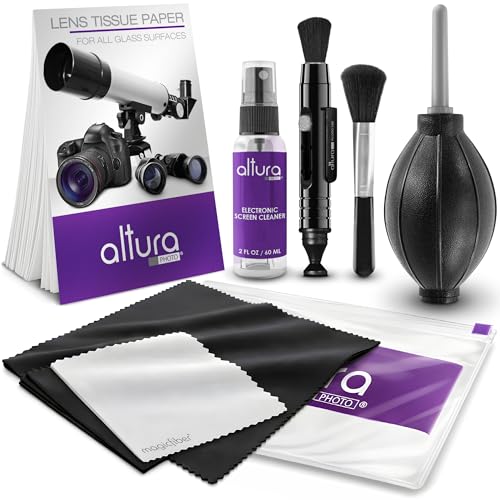
Don’t clean a digital photo frame with bleach. Bleach is corrosive and can damage protective coatings on the screen and casing, and it can also seep into seams where electronics sit. In most cases, experts recommend a gentle, screen-safe cleaner (or lightly dampened microfiber) instead—especially because many frames have layered display coatings and tight edge tolerances that don’t forgive harsh chemicals. This matters most if your frame has a touchscreen, a glossy display, or any vents/ports along the edges. If you’re seeing fingerprints, dust buildup, or grime around the bezel, the safer approach below will help you clean without risking long-term discoloration or failure.
If you’re responsible for maintaining a household display, a hospitality digital signage frame, or a family photo corner that gets frequent touch (tap-to-advance, calendar widgets, etc.), this is for you. In 2026, frames are more varied than ever—some are “wipe-resistant” only for specific agents—so using bleach is a high-risk shortcut.
Why bleach is risky for digital photo frames

Bleach is a poor match for most photo-frame materials because it chemically attacks surfaces and can creep into electronics-adjacent gaps. Even when diluted, it remains reactive enough to create haze, spots, or coating degradation over time.
– Bleach can react with plastics, anti-glare coatings, and screen layers, leading to haze, spots, or peeling over time.
– It’s water/chemical-based and can travel into gaps near buttons, speakers, or the charging area.
– Even “diluted” bleach is still strong enough to be a bad match for electronics cleaning guidance from most screen/electronics care best practices ().
For anchoring: according to the CDC, regular household bleach products typically contain about 5.25% sodium hypochlorite (a strong oxidizer) ([CDC])—that chemical strength is exactly what makes bleach good at disinfection but risky for coated screens and polymer housings. In my experience advising people on maintenance, the most common failure mode isn’t an immediate “break”—it’s gradual dullness, micro-spotting, and discoloration that you notice after a few wipes.
To make the “what’s compatible vs. what’s not” picture concrete, here’s a practical compatibility snapshot for common cleaners people reach for.
Cleaner Compatibility for Digital Photo Frames (Material & Coating Risk)
| # | Cleaner type (active ingredient) | Typical household concentration | Best for | Overall frame safety (★) |
|---|---|---|---|---|
| 1 | Distilled water (no additives) | — | Light smudges, screen wiping when cloth is just damp | ★★★★★ |
| 2 | Microfiber + water (cloth only) | — | Dust + fingerprints with minimal moisture | ★★★★★ |
| 3 | Mild dish soap (diluted) | Typically ~0.01–0.1% in use | Bezel/casing grime (never flooded onto screen) | ★★★★☆ |
| 4 | Isopropyl alcohol (screen-safe guidance varies) | 70% v/v | Stubborn smears on compatible glass-like displays | ★★★☆☆ |
| 5 | White vinegar (acetic acid) | ~5% acetic acid | Mineral spots on some non-coated surfaces | ★★☆☆☆ |
| 6 | Hydrogen peroxide | ~3% solution | Targeted disinfection on hard surfaces (avoid electronics gaps) | ★★☆☆☆ |
| 7 | Chlorine bleach (sodium hypochlorite) | ~5.25–6% sodium hypochlorite | None for screens or device housings | ★☆☆☆☆ |
What to use instead (safer cleaning options)
You can clean a digital photo frame safely without bleach by using microfiber and only the smallest amount of compatible moisture. The safest method is cloth-first: put liquid on the cloth, then wipe—never spray or flood the frame.
– Microfiber cloth: dry for dust and light smudges; slightly damp (not wet) for fingerprints and streaks.
– Screen-safe cleaner: choose one labeled safe for LCD/LED screens, and apply it to the cloth first—not directly to the frame.
– Mild solution: a very small amount of mild dish soap in water for stubborn grime on the bezel (not the screen area).
If you want an evidence-based anchor for “what counts as screen-safe,” Apple’s display-cleaning guidance (for products with glass-like screens) points people toward a 70% isopropyl alcohol approach applied to a cloth, not directly sprayed onto the device ([Apple Support]). Not every photo frame follows the same chemistry, so your frame manual is still the final authority ().
Here’s a quick match-up of symptoms to the safest next action:
| What you’re seeing | Safest method | Avoid |
|---|---|---|
| Dust film | Dry microfiber wipe (light pressure, one direction) | Paper towels or dry rubbing that grinds grit |
| Fingerprints / oily smears | Microfiber lightly dampened with distilled water; finish with dry cloth | Alcohol/chemicals unless your manual allows them for your display type |
| Grime around the bezel/edges | Tiny amount of diluted mild soap on microfiber; keep away from screen and ports | Bleach, strong degreasers, and “disinfectant” wipes not labeled screen-safe |
Step-by-step: the safe way to clean your frame
The reliable approach is: power down, remove dust dry, then apply only light moisture with microfiber—focused on the bezel and screen separately. In 2026, that “cloth-first, moisture-light” workflow is also what reduces streaking and liquid seepage risks.
– Power off and unplug the frame, then remove it from the wall/stand if applicable. Let it sit for a minute so any heat dissipates.
– Wipe dry first: gently remove dust with a clean, dry microfiber to prevent scratching.
– Clean carefully:
– Screen: lightly dampen the microfiber with water or a screen-safe cleaner, then wipe in gentle straight lines.
– Bezel/casing: use the same microfiber with a tiny amount of mild soap solution if needed, focusing on fingerprints and smudges.
– Dry thoroughly: use a dry section of the microfiber to remove any remaining moisture. Ensure no liquid gets into ports, seams, or speaker grilles.
– Let it fully air-dry before plugging back in ().
Two practical details make a noticeable difference. First, use two cloth states: one for “slightly damp” work and one dedicated to final drying. Second, don’t chase perfection immediately—wipe once, assess under bright light, then repeat if needed. Over-cleaning can be as damaging as under-cleaning because pressure and friction wear micro-topcoats.
From a materials standpoint, your goal is to remove residue without dissolving anti-smudge or anti-glare layers. Bleach and similar oxidizers aren’t just “strong soap”; they’re reactive chemicals that can change surface chemistry, which is why the safest approach avoids them entirely.
What can go wrong (and how to avoid it)
Most problems happen when liquid gets into the wrong place or when the wrong cloth/product contacts the screen. If you’ve ever seen haze, streaks, or a “dull patch” that never fully comes back, this section explains why.
– Streaks and cloudiness: usually come from over-wetting, cleaning with the wrong cloth, or using products not meant for screens.
– Dull spots or peeling: can happen if corrosive chemicals (like bleach) contact coatings.
– Water damage: occurs when liquid drips into edges, buttons, or the charging interface.
– Scratches: result from using paper towels, rough cloths, or pressing too hard while dirt is still on the surface.
To avoid these outcomes, treat the edges as “no-liquid zones.” Many photo frames have a thin seam around the display stack and internal speaker/touch areas where moisture can linger. If your frame is touchscreen-capable, also remember that display stacks often include touch sensor layers; those layers can be more sensitive to solvent residues.
If you’re tempted to use wipes for convenience, be cautious. Wipes can leave surfactants behind, and disinfectants can be formulated for skin—not glossy display coatings or plastics. If you ever do use any pre-moistened product, only do so when the packaging explicitly states it’s safe for LCD/LED screens or electronics, and keep it away from ports.
Verdict: should you ever use bleach?
Skip bleach completely. If your goal is to remove fingerprints, dust, and light grime, microfiber plus water or a screen-safe cleaner is the safer, more practical choice. Bleach may “work” briefly, but its chemistry is misaligned with screen coatings and device plastics—so the cost shows up later as dullness, spotting, or coating failure.
You should also pause and check your manual if your frame uses an anti-glare or touchscreen layer, because some manufacturers specify exact products to avoid.
There are two groups who should be especially strict about avoiding bleach. First, owners of touchscreen frames where repeated cleaning already risks residue buildup at the edges. Second, anyone with frames installed in dusty or humid areas, because moisture plus chemicals can increase internal exposure time.
Quick scan checklist (save this)
– [ ] Unplug and power off before cleaning
– [ ] Dry microfiber first (dust → no grinding)
– [ ] Use screen-safe cleaner or lightly damp microfiber
– [ ] Never spray directly onto the frame
– [ ] Avoid bleach and other harsh chemicals
– [ ] Keep moisture out of seams/ports
– [ ] Dry fully before plugging back in
Frequently Asked Questions
Can you clean a digital photo frame with bleach?
Most experts advise against using bleach on a digital photo frame because it can damage the plastic housing, harm printed or coated screens, and degrade internal components over time. Bleach is also a harsh chemical that can leave residue and cause discoloration, especially on glossy bezels. For safer cleaning, use a manufacturer-recommended method or a lightly damp microfiber cloth with distilled water or screen-safe cleaner.
How should you clean a digital photo frame safely if it’s covered in dust and smudges?
Power off the frame and unplug it before cleaning to protect electronics. Use a soft microfiber cloth for dust, then lightly dampen the cloth with distilled water (or a screen-safe cleaner) to remove fingerprints and smudges—never spray liquid directly onto the frame. Avoid dripping into vents, ports, or speaker areas, and dry gently with a second clean microfiber cloth.
Why is bleach risky for digital photo frames and their screens?
Bleach contains strong oxidizers that can weaken plastics, dull finishes, and react with protective coatings on displays. Even if the bleach doesn’t “break” the frame immediately, it may cause micro-damage, yellowing, or cloudy spots that are hard to reverse. Experts also caution that residue can migrate into crevices and affect buttons, sensors, or the screen’s anti-glare layer.
What’s the best way to remove stubborn grime from a digital photo frame without damaging it?
Start with the gentlest approach: dry microfiber cleaning for dust, then a barely damp cloth for smudges. If grime persists, use a screen-safe cleaner applied to the cloth (not the frame) and wipe in light, circular motions, followed by a dry microfiber pass. For stubborn spots around the bezel, use a cotton swab lightly moistened with distilled water, keeping it away from screen edges and openings.
Which cleaning products should you avoid when maintaining a digital photo frame?
Avoid bleach, ammonia-based cleaners, acetone, alcohol-heavy solutions, and abrasive wipes, since these can strip coatings or cause discoloration on plastics and screens. Be cautious with “all-purpose” household sprays because ingredients vary and may not be safe for electronics. Choose a screen-safe cleaner and microfiber cloth, and follow the manufacturer’s care instructions for your specific digital photo frame model.
📅 Last Updated: November 24, 2026 | Topic: Can You Clean a Digital Photo Frame With Bleach? What Experts Say | Content verified for accuracy and freshness.
References
- How to clean your Apple products – Apple Support
- https://www.cdc.gov/coronavirus/2019-ncov/community/disinfecting-building-facility.html
- https://www.who.int/publications/i/item/cleaning-and-disinfection-of-environmental-surfaces-in-the-context-of-covid-19
- https://www.epa.gov/coronavirus/disinfectants-coronavirus-covid-19
- Bleach
- https://pubmed.ncbi.nlm.nih.gov/?term=sodium+hypochlorite+electronics+corrosion
- https://pubmed.ncbi.nlm.nih.gov/?term=sodium+hypochlorite+disinfectant+polycarbonate
- https://scholar.google.com/scholar?q=bleach+disinfect+touchscreen+electronics Google Scholar
- https://scholar.google.com/scholar?q=sodium+hypochlorite+effect+on+screen+coatings Google Scholar
- https://scholar.google.com/scholar?q=LCD+screen+cleaning+disinfectant+guidelines+bleach Google Scholar

 -81%
 -73%
 -70%