

You reach for a paper towel and swipe across your mechanical keyboard’s keycaps, but the answer is no: you shouldn’t clean it with paper towels. The towel’s fibers and lint can cling to the keycaps and find their way into switch housings, turning a quick wipe into a more persistent problem than you started with.



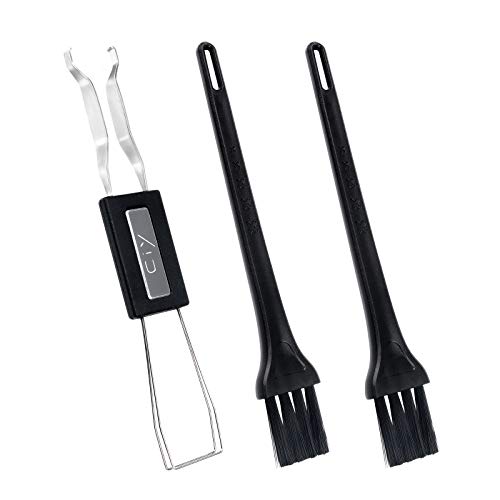
Yes, you can use paper towels in a pinch—but you shouldn’t rely on them for mechanical keyboards. Paper towels can leave fibers, shed lint, or snag on keycap edges and stabilizers, which can make your keyboard dirtier over time. This article breaks down when paper towels are acceptable and what experts recommend instead.
If you’re dealing with crumbs, smudges, or light grime on the outside of your keyboard, the safest approach depends on whether your keycaps are removable and whether your keyboard uses sealed switches. If you’re trying to clean inside the switch area or between tightly packed keys, you’ll want a lower-lint method.
What experts say about paper towels on mechanical keyboards

Experts generally advise against paper towels for mechanical keyboards because they’re designed for absorbency, not low-shedding cleaning. The issue isn’t just wetting—paper towels can tear, shed fibers, and leave residue that becomes harder to remove later.
– Experts generally recommend low-lint, non-shedding materials (like microfiber) over paper towels to avoid residue and fibers.
– Liquids and wet cleaning are usually discouraged unless the manufacturer explicitly approves it—especially around switch housings and PCB areas.
– In most cleaning guides, “air first” (compressed air/air blower) is preferred before wiping, because it removes debris without forcing it deeper.
Relative Lint/Residue Risk When Cleaning Keyboards (Late 2026 Guidance)
| # | Cleaning method | Best for | Why risk changes | Typical “go/no-go” fit | Recommendation strength |
|---|---|---|---|---|---|
| 1 | Microfiber cloth (dry) | Keycap tops & casing | Low shedding; grabs particles via fibers | Excellent for external wipe | ★★★★★ |
| 2 | Microfiber cloth (lightly damp) | Smudges, fingerprints | Controls moisture; reduces residue vs towels | Safe if kept off seams/ports | ★★★★☆ |
| 3 | Air blower / compressed air (short bursts) | Loose crumbs & dust | Lifts debris without contacting key gaps | First step for between keys | ★★★★☆ |
| 4 | Soft anti-static brush | Dry dusting | Brings particles upward for removal | Good with air follow-up | ★★★☆☆ |
| 5 | Cotton swab (dry) | Small corners & edges | Can leave lint if frayed | Use selectively | ★★☆☆☆ |
| 6 | Paper towel (brief external blot) | Emergency wipe of tops | Cellulose fibers can snag/leave residue | Only short + follow with microfiber | ★☆☆☆☆ |
| 7 | “Wet wipe” around switch openings | Deep internal cleaning | Moisture can migrate to PCB paths | Avoid unless manufacturer approves | ☆☆☆☆☆ |
Even when moisture is involved lightly, cleaning chemistry matters: water has a surface tension of about 72.8 mN/m at 20°C, which helps it cling and spread into small gaps before it’s fully wiped away (NIST Chemistry WebBook, property data). This is one reason many keyboard maintenance guides emphasize “minimum moisture” and controlled contact with keycap tops and the case.
Who this is for (and when it applies)
This guidance is for anyone cleaning a powered-off mechanical keyboard and trying to avoid trapped fibers, switch issues, or lingering residue. It applies whether you’re doing a quick desk cleanup or preparing for a deeper maintenance session later in 2026.
– This applies if your keyboard is currently safe to power off/unplug and you’re looking to clean debris and finger grime without damaging switches.
– It’s also relevant if you’re wondering whether paper towels are “good enough” for quick wipe-downs—especially on matte keycaps that show smudges easily.
– If your keyboard is under warranty and you’re planning deeper internal cleaning, follow the manufacturer’s cleaning instructions first; they may specify approved tools and materials.
In practice, the biggest differentiator is where you’re cleaning. External grime on keycap tops and the case is more forgiving; dirt between keys and near switch housings is where low-lint materials and “air first” methods usually win. As of late 2026, many reputable keyboard maintenance routines are still built around the same principle: remove loose debris dry, then wipe gently with lint-free cloths.
The safer way to clean a mechanical keyboard (step-by-step)
The safest method is a dry-first approach: remove debris with air/brush, then wipe the outside with a lint-free microfiber cloth kept only lightly damp. This reduces the chance that fibers get trapped between keycaps or that moisture migrates into sensitive areas.
– Power down first: Unplug the keyboard (or disconnect it) before you start wiping, blowing out crumbs, or removing keycaps.
– Start dry: Use a soft brush and/or compressed air/air blower to lift dust and particles from between keys.
– Wipe the outside carefully: Dampen a lint-free microfiber cloth (or follow your manufacturer’s approved method) and gently clean keycap tops and the keyboard case—avoid soaking seams and ports.
To make the steps more reliable, think in terms of contact surfaces:
1. Between keys (dry zone): Don’t introduce lint-prone paper. Use an air blower and a soft brush, then stop. If you need further cleaning later, repeat dry steps rather than switching to a towel.
2. Keycap tops (wipe zone): Microfiber is designed to lift oils and particulates without shedding. Use minimal pressure, especially on textured or painted keycap coatings.
3. Stabilizer areas (high snag zone): Stabilizers (the metal/plastic support under longer keys) create crevices. Any towel fibers that snag here are more likely to remain.
If you’re considering any alcohol or solvent-based approach, keep it controlled and follow your manufacturer’s guidance. For example, alcohol used for disinfection is typically recommended at 70% concentration or higher by public health agencies (CDC guidance on alcohol-based hand rub, concentration guidance). For keyboard cleaning, concentration doesn’t automatically make it “safe”—moisture still needs to stay out of switch openings and PCBs.
When paper towels help—and when they don’t
Paper towels can be acceptable only for very limited, external blotting when you immediately follow up with a lint-free microfiber wipe. Once you start using them in crevices or around switch openings, the risk of trapped fibers and residue rises quickly.
– Paper towels can be okay for: brief, targeted blotting of small smudges on the *outside* of the case/keycaps—especially if you immediately follow up with a lint-free wipe.
– Paper towels are a bad fit for: cleaning between keys where fibers can get trapped, wiping around stabilizers, or any situation where lint/residue would be hard to remove.
– Higher-risk scenarios: removing keycaps and cleaning deeper layers, cleaning near switch openings, or using excessive moisture—paper towels can tear, shed, and drive grime into crevices.
Paper towels vs. microfiber: what changes in the real world?
- Paper towels (typical outcome)
- Pros: fast absorbency for emergency external blotting.
Cons: cellulose fibers can remain in keycap gaps, and rough edges can snag lettering or textured sculpted keycaps. - Microfiber cloth (typical outcome)
- Pros: low-shedding cleaning; easier to see and control pressure and moisture.
Cons: needs a second pass if you over-wet it, and you still shouldn’t flood seams/ports.
From a materials perspective, microfiber is engineered for controlled fiber capture, while paper towels are engineered to absorb quickly under load. On keyboards, that “absorb quickly” behavior becomes a problem when the towel contacts crevices you can’t fully inspect afterward.
What can go wrong (common mistakes and edge cases)
Paper towels can cause problems even when you think you’re being careful. The biggest failure modes are fiber shedding, snagging, and unintended moisture migration into areas you can’t easily dry out.
– Lint and fibers stuck in crevices: Paper towels can leave strands that collect dust, making future cleaning harder.
– Snags on keycap edges: Rough or textured paper can catch on lettering, sculpted keycaps, or stabilizer areas.
– Liquid damage: Even if you only “dampen” the towel, moisture can seep into seams, switch housings, or the PCB area—especially if you wipe aggressively.
– Wrong cleaning method for your keycaps: Some keycap coatings (or printed legends) are more sensitive than others; harsh materials or chemicals can cause fading or wear.
Moisture behavior is not always intuitive. For instance, isopropyl alcohol boils at about 82.6°C at 1 atm (NIST Chemistry WebBook), which means it can evaporate relatively quickly—but that doesn’t prevent it from temporarily wicking along edges and accumulating where you can’t see. That “temporary” period is long enough to matter if your keyboard uses exposed switch mechanisms or if the case seams trap liquid.
A practical edge case: matte keycaps. Matte finishes hide smudges until they’re disturbed, then leave streaking that’s difficult to remove cleanly if the wiping cloth leaves residue. If you notice a hazy film after wiping with paper, stop and switch to a microfiber pass.
Verdict: what to do instead (and who should skip paper towels)
If you’re thinking “paper towels will just do the job,” the honest recommendation is: skip them for anything beyond the lightest, external blotting. Use a lint-free microfiber cloth and the manufacturer-approved cleaning approach for your specific model. The downside of avoiding paper towels is you’ll need a couple of simple supplies (microfiber cloth, soft brush, and air blower), but it greatly reduces the chance of residue and trapped fibers.
Skip paper-towel wiping entirely if:
– your keyboard is hard to fully dry after cleaning,
– you’ve never removed keycaps before and you’re tempted to “rinse and wipe,”
– or your manufacturer’s maintenance guide warns against linting/abrasive materials.
If you do rely on paper towels in a pinch, the least risky approach is strict triage: power down, blot only the surface, and then immediately wipe with microfiber to remove any stray fibers. That follow-up matters because fibers that remain on keycap edges and stabilizer grooves are the ones most likely to accumulate dust later.
Quick scan checklist (save this)
| Task | Best choice | Avoid |
|---|---|---|
| Remove loose crumbs | Air blower + gentle brush | Scraping with paper towels |
| Wipe keycap tops | Lint-free microfiber | Paper towels that shed fibers |
| Clean around seams/ports | Light, controlled wipe | Wet wiping or soaking |
| Deep clean / between switch areas | Follow manufacturer steps | Any towel-based method |
Frequently Asked Questions
Can you clean a mechanical keyboard with paper towels safely?
It’s possible to wipe a mechanical keyboard with paper towels, but it’s not the safest option because paper towels can shed lint and leave fibers behind, especially around switch openings and key gaps. Experts generally recommend using a microfiber cloth or lint-free wipes to avoid residue. If you use paper towels, lightly dampen them (not wet) and avoid pressing hard to reduce the risk of debris getting into the switches.
How should you clean a mechanical keyboard if you already used paper towels?
If paper towels were used, inspect for lint first—use a flashlight at an angle to check keycap edges and seams. You can gently re-wipe with a microfiber cloth, then use compressed air to dislodge any trapped particles. For deeper cleaning, remove keycaps and clean between them, since paper-towel residue is often stuck in hard-to-reach areas.
Why do experts say paper towels are a poor choice for mechanical keyboard cleaning?
Experts warn that paper towels can leave fibers and lint that accumulate over time and worsen dust buildup around mechanical switches. They can also be too abrasive, leading to smudged key legends or damaged finishes if you scrub. Because mechanical keyboards have tight tolerances and exposed switch areas, lint-free methods like microfiber, proper brush tools, and compressed air are usually preferred.
What’s the best way to clean a mechanical keyboard (without damaging switches) when there’s grime?
Start by powering down and unplugging the keyboard, then remove loose debris with compressed air held at an angle. For keycaps, cleaning is best done after removal using mild soap and water or manufacturer-safe wipes, while the bare board can be handled with a soft brush and microfiber cloth. Avoid soaking the board; instead, use slightly damp (not dripping) lint-free wipes to target grime around keycaps and edges.
Which tools should you use instead of paper towels to clean a mechanical keyboard like a pro?
Most enthusiasts and keyboard experts recommend microfiber cloths, lint-free wipes, a soft anti-static brush, and compressed air for safe mechanical keyboard cleaning. For stubborn grime, use isopropyl alcohol at appropriate concentrations on keycaps or external surfaces—never flood the switch areas. If you’re cleaning frequently, a keycap puller and a gentle cleaning kit help you remove buildup where paper towels typically can’t reach.
📅 Last Updated: November 04, 2026 | Topic: Can You Clean a Mechanical Keyboard With Paper Towels? What Experts Say | Content verified for accuracy and freshness.
References
- Legal – Apple Account & Privacy- Apple
- https://www.cdc.gov/coronavirus/2019-ncov/community/organizations/cleaning-disinfection.html
- https://www.cdc.gov/coronavirus/2019-ncov/prepare/disinfecting-your-home.html
- DSpace
- Microfiber
- keyboard contamination bacteria cleaning disinfection – Search Results – PubMed
- disinfecting electronics guidance surface disinfection wipe – Search Results – PubMed
- https://scholar.google.com/scholar?q=can+you+clean+a+mechanical+keyboard+with+paper+towels Google Scholar
- https://scholar.google.com/scholar?q=computer+keyboard+microorganisms+cleaning+disinfection+study Google Scholar
- https://scholar.google.com/scholar?q=lint-free+cloth+vs+paper+towel+electronics+cleaning Google Scholar

[…] Risk profile for mechanical keyboards […]