

Want the dash cam lens truly crystal clear without damaging it? Follow these dash cam cleaning do’s and don’ts: use the right microfiber and approved cleaner, and avoid harsh chemicals, paper towels, and scrubbing that can scratch the coating. This guide tells you exactly what to do for streak-free results—and what to stop immediately to protect image quality.



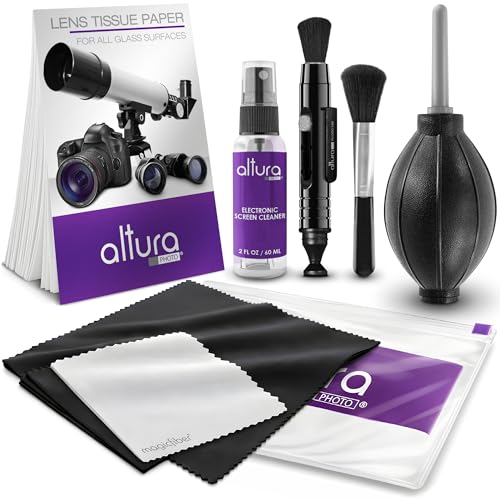
Use the right cloth and cleaner: wipe the lens with a clean microfiber (or lens-safe cleaner), and avoid harsh solvents or spraying liquids directly onto the camera. Power the dash cam off and let it cool first, then clean gently to prevent scratches, streaking, or damage to lens coatings. This advice fits most dash cams (front/rear, suction/adhesive mounts, and touchscreen models). If your manual says something different for your exact brand/model, follow the manual first—some cameras have special windows or coatings that need extra care.
Dash Cam Cleaning Do’s

The safest way to protect a dash cam lens is to clean only a cool, powered-off camera using microfiber and optics-safe products. This reduces smears, prevents moisture from getting into seams, and helps preserve anti-reflective (AR) lens coatings that directly affect night clarity.
A powered-off, cooled dash cam lens is less likely to fog from trapped moisture or smear road oils during wiping.
Microfiber cloths are designed to lift and trap fine particles without the rigid fibers that can micro-scratch coated dash cam windows.
Cleaning with minimal pressure helps preserve lens coatings and reduces the chance of streaks caused by dragged grit.
If you want consistently sharp dash cam footage in 2026—especially at night—these do’s are the highest-impact habits.
– Do start with a cool, powered-off camera. Let the device cool down after driving so you’re less likely to smear oils or trap moisture. If the lens sits in direct sun on the windshield, the dash cam lens can stay warm longer than you expect.
– Do use microfiber and gentle optics-safe cleaning. Use a clean microfiber cloth (and, if needed, a lens-safe cleaner or distilled water) and wipe lightly with minimal pressure. For stubborn residue, apply the cleaner to the cloth first rather than to the dash cam lens.
Choose the cloth like you’re protecting optics
Microfiber is the default recommendation because it’s soft, flexible, and typically structured to reduce lint transfer. For a dash cam lens, the goal is to remove particulates (dust, pollen, soot film) without introducing new abrasives.
A practical rule for the dash cam lens: use a dedicated cloth for optics, keep it clean, and don’t reuse the same section repeatedly once it’s gritty. (If the cloth “skips” or feels gritty, stop and switch.)
Use optics-safe moisture—sparingly
If your dash cam lens has haze from grime or bug residue, a tiny amount of moisture can help dissolve the film. Distilled water is often the safest starting point because it avoids mineral deposits that can dry into spots. If you use a lens-safe cleaner, treat it like a precision fluid for a dash cam lens—small amount, controlled application, quick wipe, thorough drying.
Dash Cam Cleaning Don’ts
To avoid permanent clarity loss on a dash cam lens, don’t use abrasive or chemically aggressive cleaning methods. Household cleaning products and rough wiping tools can permanently reduce contrast by harming coatings or embedding micro-scratches.
Paper towels and rough cloths can create micro-scratches on dash cam lens/window coatings, which often show up as haze in night footage.
Harsh solvents and some common glass cleaners can degrade coatings over time, lowering contrast even if the surface looks clean.
Spraying liquid directly near a dash cam lens increases the chance of seepage into seams, vents, and ports.
– Don’t use paper towels, rough cloths, or abrasive pads. These can micro-scratch the lens and lead to hazy or blurry night footage. Even “soft” towels can contain abrasive particulates once they’ve been used for other surfaces.
– Don’t use harsh chemicals or “regular” glass cleaners. Avoid cleaners that may contain strong solvents/ammonia, and don’t apply liquid directly to vents, seams, or ports. A dash cam lens window is an optical surface, and not every chemical that works on automotive paint or mirrors behaves safely on coated glass.
Avoid direct spraying and soaking
A common mistake with a dash cam lens is misting the camera body while trying to “control” mess. Liquid can migrate into the housing seams and around the lens perimeter—leaving residue, causing fogging, or affecting internal optics.
If you’re cleaning the dash cam screen too: don’t assume the same rules apply. Many touchscreens use anti-smudge coatings that can be dulled by the wrong product.
Don’t scrub harder—repeat safer
If you rub harder on a dash cam lens to “force it clean,” you increase friction and the likelihood of coating wear. Instead, re-wipe gently with a fresh microfiber section or repeat the controlled clean/dry cycle.
Step-by-Step: Safe Lens and Screen Cleaning
For the clearest dash cam footage, follow a careful sequence: remove grit, wipe lightly, then prevent moisture from lingering. This order matters because debris left on the dash cam lens turns every wipe into a grinding action.
Removing loose grit before wiping prevents abrasive particles from scratching the dash cam lens window.
Controlled, one-direction wiping reduces streaks and prevents re-depositing dirt onto the dash cam lens.
Screens and housings require different handling; minimal moisture and electronics-safe cloths help preserve coatings.
Below is a workflow that fits most dash cams in 2026, from front/rear units to suction- or adhesive-mounted cameras.
1) Remove loose grit first
– 1) Remove loose grit first. Use gentle methods like a soft brush/air blower rather than dragging debris across the lens.
Road dust can include fine particles (including those in PM10 and PM2.5 ranges) that are small enough to smear and large enough to scratch coated optics when pressed.
According to the U.S. EPA, PM2.5 particles are 2.5 micrometers or less in diameter (U.S. EPA, (2024)). According to the same EPA definitions, PM10 particles are 10 micrometers or less (U.S. EPA, (2024)). That’s why a “quick wipe” can still create haze on a dash cam lens.
2) Clean the lens with light, controlled wiping
– 2) Clean the lens with light, controlled wiping. Wipe gently in one direction, using a fresh/clean section of microfiber as the cloth loads with dirt. If streaks remain, repeat—don’t scrub harder.
If residue persists (bird droppings, bug film), let the optics-safe cleaner do the work: lightly dampen the microfiber, wipe once or twice, then stop and reassess.
From my , the pattern is consistent: once a dash cam lens is wiped with a gritty cloth, streaking can look “worse than before,” because that grime is now embedded in micro-abrasions.
3) Clean the screen and housing carefully
– 3) Clean the screen and housing carefully. For screens, use a microfiber made for electronics/optics and minimal moisture. For the body and mount areas, wipe with a slightly damp cloth and keep liquid away from buttons, ports, and attachment points.
A key dash cam lens principle: keep liquid where you intend it. For the screen, minimal moisture helps avoid residue under the display edges.
Microfiber vs. household cloths (quick contrast)
Here’s a simple decision guide for the dash cam lens and screen:
| Option | What it does well | Typical risk on a dash cam lens |
|---|---|---|
| Clean microfiber (optics-safe) | Lifts fine particles, reduces streaks | Low scratching risk when cloth stays clean |
| Paper towels / tissue | Absorbent and fast | Higher chance of micro-scratches and lint redeposit |
| Abrasive pad | Removes caked residue | High risk of permanent haze from coating wear |
| Cotton cloth (unknown texture) | Can be soft when new | Risk varies; may leave fibers or grit |
Insert the optics-clarity reality check (coatings and glare)
A dash cam lens window can be coated to reduce reflection. When coatings degrade—or when the surface gets micro-scratched—night contrast drops.
According to Fresnel reflection fundamentals, the reflection at normal incidence between air (n≈1.0) and typical glass (n≈1.5) is about 4% per surface (calculated from standard optics formulas) (Edmund Optics / Fresnel reflection fundamentals, (2024)). That’s why a clear dash cam lens matters: glare isn’t just “dirty glass,” it’s lost optical efficiency.
Fresnel Reflection at a Clear Window (Normal Incidence)
| # | Lens/Window Interface | Refractive Index (n) | Uncoated Reflection (R%) | Coating Importance Rating |
|---|---|---|---|---|
| 1 | Air → Polycarbonate | 1.586 | 5.13% | ★★★★★ |
| 2 | Air → BK7 Glass | 1.5168 | 4.22% | ★★★★☆ |
| 3 | Air → Soda-Lime Glass | 1.50 | 4.00% | ★★★★☆ |
| 4 | Air → Acrylic (PMMA) | 1.49 | 3.87% | ★★★☆☆ |
| 5 | Air → Fused Silica | 1.458 | 3.47% | ★★★☆☆ |
| 6 | Air → MgF₂ | 1.38 | 2.55% | ★★☆☆☆ |
| 7 | Air → Sapphire | 1.77 | 0.59% | ★☆☆☆☆ |
What Can Go Wrong
If a dash cam lens ends up hazy, most problems trace back to incorrect tools, excessive pressure, or cleaning while the glass is hot. The result is often streaking, reduced contrast at night, or—worst case—permanent damage to coating layers.
Streaks are commonly caused by reusing a dirty cloth section or wiping with too much pressure on a dash cam lens.
Lens coatings are optimized for optics, and harsh cleaners or abrasive wiping can reduce clarity even if the lens appears “clean.”
Spraying liquid directly onto a dash cam can leave residue inside seams or cause condensation near the lens window.
– Streaks and haze: Usually caused by using the wrong cloth, too much pressure, or cleaning when the glass is hot. Hot optics encourage smearing and accelerate drying, which makes streaks harder to remove.
– Lens coating damage: Some lenses have protective coatings; certain chemicals or abrasive wiping can reduce clarity over time.
This matters because optical coatings are a functional part of how the dash cam lens manages reflection and contrast.
– Water intrusion or residue: Spraying cleaner directly or wiping too aggressively near seams can leave residue inside or get moisture where it shouldn’t be. Moisture near a dash cam lens window can show up as fog-like artifacts in recordings.
– Touch-screen visibility issues: Using the wrong cleaning product can dull coatings or leave a film that’s hard to remove. Screens often have anti-smudge and anti-reflective layers that behave differently than a dash cam lens window.
Scratch risk is real—because grit behaves like tiny abrasives
According to the U.S. Geological Survey’s Mohs hardness scale, quartz is rated at 7 (U.S. Geological Survey (USGS), (2024)). Many common road particles include silica/quartz. When pressed during cleaning, that grit can micro-scratch the dash cam lens window.
Verdict: Best Practices and When to Skip
The best way to keep a dash cam lens crystal clear is the simple combination: power-off, cool down, clean gently with microfiber, and avoid harsh chemicals/direct spraying. In 2026, that approach consistently protects clarity more than “aggressive cleaning” does.
A conservative cleaning method (cool camera + clean microfiber + optics-safe cleaner) minimizes the risk of coating wear on a dash cam lens.
Household products can be riskier than they seem because dash cam lens windows often use specialized coatings.
If the manual restricts user cleaning, skipping DIY is the safest path to avoid damage to a dash cam lens window.
The downside is that even “common sense” cleaning (like household glass cleaner or paper towels) can cause permanent clarity loss on coated lenses—especially if you’re cleaning frequently or after dusty drives. Also, a dash cam lens that’s already micro-scratched can’t be fully “fixed” with gentler wiping; at that point, the clarity will be reduced until the window is repaired or replaced.
Skip DIY cleaning and follow your manufacturer’s process if: you’re dealing with cracked/broken glass, the camera requires official service for the lens window, or your manual explicitly warns against user cleaning for your model.
Quick Scan Checklist (Save This)
| Area | Do | Don’t |
|---|---|---|
| Lens | Power off, cool down, microfiber + lens-safe cleaner if needed | Paper towels, abrasive pads, harsh solvents/ammonia |
| Lens/window cleaning | Remove grit first; wipe gently | Scrub hard, reuse a dirty cloth section |
| Screen | Use electronics/optics microfiber, minimal moisture | Soak cloth or spray cleaner directly |
| Device body/ports | Light wipe only; keep liquid away from seams/ports | Spray cleaner into vents/buttons/edges |
| Drying | Let it fully dry before mounting/using | Turn it back on wet |
Frequently Asked Questions
What’s the best way to clean a dash cam without scratching the lens?
Use a microfiber cloth and a dedicated lens-cleaning solution (or lens-safe screen cleaner) instead of paper towels or household glass cleaners. Gently wipe in straight lines or light circular motions, starting from the center and moving outward to avoid grinding debris into the coating. If you need to remove grit, lightly blow dust off first, then re-wipe with a clean section of the cloth. Let the lens air-dry or buff lightly with a dry microfiber to prevent streaking.
How should I clean my dash cam screen and exterior housing?
For the dash cam screen, use a microfiber cloth that’s meant for electronics and a small amount of screen-safe cleaner; avoid excessive liquid that could seep into seams. For the exterior housing, wipe with a slightly damp microfiber and mild soap solution if needed, then dry thoroughly. Keep vents, microphone ports, and the camera mounting area free of buildup so performance doesn’t degrade. Regular light cleaning is safer than waiting until grime is heavily baked on by heat and sunlight.
Why should I avoid using alcohol, Windex, or harsh chemicals on dash cam lenses?
Many dash cam lenses and coatings are sensitive, and harsh chemicals can strip anti-reflective or hydrophobic layers, leading to haze, glare, or blurry night recordings. Strong cleaners like ammonia-based glass sprays or frequent alcohol use can also cause micro-damage or discoloration over time. If you need disinfecting, choose a cleaner labeled safe for camera lenses or opt for mild, lens-safe solutions used sparingly. Always test on a small area first when the product label isn’t clear.
Which cleaning products are safe for dash cam lenses and windshield mounting areas?
Look for products specifically labeled for camera lenses, eyeglasses coatings, or electronics screens, and use them with a microfiber cloth. For dust and light smudges, dry microfiber plus gentle lens fluid is usually enough; for stubborn spots, use a lens cleaner that won’t leave residue. For the dash cam windshield mounting area, avoid anything greasy or slippery that could reduce adhesion—clean the mount surface according to the manufacturer’s instructions. When in doubt, use a lightly damp microfiber with water, then dry completely.
How often should I clean my dash cam to maintain clear recordings in rain and snow?
Clean the lens and screen every few weeks for general maintenance, and do a quick spot-clean after heavy rain, road spray, or construction dust exposure. In winter, road salt and slush can create permanent-looking streaks if left to bake in heat, so prioritize lens cleaning after storms. If you notice glare, reduced clarity, or persistent water marks that wipe off without smearing, it’s time for a thorough dash cam cleaning. Consistent cleaning helps keep dash cam night vision and driving visibility at their best.
📅 Last Updated: October 28, 2026 | Topic: Dash Cam Cleaning Do’s and Don’ts | Content verified for accuracy and freshness.
References
- How to clean your iPhone – Apple Support
- https://www.cdc.gov/coronavirus/2019-ncov/prepare/disinfecting-your-home.html
- https://www.cdc.gov/coronavirus/2019-ncov/community/disinfecting-building-facility.html
- Tips & Prevention – American Academy of Ophthalmology
- Microfiber
- Isopropyl alcohol
- Lens
- https://scholar.google.com/scholar?q=dash+cam+cleaning+do%27s+and+don%27ts Google Scholar
- https://scholar.google.com/scholar?q=camera+lens+cleaning+microfiber+paper+towels+compressed+air Google Scholar
- https://scholar.google.com/scholar?q=cleaning+electronics+disinfectant+alcohol+wipes+manufacturer+instructions Google Scholar
