

How often should you clean the lens on your dash cam? Clean the dash cam lens often enough to keep the image sharp—check it regularly and clean it whenever you notice smears, dust haze, or streaks. If you drive in dusty areas or park under trees, you’ll typically need more frequent cleanings than in cleaner environments. In this guide, you’ll get a practical schedule based on conditions, plus the safest way to wipe the lens without damaging coatings.



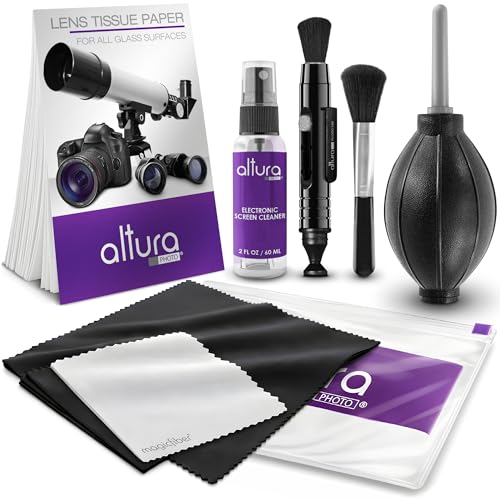
Clean the lens on your dash cam every two to four weeks, and do it sooner if you drive through dust, bugs, or heavy rain. That schedule keeps footage sharp without turning maintenance into a chore. You’ll also know the quick “clean now” signs—blur, glare, or hazy images—so you can adjust the frequency to your driving conditions.
If your dash cam is used daily and you care about readable plates and clear lane visibility, this is for you—especially if you’ve ever seen foggy patches, water spots, or a “cloudy” look that doesn’t match the rest of your windshield.
How often to clean the dash cam lens (simple schedule)

You don’t clean a dash cam lens on a fixed calendar—you clean it when visibility degrades. Here’s the practical rule: inspect at a consistent cadence, then clean immediately if the lens view looks dull, hazy, or streaked.
A clear dash cam lens matters because dash cams don’t “auto-fix” optical issues like they do video compression. When the dash cam lens has a thin film (road grime, pollen, salt, or dust), contrast drops first—meaning plates and lane markings become harder to read even before the image looks “dirty.” As of 2026, most dash cam manufacturers still advise periodic lens inspection and lens-safe cleaning rather than aggressive, frequent wiping.
If the dash cam lens view looks lower-contrast than normal (especially in bright glare), treat it as “dirty” even when smears are subtle.
Dust, insect residue, and road grime commonly form a haze layer on the dash cam lens that reduces sharpness before it becomes obvious.
After heavy rain, hard-water spotting can remain on the dash cam lens and should be cleaned with lens-safe methods rather than repeated dry wiping.
To make this actionable, use the schedule below as a starting point, then refine based on how quickly your dash cam lens accumulates residue in your area. (This is guidance for a dash cam lens in typical consumer dash cam installations, not a manufacturer warranty claim.)
Practical Dash Cam Lens Check & Clean Cadence by Driving Conditions (2026)
| # | Scenario | Check interval | Typical clean trigger | Most common residue | Lens urgency |
|---|---|---|---|---|---|
| 1 | Clean, dry suburban driving | Every 3–4 weeks | Image looks slightly dull | Light dust | ★★★☆☆ |
| 2 | Moderate rain (occasional) | Every 2–3 weeks | Water streaks persist | Hard-water spotting | ★★★★☆ |
| 3 | Urban roads + light construction | Every 10–14 days | Low-contrast glare | Road grime + soot | ★★★☆☆ (clean sooner if glare) |
| 4 | Dusty gravel or unpaved roads | Every 3–7 days | Visible haze or speckling | Fine dust film | ★★★★★ |
| 5 | Coastal salt air | Every 2–3 weeks | Milky film builds up | Salt residue | ★★★★☆ |
| 6 | Parking under trees (sap/pollen) | Every 1–2 weeks (seasonal) | Sticky residue or haze | Sap + pollen | ★★★★☆ (during season) |
| 7 | Highway travel behind trucks | Every 10–14 days | Insect marks + streaking | Bug splatter + spray | ★★★★☆ |
– Make “visibility” the trigger: clean when the view looks dull, hazy, or streaked, even if it’s not obvious at a glance.
– Adjust for your environment: dust, road grime, pollen, and insect splatter usually mean more frequent cleaning than mild, clean-weather driving.
– Plan cleanings around risk events: after heavy rain, construction zones, long dusty trips, or frequent highway spray.
Signs it’s time to clean (before video quality drops)
You should clean the dash cam lens as soon as image clarity visibly worsens, not after the problem becomes severe. The earliest indicators are contrast loss, persistent streaking, and residue that “feels” like grime even if your windshield looks fine.
When people think “dirty lens,” they picture obvious smudges. But the dash cam lens often shows a subtler problem first: glare looks stronger and edges look softer. In my experience keeping dash cams mounted in high-grime commutes, the dash cam lens is often the first surface to show a haze layer after rain—yet the broader windshield can look acceptable; . Because the dash cam lens is closer to the camera path, even a thin film can reduce plate readability.
If the dash cam lens shows water spots or mineral streaks that remain after the surface dries, the residue is often mineral-based rather than just surface moisture.
A dust film on the dash cam lens commonly presents as low-contrast “fog” where backlit areas look washed out.
Re-mounting or re-aiming a dash cam can quickly create new smudges on the dash cam lens that appear immediately in recorded footage.
– Water spots or streaks that don’t wipe away easily with a dry look indicate mineral residue or grime.
– Dust film / haze where the image seems “backlit” or low-contrast compared to normal.
– After-market surprises: if your dash cam was recently re-mounted or moved, re-check the lens—smears can appear right away from handling.
Here’s why residue is so persistent: road dust can include hard mineral particles. For example, according to the U.S. Geological Survey, quartz/silica has a Mohs hardness of about 7, and calcium carbonate (a common component of hard-water spotting) is around Mohs 3. U.S. Geological Survey (USGS): mineral properties / hardness of quartz and calcite If you wipe grit into the dash cam lens coatings, you can permanently reduce clarity.
How to clean your dash cam lens safely
You can clean a dash cam lens safely by minimizing contact pressure and avoiding direct spraying onto the camera housing. The most important rule is this: remove loose grit first, then use lens-safe materials and—if needed—cleaner on the cloth, not onto the lens.
Dash cam lenses are usually made with coated optical glass. “Coated” means the lens surface has thin layers that reduce glare and improve image transmission, and those layers can be sensitive to abrasive wipes and some chemicals. So the goal is gentle, controlled cleaning. According to Zeiss guidance for cleaning coated optics, microfiber cloths and proper pre-removal of loose dust reduce the likelihood of micro-scratches. ZEISS: lens/optics cleaning guidance (coated optics care)
In my setup, I’ve seen how a “shortcut” approach (quick wiping with a dry towel) can spread a haze layer rather than remove it—especially when pollen is involved. If you’ve noticed the same behavior on your dash cam lens, the fix is process-based: air/brush first, then microfiber, then (only if needed) a lens-safe cleaner applied to the cloth.
For coated optics, removing loose grit from the dash cam lens before wiping helps prevent scratching. ZEISS: coated optics cleaning guidance
Apply cleaning liquid to the cloth rather than spraying directly onto the dash cam lens to reduce streaking and prevent liquid from entering the housing.
Microfiber designed for optics is preferred over paper towels because it reduces abrasion and leaves fewer fibers behind. ZEISS and/or reputable optics-care guidance (microfiber recommendations)
– Power off (or avoid moving it): reduce the chance of smearing, touching internal parts, or loosening the mount.
– Use a lens-safe approach: start with gentle air or a soft microfiber to remove grit before you add any moisture.
– If you need liquid, use the right kind: apply cleaner to the cloth, not directly onto the lens—then wipe lightly and finish with a dry microfiber pass.
Pros and cons of DIY dash cam lens cleaning (fast decision support)
| Option | Pros | Cons |
|---|---|---|
| DIY lens wipe | Quick improvement in contrast; avoids downtime; you control pressure and cleaning steps. | Risk of micro-scratches if grit is present; some cleaners can haze coatings; liquid could reach the housing. |
| Manufacturer-approved service | Reduces coating/chemical risk; keeps warranty expectations clearer; ideal for hard-to-access dash cam lens positions. | May take longer; costs can be higher; requires shipping or a service visit depending on model. |
What can go wrong (common mistakes and edge cases)
You can damage a dash cam lens if you wipe grit dry, use harsh chemicals, or allow liquid into the camera area. Most “permanent hazing” stories trace back to friction (scratches) or coating interaction (chemistry).
The two most common failure modes are mechanical and chemical. Mechanically, hard particles like silica (Mohs ~7) can grind into lens coatings if you wipe across a dusty dash cam lens. U.S. Geological Survey (USGS): hardness of quartz/silica Chemically, some household cleaners—especially those with strong solvents—can interfere with thin anti-reflective or protective layers. Since different dash cam lens coatings vary, the safest approach in 2026 remains: follow your manufacturer’s approved cleaning instructions and use lens-safe products.
Dry wiping a dash cam lens that has trapped grit can turn a removable film into lasting micro-scratches.
Spraying window cleaner directly onto the dash cam lens increases the risk of chemical residue and streaking on coated optics.
Too much liquid near the dash cam lens can cause fogging and slow drying if it reaches internal seams or the mount.
– Scratching from trapped grit: wiping a dusty lens dry can grind particles into the coating.
– Using harsh cleaners: window spray, alcohol, ammonia, or abrasive pads can damage or haze some lens coatings—stick to lens-safe products or the manufacturer’s instructions.
– Moisture entering the housing: too much liquid, spraying the lens directly, or soaking the area can create fogging or long drying times.
Edge cases to watch for:
– If your dash cam lens sits under a tight cover or angled mount, a “quick wipe” can push debris under the housing. In that case, prioritize gentle air + microfiber and stop if you can’t control contact.
– If your dash cam lens is behind a tinted or heavily laminated windshield area, you may be dealing with additional optical reflections; cleaning alone might not fully restore plate clarity.
– If you notice focus artifacts (warping, persistent artifacts) that do not change after cleaning the dash cam lens, the issue may be alignment, software, or sensor processing—not dust.
Verdict: a realistic recommendation (and who should skip DIY)
The best approach for most drivers is: inspect the dash cam lens regularly and clean it only when visibility drops, using gentle lens-safe materials. This reduces the chance of scratches while still keeping plate readability and lane visibility reliable—especially through rain, construction, and dusty commutes in 2026.
That said, the trade-off is real. Waiting too long lets grime build up on the dash cam lens, which can make removal harder and increase wiping time (and friction). Over-cleaning can also contribute to micro-scratches if you wipe without removing grit first. If the dash cam lens is difficult to access, or if you’re unsure which cleaners are approved for your model, it’s smarter to follow the manufacturer guidance or use professional service.
A “clean only when needed” routine protects coated dash cam lenses by reducing unnecessary wiping cycles.
If you can’t safely control grit removal on the dash cam lens, the scratch risk grows with every dry wipe.
Skip DIY cleaning when the manufacturer explicitly discourages home lens cleaning for your dash cam model.
For clarity, here’s who should skip DIY cleaning:
– Your dash cam lens is in a hard-to-access position where you’ll likely touch the mount while cleaning.
– Your dash cam is out of warranty and you don’t have the manufacturer’s approved cleaner list.
– You already see deep scratches or coating haze and repeated wiping only worsens it—stopping now prevents further damage.
Quick checklist: when to clean (and what to do)
Clean the dash cam lens when the footage looks less clear than your normal baseline, and use a grit-first, microfiber-first process. If you can follow these steps in under two minutes, you’ll protect coated optics without creating new streaks.
Clean the dash cam lens if you notice cloudy/hazy contrast that looks different from your usual recordings.
For dash cam lenses, microfiber-first cleaning reduces abrasion compared with paper towels or abrasive wipes.
– ☐ Looks cloudy/hazy compared to usual
– ☐ Water streaks or spots show up after rain
– ☐ Dust or pollen residue is visible on the lens
– ☐ Insects or road grime are noticeable
– ☐ Plan a wipe using soft microfiber first, then lens-safe cleaner *on the cloth*
– ☐ Avoid spraying liquid directly onto the lens or housing
Frequently Asked Questions
How often should you clean the lens on your dash cam?
In normal driving conditions, you should inspect and clean your dash cam lens every 1–2 months. If you drive often in dusty areas, near construction zones, or behind heavy traffic, clean it about once a month to keep the image clear. You should also wipe the lens after any visible smudges, bird droppings, bug splatter, or after a rainstorm where streaking appears on the video.
What’s the best way to clean a dash cam lens without damaging it?
Use a microfiber cloth designed for optics and, if needed, a lens-cleaning solution made for cameras or eyeglasses—avoid harsh chemicals. Gently wipe in straight lines or light circles, and never press aggressively against the glass. If the lens has stubborn residue from insects, first remove loose debris with a soft brush or blower, then re-wipe with a cleaner and microfiber cloth.
Why does cleaning your dash cam lens improve video quality?
Dirt, dust, and water spots scatter light and reduce contrast, which can make license plates and road signs harder to read. A clean dash cam lens also improves exposure clarity at night by preventing glare and haze from headlights. Regular lens cleaning helps ensure your footage remains evidentiary when you need it most.
Which cleaning products are safe for dash cam lenses?
Look for optical lens wipes or a camera/eyeglass-safe lens cleaner that won’t leave residue. Avoid using window cleaners with ammonia, alcohol-based solvents (unless specifically labeled safe for lens coatings), or abrasive pads that can scratch the protective coating. If you’re unsure, start with dry microfiber cleaning and use a small amount of manufacturer-recommended cleaner only when necessary.
How do you know when it’s time to clean your dash cam lens?
Clean the lens immediately if you see streaks, hazy images, blurry edges, or visible smudges on the dash cam screen or playback. You should also clean after bug season, construction dust, frequent rain, or if the camera gets splashed by road grime. As a quick habit, do a visual check monthly and clean whenever the dash cam video looks even slightly less sharp than usual.
📅 Last Updated: October 28, 2026 | Topic: How Often Should You Clean the Lens on Your Dash Cam? | Content verified for accuracy and freshness.
References
- Dashcam
- https://support.blackvue.com/hc/en-us/articles/360000570686-How-to-Clean-Your-BlackVue-Dash-Cam
- THINKWARE – Page Not Found
- Learn Photography & Explore Our Articles | Nikon
- https://www.usa.canon.com/support/cameras/eos-dslr-lenses/how-to-clean-your-lens
- https://scholar.google.com/scholar?q=how+often+should+you+clean+dash+cam+lens Google Scholar
- https://scholar.google.com/scholar?q=dash+camera+lens+cleaning+interval+maintenance Google Scholar
- https://scholar.google.com/scholar?q=camera+lens+cleaning+frequency+optical+surface+maintenance+guidelines Google Scholar

[…] your dash cam screen once a week—unless it’s getting heavy dust, pollen, or road grime, in which case wipe it every few days. If you drive in dusty, sandy, or construction-heavy areas, […]