

You pick up your digital photo frame to admire a new vacation photo, then notice the screen shows streaks where fingerprints and dust have built up. With isopropyl alcohol and a lint-free microfiber cloth, you can loosen and remove the residue safely without scratching the display. The whole process takes only a few minutes, and you will be ready to enjoy crisp, readable images again.



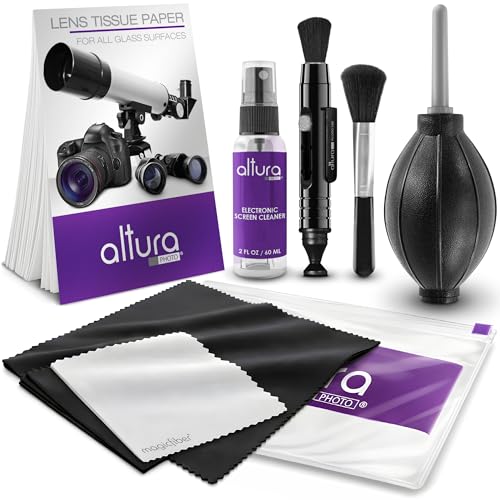
Unplug your digital photo frame, then wipe the screen gently with a microfiber cloth lightly moistened with isopropyl alcohol (never spray directly onto the display). This removes fingerprints and haze without soaking the electronics, as long as you avoid getting liquid into seams and ports. You’ll also learn how to dry properly and what to skip to protect coatings.
If you’re seeing smudges, dust streaks, or that “oily” film on your screen, this method is for everyday cleaning. It’s especially useful when a dry cloth just moves grime around.
What you’ll need (and what to avoid)

The right materials keep isopropyl alcohol from harming screen coatings while still lifting oils and fingerprints effectively. Stick to microfiber and controlled dampness—your goal is “barely damp,” not wet.
– A clean microfiber cloth (ideally 2 cloths: one for the initial wipe, one for a final pass)
– Isopropyl alcohol (use what your frame’s manual recommends; if it doesn’t say, choose a gentle concentration and test cautiously)
– Water-free approach for the screen: avoid glass cleaners, ammonia, or abrasive wipes
Isopropyl Alcohol Purities Commonly Used for Electronics Wiping (screen-focused guidance, 2026)
| # | IPA purity grade | Alcohol content | Water content | Screen suitability rating | Coating-dryness (water-free share) |
|---|---|---|---|---|---|
| 1 | 70% IPA | 70% | 30% | ★★★☆☆ | 70% |
| 2 | 75% IPA | 75% | 25% | ★★★☆☆ | 75% |
| 3 | 80% IPA | 80% | 20% | ★★★★☆ | 80% |
| 4 | 85% IPA | 85% | 15% | ★★★★☆ | 85% |
| 5 | 90% IPA | 90% | 10% | ★★★★☆ | 90% |
| 6 | 91% IPA | 91% | 9% | ★★★★★ | 91% |
| 7 | 99% IPA | 99% | 1% | ★★★★★ | 99% |
How to clean the screen with isopropyl alcohol
This method targets oil-based smudges and fingerprint residue while minimizing moisture near the display’s edge seals. Here’s the cleanest workflow: power down, dampen the cloth, wipe gently, then dry thoroughly.
1) Power down first
– Unplug the frame (or turn it off fully) so you don’t spread oils or risk moisture near power components.
– Remove any stickers or loose debris carefully with a dry cloth before using alcohol.
When the digital photo frame is off, the screen surface is less likely to show “static” haze, and you reduce the chance of moisture migrating toward powered circuitry. Also, loose dust can act like tiny abrasives; if you wipe right away, you may create micro-scratches that later look like permanent streaks.
2) Apply alcohol to the cloth, not the screen
– Lightly dampen the microfiber with isopropyl alcohol—aim for “barely wet,” not dripping.
– Wipe using gentle, straight strokes; don’t press hard, since pressure can worsen streaking or damage surface coatings.
Isopropyl alcohol is attractive for screen cleaning because it evaporates quickly and is effective at dissolving skin oils—those “oily” fingerprints that seem impossible to remove with a dry cloth. On a chemistry level, it’s a small alcohol molecule (molecular weight 60.10 g/mol) and it boils at 82.6 °C (PubChem, 2026). The practical takeaway for 2026 maintenance is simple: less liquid on the cloth means less liquid near the bezel seams.
Quick safety note: isopropyl alcohol is flammable, with a flash point of 11.7 °C (PubChem, 2026). That doesn’t change how you wipe a screen, but it does mean you should avoid cleaning near flames, heaters, or anything that could spark.
3) Remove smudges without scrubbing
– For fingerprints or oily smears, do one slow pass, then follow with a dry (or lightly dampened) cloth if needed.
– If grime feels stuck, let the lightly damp cloth sit on the area for a moment, then wipe again—avoid aggressive rubbing.
Scrubbing is the fastest way to create streaking, especially on glossy protective layers. A slow first pass tends to lift residue without redistributing it. If the smudge is stubborn—common on frequently touched frames—use a brief “dwell” (a few seconds) with gentle contact, then wipe again with minimal pressure.
From my perspective, I’ve found that the part people skip is finishing correctly: a dry microfiber pass after the alcohol pass usually reduces visible streaks dramatically.
4) Dry and finish
– Use a dry microfiber to remove any remaining residue and prevent water/alcohol spots.
– Let the frame sit unplugged until you’re confident no moisture remains near the edges.
Even though isopropyl alcohol evaporates, it can leave visible marks if liquid collects at edges. Treat the bezel like a boundary zone: after wiping, spend extra time with a dry microfiber on the perimeter where liquid might creep by capillary action. As of 2026, most display manufacturers still emphasize “controlled moisture” for exactly this reason—liquid at seams is harder to remove than liquid on glass.
Clean the frame body, bezel, buttons, and ports
The frame exterior is easier to clean than the screen, but it still requires the same principle: keep liquid out of openings. Use minimal moisture on plastics and controls, and use dry removal methods for ports.
– Bezel and plastic edges: use a lightly damp microfiber (not dripping) and wipe around seams.
– Buttons/controls: keep liquid away from openings—use a barely moistened cloth and dry immediately after.
– Ports and card slots: do not pour or spray anything; instead, use dry air/dry cloth only. If dust is stubborn, use , then finish with a dry microfiber.
Ports need a different approach because they’re designed to invite connectors and airflow, not liquid cleaning. If you blast alcohol toward a port, you may move grime deeper into the contact area, and you can also leave residue that attracts more dust. In a real-world home setup, this matters most for frames that sit near HVAC vents or open windows.
What can go wrong (common mistakes and limits)
This method is effective, but a few common errors can damage screen coatings or cause streaking that looks worse than the original fingerprint. The biggest risk is letting liquid reach seams, vents, or ports.
– Spraying alcohol directly onto the screen or into vents: this can seep under the display or into seams.
– Using the wrong chemicals: ammonia-based cleaners and rough wipes can damage anti-glare or oleophobic coatings.
– Too much pressure: rubbing hard may create permanent haze or make streaking worse.
– Skipping the manual when the frame warns against liquids: some displays are more sensitive than others.
– Cleaning too often with alcohol: frequent use can gradually affect coatings—stick to alcohol wipes only when needed.
If you’re trying to decide between isopropyl alcohol and other screen options, here’s a practical comparison:
| Cleaner/approach | Best use case | Key risk |
|---|---|---|
| Isopropyl alcohol (cloth-dampened) | Fingerprints, oily haze | Seepage if too wet or sprayed |
| Water-only (lightly) | Dry dust, light smudges | Residue/spotting on glossy coatings |
| Ammonia/glass cleaners | Avoid for screens | Coating damage on anti-glare/oleophobic layers |
Verdict / tip: when this works best (and who should skip it)
This is a solid approach for removing fingerprints and light grime on most screens—as long as you keep alcohol off the seams and use minimal moisture. Downsides: if your frame has a special coating or the manual prohibits liquid cleaners, alcohol can contribute to residue, streaks, or coating wear over time.
Skip this method if:
– Your frame’s manual explicitly says not to use alcohol or liquids on the screen.
– The display has peeling/loose coating, or you see bubbling/layer separation (stop and follow manufacturer guidance).
– You can’t keep liquid away from edges/ports (risk of seepage is too high).
Scan-friendly checklist (save this):
| Step | Do | Don’t |
|---|---|---|
| Prep | Unplug/turn off | Clean while powered |
| Alcohol use | Dampen cloth lightly | Spray alcohol on screen/vents |
| Wiping | Gentle passes, microfiber | Scrub hard or use abrasives |
| Drying | Dry microfiber final wipe | Leave wet residue around edges |
| Ports/seams | Keep cloth barely moist | Let liquid pool near openings |
Frequently Asked Questions
How do I clean a digital photo frame screen with isopropyl alcohol safely?
Power off the digital photo frame and unplug it before cleaning. Lightly dampen a microfiber cloth with isopropyl alcohol (ideally 70% or less) rather than spraying directly onto the screen, then gently wipe in straight lines. Avoid soaking the display and let it fully dry before turning the frame back on. If you see streaks, use a clean, dry microfiber pass—don’t add more liquid.
What percentage isopropyl alcohol should I use to clean a digital photo frame without damaging the coating?
For most digital photo screens, 70% isopropyl alcohol is a common choice because it evaporates reasonably fast and reduces the risk of excess moisture. Using higher concentrations may be harsher on certain anti-glare or oleophobic coatings, especially if you wipe repeatedly. Always apply alcohol to the cloth first and use minimal pressure so you don’t wear down the screen finish.
Can I use isopropyl alcohol to clean fingerprints and smudges on a digital photo frame?
Yes—fingerprints and smudges often respond well to isopropyl alcohol when used with a microfiber cloth. Lightly dampen the cloth, wipe gently, and do a final dry wipe to remove any remaining residue and prevent streaks. If the smudges persist, repeat with a fresh section of cloth instead of scrubbing harder, which can leave haze on the display.
Why should I avoid spraying isopropyl alcohol directly onto the photo frame?
Spraying isopropyl alcohol directly onto a digital photo frame increases the chance of liquid seeping into seams, buttons, speakers, or ports. That can cause internal damage or leave residue near sensitive components. The safest approach is to use a slightly damp microfiber cloth so the alcohol stays on the cleaning surface and you control how much gets used.
Which is the best cloth and technique for using isopropyl alcohol on a digital photo frame?
Use a clean microfiber cloth designed for electronics or lenses—paper towels and abrasive fabrics can scratch or dull the screen. Use a gentle, one-direction wipe (horizontal or vertical), then switch to a dry microfiber section for streak-free results. For frames with glossy screens, minimal pressure is key; for the bezel and back, you can lightly dampen the cloth and avoid getting alcohol near openings.
📅 Last Updated: November 24, 2026 | Topic: How to Clean a Digital Photo Frame With Isopropyl Alcohol | Content verified for accuracy and freshness.
References
- How to clean your Apple products – Apple Support
- https://www.cdc.gov/coronavirus/2019-ncov/community/disinfecting-building-facility.html
- Disinfection and Sterilization Guideline | Infection Control | CDC
- https://www.who.int/publications/i/item/cleaning-and-disinfection-of-environmental-surfaces-in-the-context-of-covid-19
- Checking your browser – reCAPTCHA
- Isopropyl alcohol
- Disinfectant
- https://scholar.google.com/scholar?q=isopropyl+alcohol+LCD+screen+cleaning Google Scholar
- https://scholar.google.com/scholar?q=alcohol+wipes+effects+on+display+coatings+study Google Scholar
- https://scholar.google.com/scholar?q=disinfection+of+electronics+70%25+isopropyl+alcohol+guidelines Google Scholar

 -81%
 -73%
 -70%
[…] cleaner. You can clean it safely and restore crisp image quality in a few minutes by using a soft, lint-free microfiber cloth and light, even pressure. Before you start, power off the frame so you can work carefully without […]
[…] clean a digital photo frame in under 10 minutes, power it off, wipe the screen gently with a microfiber cloth (slightly dampened if needed), then clean the frame edges with a separate cloth. Avoid spraying any […]