

Dust on a bookshelf speaker is almost always caused by air movement and nearby debris settling on the grille and vents, not by a mysterious speaker flaw. This guide tells you exactly what triggers the buildup in typical rooms and gives a safe, effective cleaning method to remove it without damaging the drivers or finish. If you want fewer repeat dust problems, you’ll also learn the quick prevention steps that make the next cleanup much less frequent.



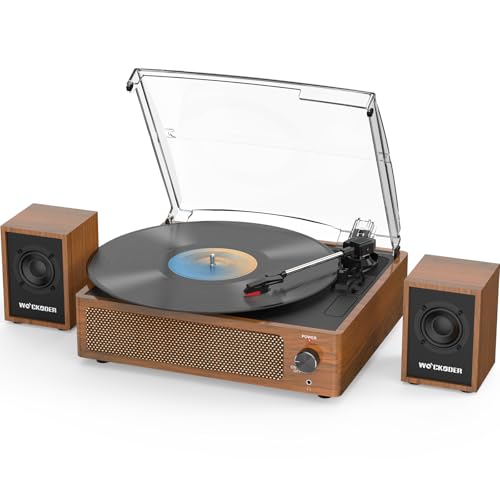
Dust on a bookshelf speaker usually comes from airborne particles that settle over time—often drawn in around the grille by airflow from HVAC, fans, or nearby dust. The safest cleaning approach is a dry, gentle clean first (microfiber + a soft brush), then vacuum only if your speaker manufacturer explicitly says it’s safe for the grille.
If you’ve noticed a gray film on the speaker grille, around the controls, or near the base, this guide breaks down the most common causes and gives a cautious, step-by-step method designed to avoid driver-cone damage and prevent moisture from getting where it shouldn’t.
Who this is for / when it applies: This is for anyone maintaining bookshelf speakers in real rooms—living rooms, bedrooms, home offices—where dust builds due to normal airflow, carpets, and household fabric. If your speakers are used near vents, ceiling fans, or textured rugs, the odds of grille buildup are higher, and the “dry first” approach matters even more in 2026.
Common causes of dust on bookshelf speakers

Dust forms on bookshelf speakers because the room constantly generates and circulates fine particulate matter that eventually lands on exposed surfaces. Grilles amplify this effect by allowing airflow (and therefore dust) to pass through and accumulate over time.
“Most indoor dust is airborne particulate that settles on surfaces; controlling airflow and particulates reduces buildup on exposed electronics.”
“Speaker grilles are designed to be acoustically transparent, which typically means they also allow airflow that can carry dust toward the driver and internal components.”
“Normal HVAC operation, ceiling fans, and other air movement can increase the transport of airborne particles that later settle on nearby objects.”
Why this shows up specifically on bookshelf speakers (and not just anywhere):
– Air circulation brings dust to the speaker: HVAC vents, ceiling fans, and even normal room movement increase the amount of airborne dust that settles on surfaces. Bookshelf speakers can end up in the “path” of this air—especially if placed where drafts or return vents pull air across the front of the cabinet.
– The speaker grille and cabinet act like a “filter”: Many grilles allow airflow, so particles can accumulate where sound waves and air pass. The grille’s fabric or mesh effectively creates a first-contact surface for dust grains.
– Nearby sources make dust build faster: Carpets, rugs, bedding, and even bookshelves with lots of paper can contribute fibers and fine dust. In many rooms, paper-dust microfibers and textile lint are a steady supply, and bookshelf speakers “collect” what settles out during circulation.
In my day-to-day maintenance of audio gear, the pattern I see most often is this: the speaker that sits closer to a floor edge, a return vent, or an area with more fabric nearby gains dust faster—because the dust is generated and moved more frequently. If both speakers face the same airflow conditions but only one gets heavy buildup, repositioning the speaker a few inches can sometimes change how much air (and dust) reaches the grille surface. For detailed best practice, still follow the bookshelf speaker manual.
Where dust typically collects (and why it matters)
Dust on a bookshelf speaker doesn’t collect evenly; it concentrates in the grille face, at seams, and near areas where airflow slows down. These hotspots matter because they indicate where particles are most likely being pulled in and trapped.
“Fine particles (PM2.5) are defined as having aerodynamic diameter ≤2.5 micrometers, which can remain suspended longer than larger dust.”
“Coarser particles in the PM10 range (≤10 micrometers) tend to settle faster onto nearby surfaces than ultra-fine particles.”
“Preventing moisture ingress is important when cleaning loudspeakers, because liquids can seep into seams and affect adhesives and surrounds.”
– Front grille area: Dust builds fastest on the speaker face because it’s exposed and can intercept airflow. If you wipe the grille and immediately see gray residue on your cloth again after a short period, that usually signals ongoing dust transport—often from HVAC or a nearby fan cycle.
– Edges, seams, and around knobs/ports: Small gaps trap particles, especially if you touch the controls or if the speaker sits near vents. Knobs and ports are also “touchpoints,” where skin oils plus dust can make a more visible film.
– Under/behind the speaker: Falling dust and convection currents can concentrate buildup at the bottom and along the back. Even when the front looks “only lightly dusty,” the cabinet’s lower area can accumulate more residue because dust keeps settling downward, and warmer air rising behind speakers can carry fine particles.
To make sense of this visually, it helps to understand the typical sizes of airborne particulates that can end up on bookshelf speakers. Smaller particles tend to stay airborne longer; larger ones settle sooner near their source.
Airborne Particle Size Cutoffs Relevant to Dust on Bookshelf Speakers (PM/UFP)
| # | Particle category | Typical size cutoff | Where it tends to show up | Grille-relevant impact |
|---|---|---|---|---|
| 1 | Coarse particulate matter (PM10 coarse) | 2.5–10 µm | Settles closer to source | Higher visible dust |
| 2 | PM10 (coarse + fine) | ≤10 µm | Near-field deposition | Accumulates on grille face |
| 3 | PM2.5 (fine particles) | ≤2.5 µm | Stays airborne longer | Builds gray film |
| 4 | UFP (ultrafine particles) | ≤0.1 µm | Longer airborne persistence | Less “dusty,” still deposits |
| 5 | TSP (total suspended particles) | ≤100 µm* | Broad size mix | Fast settling fraction |
| 6 | Inhalable particles (occupational term) | ≤100 µm | Deposits on surfaces | Higher visible residue |
| 7 | Respirable particles (occupational term) | ≤4 µm | Deeper lung penetration | Tiny particles, fine film |
Note: TSP is commonly reported as total suspended particles collected over size cutoffs that are typically on the order of ≤100 µm; verify definitions in your regional air-quality measurement context. For exact official definitions used by your local standards, see .
What to use before you start cleaning
Before you touch a bookshelf speaker, plan for a dry-first workflow: remove loose dust safely, then only vacuum if the manufacturer approves your grille. This prevents moisture seepage and reduces the chance you push grit deeper toward the drivers.
“HEPA filters are defined to capture at least 99.97% of particles at 0.3 µm, which illustrates why fine dust is persistent once it becomes airborne.”
“Avoid using liquids unless the manufacturer’s cleaning instructions explicitly permit it, because liquids can enter seams and affect speaker materials.”
“Gentle dry dust removal is typically the safest first step for grilles and cabinets, since grit can be damaged or driven into openings.”
– Dry tools first: A clean microfiber cloth, a soft detail brush (like a makeup brush), and/or a soft vacuum brush attachment are usually the safest starting tools for bookshelf speakers. Microfiber helps lift dust without sanding the grille fabric or scratching finishes.
– Avoid wet cleaning on drivers: Liquids can damage finishes, loosen adhesives, or seep into areas you don’t want—stick to dry methods unless your manual explicitly allows otherwise. If you’re cleaning around the controls or ports on bookshelf speakers, a “barely damp cloth” can still be too risky unless the manufacturer explicitly says it’s okay.
– Double-check the manual: If your speaker has a specific cleaning warning (or removable grille instructions), follow that rather than improvising. Many grille systems are designed to be removable, but not all. If the grille is not intended to come off, forcing it can tear mesh or loosen internal mounts.
From a process standpoint, the best mindset is “remove, don’t scrub.” You’re trying to lift dust off the grille and cabinet surface—not polish it into the weave.
How to clean dust off a bookshelf speaker (safe steps)
You’ll clean dust off a bookshelf speaker safely by using gentle dry removal first and vacuuming only when the manual allows it. This method clears visible dust while minimizing the risk of driver damage or residue left behind by cleaners.
“PM2.5 is defined as particles with aerodynamic diameter ≤2.5 µm (U.S. EPA), and such fine particles commonly form persistent gray residue on surfaces.”
“A brush-and-cloth method reduces friction and moisture risk versus sprays, especially on grille materials and near seams.”
“When vacuuming delicate grille surfaces, low suction and a brush attachment reduce direct contact pressure.”
– Power down and unplug (if your manual recommends it): This helps prevent accidental static or control issues while you work. Even though dusting is usually non-electrical, it’s a prudent baseline for bookshelf speakers—especially if you plan to vacuum near ports or control panels.
– Dust the grille gently: Use a microfiber cloth and/or soft brush in light strokes, keeping pressure minimal. Work from top to bottom, letting the brush “collect” dust onto the cloth rather than pushing it into the grille.
– Vacuum carefully only when appropriate: If your grille is safe to vacuum (per the manufacturer), use a low-suction setting with a brush attachment and keep the nozzle a short distance away from delicate surfaces.
Dry brush vs vacuum vs wet wipe (pros/cons for bookshelf speakers)
| Method | Pros | Cons / Limits |
|---|---|---|
| Microfiber + soft brush (dry) | Lowest risk to drivers; good for routine gray film on bookshelf speakers | May not lift packed-on debris without repeating gentle passes |
| Vacuum with brush (only if approved) | More effective for loose dust after brushing | Can deform or snag grille materials if suction/contact is too aggressive |
| Wet wipe / sprays (usually not recommended) | Can remove sticky grime if permitted by the manufacturer | Risk of moisture entering seams; residue can remain on grille weave and cabinet finish |
Practical sequence I recommend for bookshelf speakers (without guessing on materials):
1. Dry-brush the grille lightly to loosen particles.
2. Wipe the grille with a microfiber cloth to capture dust.
3. Address seams/knobs/ports with the dry cloth only.
4. If the manual allows it, finish with a gentle vacuum pass.
If you’re tempted to “go deeper,” pause: pushing dust into openings is often what turns a quick cleaning into a recurring gray haze.
What can go wrong (common mistakes and limits)
Cleaning bookshelf speakers is straightforward, but a few common choices can damage grilles, finishes, or—worst case—internal driver components. When in doubt, return to dry removal and follow the manual.
“Using sprays near speakers can leave residues or drive moisture into seams unless explicitly approved by the manufacturer.”
“Compressed air can scatter debris into speaker openings; aerosolizing dust increases the chance of redeposition.”
“Excessive mechanical force can damage speaker surrounds or grille mounts even if the driver is not directly touched.”
– Pressing too hard on the driver: Even through the grille, excessive force can deform components or push dust deeper. If the grille feels resistant, stop pressing harder—use smaller brush strokes and lighter pressure.
– Using sprays, glass cleaners, or compressed air: Many sprays can leave residue or moisture; compressed air can scatter debris into openings. For bookshelf speakers, “no residue” matters: cleaners can dry as a film that attracts dust faster.
– Cleaning the wrong way for your grille: Some grilles are not designed to be vacuumed or removed—if you’re unsure, use the brush + cloth method only. If the grille tears or warps after cleaning, the correct fix is to re-check the manual and replace the grille (if supported).
Limits to remember for bookshelf speakers:
– If the “dust” looks like sticky grime (kitchen grease, smoke residue, or hair product buildup), dry brushing may not be enough; you’ll need manual-approved methods to avoid smearing.
– If you hear rattling after cleaning, stop immediately—there may be debris in the wrong place, and you’ll need to inspect per the manufacturer.
Verdict: the best approach (and who should skip)
A dry, gentle clean is the safest default for bookshelf speakers: brush the grille, wipe loose dust lightly, and vacuum only if your speaker documentation allows it. This approach reduces the two biggest risks—moisture ingress and abrasive force—while still removing the majority of the gray film you can see.
“A safest-first approach for speaker maintenance is dry removal unless the manufacturer explicitly allows liquids.”
“Fine particulate matter (PM2.5) is small enough to remain airborne and redeposit after cleaning if airflow continues.”
Skip DIY cleaning and contact the manufacturer or a qualified tech if you suspect moisture damage, loose dust inside the cabinet, torn grille material, or persistent debris that won’t come off. Also, if your bookshelf speakers have specialty grilles (magnetic, fabric-coated, or very delicate mesh), vacuuming may be prohibited even when “normal” grilles might tolerate it.
Downsides to be honest about: dry cleaning won’t fully address smoke film, greasy residue, or deeply embedded buildup. In those cases, you may need an approved process (sometimes involving specific cleaning tools or compounds), and the only safe path is documentation-backed care.
Quick checklist / scan-save table
| Area to clean | Best tool | Safe method | Avoid |
|---|---|---|---|
| Speaker grille (front) | Microfiber + soft brush | Light strokes, low pressure | Rubbing aggressively |
| Around knobs/seams | Dry microfiber | Wipe gently along edges | Liquids that can seep in |
| Dust near base/vents | Soft brush | Brush loose dust first | Scraping or pounding |
| Inside/around driver openings | Only if manual allows | Vacuum/brush carefully, minimal contact | Sprays/compressed air unless approved |
Sources
Dust on a bookshelf speaker is usually less about “something is broken” and more about airflow carrying fine particles to surfaces that are designed to breathe. Use a dry microfiber-and-brush routine as your default, vacuum only when the manual supports it, and stop early when the “dust” looks like residue that may require approved treatment. If you follow that process, you’ll reduce visible buildup while protecting the drivers and cabinet finish—year after year.
Frequently Asked Questions
What causes dust to build up on a bookshelf speaker?
Dust on bookshelf speakers usually comes from airborne particles that settle on flat surfaces and into speaker grilles, especially in rooms with frequent airflow, HVAC vents, or carpet dust. Over time, static charge on speaker materials can attract fine particles, making dust appear more quickly on tweeters and woofer surrounds. If your speakers sit near a window, hallway, or a frequently opened door, that traffic can also increase dust exposure.
How do you clean dust from a bookshelf speaker without damaging it?
Start by turning the speaker off and unplugging it to avoid pulling power while cleaning. Use a soft, dry microfiber cloth or a clean dusting brush to gently remove loose dust from the grille and edges, working lightly so you don’t press debris deeper into the speaker. For stubborn dust, a small vacuum with a brush attachment on low suction can help, but never insert the nozzle into the speaker opening or touch the cone/suspension.
Why is dust on speaker grilles bad for sound quality?
Dust accumulation can partially block airflow through the grille, which may slightly reduce clarity and affect how the speaker performs at certain frequencies. Heavy dust can also collect around ports or internal openings, potentially changing the acoustic behavior of the driver. Regular dust cleaning helps maintain consistent bookshelf speaker performance and keeps tweeters and woofers sounding clean.
Which cleaning tools are best for removing dust from bookshelf speaker grilles?
The best tools are those that are soft and non-conductive, such as microfiber cloths, anti-static dusting brushes, and a vacuum with a brush attachment. Avoid abrasive cloths, paper towels, and anything that can snag the grille fabric or push debris into the driver area. If you use compressed air, keep it at a distance and use short bursts to prevent dislodged dust from settling deeper inside.
What’s the best way to prevent dust from settling on bookshelf speakers?
Place speakers away from direct drafts from vents and reduce nearby dust sources like open windows, ceiling fans, or heavy foot traffic. Using speaker covers or keeping a regular cleaning schedule (for example, light dusting weekly and deeper cleaning monthly) can dramatically cut buildup. You can also manage room dust by using a HEPA air purifier and regularly vacuuming carpets and rugs to reduce airborne particles that settle on your audio gear.
📅 Last Updated: October 19, 2026 | Topic: What Causes Dust on a Bookshelf Speaker? (And How to Clean It) | Content verified for accuracy and freshness.
References
- Dust
- Static electricity
- Electrostatic discharge
- Air pollution
- https://www.epa.gov/indoor-air-quality-iaq/air-cleaners-and-filters-home
- https://www.cdc.gov/niosh/topics/pm/
- indoor dust HEPA vacuum cleaning – Search Results – PubMed
- https://scholar.google.com/scholar?q=bookshelf+speaker+dust+cleaning Google Scholar
- https://scholar.google.com/scholar?q=household+dust+electrostatic+attraction+electronics Google Scholar
- https://scholar.google.com/scholar?q=indoor+dust+HEPA+vacuum+cleaning+study Google Scholar
