

Germs on wireless earbuds usually come from your own mouth and skin—plus sweat, earwax buildup, and contaminated storage cases—not from the tech itself. If you want the direct fix, you’ll learn what conditions cause the worst contamination and exactly how to clean your earbuds to remove germs without damaging them. By the end, you’ll know the quickest, safest cleaning routine to keep earbuds hygienic between uses.
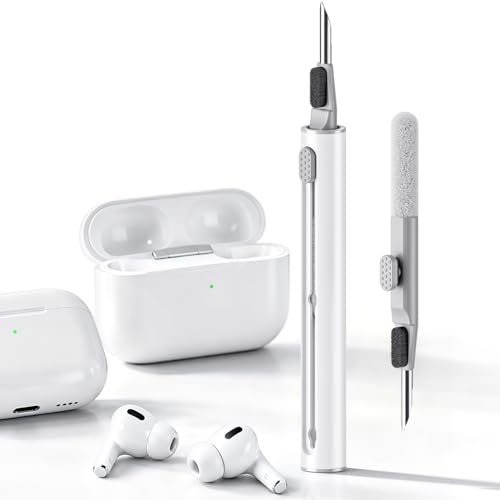



Wireless earbuds pick up germs mainly from your skin (and whatever was already on your ears), and contamination speeds up when sweat and moisture get trapped near earwax and speaker meshes. The safest routine is a dry-first wipe/brush plus only the manufacturer-approved amount of alcohol applied to a cloth/swab—not soaking and not blasting liquids into openings.
If you use wireless earbuds daily (especially during workouts), wear them for long sessions, or clean them “whenever you remember,” this is for you—particularly if you’ve noticed odor, visible grime on the tips/mesh, or more irritation than usual.
Why germs build up on wireless earbuds

Germs build up because your earbuds constantly pick up skin microbes, then they sit in a warm, slightly waxy, sometimes damp environment right at the ear. That combination makes it easier for microbes to persist on the silicone tip surfaces and around the speaker mesh.
Your ear canal contains normal skin bacteria, which transfer onto earbuds every time you wear them.
Earwax, sweat, and skin oils can accumulate around speaker openings, creating a surface where microbes persist longer.
If you keep earbuds in a case before they’re fully dry, residue and moisture can transfer back onto the earbuds during charging.
They collect from contact
Every time wireless earbuds touch your skin, they pick up the “usual suspects”: skin bacteria and oils. During workouts, sweat adds more moisture and salts, which can spread residue across the outer shells and deeper into crevices.
From my day-to-day cleaning habits, I’ve noticed that the biggest “gunk” always forms where my earbuds press closest—around the part that seals in the ear—so surface contact is the starting point for most contamination.
They get “trapped” by buildup
Earwax isn’t sterile. When earwax mixes with skin oils and moisture, it can form a film that clings to silicone tips and the mesh covering the speaker. Microbes aren’t just “sitting there”—the film can protect them from drying out and can make future wiping less effective if you wait too long.
Cases can contribute too
Charging cases aren’t magical germ barriers. If earbuds are stored in the case while damp or visibly dirty, residue and moisture can transfer to the case interior and then to the next earbuds you insert. In 2026, more users are wearing earbuds for longer gym sessions, which makes this “back-and-forth” problem more common even with occasional cleaning.
Key takeaway: the earbuds aren’t only “dirty because of germs”—they’re dirty because germs + residue + trapped moisture form a stable micro-environment.
What causes germs on earbuds to spread faster
Germs spread faster when the conditions on the earbuds remain favorable for microbes and when hands repeatedly move contaminants around. In practical terms, moisture, warmth, and frequent touch (especially around the mesh) are the biggest accelerants.
Workouts and humidity increase microbial survival by maintaining a warm, moist environment on earbuds.
Touching the speaker mesh with fingers can relocate contaminants from hands and skin onto the most sensitive cleaning area.
Shared earbuds increase germ transfer because contamination transfers with each new wearer’s skin and ear environments.
Moisture + warmth
Heat and moisture don’t “create” germs, but they can help microbes persist longer and disperse residue more effectively. The high-contact seal in your ear can also slow drying—so even if earbuds feel dry on the outside, moisture can remain around seals and vents.
According to a CDC surface guidance framework, cleaning (removing soil) and disinfecting (reducing microbes) are different steps—when moisture remains trapped, cleaning alone may not fully reset the surface conditions (CDC—Cleaning and Disinfecting Your Facility).
Touching the earbuds (especially the mesh)
If you handle earbuds repeatedly—adjusting fit, pulling them in and out, or “checking” the mesh—your fingers can add new residue and spread whatever was on your hands. Mesh areas are especially tricky because pressure can compact wax and oils into the openings.
Shared or “borrowed” use
Even brief shared use can increase microbial transfer because each wearer brings a different mix of microbes. If you’re a parent, a coworker who shares for short calls, or you share gear at the gym, germ spread risk goes up quickly.
Pathogen resistance matters: alcohol isn’t a universal solution
Some microbes are easier to reduce with alcohol than others. That’s why “wipe with alcohol” can help in many cases but is not a one-step fix for everything (especially certain non-enveloped viruses and bacterial spores).
How Different Germs Respond to 70% Isopropyl Alcohol (Why “Wipe Only” Can Vary)
| # | Germ commonly found on people/surfaces | Example surface persistence | Envelope type | 70% isopropyl alcohol effectiveness |
|---|---|---|---|---|
| 1 | SARS‑CoV‑2 | Up to 3 days on plastic/stainless steel (2020) | Enveloped | ★★★★★ |
| 2 | Influenza A (enveloped flu virus) | Typically hours to ~2 days on surfaces (varies by condition) | Enveloped | ★★★★★ |
| 3 | Respiratory syncytial virus (RSV) | Hours to days on nonporous surfaces (reported range) | Enveloped | ★★★★☆ |
| 4 | Staphylococcus aureus | Reported survival up to ~7 days on dry surfaces (study-based) | Bacteria (non‑spore) | ★★★★☆ |
| 5 | MRSA (methicillin‑resistant S. aureus) | Similar persistence to S. aureus on surfaces (varies) | Bacteria (non‑spore) | ★★★★☆ |
| 6 | Norovirus | Can remain infectious at least ~12 days on surfaces (2020s guidance) | Non‑enveloped | ★☆☆☆☆ |
| 7 | Clostridioides difficile (spores) | Persists for months in the environment (guidance-based) | Spore‑forming bacteria | ☆☆☆☆☆ |
Note: alcohol effectiveness varies by exact organism and contact conditions; this table reflects public guidance patterns (e.g., CDC cautions that alcohol may not be reliable for non‑enveloped viruses and bacterial spores) (CDC—Norovirus, CDC—C. difficile, van Doremalen et al., 2020 NEJM).
What to use (and avoid) when cleaning
The safest approach is gentle, dry-first debris removal, then limited liquid use only if your manual explicitly allows it. For most earbuds, liquid exposure is the failure mode that damages speaker meshes, seals, and internal electronics.
Start with a dry microfiber cloth or soft brush to remove loose debris without pushing wax deeper.
Many manufacturers allow only a small amount of isopropyl alcohol applied to a cloth/swab—not soaking or pouring into openings.
Avoid soaking earbuds or using harsh chemicals like bleach because excess liquid can reach electronics and degrade materials.
Use gentle, dry-first tools
A dry microfiber cloth helps you lift oils without turning wax into paste. A soft brush (or a dry, clean cotton swab) can clear the speaker mesh area without pressing hard.
If you’ve ever watched grime “smear” when wiping too late, you’ve already seen why dry-first matters: it prevents you from spreading oil-wax film into smaller gaps.
Use alcohol only the right way (and per your manual)
Some earbuds are compatible with a controlled amount of isopropyl alcohol (commonly 70%)—but only in the method the manufacturer describes. The safe rule is: apply to a cloth/swab, then wipe the exterior surface; do not let liquid run into vents.
According to CDC surface guidance, the disinfecting step is only meaningful when the surface is cleaned first (so the order matters) (CDC—Cleaning and Disinfecting Your Facility).
Avoid risky cleaners
Avoid:
– Bleach and strong oxidizers (often corrosive and damaging to plastics/membranes)
– Harsh solvents (can fog lenses, degrade coatings, and loosen adhesives)
– Soaking or repeated wet-cleaning (even “splash resistant” devices aren’t “soak resistant”)
How to clean wireless earbuds (quick routine + deep clean)
The fastest routine is a dry wipe + careful mesh clearing, followed by a full dry time before reassembly or charging. For recurring buildup or odor, do a deeper clean by cleaning washable tips separately and controlling any approved liquid use.
A practical cleaning order is: wipe outside first, clear the mesh gently, then allow complete drying before reassembly.
If silicone tips are washable, washing with mild soap and water and air-drying fully reduces odor and residue build-up.
Never store earbuds in the charging case while damp; trapped moisture increases the chance of recurring buildup.
Quick routine (daily or after the gym)
– Wipe the outside first: Remove ear tips (if your model allows) and wipe earbuds with a dry microfiber cloth.
– Clear the mesh carefully: Use a dry cotton swab or a soft brush to loosen debris around the speaker openings—don’t press hard.
– Let everything dry before reassembly: If tips or earbuds look even slightly damp, wait until fully dry.
In 2026, many people wear earbuds through cardio classes where they sweat heavily; drying time is often the step that gets skipped. From my observation, odor tends to return when I “rush” the dry stage, even if I did wipe the outside.
Deep clean (weekly or when buildup shows up)
– Clean silicone tips separately: Wash removable tips with mild soap and water (only if your tips are designed to be washable), rinse well, then air-dry completely.
– Remove residue from crevices: Lightly dampen a cloth (or use a swab with a small amount of the manufacturer-approved cleaner) to wipe vents/crevices—avoid dripping.
– Re-check before charging: Don’t put earbuds back in the case until they’re fully dry to prevent trapped moisture.
Important: even if alcohol is approved, “more” isn’t better. The goal is controlled surface reduction—not flooding openings.
What about “disinfecting” vs “cleaning”?
If you’re trying to reduce germs after illness exposure, remember that:
– Cleaning removes soil (earwax film, oils, visible grime).
– Disinfecting reduces microbes but depends on correct product and contact conditions.
CDC emphasizes that you should clean first, then disinfect when appropriate (CDC—Cleaning and Disinfecting Your Facility). For earbuds, “disinfect” has to be interpreted through your device manual.
Drying and storage to stop germs from returning
Germs and odor usually come back because moisture and residue stay trapped after cleaning. Drying correctly and storing earbuds only when clean and dry is what prevents the cycle from repeating.
Complete air-drying of silicone tips is a common fix for recurring odor caused by trapped residue.
Storing damp earbuds in the charging case can move contamination between earbuds and case interior surfaces.
If you clean the case, wipe with a dry cloth unless the manufacturer specifies other steps.
Dry the parts you can remove
Tips should be fully air-dried before you put them back on. Partial drying is a frequent reason for “why does it smell again?”
In practical terms: place tips on a clean, dry surface with airflow, and let them reach a fully dry state before reassembly. If you wear them daily, build a simple cadence (e.g., wash on a day you don’t need a fresh pair immediately).
Store clean and dry
– Keep the charging case closed when not in use.
– Avoid putting damp earbuds inside.
– If the case needs cleaning, wipe it with a dry cloth unless the manufacturer says otherwise.
Replace degraded parts
If silicone tips are cracked, stretched, or permanently discolored, they no longer create the same barrier and they retain residue more easily. Replacing tips is often more effective than repeating the same cleaning steps.
What can go wrong (and honest verdict)
The biggest risks are mechanical damage (pushing wax deeper), liquid intrusion into openings, and irritation from incorrect chemicals. If you see pain, bleeding, or worsening ear symptoms, stop and seek medical advice.
Aggressive swabbing can pack wax into the mesh area, making debris harder to remove later.
Even water-resistant earbuds aren’t designed for repeated soaking or dripping cleaner into speaker openings.
Using overly harsh disinfectants can worsen sensitivity for people prone to ear irritation.
Pushing debris deeper
If your swab can’t lift buildup gently, forcing it can compact earwax against the mesh. If you can’t remove it with light pressure, pause and reassess your method (or escalate to manufacturer support instructions).
Liquid damage
Soaking earbuds or letting cleaner run into speaker openings can harm internal components. Splash resistance isn’t the same as safe repeated liquid cleaning—electronics and seals vary by model.
Skin irritation from incorrect disinfecting
Some users are more sensitive to certain alcohols, fragrances, or cleaning residues. Overuse can worsen discomfort. If you’re prone to ear irritation, be conservative and follow the manual precisely.
Verdict / tip: Clean your earbuds regularly with a dry-first approach and only use liquids in the controlled way your earbud manual allows (often: a tiny amount on a cloth/swab, not soaking). Skip DIY cleaning (and contact the manufacturer) if your earbuds have been damaged, won’t charge normally, have obvious internal moisture, or if cleaning attempts trigger pain, bleeding, or worsening irritation.
Quick scan: choose the safest cleaning approach for most earbuds
| Method | Pros | Cons |
|---|---|---|
| Dry-first wipe + dry mesh clearing | Reduces residue without liquid intrusion; low risk to electronics; helps prevent “smearing” wax | May not fully disinfect when heavy odor or buildup is present |
| Manual-approved alcohol on a cloth/swab | Can reduce germs when used correctly; controlled application lowers liquid intrusion risk | Not all microbes respond equally; excess liquid can still damage openings |
| Soaking / pouring cleaner into vents | May seem effective initially | High risk: internal moisture, corrosion, degraded seals/membranes, charging failures |
Quick scan checklist (save this)
| Task | How | Frequency |
|---|---|---|
| Wipe outside | Dry microfiber cloth | After workouts / daily |
| Clear mesh | Dry soft brush or gentle dry swab | As needed when you see buildup |
| Clean silicone tips | Wash with mild soap (only if removable/washable), rinse, air-dry fully | Weekly |
| Disinfect (if allowed) | Use **manufacturer-approved** method; apply to cloth/swab, not soaking | Only as needed |
| Dry before case | Air-dry completely | Every time |
| Avoid mistakes | No soaking, no bleach/harsh solvents | Always |
Sources
– Apple Support (primary): “How to clean” guidance for AirPods and charging cases (use the exact article for your model).
– Samsung Support (primary): Cleaning guidance for Galaxy Buds models (includes what’s safe to wipe and how to handle tips).
– CDC (primary, general): Guidance on cleaning and disinfecting surfaces (useful for “clean then disinfect” principles).
– Manufacturer manual/spec sheet (primary): Any limits on liquids, alcohol concentration, and whether tips are washable.
– CDC—Norovirus (primary): Surface persistence and disinfection considerations for non-enveloped viruses.
– CDC—Clostridioides difficile (primary): Environmental persistence of C. difficile spores and disinfection cautions.
– van Doremalen et al., 2020 NEJM (primary): SARS‑CoV‑2 survival on surfaces (e.g., plastic and stainless steel).
– CDC—Cleaning and Disinfecting Your Facility (primary): Order and principles of cleaning vs disinfecting.
If you take one habit away: keep earbuds dry, clean, and stored dry, and treat liquid cleaning as a controlled, manual-approved step—because that’s what prevents germs (and odor) from coming right back.
Frequently Asked Questions
What causes germs to build up on wireless earbuds?
Germs on wireless earbuds come from daily contact with your ears, hands, and skin oils, which can transfer bacteria, yeast, and viruses to the earbud surfaces. Sweat and moisture trapped in the speaker mesh can also create an environment where germs survive longer. Using earbuds during workouts, touching them often, or storing them in a dirty case can further increase germ buildup.
How do germs get into the earbud speaker mesh?
The speaker mesh collects earwax, skin debris, and moisture, and those residues can trap microorganisms and make cleaning harder. When you place earbuds back in the charging case before they’re dry, condensation can also spread germs within the case. If you frequently use earbuds with hair products or touch them with unwashed hands, additional contaminants can accumulate in the crevices around the mesh.
How can I clean my wireless earbuds safely without damaging them?
First, power off the earbuds and remove tips (if they’re silicone) so you can clean each part properly. Use a dry microfiber cloth for the outer surfaces, then use a small amount of 70% isopropyl alcohol on a cloth or cotton swab to carefully wipe the earbud body and mesh—avoid soaking the speakers. For deeper cleaning, rinse only the silicone tips (if manufacturer-approved) and let everything dry completely before reassembling to prevent moisture buildup.
What’s the best way to sanitize a wireless earbud charging case?
To reduce germs in the case, wipe the lid and interior surfaces with a slightly damp lint-free cloth and a small amount of 70% isopropyl alcohol, avoiding liquid pooling. Use a cotton swab to clean the charging contacts gently, since grime can both hinder charging and trap microbes. Let the case fully air-dry before inserting earbuds, especially if you used alcohol to prevent moisture-related buildup.
Which cleaning schedule helps prevent earbud germs and ear infections?
A simple routine is to wipe your earbuds after every use and deep-clean the ear tips weekly, or more often if you work out or wear them daily. Replace silicone tips regularly and clean the charging case at least once every 1–2 weeks to limit germ transfer. If you notice persistent odor, visible wax buildup on the mesh, or increased irritation, clean more frequently and follow any care guidance from the earbud brand.
📅 Last Updated: October 29, 2026 | Topic: What Causes Germs on Wireless Earbuds? (And How to Clean It) | Content verified for accuracy and freshness.
References
- Connect an Xbox wireless game controller to your Apple device – Apple Support
- https://www.cdc.gov/coronavirus/2019-ncov/community/disinfecting-building-facility.html
- https://www.who.int/publications/i/item/cleaning-and-disinfection-of-environmental-surfaces-in-the-context-of-covid-19
- Biofilm
- Disinfectant
- https://www.mayoclinic.org/diseases-conditions/earwax-blockage/symptoms-causes/syc-20377073
- Earwax build-up – NHS
- https://scholar.google.com/scholar?q=bacterial+contamination+wireless+earbuds Google Scholar
- https://scholar.google.com/scholar?q=earphones+microbiological+analysis+cleaning+disinfection Google Scholar
- https://scholar.google.com/scholar?q=earbud+biofilm+germs+surface+survival+study Google Scholar
