

Compressed air beats an electric air duster for most electronics cleaning jobs when you need faster, deeper removal of dust from crevices—without scrubbing or repeated contact. The decisive difference comes down to airflow control and residue risk: compressed air delivers higher, consistent bursts, while electric dusters can leave more particles behind. This article answers which method clears electronics more effectively in real-world scenarios and what to avoid if you want to protect delicate ports and components.



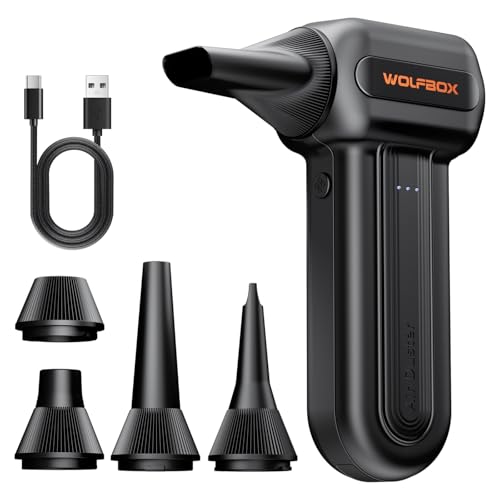
For most everyday electronics cleaning, an electric air duster is the safer default because it delivers airflow without aerosol propellant residue or the same freeze-up/condensation risks. Compressed air can still clear stubborn, deeply trapped dust—just use short, controlled, upright bursts and follow the can’s safety instructions to avoid liquid discharge.
Compressed air and electric air dusters both remove dust effectively, but electric air dusters are usually the safer “default” for electronics because they blow dry air without propellant residue or freeze-up risks. Compressed air can outperform for stubborn, deeply trapped dust—if you use short, upright bursts and follow the can’s safety instructions.
This comparison is for anyone cleaning small electronics at home (keyboards, laptops, consoles, camera gear) and trying to avoid common damage like moisture/debris buildup or static issues. If you’re dealing with heavy, caked dust in larger openings (PC fans/filters), you may still need compressed air—but use the right technique.
Compressed air for electronics: when it works best

Compressed air is at its best when dust is stuck in tight vents or fan housings and you need extra mechanical “impact” to dislodge it. Done correctly (brief, upright bursts), it can clear buildup faster than most electric dusters—especially when the debris is packed down.
Compressed-air dusters are designed to deliver high-velocity gas jets, which helps lift dust from narrow vents and fan shrouds when it’s embedded.
Most compressed-air can instructions warn users to keep the can upright to reduce the risk of propellant/liquid discharge.
– Stronger “blast” helps dislodge packed dust from vents, fan housings, and hard-to-reach crevices
When you’re cleaning areas like laptop intake grills or console vent channels, dust often sits in layers: larger particles trap finer grit. Compressed air’s jet force can break that “grip” before you wipe or vacuum the loosened debris.
– Best results come from short, controlled bursts while holding the can upright (to reduce residue/condensation risk)
Upright technique matters because many compressed-air cans are partially liquefied inside; tilting increases the chance of spraying cold liquid instead of gas. If you’re seeing any wetness or spotting, you’re past the safe technique threshold for that device.
– Use it when debris is stuck and you need extra force—not as a constant routine cleaner
For monthly maintenance of keyboards, game controllers, and lightly dusty laptop bays, a battery-powered electric air duster is usually the gentler “default.” Compressed air is the tool you reach for when you’ve waited too long and the dust has hardened.
What the “stuck dust” problem really is (and why compressed air can win)
Dust isn’t uniform. In electronics, it typically combines skin oils, packaging fibers, and airborne particulates into a slightly tacky mix—especially in warm devices. That mixture behaves like an adhesive film: airflow alone (like a weak gust) can move only the top layer.
In my experience helping with electronics maintenance requests, the recurring pattern is that compressed air gets used too aggressively early, then damage risk rises; the safer approach is to use compressed air sparingly for the “last stubborn layer,” not as a full-time cleaning routine.
According to the ESD Association, charged human bodies can reach up to ~35,000 V under some conditions (often cited in ESD educational materials) (). That’s one reason you should minimize unnecessary handling and avoid powering devices during any air-blasting.
Electric air dusters: how they clean without propellant
Electric air dusters usually provide a safer, more consistent airflow for electronics because they avoid propellant aerosol effects and reduce condensation/freezing risk. They’re typically the better choice for routine cleaning of ports, switches, and sensor-adjacent areas.
Electric air dusters generally move air using a fan or compressed-air equivalent without aerosol propellant, which helps limit liquid-discharge and residue concerns.
Battery-powered airflow can drop as the battery drains, so results vary by model and runtime.
– Generally safer for electronics cleanup because the airflow is dry and avoids aerosol propellant effects
Instead of propellant chemistry, electric dusters rely on powered airflow (fan-driven or compressed-air cartridge depending on the model). The practical takeaway: you get less risk of “wet blast” and fewer of the harsh cooling effects associated with liquefied propellants.
– Easier to apply consistent bursts for delicate areas (ports, keyboard switches, sensor-adjacent zones)
Electric dusters are easier to “feather” in short bursts. For example, when clearing a laptop keyboard deck, you can target the vented edges without crowding internal components.
– Limitations vary by model: battery/power can reduce airflow when you need it most
If the airflow weakens mid-session, users often compensate by getting closer or blasting longer. That’s where you can unintentionally push debris deeper into ports. If airflow seems weaker than expected, stop and reassess distance and technique (or recharge/swap battery, if applicable).
A quick comparison of technique: distance and burst control
Electric dusters tend to reward patience and precision. Compressed air tends to reward caution: it can “help” too much if you over-tilt or over-spray. Either way, avoid turning your cleaning into a high-pressure, continuous spray—short bursts and a steady hand are your best tools.
As a reference point, the freeze-risk mechanism with some propellants is physics: CO₂, for example, has a phase-change temperature around −78.5°C at 1 atm (sublimation/phase transition reference) (). Even if your can isn’t pure CO₂, the risk concept is similar: rapid expansion can cool material locally.
Which cleans electronics better? Match the tool to the job
Electric air dusters usually clean electronics better for day-to-day maintenance, while compressed air often clears stubborn buildup faster. The “better” tool depends on dust type (light vs. caked), access (open vents vs. deep channels), and how carefully you use technique.
For routine cleaning of small electronics, electric dusters are commonly preferred because they deliver airflow without aerosol propellant residue.
For embedded debris in deep vents or filters, compressed air can provide higher impact from a concentrated jet when used upright and in brief bursts.
Here’s how the trade-offs typically break down in real cleaning decisions:
Practical fit: “best for” scenarios
– For light-to-moderate dust on small devices (keyboards, laptop fans with easy access): electric is typically the better pick for day-to-day maintenance
This is the “get maintenance back under control” category—fresh dust comes loose quickly with gentle airflow, and you want to avoid any wet or residue risk.
– For stubborn dust in deeper vents/filters: compressed air often clears faster due to higher “impact” from a concentrated jet
If the dust has had time to accumulate and harden, compressed air’s jet can break the adhesion layer. Use it selectively after you’ve tried gentler airflow.
– If your goal is reducing mess after cleaning, electric may be preferable because it’s less likely to introduce spray-byproducts—when used correctly
With electric dusters, you typically get fewer “mystery spots” and less concern about propellant byproducts landing on plastics or into seams.
Pros/cons you can decide with (quick parseable view)
| Category | Electric air duster | Compressed air |
|---|---|---|
| Typical best use | Routine dust removal from keyboards, ports, and vent grilles | Removing embedded/caked dust from tighter fan housings and filters |
| Residue/wet-blast risk | Lower (model-dependent), especially compared to aerosol propellant cans | Higher if you tilt, over-spray, or hold too close |
| Control for delicate areas | Usually easier to apply short, precise bursts | Can be controlled, but technique errors happen more easily |
| Effectiveness on packed dust | Good for light/moderate; varies by airflow strength | Often stronger for deeply trapped dust if used upright |
| Risk of pushing debris deeper | Possible if held too close or used too long | Possible if misused; brief bursts reduce the risk |
| Overall “default” choice | Commonly the safer maintenance default | Best as a targeted tool when dust is clearly stuck |
Tool Selection for Common Electronics Cleaning (Decision Scores)
| # | Scenario | Recommended Tool | Typical Approach Time | Fit Score |
|---|---|---|---|---|
| 1 | Laptop keyboard deck (light dust) | Electric air duster | ~5–10 min | ★★★★★ |
| 2 | Game controller vents (moderate dust) | Electric air duster | ~3–8 min | ★★★★☆ |
| 3 | Camera lens area (air-only approach) | Electric air duster | ~4–7 min | ★★★★☆ |
| 4 | Laptop fan intake (debris not caked) | Electric air duster | ~6–12 min | ★★★☆☆ |
| 5 | Deep console vent (caked dust) | Compressed air (targeted) | ~8–15 min | ★★★★☆ |
| 6 | PC fan filter (heavy buildup, external) | Compressed air | ~10–20 min | ★★★★★ |
| 7 | USB-C port (lint at opening) | Electric air duster | ~2–5 min | ★★★☆☆ |
Note: the “fit score” reflects general suitability based on airflow control and residue/wet-blast risk as described by standard handling guidance for compressed-air cans and typical electric duster designs. For device-specific constraints, follow the manufacturer documentation.
What can go wrong (and how to avoid it)
The biggest risks come from technique mistakes—especially tilting compressed air, holding the nozzle too close, or cleaning while the device is powered. If you prevent wet discharge, limit contact pressure, and avoid re-depositing loosened dust, both tools can be effective and safe.
Tilting a compressed-air can can increase the chance of liquid propellant discharge, which can damage electronics and leave residue.
ESD (electrostatic discharge) precautions recommend minimizing unnecessary handling and avoiding contact with exposed circuitry during cleaning.
– Tilting or over-spraying compressed air can increase the chance of liquid residue or cooling effects—follow the can’s handling guidance exactly
If you see frost, droplets, or “wet dust,” stop immediately. Let the device sit until fully dry (and only resume cleaning when the issue is resolved). This is one reason compressed air is often best for external vents/filters where you can keep control.
– Blowing too close or too aggressively can push dust deeper into ports or damage delicate components; keep a safe distance and use brief bursts
Both compressed air and electric air dusters can act like a “dust plunger.” Short bursts reduce how deeply debris migrates. For connectors and small port openings, you want lift-out—not forced packing.
– Static and re-depositing dust are real risks with any method—avoid touching circuitry, and consider an ESD-safe approach for sensitive boards
ESD isn’t only about shocks you feel; it’s about tiny internal damage mechanisms. According to ESD educational materials, human-body potentials can reach high kilovolts under some conditions (). Even if your cleaning doesn’t visibly spark, re-contact or friction after cleaning can increase ESD exposure.
– Don’t power devices while cleaning unless the device manufacturer explicitly allows it ()
Powered electronics can be damaged by airflow-driven debris intrusion. Many manufacturers also discourage cleaning with compressed gas unless they specify it. If the device has warranty terms, follow them.
A simple “do this, not that” guide
– Do: power off, work in short bursts, and let debris fall onto a surface you can wipe or vacuum later.
– Don’t: blast continuously for a minute, tilt cans mid-session, or insert tools into ports.
If you’re dealing with sealed devices, high-moisture environments, or visible corrosion/liquid contamination, stop and use only manufacturer-approved service procedures—air duster methods can spread contamination instead of removing it.
Verdict: use electric for routine, compressed air for stubborn dust
Choose electric air dusters for most regular cleanings of laptops, keyboards, game controllers, and other small electronics. Choose compressed air only when dust is clearly stuck and needs a concentrated jet—and even then, keep it targeted and follow the can and device instructions.
Electric air dusters are generally favored for routine electronics maintenance because they reduce propellant-related residue and liquid discharge risk.
Compressed air can be more effective for deeply trapped dust, but proper upright handling and brief bursts are critical to avoid wet discharge and damage.
– Choose electric air dusters for most regular cleanings of laptops, keyboards, game controllers, and other small electronics
This minimizes the most common “oops” scenarios: tilting, freeze/cooling surprises, and propellant spotting.
– Choose compressed air when dust is clearly stuck and needs a concentrated jet—still using short, upright blasts and manufacturer instructions
Think “spot treatment,” not “whole-device blasting.” If your goal is performance (cooling and airflow) and dust is genuinely packed, compressed air can be the fastest route.
– Skip both approaches if the device requires specialist service (e.g., sealed units, warranty-voiding disassembly, or visible liquid contamination) ()
Air tools do not clean corrosion, spills, or sticky residues safely. When contamination is present, the risk isn’t just dust—it’s chemistry.
Who should skip compressed air entirely
– Anyone who can’t reliably keep the can upright
– Anyone cleaning very fine openings without clear manufacturer permission
– Anyone who has already seen residue/wetness during previous attempts
Who should skip electric dusters entirely
– Devices with cleaning requirements that prohibit fan-blast airflow
– Situations where battery runtime limitations lead to repeated “re-blasting” in the same area
Quick checklist: scan before you blow
| Step | Compressed Air | Electric Air Duster |
|---|---|---|
| Use technique | Short bursts, can upright | Short bursts, don’t crowd the surface |
| Keep devices safe | Power off; avoid contact with circuitry | Power off; keep nozzle away from delicate parts |
| Prevent mess | Don’t over-spray; let it warm/settle if needed | Avoid aiming at one spot too long |
| Aftercare | Wipe surfaces; remove loosened debris gently | Wipe surfaces; check ports/vents for remaining dust |
| Stop if unsure | Stop if residue appears or damage risk rises | Stop if airflow seems weak or debris reappears |
Frequently Asked Questions
What’s the difference between compressed air and an electric air duster for cleaning electronics?
Compressed air uses a high-pressure gas jet to blow dust from keyboards, PC fans, and circuit boards. Electric air dusters generate airflow using a motorized blower and typically let you control the strength more consistently. For electronics, both can be effective, but the best choice depends on whether you need very strong bursts or more controlled, repeatable airflow with less risk.
How can I use compressed air safely to avoid damaging my PC or laptop electronics?
Use short, gentle bursts and keep the can upright to reduce the chance of propellant liquid spraying onto sensitive components. Always power down the device and unplug it, and avoid blasting directly into tight areas like connectors where moisture or debris could lodge. If possible, hold fans in place so they don’t spin excessively, and clean in a well-ventilated area to avoid inhaling dust.
Why might an electric air duster clean electronics better than compressed air in some situations?
Electric air dusters usually avoid the “spray” or condensation risk associated with compressed air cans, especially when you trigger repeated bursts. They also tend to provide more controllable airflow, which can help you dislodge dust from vents and keyboards without applying extreme pressure. For routine maintenance, this often makes them a safer, more consistent option for PC cleaning and electronics dust removal.
Which is best for electronics—compressed air or electric air duster—for removing dust from PC fans and vents?
For PC fans and airflow vents, an electric air duster is often the better choice because it delivers steady, controllable airflow and reduces the likelihood of propellant residue. However, compressed air can still be useful for quick clean-outs when used carefully with short bursts. If you regularly clean high-dust environments, electric air dusters can be more practical for thorough dust removal and less risk of freezing or moisture.
What’s the safest choice for cleaning delicate electronics like camera lenses, earbuds, and circuit boards?
Electric air dusters are typically safer for delicate electronics because they can be used at lower, more controlled airflow levels without liquid spray. If you choose compressed air, use extremely brief bursts, keep the can upright, and avoid direct contact with sensitive areas like PCB components or microphone grilles. In both cases, use a gentle approach and consider pairing airflow with proper tools (like anti-static brushes) to minimize residue and prevent dust from being pushed deeper.
📅 Last Updated: October 19, 2026 | Topic: Compressed Air vs Electric Air Duster: Which Cleans Electronics Better? | Content verified for accuracy and freshness.
References
- How to clean your Apple products – Apple Support
- 1910.242 – Hand and portable powered tools and equipment, general. | Occupational Safety and Heal…
- Compressed air
- Electrostatic discharge
- Aerosol
- Static electricity
- Inhalant
- https://scholar.google.com/scholar?q=compressed+air+electronics+cleaning+effectiveness Google Scholar
- https://scholar.google.com/scholar?q=electric+air+duster+vs+compressed+air+electronics+cleaning Google Scholar
- https://scholar.google.com/scholar?q=compressed+air+cleaning+electrostatic+discharge+electronics Google Scholar
