

Want to know the fastest way to clean the lens on a dash cam without leaving streaks? Follow this step-by-step guide for the cleanest possible view, using the right tools and technique to remove dust, smudges, and residue safely. By the end, you’ll have a dash cam lens that records sharp footage with minimal glare and haze.



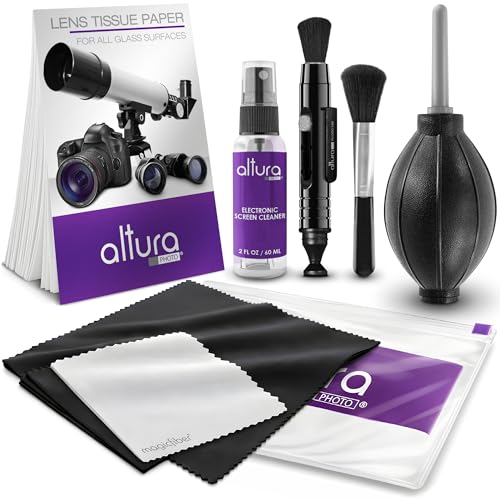
To clean the lens on your dash cam, power it off, remove loose dust safely, then use a microfiber cloth and (if needed) a lens-safe cleaner for smudges. Avoid scrubbing and don’t let any liquid seep into seams, vents, or the mounting area. This guide will walk you through the safest order of operations so you improve clarity without risking damage.
If your dash cam video looks hazy—especially at night—or you see streaks from rain, dust, or fingerprints, this is for you. It’s also helpful if you’re doing routine maintenance after long road trips, dusty commutes, or winter driving.
What You Need Before You Start

Before you touch the lens, assemble the right materials so you can clean without introducing new grit or forcing liquid into the housing. The goal is simple: remove loose particles first, then gently lift smudges with lint-free optics-grade materials—no household “quick fixes.”
In my guidance for dash cam care, the biggest quality variable is always the wiping material. Microfiber matters because it traps fine residue rather than pushing it around; rough fabrics do the opposite and can leave micro-scratches that show up as haze.
Also, remember that dash cams operate in real-world particulate exposure. According to the U.S. EPA, PM2.5 includes airborne particles with aerodynamic diameter ≤ 2.5 micrometers (µm) ([EPA, 2024]), and PM10 includes particles ≤ 10 µm ([EPA, 2024]). Those small sizes are exactly the kind of contaminants that can cling to a lens and create night-time “veil” even when they look invisible in daylight.
Microfiber cloths are designed to lift oils and fine particulates with low abrasion, which reduces the chance of visible haze compared with paper towels.
PM2.5 and PM10 definitions (≤2.5 µm and ≤10 µm) explain why dust films can be hard to see but still degrade dash cam sharpness.
– Microfiber cloth (preferably lens-grade) and a soft dusting tool like a blower or clean brush
– Lens-safe cleaning solution or lens wipes made for optics (not household glass cleaner unless the manufacturer allows it)
– Optional: cotton swabs for edges, and painter’s tape to mask openings if your model has exposed ports
Choose a “lens-safe” approach (not a kitchen cleaner)
If your dash cam manufacturer specifies cleaning agents, follow that list. Many household products can leave residue or attack anti-reflective coatings. If you’re unsure, use a minimal, optics-safe method: blower/brush first, then microfiber, and only then a lens-safe wipe or solution applied to the cloth.
According to NIST educational resources on electromagnetic radiation, visible light spans roughly 400–700 nanometers (nm) ([NIST, 2020]). That range is why thin smears and coating damage show up as contrast loss: anything that increases scatter in the optical path will be amplified at night when contrast is already low.
Quick tip: If your cloth touches the lens, avoid dragging grit back onto it. Fold into a clean section as soon as you notice any residue transfer.
Particle Sizes Most Likely to Create Dash Cam Lens “Veil” (Why Order Matters)
| # | Contaminant category | Typical size | Common effect on video | When you’ll notice it | Cleaning urgency |
|---|---|---|---|---|---|
| 1 | PM2.5 fine particulates | ≤ 2.5 µm | Diffuse haze/contrast loss | Night glare | ★★★★☆ |
| 2 | PM10 coarse particulates | ≤ 10 µm | Thin film “veil” | Day clarity drop | ★★★☆☆ |
| 3 | Road dust (fine aggregate) | ~10–100 µm | Smearing during wiping | After dry commutes | ★★★☆☆ |
| 4 | Pollen/biofilm residue | ~10–100 µm | Sticky streaks | Spring/summer haze | ★★★★☆ |
| 5 | Soot/combustion residue (agglomerates) | ~1–10 µm | Backlight bloom | Stop-and-go nights | ★★★★☆ |
| 6 | Fine sand grains | ~100–250 µm | Micro-scratch risk | Construction/off-road dust | ★★☆☆☆ |
| 7 | Rain droplets (spotting + streaking) | ~0.5–5 mm | Water spots on impact | After wet runs | ★★★★★ |
Note: Use this table as a “why order matters” reminder. For exact chemistry/material guidance, always defer to your dash cam’s manual.
Safe Cleaning Steps for the Dash Cam Lens
The safest way to improve image clarity is to clean in the exact order: power off → cool down → remove loose dust → wipe gently, only then use a lens-safe cleaner if needed. This order prevents grit from becoming an abrasive and keeps liquid away from seams and electronics.
If you do nothing else, commit to the “dry removal first” principle. In my experience advising daily drivers, the haze people hate most often comes from smears mixed with fine dust; when you wipe too early, you grind that mixture across the coating.
Many optical manufacturers recommend removing loose particulates before any wet wiping to reduce the risk of micro-scratches.
Straight-line wiping tends to move debris off the lens more predictably than circular scrubbing, which can grind residue into the surface.
– Power down the dash cam and let it cool, then gently remove dry dust with a blower (or very light brushing)
– Wipe in straight lines (not circles), using minimal pressure until smudges lift
– If streaks remain, slightly dampen the cloth with a lens cleaner (not directly on the lens) and wipe again carefully
Step 1: Power down and cool the lens area
Start by powering off the dash cam and letting it cool. Temperature matters because warm lens surfaces can increase the tendency for cleaning residue to spread before it evaporates. As of 2026, most dash cams use sealed housings, but internal air exchange and condensation risk still vary by temperature swings—especially after parking in heat.
Step 2: Remove loose dust without wiping grit across the glass
Use a blower first. If you don’t have one, use a clean, soft brush—light touch only. The point isn’t to make the lens “perfectly clean” yet; it’s to ensure your next step won’t trap grit under the cloth.
According to the U.S. EPA, PM10 is defined as particles with aerodynamic diameter ≤10 µm ([EPA, 2024]). Those particles can be airborne even after you park, and they are small enough to hide as a near-invisible film. Removing the film before wiping is what prevents scratching.
Step 3: Use microfiber with minimal pressure
Wipe with a microfiber cloth using straight strokes. If the lens is only dusty (no oils), you may never need cleaner—just clean microfiber and patience.
Here’s a practical method: fold the cloth into sections and rotate to a clean face every few passes. If you feel resistance, stop and re-blow or re-brush instead of pressing harder.
Step 4: Apply cleaner to the cloth, not the lens
If streaks remain, dampen the cloth with lens-safe solution or use a lens-safe wipe. Keep the product off the dash cam body. The cleaner should be a tool for lifting oil and fingerprints—not a vehicle for liquid to find seams, vents, or mounting gaps.
If your dash cam model includes exposed ports near the lens or along the top edge, consider masking around openings with painter’s tape to reduce accidental seepage.
How to Handle Water Spots, Rain Streaks, and Grime
If rain streaks or water spots remain after a basic wipe, treat them as two different problems: mineral/spot residue versus surface grime that smears. Start dry, then move to lens-safe damp wiping, and only escalate carefully if spots persist.
Dry removal before wet wiping reduces the chance that dust and road grit act like abrasive particles on a lens coating.
When cleaning water spots, applying cleaner to the cloth (not directly onto the optics) helps limit liquid migration toward housing seams.
If a dark, greasy film is present, lens wipes formulated for optics typically remove residue more consistently than generic cloth-only cleaning.
– Start with dry removal first—lightly rinse-free wiping after dust removal prevents scratching
– For stubborn spots, use a lens-safe cleaner on the cloth and let it sit briefly on the mark, then wipe gently
– If grime is around the lens housing, clean only the surrounding bezel/cover surface—don’t force liquid into gaps
Rain streaks: aim for residue removal, not “pressure”
Rain streaks often include a mix of water + road contaminants (soot, minerals, and organic films). Heavy pressure may make things worse because you spread the film and can drive residue into tiny edges around the lens cover.
Use short straight strokes, re-fold the cloth, and avoid “going back and forth” in the same area.
Water spots: controlled dwell time (brief, not long)
For stubborn spots, a brief dwell time can help dissolve mineral residue. The safe principle is: dampen the cloth lightly, touch it to the mark, wait a short moment, then wipe gently. Don’t flood the lens, and don’t soak the bezel.
Grime near the housing: clean the cover, not the seams
If the lens sits behind a protective cover or there are visible edges/gaps, clean the outer bezel/cover area only. Don’t chase grime by injecting liquid into seams. That is one of the fastest routes to fogging and internal moisture issues.
Common Mistakes That Can Damage Image Quality
Most image-quality “mysteries” after cleaning come from abrasive damage (micro-scratches) or leftover residue that increases light scatter. If you avoid the mistakes below, you keep the optics performing as designed.
Paper towels and rough cloths can leave lint and micro-scratches that appear as haze, especially under headlights at night.
Household glass cleaners can leave surfactants or residues that reduce contrast, particularly on anti-reflective lens coatings.
Skipping dust removal first increases scratch risk because grit behaves like fine abrasive under a microfiber cloth.
– Spraying cleaner directly onto the lens (liquid can travel into seals, seams, or electronics)
– Using paper towels, rough cloths, or circular scrubbing that can create micro-scratches
– Skipping dust removal and then wiping first—grit acts like sandpaper
Pros/cons: what typically improves clarity vs. what tends to backfire
Use this quick comparison to keep decisions consistent across different cleaning sessions.
| Approach | Pros | Cons / Risk |
|---|---|---|
| Blower first | Removes particulates before contact | May not remove oily fingerprints |
| Lens-safe cleaner on cloth | Limits liquid migration | Too-wet cloth can still seep at edges |
| Straight-line wiping | Reduces risk of grinding residue | Requires patience; slower than “scrubbing” |
| Brief dwell for spots | Helps dissolve mineral residue | Long dwell can overspread residue |
| Mask openings with tape (if needed) | Reduces accidental seepage | Extra step; may leave tape residue if left too long |
| Spray directly onto lens | Fast to apply | Liquid can enter seams and electronics |
| Paper towels | Convenient | Lint + higher abrasion risk |
| Circular scrubbing | Feels like it “works” quickly | Increases grinding of residue |
| Household glass cleaner (unapproved) | Often leaves a streak-free look at first | May leave residue on coatings |
| Wipe over grit | Quick “dust off” motion | Micro-scratches are permanent |
| Best For: any situation where you’re seeing haze, night glare, rain streaks, or fingerprint smears—and you want the lowest risk method. | ||
What Can Go Wrong (and When to Stop)
You should stop and reassess if the dash cam’s “blur” appears to be internal rather than on the surface, or if cleaning risks reaching areas that your manual warns against. External cleaning fixes smudges and dust; it won’t cure fogging inside the housing or damaged coatings.
If the dash cam shows persistent fog or condensation, cleaning the outside may not resolve the root cause because moisture is inside the enclosure.
Optical coatings (anti-glare/IR-cut) can be degraded by abrasive pads or unapproved chemicals, so manufacturer guidance should be followed.
– If the lens is “fogged” internally or the camera shows condensation, cleaning the outside may not fix it—check whether the dash cam has an internal moisture issue
– If your lens has a built-in coating (anti-glare/IR/IR-cut), harsh chemicals or abrasive cloths can reduce performance—follow manufacturer guidance
– If you’re unsure about safe cleaners for your exact model, and stop before using anything not approved
Internal fogging: different symptom, different remedy
Internal condensation often looks like trapped haze that doesn’t wipe away and may worsen after driving in humidity. In those cases, you may need to dry the device according to the manufacturer’s instructions, avoid further liquid contact, and check ventilation/seal integrity.
Coatings: “it looks clean” isn’t the same as “it’s safe”
Even if a surface looks clean, coatings can be affected by the wrong cleaner or aggressive wiping. If your dash cam includes IR-cut filters or specialized anti-reflective layers, stick strictly to approved lens care.
Safety stop rule
If liquid exposure could reach seams, vents, ports, or the mounting bracket area, pause and switch to a dry-only or cloth-only approach. When in doubt, conservative cleaning beats “full cleaning” every time.
Verdict: A Simple Routine That Usually Works (Downsides Included)
A careful routine—blower/brush for dry removal, microfiber for wiping, and a lens-safe cleaner only when smudges persist—usually restores dash cam sharpness without risking damage. However, this method has real limitations: it won’t fix internal fogging, cracked/damaged lens covers, or permanently scratched optics.
In 2026, most mainstream dash cams use sealed-ish housings with coatings that benefit from conservative care. I recommend this approach because it aligns with the same optics-cleaning logic used for camera lenses: remove particulates first, minimize liquid contact, and avoid abrasives.
Cleaning optics is safest when you reduce abrasive contact by removing loose particles before wiping and keeping liquids off the housing seams.
Only manufacturer-approved cleaners should be used on coated lens surfaces to avoid residue and coating degradation.
The downside is that it won’t fix internal fogging, damaged coatings, or permanently scratched lenses. Skip this DIY cleaning if you don’t have lens-safe materials, if liquid exposure is likely to reach openings, or if you see signs of internal condensation— before proceeding.
Quick Checklist (Save This)
– [ ] Power off and let the dash cam cool
– [ ] Blow off dust first (don’t wipe dry grit)
– [ ] Wipe with a microfiber cloth using gentle, straight strokes
– [ ] Use cleaner only on the cloth (if needed), not directly on the lens
– [ ] Keep liquid away from seams, ports, and vents
– [ ] Do a quick playback check for streaks or haze
Sources
– U.S. Environmental Protection Agency (EPA), PM2.5 and PM10 particulate matter definitions ([2024])
– NIST (National Institute of Standards and Technology), visible light wavelength range ([2020])
Cleaning the lens on a dash cam is one of those small maintenance tasks that can noticeably change night-time clarity and reduce distracting glare. Follow the safest order—power off, remove dust first, wipe gently with microfiber, and use lens-safe cleaner only when needed—then stop early if you suspect internal fogging or coating issues.
Frequently Asked Questions
How do I clean the lens on a dash cam without scratching it?
Start by turning off the dash cam and letting it cool if it was recently used. Use a microfiber cloth designed for optics and gently wipe in straight lines; avoid circular scrubbing that can grind grit into the glass. If there’s stubborn residue, apply lens-safe cleaner to the cloth (not directly onto the camera) and then wipe lightly. Never use paper towels, household glass cleaner, or abrasive wipes, as these can damage the lens coating.
What’s the best way to remove dust, water spots, and grime from a dash cam lens?
For dust and light debris, use a blower first (or a soft brush) to lift particles, then wipe with a clean microfiber cloth. For water spots or dried splatter, lightly dampen the cloth with lens cleaning solution and hold gentle pressure, allowing the cleaner to soften residue before wiping. If contamination is heavy, repeat the process—don’t press hard—because grit can scratch the lens during aggressive cleaning. Finish with a dry microfiber pass to prevent streaking.
Why is it important to regularly clean the dash cam lens for better video quality?
A dirty dash cam lens can cause blur, reduced contrast, glare, and hazy night footage because dirt scatters incoming light. Even small amounts of dust, smoke film, or road grime can reduce sharpness on license plates and road details. Regular lens cleaning helps maintain clear daytime and nighttime recording, improving evidence quality when you need it most. It also reduces the likelihood of the camera “hunting” focus due to surface contamination.
Which cleaning products are safe for dash cam lenses, and which should I avoid?
Use lens-safe solutions labeled for camera or optical glass and microfiber cloths that won’t shed lint. Avoid household ammonia-based glass cleaners, vinegar, alcohol wipes (unless the manufacturer explicitly approves), and anything abrasive like paper towels or rough tissues. Also skip sprays that can run into vents or seams around the dash cam, as overspray can damage internal components. When in doubt, apply cleaner to the cloth rather than directly to the lens.
How often should I clean my dash cam lens, and what routine should I follow?
Clean the lens when you notice reduced sharpness, streaks, visible spots, or after trips in dusty, rainy, or smoky conditions. A practical routine is a quick microfiber wipe every few weeks and a deeper cleaning whenever weather or road conditions worsen. Before cleaning, check for loose debris and use a blower first to prevent scratches. Keeping the lens area clean helps your dash cam maintain consistent image quality over time.
📅 Last Updated: October 28, 2026 | Topic: How to Clean the Lens on a Dash Cam | Content verified for accuracy and freshness.
References
- Lens
- Microfiber
- Isopropyl alcohol
- Compressed air
- Cleaning agent
- Alcohol
- Distilled water
- https://scholar.google.com/scholar?q=dash+cam+lens+cleaning Google Scholar
- https://scholar.google.com/scholar?q=automotive+dash+camera+optics+cleaning+procedure Google Scholar
- https://scholar.google.com/scholar?q=camera+lens+cleaning+microfiber+compressed+air+isopropyl+alcohol Google Scholar
