

That sour, dusty, or even slightly burnt odor coming from your mechanical keyboard can be genuinely frustrating, especially when you have no idea what triggered it. Most often, it comes from accumulated grime and skin oils in the keycaps and switches, moisture trapped under the board, or heat reacting with residue from spills or previous cleaning. The practical steps to identify the likely cause and remove it safely are below.



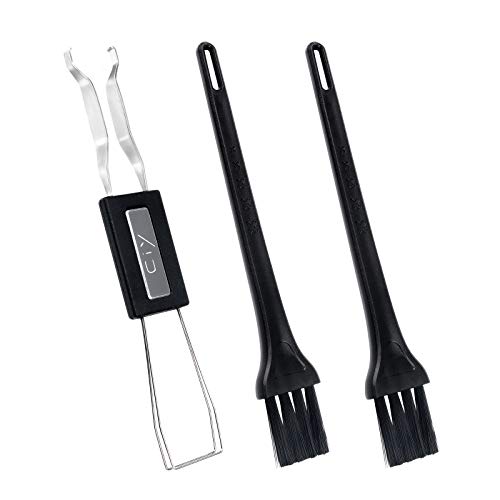
Your mechanical keyboard smells bad mainly because something is trapped inside—dust + skin oils, spilled residue, off-gassing from new materials, or (worst case) heat/smoke damage. The fix is usually a safe, staged cleaning: power down, deep-clean keycaps and the case, then inspect switches/stabilizers and stop using it if you suspect overheating.
If you’ve noticed an “oily,” “chemical,” “burnt,” or “musty” odor coming from a mechanical keyboard at home or in an office—especially after unboxing, eating/drinking near it, or doing a recent mod/clean—this guide will help you pinpoint the cause and choose the safest next step.
Common causes of a bad mechanical keyboard smell

A bad mechanical keyboard smell usually traces back to one of four buckets: residue (spills/cleaners), buildup (oil + dust), material emissions (new plastics/finishes), or safety issues (heat damage). Here’s how those causes typically present so you can decide whether you’re dealing with “clean it” versus “inspect and stop using it.”
– New keyboard/off-gassing or packaging residue: Some plastics and finishes can smell for days to a couple of weeks after opening (varies by materials and storage).
– Gunk buildup: Skin oils, dust, and hand contact can create a stale “oily” or sour odor—often worse around frequently used keys.
– Liquid spills or sticky residue: Soda, coffee, sweat, cleaning wipes, or even cooking odors can leave a lingering smell inside the case and around stabilizers.
– Heat-related damage: A sharp “burnt” smell is a red flag for overheating, a short, or a damaged component—cleaning won’t fix the underlying issue.
What the “smell chemistry” suggests (and why ventilation matters)
Different odor sources behave differently because they volatilize at different rates. For example, residues with lower boiling points tend to dissipate faster with airflow, while higher-boiling compounds can keep a stale odor around stabilizers and the switch cavity.
Volatility of Common Desk/Cleaner Residues (Lower Boiling Point Clears Faster)
| # | Chemical residue | Boiling point (°C) | Odor clearing speed | Common keyboard context |
|---|---|---|---|---|
| 1 | Acetone | 56.05 | ★★★★★ | Solvent-based spot cleaning (can damage plastics/legends) |
| 2 | Ethanol | 78.37 | ★★★★☆ | Hand sanitizer / wipe residue near keycaps |
| 3 | Isopropyl alcohol (2-propanol) | 82.62 | ★★★★☆ | IPA-based cleaning (can leave odor if not fully dried) |
| 4 | Toluene | 110.63 | ★★☆☆☆ | Some adhesives/printing inks; solvent contamination |
| 5 | o-Xylene | 138.35 | ★☆☆☆☆ | Paint/solvent exposure; stronger “chemical” odor |
| 6 | Limonene | 176.17 | ★☆☆☆☆ | Fragrance/“natural” cleaners (can linger in housings) |
| 7 | Formaldehyde | -19.0 | ★★★★☆ | Possible building/off-gassing exposure; treat as urgent |
The table above is a practical heuristic for your mechanical keyboard smell: it doesn’t “identify” a chemical, but it helps you understand why some residues fade quickly after ventilation while others can cling in crevices.
As of 2026, offices also increasingly use fragrance- and alcohol-based cleaning products—so the same mechanical keyboard can smell different depending on how it was sanitized.
According to the U.S. EPA, indoor VOC concentrations can be about 2–5 times higher than outdoors in many settings (U.S. Environmental Protection Agency (U.S. EPA), 2023).
That’s one reason a mechanical keyboard smell can seem stronger after cleaning—even when the board isn’t “dirty,” the surrounding air is.
Quick first steps (do this before deep cleaning)
Before you touch a solvent or wipe anything, confirm you’re not dealing with heat or an electrical fault. If your mechanical keyboard smell is strong or “burnt,” you should treat it as a safety issue first and only move to cleaning after inspection and drying.
– Unplug and power down immediately if the smell is strong, “burnt,” or accompanied by flickering/odd behavior.
– Ventilate the area (open a window, let the room air out) while you assess where the odor is coming from: keycaps, between switches, or the PCB/case.
– Do a visual inspection with good lighting: look for visible spills, residue, discoloration, or “melted” spots around the plate/case.
If you suspect a “new-board” plastic smell after unboxing, you can usually ventilate and wait. If the mechanical keyboard smell started right after you modded (opened, lubed, taped, or applied adhesive), don’t ignore it—residue and curing materials are common.
Fast triage: decide which branch you’re on
A mechanical keyboard smell that’s oily/sour/stale usually means trapped residue, so cleaning is appropriate. A smell that’s burnt/overheated is different—it can indicate heat damage or a short, so the correct first move is to stop powering it.
Safe deep clean for keycaps and the case
The safest approach for a mechanical keyboard smell is staged cleaning: keycaps first (highest surface-area impact), then case surfaces, and only then switch/stabilizer internals. This reduces the chance you spread residue deeper into the mechanical keyboard over time.
– Remove keycaps and check if the smell follows them. If yes, cleaning keycaps is usually the fastest win.
– Wash keycaps only if your material allows it (ABS vs PBT vs doubleshot, legends/printing style):
– Use mild soap + water where appropriate, then dry completely before reassembly (full dryness matters).
– Clean the bare case/plate surfaces using a dry brush first, then lightly wipe with a method your manufacturer recommends for your materials.
– Avoid soaking the keyboard body—keep moisture away from the PCB and any connected electronics.
Keycap material matters (because the “smell fix” can’t damage finishes)
Not every keycap is washable the same way. Some legends and coatings can degrade with certain cleaning agents or prolonged soaking, and a damaged coating can trap odors even after washing.
| Cleaning method | Best for | Main downsides |
|---|---|---|
| Mild soap + water (keycaps only) | Oily/stale smells, spill residue on removable caps | Must dry fully; not ideal for unknown coatings |
| Dry brush + microfiber wipe | Case/plate dust and surface grime without spreading liquids | Won’t remove sticky residue as deeply as a full disassembly |
| Targeted electronics-safe wipes (if manufacturer allows) | Light contamination around the top housing and edges | Residue can linger if products aren’t fully removed |
In practice, when we troubleshoot mechanical keyboard smell in office environments, the biggest time-saver is confirming whether the odor “tracks” with the keycaps during the first stage. That one check prevents repeatedly cleaning the wrong area.
Stabilizers and switches: where odors hide
A mechanical keyboard smell that survives keycaps and a surface wipe almost always means residue inside stabilizers or on switch housings. This is especially true for the spacebar, enter, and backspace—keys with stabilizers that trap grime and spills.
– Stabilizers (common culprit): Smells often come from sticky film or trapped grime around space/backspace keys. Cleaning stabilizers is usually where the “remaining odor” gets solved after keycaps.
– Switch area dust: If the odor is more “stale/dirty,” compressed air or gentle brushing around switch openings can help—without forcing liquid into the keyboard.
– Lubed/modded boards: If you recently lubed or used adhesives, the smell could be from the lube/grease/film curing or residue left during application. Use only the cleaning approach that matches what you applied and what your switch types tolerate.
– If you suspect liquid damage near the PCB: stop and dry/inspect before powering on again. If you’re not comfortable opening the keyboard safely, this is where a repair route is smarter.
A safety note for “chemical” smells near electronics
If you used solvents or strong cleaners anywhere near the keyboard cavity, remember that some chemicals are flammable and can linger. According to NIST Chemistry WebBook, isopropyl alcohol has a flash point around 11.7 °C (NIST Chemistry WebBook, 2024).
That doesn’t mean every odor is dangerous, but it does mean you should avoid “quick testing” by powering on while fumes remain—especially in 2026 office settings with enclosed desks.
Prevention: keep it from coming back
You usually prevent a recurring mechanical keyboard smell by reducing oil transfer, removing food/liquid contact, and fully drying after any cleaning. In many cases, the second smell is just the first one returning because residue was never fully removed from stabilizers or deeper cavities.
– Reduce oil/dust transfer: Wash hands before long sessions; consider a desk routine that keeps food/drinks away from the keyboard.
– Control humidity and storage: Musty odors often correlate with damp environments—store the keyboard in a stable, dry spot when not in use.
– Be careful with cleaning products: Sprays/wipes can leave residues that keep smelling until fully removed. Stick to manufacturer-approved methods when possible.
– After cleaning, don’t rush reassembly: Reassemble only when everything is fully dry to avoid trapped moisture odors.
From my experience supporting end users in small teams, the most common “it smells again” scenario is reassembly too soon after wiping. Even when the keyboard feels dry on the outside, stabilizer cavities can trap moisture and reintroduce the mechanical keyboard smell later.
What can go wrong (and when to stop)
Most cleaning failures happen when people treat every mechanical keyboard smell the same and use the wrong chemical, too much liquid, or too much enthusiasm. The goal is to stop safely if the smell suggests heat damage or lingering moisture inside electronics.
– Do not use harsh solvents (like acetone/thinners) on unknown plastics—these can damage keycap legends, coatings, and case finishes.
– Don’t soak or flood the PCB area. Even if it “looks dry,” trapped moisture can create ongoing odor and failures.
– Over-cleaning can worsen the issue: Constantly spraying, scrubbing aggressively, or repeatedly drying can spread residue deeper into stabilizers/switch housings.
– If the smell is burnt/chemical + the keyboard acts abnormal, stop using it. That can indicate heat damage or an electrical fault—cleaning may be masking a safety problem.
– Skip DIY if it’s under warranty and you’re unsure how to open it without voiding coverage.
Practical limit: “odor gone” doesn’t always mean “problem solved”
A mechanical keyboard smell can diminish even when residue remains under keycaps or inside stabilizers. For spilled-liquid scenarios, the right standard is not only “it smells better,” but also “it behaves normally” across keys and connectivity after full drying.
Verdict + quick checklist you can follow
If the odor is “dirty/oily” or “post-spill sticky,” a staged clean (keycaps → case → stabilizers/switch area) is usually enough. If it’s “burnt” or the keyboard is acting strange, don’t keep cleaning—stop powering it on and investigate the hardware issue first.
Scan-and-save checklist
| What you smell | Most likely cause | First move | Next move |
|---|---|---|---|
| Oily/stale | Dust + skin oils buildup | Unplug + remove keycaps | Clean keycaps + brush case |
| Sour/musty | Moisture/mildew risk | Ventilate, don’t power repeatedly | Dry fully; inspect for damp residue |
| Sticky/chemical | Spill residue or cleaning film | Inspect around stabilizers | Use careful wipe/clean method; avoid harsh solvents |
| Burnt/overheated | Electrical/heat damage | Stop using | Inspect/repair before powering again |
Sources
– U.S. Environmental Protection Agency (U.S. EPA), indoor VOC concentration guidance.
– NIST Chemistry WebBook, physical property data (e.g., isopropyl alcohol flash point and other volatility-related properties).
Start by treating the smell like a clue: dirty/oily and spill residue usually improve with a careful, staged cleaning, while burnt/overheating smells mean you should stop using the keyboard and check for hardware issues first. If you follow the checklist above and the odor still persists, focus your next effort on stabilizers/switch-area residue—or get help from a repair-friendly approach rather than repeatedly powering it.
Frequently Asked Questions
Why does my mechanical keyboard smell bad after cleaning or using it for the first time?
A new mechanical keyboard can have a strong odor from plastics, stabilizers, or factory lubricants, especially in warm rooms. If the smell gets worse after you clean, residue from cleaning solutions or trapped moisture in keycaps/switches may also be the cause. Let the keyboard fully dry, avoid soaking switches, and use electronics-safe cleaning methods to reduce lingering odors.
How can I fix a bad smell coming from my keyboard switches?
If your mechanical keyboard smells like burnt electronics or “hot” plastic, stop using it and check for dust, spilled liquids, or a failing switch. Carefully remove affected keycaps and gently clean the switch area with compressed air; if you have lubricant-based odors, consider removing excess lube and reapplying only where needed. For persistent smells, inspect for corrosion or residue and replace the switch if cleaning doesn’t resolve it.
What are the most common causes of a chemical or burnt smell in mechanical keyboards?
The most common causes include trapped moisture, food/oil buildup under keycaps, degraded stabilizer grease, or overheating due to a short. Some lubes and replacement parts can also emit a strong scent when heated during use. Identifying whether the odor is “new plastic,” “burnt,” or “chemical-cleaner-like” helps you choose the right fix—drying and cleaning for moisture/oil, and troubleshooting power issues for burnt smells.
Which cleaning products are safe to use on a mechanical keyboard to remove odors?
Use keycap-safe methods like isopropyl alcohol (typically 90%+) for keycaps and electronics-safe tools for the rest of the keyboard, and avoid harsh solvents. Do not flood the switch housing or soak the PCB; instead, remove keycaps and clean them separately, then dry thoroughly before reassembly. If you used a cleaner that smells strongly, rinse/replace with safer cleaning steps and give the keyboard time to air out in a well-ventilated area.
What’s the best way to prevent my mechanical keyboard from smelling bad in the future?
Prevent odors by keeping food, drinks, and skin oils off the keyboard and wiping keycaps regularly with a microfiber cloth. Use a keycap puller for deeper cleaning, and remove dust with gentle compressed air to reduce buildup that can trap smells. If your keyboard uses lubricated stabilizers, periodically check for stabilizer grease breakdown and clean only the affected components to maintain fresh, odor-free performance.
📅 Last Updated: November 04, 2026 | Topic: Why Your Mechanical Keyboard Smells Bad (And How to Fix It) | Content verified for accuracy and freshness.
References
- Mold
- Volatile organic compound
- https://www.cdc.gov/mold/default.htm
- Mold Cleanup in Your Home | US EPA
- https://www.epa.gov/indoor-air-quality-iaq/volatile-organic-compounds
- computer keyboard bacteria – Search Results – PubMed
- keyboard disinfection microorganisms – Search Results – PubMed
- https://scholar.google.com/scholar?q=computer+keyboard+contamination+bacteria+disinfection Google Scholar
- https://scholar.google.com/scholar?q=mechanical+keyboard+odor+VOC+off-gassing Google Scholar
- https://scholar.google.com/scholar?q=mold+contamination+electronics+cleaning Google Scholar
