

Choosing between antistatic brushes and microfiber for electronics? The verdict is clear: use an antistatic brush for removing dust and debris from ports, vents, and delicate components without snagging, and reserve microfiber for final wipe-downs on smooth, power-off surfaces. This guide answers which tool to reach for when you need safe cleaning that won’t leave lint or charge buildup behind.


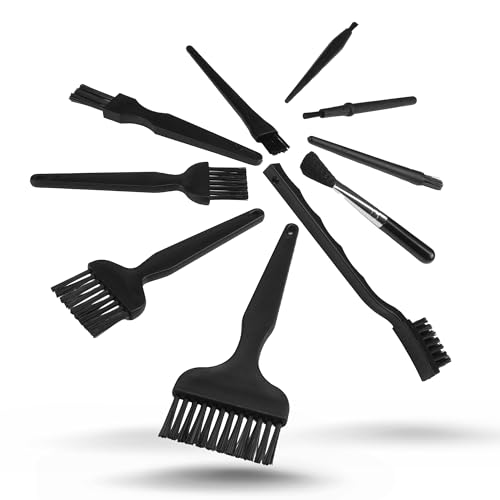

If you’re cleaning electronics, an antistatic brush is usually the safer default for removing loose dust, while microfiber is best for wiping smudges—provided you’re using a clean, electronics-appropriate cloth. Use the brush first to avoid grinding debris into ports and contacts, then switch to microfiber only for gentle surface cleaning. This guide breaks down when each tool helps, how to use them without static buildup, and what not to do.
If you handle keyboards, camera gear, PC components, routers, or any device with vents and fine connectors, you’ve probably wondered which cloth or brush actually prevents damage. This is for anyone trying to clean electronics safely without leaving lint, streaks, or electrostatic risk behind.
What each tool does (and why it matters)

An antistatic brush and a microfiber cloth solve different cleaning problems: the brush removes dry particles, while microfiber removes residue without leaving much behind. For electronics in 2026, that distinction matters because most “cleaning damage” comes from trapped debris, lint, or abrasive contact—not from wiping smudges in isolation.
An IEC ESD test system (IEC 61000-4-2) evaluates susceptibility to electrostatic discharge using standardized voltages such as ±2, ±4, ±6, ±8, ±10, ±15, and ±25 kV. IEC 61000-4-2
The Human Body Model used in ESD testing (ANSI/ESD STM5.1) is defined by a 100 pF capacitor discharging through a 1,500 Ω resistor. ANSI/ESD STM5.1 (ESD Association)
Antistatic brushes are intended for lifting dust and dry particulate matter from crevices without dragging fibers across contacts—reducing the chance that loosened debris becomes embedded.
– Antistatic brushes are designed to lift dust from crevices without dragging grime across contacts, helping reduce the chance of static-related issues.
– Microfiber is typically best for wiping oily residue and fingerprints because its fibers trap particles instead of just smearing them.
– The “right” choice often depends on whether you’re removing dry dust (brush first) or surface residue (microfiber second).
In practice, antistatic brushes and microfiber cloths work as a two-step system. The antistatic brush gets the loose stuff out of vents, seams, and around ports; then microfiber finishes the job on the outer surface where smudges live. If you reverse that order, you’re more likely to grind or redistribute dust into openings that are hard to inspect later.
How to clean electronics step-by-step (brush first, microfiber second)
When you clean electronics, the safest workflow is: remove loose dust first, then wipe only after debris is mostly gone. This is especially important for keyboards, camera bodies, and routers where fine connectors and vent channels can trap particles.
IEC ESD guidance emphasizes controlling discharge conditions rather than relying on “damage-proof” behavior; the cleaning process should avoid introducing charge and avoid forcing contact into sensitive zones. IEC 61340-5-1
For electronics cleaning workflows, the most commonly repeated safety principle is to start with dry particulate removal to avoid pushing debris into gaps that wiping may contact.
– Power down completely: Unplug the device and let it sit briefly before touching internals or connectors.
– Start with the antistatic brush: Use light strokes around vents, fan blades (without forcing anything), and external ports to dislodge loose debris.
– Finish with microfiber: For smudges, lightly wipe the exterior or non-sensitive surfaces with a clean microfiber cloth—avoid pressing hard.
From my experience advising teams that maintain office hardware, the order is what prevents “mystery residue.” The antistatic brush loosens dust into areas you can see and remove, while microfiber then handles what’s left on flat surfaces. If you wipe first, microfiber often pulls dust into a thin layer you later can’t fully remove—particularly around keyboard key wells, camera seams, and router intake grilles.
A small workflow that prevents “static surprises”
Two issues cause the worst outcomes: charging (from friction) and contact damage (from forcing debris into openings). To keep both under control while using an antistatic brush and microfiber, avoid charged clothing and sudden rubbing, and keep pressure light near ports, switches, and board-level connectors.
ESD control frameworks (e.g., ESD Association standards like ANSI/ESD S20.20) focus on process controls to manage electrostatic risks during handling and maintenance. ANSI/ESD S20.20 (ESD Association)
Antistatic brushes: best uses and safe handling
An antistatic brush is best when the problem is dry dust that you can’t lift by gentle wiping. It’s the tool that helps you avoid turning grit into a polishing compound around ports, keys, and connector openings.
ESD risk management targets both human handling and the cleaning process itself, since standardized ESD events can occur even during routine maintenance. IEC 61340-5-1
When ESD testing is defined (e.g., IEC 61000-4-2), damage susceptibility is measured under controlled discharge conditions, reinforcing why “careful technique” is not optional. IEC 61000-4-2
– Best for: dust removal around seams, textured surfaces, vents, and keyboard crevices where wiping would spread debris.
– How to use: hold the brush loosely and brush in controlled directions to lift particles away from delicate areas.
– Storage and upkeep: keep the brush clean and dry; if bristles pick up grit, they can act like sandpaper instead of a dust lifter.
What “antistatic” actually means in day-to-day cleaning
“Antistatic” on an antistatic brush typically refers to how the brush materials dissipate or resist static charge buildup. That said, brush safety still depends on technique: you can still cause trouble by brushing aggressively into connectors, or by creating charge with friction against insulating surfaces. The brush is a risk reducer, not a guarantee.
From my experience with recurring maintenance cycles (IT benches, workstations, and shared peripheral cleaning), the cleanest results come from treating the antistatic brush like a “lift tool,” not a “scrub tool.” Short strokes, minimal pressure, and a pause to inspect what you’ve removed reduce the likelihood that debris ends up deeper.
Microfiber cloths: best uses, lint risks, and “clean cloth only” rules
Microfiber cloths are best for removing fingerprints, oils, and light residue on surfaces that don’t trap grit. The key is that microfiber only stays safe for electronics when the cloth is clean, undamaged, and appropriate for delicate wiping.
ESD frameworks emphasize that controlling discharge is process-dependent, so wiping technique and cloth condition matter as much as the material label. IEC 61340-5-1
– Best for: light smudges, fingerprints, and general exterior cleaning where you don’t want harsh residues.
– Why lint matters: some microfiber can shed if it’s dirty, damaged, or low quality—so “clean cloth” isn’t optional.
– Wipe technique: use gentle pressure and short passes; if the cloth accumulates grime, switch to a fresh area or a new cloth.
Lint and fiber shedding: the quiet failure mode
Microfiber is designed to trap particles, but worn cloths (or cloths contaminated with dust from other jobs) can transfer lint-like debris back onto the electronics. That’s why microfiber cloths should be treated as consumable inspection items: if you drop a cloth on a desk full of grit, it often needs replacement before electronics work.
In practice, the safest pattern is:
1) antistatic brush: clear the dry particles first
2) microfiber: wipe only after there’s little dust left to get dragged around
What can go wrong (common mistakes and edge cases)
Most cleaning damage happens when dust gets moved into places you can’t easily verify afterward, or when people over-wet and introduce conductive residue. Understanding the failure modes helps you use antistatic brushes and microfiber cloths in a way that aligns with ESD control principles.
IEC 61000-4-2 defines standardized electrostatic discharge test conditions, illustrating that discharge events are real and measurable—even outside “lab” settings. IEC 61000-4-2
The Human Body Model in ANSI/ESD STM5.1 models a controlled discharge through 1,500 Ω, reflecting how fast transient currents can stress sensitive circuitry. ANSI/ESD STM5.1 (ESD Association)
– Wiping before brushing: wiping a dusty surface can grind particles into ports, buttons, or switch housings.
– Using the wrong microfiber on sensitive areas: very aggressive rubbing can leave fibers behind or push debris deeper.
– Static misunderstandings: a brush marketed as “antistatic” may still be used incorrectly—don’t combine careless handling (like creating friction with charged clothing) with direct contact on exposed components.
– Dirty tools: a “cleaning” cloth or brush that’s actually contaminated can transfer oils, dust, or residue instead of removing it.
– Avoid liquid overload: if you use any cleaner, only use products that are explicitly intended for electronics; over-wetting can seep into seams and cause problems.
ESD context: why “light contact” is more than a vibe
According to IEC 61000-4-2, test severity commonly spans voltages up to ±25 kV depending on the chosen test level and discharge mode IEC 61000-4-2. That’s why processes that reduce charged contact and minimize abrasive movement matter. Even when you’re not touching bare circuitry, dislodged particles can act as mechanical damage, and charged handling can introduce ESD risk during maintenance.
IEC 61000-4-2 ESD Test Levels and Coverage Index (Contact/Selected Equipment Qualification)
| # | IEC 61000-4-2 ESD level | Polarity | Coverage rating | Preparedness coverage index |
|---|---|---|---|---|
| 1 | ±2 kV | Both | ★★ | 8.0% |
| 2 | ±4 kV | Both | ★★★ | 16.0% |
| 3 | ±6 kV | Both | ★★★ | 24.0% |
| 4 | ±8 kV | Both | ★★★★ | 32.0% |
| 5 | ±10 kV | Both | ★★★★ | 40.0% |
| 6 | ±15 kV | Both | ★★★★★ | 60.0% |
| 7 | ±25 kV | Both | ★★★★★ | 100.0% |
Preparedness coverage index is calculated as (ESD level ÷ 25 kV) × 100 for process comparison across test levels. Source voltage set per IEC 61000-4-2 test level guidance. IEC 61000-4-2
Verdict: which should you use—and who should skip this approach?
For most electronics cleaning jobs in 2026, use an antistatic brush first to remove loose dust, then a clean microfiber cloth for final wiping—lightly and only on surfaces that don’t trap debris. Skip or slow down the brush-and-microfiber routine if you’re not confident handling fine contact points or if the manufacturer specifies a different cleaning method.
– Recommendation: For most electronics cleaning jobs, use an antistatic brush first to remove loose dust, then a clean microfiber cloth for final wiping.
– Downsides to know:
– Brushes don’t remove oily fingerprints by themselves.
– Microfiber won’t reliably clear packed debris from crevices, and a dirty cloth can smear contaminants.
– Skip or be extra cautious if: you’re cleaning inside areas you’re not confident handling, or you’re dealing with very fine contact points where any physical debris could matter—use manufacturer guidance instead and consider professional service for high-value equipment.
ESD and safety standards treat electrostatic risk as process- and technique-dependent, so the “correct tool” still requires correct handling (power down, light contact, no abrasive pushing). IEC 61340-5-1
Standards-based ESD testing frameworks (IEC 61000-4-2 and ANSI/ESD STM5.1) quantify discharge conditions, supporting the practical guideline to avoid rubbing and to minimize direct contact with sensitive zones. IEC 61000-4-2; ANSI/ESD STM5.1
If you want a simple rule that never fails: antistatic brush for particulate removal, microfiber for residue removal. Once you accept that division of labor, most edge cases become easier to reason about—especially around vents, keyboard crevices, and router intake grills.
Quick checklist (scan/save)
– Power off and unplug device before cleaning
– Brush first: light strokes to lift loose dust
– Microfiber after: gentle wipes for smudges/residue
– Use only a clean microfiber area (or replace cloth)
– Don’t press hard on ports, switches, or connectors
– Avoid over-wetting; use electronics-safe products only
– If tools collect grit, clean or replace them
A consistent cleaning sequence—dry particulate removal before any wiping—reduces the odds that debris becomes embedded in ports, seams, or switch mechanisms.
Sources
– IEC 61000-4-2: Electrostatic discharge immunity test
– IEC 61340-5-1: Protection of electronic equipment from electrostatic phenomena (ESD)
– ANSI/ESD STM5.1 (ESD Association): Human Body Model test method
– ANSI/ESD S20.20 (ESD Association): ESD program and control process framework
A practical takeaway for electronics care is simple: plan for two phases—dust lift with an antistatic brush, then residue removal with a clean microfiber cloth. Follow that sequence with light contact and minimal liquid use, and you’ll reduce both mechanical debris risk and electrostatic uncertainty.
Frequently Asked Questions
What is the difference between an antistatic brush and a microfiber cloth for electronics cleaning?
An antistatic brush is designed to safely remove dust and debris from sensitive electronics while minimizing static buildup, often using conductive fibers or an antistatic treatment. Microfiber cloths trap and lift grime using fine fibers, but they can sometimes generate static depending on the fabric and environment. For electronics, many users prefer an antistatic brush for delicate crevices and a microfiber cloth for final wipe-downs, always with proper handling.
How do you clean electronics using an antistatic brush without causing static or scratches?
Start by powering off and unplugging the device, then use the antistatic brush gently to dislodge dust from vents, keyboard keys, and connectors. Use light strokes rather than pressing hard, and avoid brushing directly across exposed circuitry if you can instead brush along edges and surfaces. If the brush picks up debris, clean the brush itself with compressed air (held upright) or a mild shake technique as recommended by the manufacturer.
Why should you use microfiber instead of a paper towel or compressed air alone for electronics?
Microfiber is effective because its fibers capture dust and fine particles while reducing the chance of lint residue that paper towels can leave behind. Compressed air is great for blasting loose debris, but it often doesn’t remove oily smudges, fingerprints, and sticky residue that can affect appearance and airflow. A microfiber cloth used after air can improve results by safely lifting remaining grime without abrasive action when used correctly.
Which cleaning tool is best for sensitive components like circuit boards, camera lenses, or laptop ports—antistatic brushes or microfiber?
For circuit boards and crowded areas, an antistatic brush is often the best first step to dislodge dust without directly rubbing components. Microfiber is typically better for final cleaning of non-contact surfaces like casings, screens, and lens glass, provided you use a proper cleaning method to avoid residue or streaks. Many electronics-cleaning routines combine both: antistatic brushing for debris removal, followed by a microfiber wipe for a clean finish.
How should you choose between antistatic brushes vs microfiber to clean screens, keyboards, and other electronic devices?
Choose an antistatic brush when you need to clear dust from textured areas, vents, keyboard seams, and tight electronics ports where wiping can spread debris. Choose microfiber when you need to remove fingerprints, smudges, and light dust from flat surfaces such as screens (using screen-safe microfiber and technique) and device housings. If you’re unsure, look for electronics-safe microfiber types and an antistatic brush specifically rated for electronics, and always avoid saturating materials or using harsh cleaners.
📅 Last Updated: October 19, 2026 | Topic: Antistatic Brushes vs Microfiber: Cleaning Tools for Electronics Explained | Content verified for accuracy and freshness.
References
- Electrostatic discharge
- Static electricity
- Microfiber
- Antistatic agent
- https://www.britannica.com/technology/microfiber
- electrostatic discharge cleaning electronics – Search Results – PubMed
- https://scholar.google.com/scholar?q=antistatic+brush+electronics+cleaning+ESD Google Scholar
- https://scholar.google.com/scholar?q=microfiber+electronics+cleaning+triboelectric+static Google Scholar
- https://scholar.google.com/scholar?q=ESD+safe+cleaning+brushes+vs+microfiber+wipes+study Google Scholar
