

You can use baby wipes to clean a charging cable, but only in a very limited way and only if they are alcohol-free. The key risk is that moisture and residues can seep into the connector and damage internal contacts or interfere with charging. For best results, wipe the outer cable lightly, keep liquid away from the plug, and let it dry completely before plugging it in.
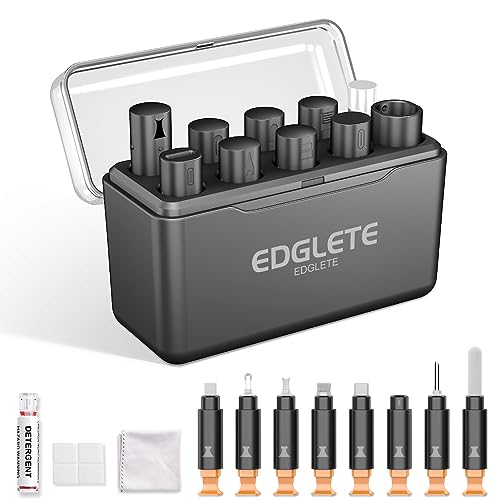



Yes—but only in limited cases. If a wipe is damp and leaves residue, it can migrate into the connector and create intermittent charging or connection failures, so experts generally advise keeping baby wipes away from the metal contact area; instead, use dry, lint-free cleaning first and only lightly moistened cloths when the manufacturer guidance allows. In this guide, you’ll learn when baby wipes are risky, safer alternatives, and how to clean the USB/C charging contact area without damaging it.
If your cable’s outer sheath feels dirty or you only need to remove light grime, this matters. But if you’re trying to clean the metal connector or you suspect moisture, “wipe it down and plug it in” can backfire—so keep reading before you do.
Who this advice is for (and when to pause)

This advice is mainly for anyone who wants to improve charging reliability without introducing new residue or moisture. It’s especially relevant for baby wipes and charging cables because connector ports are where tiny amounts of film or liquid can cause repeated connection problems—often without obvious visible damage.
– You’re dealing with a grimy cable, but you care about keeping charging reliable.
– You’re cleaning the connector end (USB-C/Lightning/micro-USB) where liquid and residue are most likely to cause problems.
– You should pause if there’s visible moisture, corrosion, or the cable gets warm/acts unstable—stop and dry first rather than cleaning further.
Can you use baby wipes on a charging cable?
You can use baby wipes on a charging cable only when you treat them as a jacket-cleaning tool, not a connector-cleaning tool. Experts caution that baby wipe formulations (often water plus surfactants, fragrance, and conditioning agents) can leave films that interfere with electrical contact if they reach the connector.
Why baby wipes are risky near the connector metal
Baby wipes aren’t designed as electronics cleaners, and the chemistry matters. Many wipes are made to moisturize skin, which can mean non-volatile ingredients—substances that don’t fully evaporate—that can leave a thin residue layer on metal contacts. With charging cables, that residue can increase contact resistance (a measure of how easily electricity flows), which often shows up as slow charging, cut-in/cut-out behavior, or “it charges only when I hold it at a certain angle.”
Quick, accurate comparison: what to use instead
If your goal is reliable charging, the safer approach is dry cleaning first, then—only if guidance allows—very controlled use of a suitable cleaner applied to a cloth or swab (not poured or sprayed into the connector).
| Method | What it removes well | Primary risk near connector | Best use |
|---|---|---|---|
| Dry lint-free cloth | Dust, lint, surface grime | Minimal (if no liquid is used) | Connector exterior + cable jacket |
| Baby wipe (jacket-only) | Light grime on cable sheath | Residue/film transfer if it reaches metal contacts | Outer jacket only; let fully dry |
| 70% isopropyl alcohol on swab (if recommended) | Sticky residue, oils, stubborn debris | Too much liquid can wick deeper into the connector | Very targeted cleaning only |
What experts generally say about baby wipes on charging cables
– Avoid wiping the connector metal directly: baby wipes often contain moisturizing agents/fragrance and can leave residue that interferes with contact.
– If you use one at all, keep it off the connector: wipe only the cable’s outer jacket, then let it fully dry before charging.
– Check the wipe ingredients: if it’s scented, oily, or designed to leave “conditioning” behind, it’s a poor choice near electronics.
As of 2026, the practical takeaway from manufacturer-style guidance is consistent: charging ports and connector pins need controlled, minimal moisture—not general-purpose wipes.
Saer cleaning steps experts typically recommend
The safest cleaning workflow for a charging cable is dry first, then (only if allowed) very limited, electronics-appropriate moisture applied externally. This minimizes the chance that baby wipe residue—or any liquid—migrates into the connector where it can affect contact reliability.
Step-by-step: cleaning without damaging USB/C contacts
– Step 1: Unplug and inspect
Look for lint, dust, or debris around the connector. If you see anything packed in, don’t scrape aggressively.
– Step 2: Use dry cleaning first
Wipe the cable jacket with a dry or slightly damp lint-free cloth. For the connector area, start with a dry cloth and gentle brushing (using a soft, non-metal approach).
– Step 3: If you need extra cleaning, use electronics-safe methods
Many manufacturer recommendations for ports emphasize *avoiding* liquids and harsh chemicals. If you’re going beyond dry cleaning, use an electronics-safe cleaner only as the manufacturer guidance allows (often meaning: apply to a cloth, not directly into the port/connector).
– Use the manufacturer’s recommended approach: for example, Apple’s published cleaning guidance for iPhone/iPad ports describes cleaning with a soft, dry, lint-free cloth first, and—when needed—using a cotton swab lightly dampened with 70% isopropyl alcohol, applied to the swab (not poured into the port), followed by allowing the area to dry fully.
Why “lightly moistened” is not the same as “wipe and plug in”
Liquid behavior is the hidden issue. Water boils at 100°C at standard atmospheric pressure , so it won’t “instantly disappear” in a port environment—especially if a wipe adds additional non-volatile ingredients. Meanwhile, acetone boils around 56.05°C and is often used as a solvent in industrial cleaning—but it’s generally *not* the kind of chemical you should improvise near device contacts unless the manufacturer explicitly says so. Even isopropyl alcohol (boiling point around 82.6°C) can wick if applied too aggressively.
That is why experts emphasize: apply to a cloth/swab, keep the volume minimal, and fully dry before reconnecting.
What can go wrong (common edge cases)
You can accidentally make charging worse when residue or moisture ends up inside the connector area. This is where baby wipes on charging cables tend to create “intermittent charging” that feels like the cable is almost working—until it suddenly stops.
– Residue buildup: baby wipes can leave a film that attracts dust and reduces contact reliability.
– Liquid in the connector: even “mostly dry” wipes can push moisture toward the internal contacts.
– Fragrance/oils: conditioning ingredients can interfere with conductive surfaces.
– Damage from aggressive cleaning: metal picks, soaked wipes, or harsh solvents can harm the connector plating or internal contacts.
– False comfort with “it still charges”: early residue can cause intermittent charging that gets worse over time.
Additional real-world edge cases to watch for (especially in 2026):
– Wipes used after a food/drink spill: if the cable picked up sugars, salts, or oils from the environment, residue is more conductive and harder to remove with a baby wipe.
– Lint trapped in the port: if you wipe without clearing debris, you can smear lint deeper instead of removing it.
– Connector warmth after cleaning: if the cable end or port area warms while charging, stop using it and let everything dry fully—warmth can indicate poor contact, higher resistance, or an underlying connector issue.
Verdict: Should you clean with baby wipes?
Baby wipes are best treated as a jacket-only tool, not a connector-cleaning solution. If you want the safest outcome, use dry cleaning first, keep liquids away from the connector, and follow your device/cable maker’s guidance. Skip baby wipes entirely if the cable end looks corroded, if you suspect moisture intrusion, or if you’re cleaning the connector itself—switch to dry/lint-free cleaning and manufacturer-approved methods instead.
Downsides to be clear about:
– Baby wipes can leave residues that don’t show up until you plug in.
– “Let it dry” may not be enough if oils/conditioning agents remain on metal contacts.
– If there’s corrosion, cleaning won’t reliably fix a compromised contact surface—replacement is often the durable fix.
Who should not follow this approach:
– If you see visible corrosion on the connector pins or metal shielding, cleaning may spread damage—consider professional inspection or replacement.
– If the cable/port area got wet internally (for example, after submersion or a spill that reached the connector), prioritize drying and manufacturer support rather than repeated wipe attempts.
Quick checklist: cable cleaning dos and don’ts
| Do | Don’t |
|---|---|
| Unplug the cable before cleaning | Plug it in immediately after wiping |
| Start with a **dry** lint-free cloth | Apply baby wipes directly to the connector metal |
| Keep wipes on the **outer jacket** only | Use wipes that are oily, scented, or meant to leave residue |
| Let everything dry fully | Use metal tools to scrape inside the connector |
| Follow manufacturer guidance for port/connector cleaning | Rely on “waterproof” claims if the wipe is still leaving moisture/film |
Conclusion
Baby wipes can be useful on a charging cable’s outer jacket, but using them on the connector metal is a common path to intermittent charging because residue and moisture are hard to predict and control. For reliable results—especially with USB-C, Lightning, and micro-USB—start with dry, lint-free cleaning, keep liquids away from the contact area, and follow manufacturer guidance if you need controlled moisture (such as a lightly dampened swab method where explicitly recommended). If corrosion or moisture intrusion is suspected, the safest move is to stop, dry thoroughly, and consider service or replacement rather than repeating wipe-based cleaning.
Sources:
Frequently Asked Questions
Can you clean a charging cable with baby wipes without damaging it?
You can sometimes wipe a charging cable with baby wipes, but it’s not risk-free. Many baby wipes contain alcohol, fragrances, or conditioning agents that can leave residue on the cable’s jacket and may dry out printed labels or degrade some coatings over time. Use baby wipes only for a quick exterior wipe, avoid soaking, and never let liquid seep into the connector or charging port area.
How should you clean a dirty charging cable safely if baby wipes aren’t ideal?
For safer cleaning, unplug the cable and use a lightly damp, lint-free cloth to remove visible grime from the outer insulation. If you need to sanitize, use a small amount of isopropyl alcohol on a cloth (not directly on the cable) and wipe the exterior, then let it fully dry. For connector areas, stick to dry cleaning tools like a soft brush or compressed air—experts generally advise avoiding wet wipes near the metal contacts.
Why do experts warn against using baby wipes on charging ports and connectors?
Experts typically caution because connectors and port contacts are delicate and can trap moisture or wipe residue. Ingredients in baby wipes can be sticky or leave film, which may interfere with the electrical connection and lead to poor charging performance or intermittent connectivity. Keeping wipes away from the plug end and the actual port helps reduce the risk of corrosion and contact issues.
What’s the best way to remove grime from the plug end of a charging cable?
The best approach is dry, careful cleaning: inspect the plug, then use a soft, dry brush or a clean microfiber cloth to lift dust and lint. For stubborn debris, use compressed air in short bursts and avoid any liquid getting into the connector. If you’re dealing with visible gunk, only use minimal isopropyl alcohol applied to a cloth tip—never flood the plug—and allow complete drying before plugging in.
Which cleaning products are safest for charging cables and what should you avoid?
Safest options are plain microfiber cloths, lint-free swabs, and isopropyl alcohol applied sparingly to the outside (with no liquid entering the connector). Avoid baby wipes that contain alcohol, fragrance, oils, or moisturizers near the plug, as well as disinfectant sprays and soaking methods that can leave residue or cause moisture buildup. If your cable is heavily soiled, replacing it may be safer than repeatedly cleaning it, especially if you notice charging cutouts or corrosion signs.
📅 Last Updated: November 01, 2026 | Topic: Can You Clean a Charging Cable With Baby Wipes? What Experts Say | Content verified for accuracy and freshness.
References
- https://www.cdc.gov/coronavirus/2019-ncov/prevent-getting-sick/disinfecting-your-home.html
- https://www.who.int/publications/i/item/cleaning-and-disinfecting-environmental-surfaces-in-the-context-of-covid-19
- Coronavirus (COVID-19) and Disinfectants | US EPA
- Wet wipe
- baby wipes disinfectant efficacy – Search Results – PubMed
- electronic devices cleaning disinfectant wipes 70% isopropyl – Search Results – PubMed
- quaternary ammonium residue electronic surfaces wipes – Search Results – PubMed
- https://scholar.google.com/scholar?q=cleaning+disinfecting+electronic+devices+disinfectant+wipes Google Scholar
- https://scholar.google.com/scholar?q=baby+wipes+disinfectant+effectiveness Google Scholar
