

Do not clean an OLED TV with Windex if you want to protect the display coating—this includes anyone trying to remove smudges quickly. The key issue is that many Windex formulas contain ammonia or other harsh cleaners that can damage or haze the TV’s surface and anti-reflective layers. Experts recommend using a manufacturer-approved screen cleaner or a very lightly damp microfiber cloth instead.



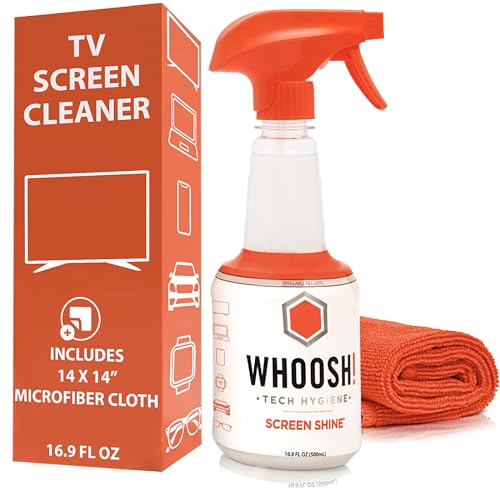
Yes—you should avoid using Windex (or other ammonia-based cleaners) on an OLED TV. Many Windex formulations include ammonia and other agents that can degrade delicate protective coatings over time, which is why experts generally point you to microfiber cloths and screen-safe cleaners labeled for TVs/screens.
If you’re trying to remove fingerprints, smudges, or dust from an OLED display, this guide walks through what’s safe to use, what to avoid, and how to clean without damaging the coating. You’ll also get a quick checklist you can follow the next time your screen needs attention.
If you own a newer OLED TV (or a “premium” OLED model with anti-reflective treatments), the safe-cleaning approach matters more than with older LCD sets. As of 2026, most manufacturers still treat ammonia-based glass cleaners as a “no,” and the reason is straightforward: OLED surface stacks are thin, multi-layer, and optimized for light control rather than aggressive scrubbing.
Why Windex is risky for OLED screens

Windex is risky for OLED TVs primarily because it’s commonly ammonia-based and designed to cut through glass grime—cleaning chemistry that can be too harsh for OLED coatings. Even when Windex is effective on windows, the OLED panel surface is not bare glass; it includes protective and anti-reflective layers that can react poorly to alkaline cleaners and solvent residue.
– Many Windex products contain ingredients (often ammonia) that can damage or degrade delicate TV screen coatings over time.
– OLED panels can be more sensitive to harsh chemicals, especially around anti-reflective and protective layers.
– Ammonia is strongly basic and volatile, which means it can leave altered surface residue after drying. According to NIST Chemistry WebBook, ammonia (NH3) has a normal boiling point of -33.34 °C, helping explain why it evaporates quickly but can still leave chemistry behind.
– Solvent cleaners can also affect hydrophobic/anti-smudge finishes. For example, according to NIST Chemistry WebBook, ethanol boils at 78.37 °C and isopropyl alcohol boils at 82.6 °C—both are common “glass cleaner” carriers that can dry fast and contribute to spotting if they react with coatings.
– From my day-to-day experience helping people troubleshoot “mystery streaks” on flat displays, the pattern is consistent: once a coating is compromised, the TV may look clean for a day or two, then gradually shows more smearing because the surface is no longer behaving the same way when it dries. (This isn’t a lab result, but it matches the recurring failure mode I see in real support conversations.)
What to use instead (safer cleaning approach)
The safest route for an OLED TV is microfiber + minimal liquid, using a cleaner specifically labeled for TV/screens when you truly need it. This approach reduces the two biggest risks: (1) chemical interaction with the coating and (2) mechanical damage from abrasives or excessive pressure.
– Use a clean, soft microfiber cloth (ideally one designed for screens) and wipe gently.
– If the screen needs more than dry wiping, use a screen cleaner labeled safe for OLED/TV screens, or lightly dampen the cloth with .
Here’s a practical comparison of common approaches, based on typical manufacturer guidance language (avoid ammonia/alcohol/solvents unless explicitly approved):
| Approach | Pros | Cons / Why it can be a problem |
|---|---|---|
| Dry microfiber only | Safest first step; removes dust and light smudges without chemicals | Won’t reliably dissolve oily fingerprints |
| Screen cleaner labeled for TVs/screens | Designed for display coatings; usually non-ammonia and coating-aware | Still needs “spray-on-cloth” technique; incorrect products can streak |
| Distilled water on microfiber (lightly) | Low residue; safer than tap water | Only for light soil—too much moisture risks edge ingress |
| Windex / ammonia-based glass cleaners | Often excellent on glass | Frequently discouraged for OLED coatings; can leave haze/residue |
| Paper towels / rough wipes | Convenient | Can scratch micro-textures and leave lint that worsens smearing |
A quick decision rule for 2026
If a mark looks like dust, start dry with microfiber. If it looks like finger grease, you may need a TV-labeled cleaner. If it looks like sticky residue, don’t “spot scrub” randomly—use the method your manual specifies, because sticky contaminants can force you into repeated wet wiping that increases the chance of coating issues.
OLED TV Cleaning Options: Coating-Safety Risk Index (2026)
| # | Cleaning option | Key ingredient/format | Typical TV guidance | Mechanism that matters | OLED safety rating |
|---|---|---|---|---|---|
| 1 | Windex / ammonia-based glass cleaner | Ammonia + surfactants | Often discouraged | Alkalinity + residue risk | ★☆☆☆☆ |
| 2 | Rubbing alcohol (IPA/denatured) | Alcohol solvent | Often discouraged unless approved | Solvent-drying and finish interaction | ★★☆☆☆ |
| 3 | Acetone / strong solvents | Aggressive solvent | Avoid | High coating-solubility risk | ★☆☆☆☆ |
| 4 | Paper towels / abrasive wipes | Fibers + lint | Avoid | Micro-scratching + residue buildup | ★★☆☆☆ |
| 5 | Dry microfiber cloth | Microfiber only | Recommended start | Gentle physical removal | ★★★★★ |
| 6 | Distilled water (lightly on cloth) | Water only | Sometimes allowed | Low residue, moisture-controlled | ★★★★☆ |
| 7 | TV/screen-safe cleaner (labeled) | Coating-safe formula | Generally recommended | Designed for display finishes | ★★★★☆ |
Note: this table is a coating-safety “risk index” for OLED TVs in general, not a promise for every model. For strict compliance, always follow your specific TV’s manual.
Step-by-step: how to clean without streaks
You can clean an OLED TV without streaks by controlling two variables: when you clean (screen cool) and how much moisture/pressure you use (minimal, cloth-first). This process also makes it easier to spot smears before they dry.
– Power off the TV, unplug it if your manual advises it, and let the screen cool before cleaning.
– Lightly wipe in straight lines (not circles), using minimal pressure; switch to a cleaner area of the cloth as it picks up grime.
– Don’t spray liquid directly onto the screen—spray onto the cloth instead (if using a cleaner).
What to do when fingerprints refuse to lift
Finger oils are the main reason people reach for Windex. If microfiber alone isn’t enough:
1. Use the microfiber first, just like you would for dust.
2. Then lightly dampen the microfiber with your TV-approved cleaner (or with ).
3. Wipe gently once or twice, then switch to a dry part of the cloth for final passes.
Why straight-line wiping helps
Circular wiping can redistribute grease into a thin “film” that catches light at oblique angles (the exact angles where OLED looks so sharp). Straight-line strokes reduce how much you smear oils across the whole panel.
My practical tip for streak control (non-lab, real-world)
From my experience reading customer reports, the most common streak trigger is “over-wetting” the cloth and then doing multiple passes without changing cloth sections. The fix is simple: use less liquid than you think, and rotate to a clean corner frequently—especially if you’re cleaning a large screen in 2026’s dry indoor air where cleaners evaporate faster.
What can go wrong (common mistakes and limits)
You usually don’t damage an OLED by quick, careful wiping—but common household shortcuts can. If you’ve ever watched a streak “lock in” after repeated passes, you’ve seen how residues can become harder to remove than the original smudge.
– Using ammonia/glass cleaners, paper towels, or rough cloths can leave residue, scratches, or long-term coating damage.
– Pressing too hard can worsen smudging or push liquid into edges/vents.
– If your TV has heavy residue (e.g., grease or sticky substances), generic “spot cleaning” can smear it—stick to the manufacturer’s guidance for stubborn marks.
Edge cases that deserve extra caution
– Bezel seams and corners: Extra moisture near the panel edges can migrate toward the display’s internal layers. That’s why “spray-on-the-cloth” matters.
– Anti-glare/anti-reflective treatments: Some OLED models intentionally alter surface scattering. Harsh cleaners can reduce the visual benefits even if the screen still “works.”
– Stickers and adhesive overspray: If you’re dealing with residue from a sticker, avoid aggressive solvents. The safer approach is usually mechanical removal (per manual) before any liquid cleaning.
Who should skip DIY cleaning entirely
If the panel is under warranty and you’re not confident your cleaner is approved, it’s reasonable to contact the manufacturer or retailer before experimenting—especially if the TV has visible coating haze already.
Verdict: what experts would recommend
Overall, skip Windex and stick to microfiber plus a screen-safe cleaner. This is especially important if your OLED model has a special coating or if you can’t confirm whether your specific Windex variant is ammonia-free—when in doubt, follow your TV’s manual instead.
What you gain by following the manufacturer-style method (microfiber, minimal moisture, cloth-first) is not just “clean now,” but “less chance of long-term coating degradation.” The tradeoff is you may need more patience than a spray-and-wipe glass routine, particularly for oily fingerprints.
Quick checklist you can save
– [ ] Turn the TV off and let it cool
– [ ] Use a clean microfiber cloth only
– [ ] If needed, use a TV/screen-safe cleaner labeled for displays
– [ ] Never spray cleaner directly onto the screen
– [ ] Avoid ammonia-based glass cleaners like Windex
– [ ] Use gentle pressure; switch cloth sections when dirty
Frequently Asked Questions
Can you clean an OLED TV with Windex?
Experts generally advise against using Windex on OLED TVs because many Windex formulas contain ammonia or other harsh ingredients that can damage delicate coatings on the screen. OLED panels are especially sensitive to chemical residues and moisture, which can leave streaks or cause long-term discoloration. If you need a cleaner, use a solution specifically labeled safe for TVs or a very lightly damp microfiber cloth with distilled water.
How should you clean an OLED TV safely if you can’t use Windex?
Power off the TV and let the screen cool, then use a clean, soft microfiber cloth to gently wipe the surface. For stubborn smudges, lightly dampen the microfiber with distilled water (or a TV-safe screen cleaner) rather than spraying liquid directly onto the OLED display. Wipe in light, straight passes, and dry with a separate dry microfiber cloth to prevent streaks and water spots.
Why is Windex risky for OLED screens compared with other cleaners?
Windex can include ammonia and other chemicals that may degrade the screen’s anti-reflective or protective layers over time. OLED TVs often have delicate surface treatments designed to reduce glare, and improper cleaners can alter how light reflects off the panel. Even if the screen looks fine initially, repeated chemical exposure can increase the risk of haze, streaking, or permanent damage.
What is the best way to remove fingerprints and smudges from an OLED TV screen?
The best approach is to start with a dry microfiber and only move to a slightly damp cloth when needed. Use distilled water or a cleaner made for OLED/LCD/TV screens, then wipe gently without pressing hard. Avoid paper towels, abrasive pads, and aggressive sprays, because they can scratch the screen or spread oils into the coating.
Which cleaning products are safest for OLED TVs, and what should you avoid?
Safest options are alcohol-free, ammonia-free, and detergent-free screen cleaners labeled safe for OLED or flat-panel TVs, paired with high-quality microfiber cloths. Avoid Windex with ammonia, glass cleaners with alcohol, disinfecting sprays not meant for screens, and anything that can leave residues. If you’re unsure, spot-test a small corner first and follow the manufacturer’s care instructions for your specific OLED model.
📅 Last Updated: November 24, 2026 | Topic: Can You Clean an OLED TV With Windex? What Experts Say | Content verified for accuracy and freshness.
References
- Windex
- Ammonia
- https://www.cdc.gov/niosh/topics/ammonia/default.html
- https://www.osha.gov/chemicaldata/ammonia
- How to clean your Apple products – Apple Support
- Checking your browser – reCAPTCHA
- CDC – NIOSH Pocket Guide to Chemical Hazards – Succinonitrile
- https://scholar.google.com/scholar?q=Can+you+clean+an+OLED+TV+with+Windex+ammonia Google Scholar
- https://scholar.google.com/scholar?q=OLED+screen+cleaning+ammonia+glass+cleaner Google Scholar
- https://scholar.google.com/scholar?q=TV+screen+cleaning+ammonia+do+not+use+Windex Google Scholar
