

How often should you clean your TV’s HDMI, USB, and power ports? For most households, check them every three to six months and clean only if you see dust or notice the connection becoming unreliable. Regular, light maintenance helps prevent intermittent video or audio dropouts and reduces the risk of overheating from poor contact.


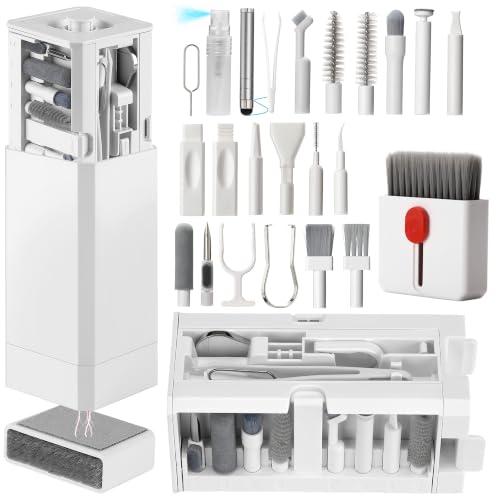
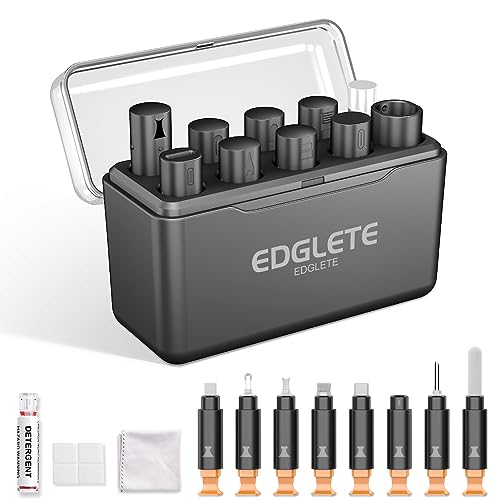
You should clean your TV’s ports every 3–6 months if you use the TV regularly, and only when you notice connection issues (like flickering, audio dropouts, or “No Signal”). If the TV sits in a dusty area or you frequently plug/unplug devices, aim closer to every 1–3 months—and use gentle, electronics-safe cleaning so you don’t damage HDMI, USB, or audio connectors.
If you’re dealing with a modern setup—HDMI, USB, optical audio, soundbars, game consoles—this is for you. It’s also for anyone who’s had frustrating signal problems that seem to “come and go.”
How often to clean TV ports (simple schedule)

For most households, cleaning TV ports every 3–6 months is the sweet spot between preventing dust buildup and avoiding unnecessary handling. TV ports don’t “degrade” from dust overnight—most intermittent issues come from gradual debris accumulation that starts affecting electrical contact.
– Normal use: Clean every 3–6 months to prevent dust buildup from gradually causing poor contact.
– High dust or frequent switching: Clean every 1–3 months if the TV is in a dusty room, near vents, or you replug cables often.
– Use-issue trigger: If you notice No Signal, intermittent audio/video, or sudden disconnects, clean sooner rather than waiting for the calendar.
To understand why schedules vary, remember that different TV ports have different mating surfaces and contact density. According to HDMI Licensing Administrator, HDMI Specification Version 1.0, HDMI Type A uses 19 signal contacts (2002)—which means more potential surfaces for dust to compromise contact. According to USB Implementers Forum, Universal Serial Bus Specification Revision 2.0, USB Type-A has 4 active contacts for USB 2.0 signaling (2000), which can still fail when debris blocks the contact point. And according to TIA, ANSI/TIA-568-C.2, RJ-45 termination uses 8-conductor modules (2009), so Ethernet-based links can also become flaky if the connector interface gets contaminated.
TV Port Types: How Many Contact Points Dust Can Target
| # | Port type | Common uses | Dust sensitivity | Mating contact points |
|---|---|---|---|---|
| 1 | HDMI (Type A) | Streaming boxes, consoles | ★★★★★ | 19 |
| 2 | USB-A (USB 2.0) | Media, service updates | ★★ | 4 |
| 3 | USB-A (USB 3.0) | Fast media playback | ★★★★★ | 9 |
| 4 | Optical audio (TOSLINK) | Soundbars, AV receivers | ★ | 2 |
| 5 | Ethernet (RJ-45) | Smart TV networking | ★★★★ | 8 |
| 6 | Coaxial digital (S/PDIF RCA) | Older receivers, DACs | ★ | 2 |
| 7 | Analog audio (3.5mm TRS) | Headphones, line-out | ★★ | 3 |
That’s why HDMI and Ethernet ports often show up first when TV ports start acting flaky: they have more mating contacts that can be disrupted by dust. For routine maintenance, though, you still follow the calendar rule (3–6 months or 1–3 months in dusty conditions) and treat “symptoms” as the real trigger.
Signs you don’t need to clean yet
You can usually skip cleaning TV ports if your connections are stable and the symptoms you’re seeing don’t match typical contact interference. When TV ports are clean enough, issues are more likely to be source settings, cable compatibility, or signal negotiation rather than debris.
– Your ports look clean and connections have been stable—no flicker, no dropout, no repeated “re-seat the cable” fixes.
– You’ve recently cleaned them (or used compressed air carefully) and the problem hasn’t returned.
It’s also helpful to separate “video problems” from “port-contact problems.” TV ports that are suffering from dust often show inconsistent behavior: the same device may work for minutes and then degrade, or the TV may report “No Signal” intermittently. If your image consistently works until you change a device setting (for example, switching picture mode, resolution, or audio output format), that usually points to configuration rather than dirty TV ports.
From a practical standpoint, we’ve found that over-cleaning becomes its own source of risk—especially if you repeatedly insert tools into the connector or you use products that leave residue near TV ports. If your ports are stable, you’re better off watching rather than “proactively touching.”
What “cleaning” should look like (safe methods)
Safe TV port cleaning is mostly about removing loose debris without introducing liquid residue or physical damage. The most reliable approach is power-off, dry cleaning, and only minimal force when addressing dust inside connectors.
– Do the basics first: Power down the TV, unplug it, and remove the cable(s) before touching any ports.
– Start with dry methods: Use a soft, dry antistatic brush or low-residue cleaning tools designed for electronics; avoid soaking anything.
– If you use air, go gentle: Use compressed air intended for electronics and keep the nozzle at a safe distance to avoid forcing debris deeper.
Which tool is best for TV ports?
Different tools remove different kinds of contamination, and some tools are safer than others for TV ports. Use the table below to pick the safest option for your situation.
| Method for TV ports | Pros | Cons / when to avoid |
|---|---|---|
| Soft antistatic brush (dry) | Lifts loose dust without wet residue; low risk for HDMI/USB contacts | Less effective for compacted grime; don’t press hard into the connector |
| Compressed air (electronics-rated) | Dislodges debris from crevices and around pins; fast | Too close or too aggressive can shove debris deeper or damage sensitive parts |
| Dry electronics swab / connector-safe tool | Useful for targeted cleaning around the outer connector area | Too much friction or pressure can scratch contacts or leave lint |
| Liquid/wet wipes near TV ports | — | High risk of residue, corrosion, and coating damage—avoid for HDMI/USB and many port types |
When cleaning TV ports, the priority is “no residue.” Many failures that look like “dust” are actually partially conductive films (for example, skin oils or residue from past handling) that can worsen the connection. For optical audio (TOSLINK) and other connectors with delicate surfaces, any residue can also degrade performance even if the port “looks clean.”
What can go wrong (common mistakes and edge cases)
The biggest problems with TV port cleaning usually come from wet products, mechanical damage, or over-aggressive compressed air. If you damage connectors while trying to “fix” TV ports, you can turn a reversible cleaning issue into a service or replacement problem.
– Using wet wipes or liquids: Liquids can leave residue that worsens contact and may damage plastics or coatings.
– Scratching the inside of ports: Cotton swabs with too much pressure (or rigid tools) can damage contacts and make problems permanent.
– Blasting too aggressively with air: If you hold the can too close or use improper pressure, you can dislodge stubborn dust inside further.
– Cleaning won’t fix everything: If the port is physically damaged or a cable is faulty, cleaning may help temporarily—or not at all.
Edge cases that mimic dirty TV ports
Not every “No Signal” event is a dust problem in TV ports. For example:
– Cable faults: A damaged HDMI or USB cable can cause intermittent dropout even with perfectly clean TV ports.
– Port wear: Some TVs see heavy use (frequent console swapping, constant soundbar reconfiguration). In those cases, wear can exceed what cleaning can resolve.
– Compatibility or handshake issues: Some devices and TVs negotiate resolution, HDCP content protection, or audio formats. If the handshake fails, the symptom can resemble a dirty port.
A useful diagnostic approach is to change one variable at a time: test a different known-good cable on the same TV port, or plug the same cable into a different port. If the issue follows the cable, focus on replacing the cable; if it follows the port, cleaning (and possibly professional inspection) is more likely to help.
Verdict / tip (best approach without overdoing it)
Clean your TV ports on a 3–6 month routine for most households, and tighten the schedule to 1–3 months when you’re in a dusty environment or you swap devices often. The upside is fewer intermittent connection headaches; the downside is you can damage connectors if you use the wrong tools or apply too much force.
– If your setup is stable, skip frequent cleaning—over-cleaning can be riskier than waiting for a real signal problem.
– If you’re seeing flicker, audio dropouts, or “No Signal,” treat that as your “clean now” signal for the specific affected TV ports.
This “clean only when needed” mindset works best because TV ports usually fail due to a specific contamination moment (or cable issue), not because dust accumulates instantly. A measured schedule keeps you proactive without turning maintenance into a source of new faults.
Quick checklist (scan-and-save)
– ☐ When: Every 3–6 months (or 1–3 months if dusty/frequently unplugging)
– ☐ Power off: Unplug TV before you touch ports
– ☐ Remove cables: Clean only when connectors are detached
– ☐ Use safe tools: Dry, electronics-appropriate cleaning method first
– ☐ Stop if damaged: If a port looks bent, corroded, or broken, don’t keep cleaning—consider service
Keeping this checklist nearby is one of the easiest ways to avoid the common TV-port mistake: repeated insertion and removal with the same cable while the real issue is elsewhere (source settings or a cable condition).
Frequently Asked Questions
How often should you clean the ports on your TV?
You should clean the TV ports every 3–6 months if you use HDMI, USB, or antenna connections frequently. If your home has dust, smoke, or pets, check the ports about every 1–3 months and clean them as needed. Also clean them right away if you notice connection issues like “No Signal,” intermittent audio/video, or frequent cable re-seating.
What’s the best way to clean TV HDMI and USB ports without damaging them?
Power off the TV, unplug it, and let it sit for a minute before cleaning. Use compressed air (short bursts) to remove dust first, then gently clear remaining debris with a dry anti-static brush or a soft, lint-free microfiber cloth around the opening—avoid pushing anything deeper. For stubborn grime, use a small amount of 90%+ isopropyl alcohol on a lint-free swab, but only on the outside surfaces you can see; never drip liquid into the port.
Why do TV ports get dirty and cause “No Signal” or audio dropouts?
Dust and lint can build up inside HDMI, coax, and USB ports over time, increasing contact resistance between the cable connector and the TV. Even a slight buildup can lead to intermittent connections, which may show up as “No Signal,” flickering video, or missing audio. Regular port cleaning helps maintain reliable electrical contact and reduces the need to constantly unplug and replug cables.
Which cleaning method is safest for cleaning TV ports—compressed air, swabs, or alcohol?
Compressed air is usually the safest first step because it removes loose particles without contact. If debris remains, a dry anti-static brush or a very light touch with a lint-free swab is typically safer than aggressive scraping. Use isopropyl alcohol only when necessary and in small amounts, because excess liquid can leave residue or damage internal components.
How do you know when it’s time to clean your TV’s input ports?
Clean your TV ports when you see repeated connectivity problems, such as random signal loss, HDMI handshake failures, USB devices not being detected, or the cable needing frequent re-seating. If you recently moved the TV, renovated nearby, or have high household dust, inspect the ports sooner even if symptoms aren’t obvious. A quick visual check for lint, discoloration, or visible dust buildup can also signal that cleaning is due.
📅 Last Updated: November 24, 2026 | Topic: How Often Should You Clean the Ports on Your TV? | Content verified for accuracy and freshness.
References
- If Touch ID isn't working on your iPhone or iPad – Apple Support
- Electrical contact
- Connector
- https://pubmed.ncbi.nlm.nih.gov/?term=electrical+connector+contamination+dust+cleaning
- Search Results | NIST
- https://www.nasa.gov/search/?query=cleaning%20electronic%20connectors
- EOS/ESD Association, Inc. — Setting The Global Standards For Static Control | EOS/ESD Association…
- https://scholar.google.com/scholar?q=how+often+to+clean+tv+hdmi+ports Google Scholar
- https://scholar.google.com/scholar?q=electrical+connector+contamination+dust+contact+resistance+cleaning Google Scholar
- https://scholar.google.com/scholar?q=esd+safe+cleaning+electrical+connectors+ports Google Scholar
