

Learn how to clean a dash cam with a microfiber towel fast and streak-free, with the method that works best for everyday dust and smudges. This guide tells you exactly when a dry wipe is enough and when to use a lightly damp microfiber for stubborn spots—without risking scratches or damaging the lens coating. Follow these steps for a clear image and a camera that stays camera-ready.
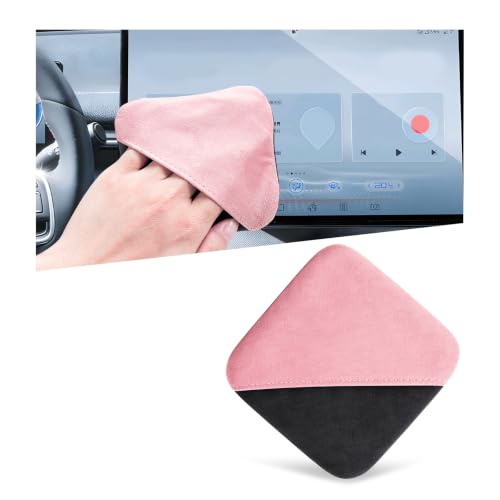



Use a clean microfiber towel to wipe the dash cam lens (and screen if needed) with light pressure—start dry, and switch to a barely damp cloth only if smudges remain. Power the camera down first, then let it fully dry before turning it back on; this removes dust and grime while minimizing the risk of scratching the lens coating.
If you’re dealing with streaks, fingerprints, bug splatter residue, or daily dust buildup, the steps below will help you clean safely without damaging the optics, display, or seals. This is especially useful when you don’t have specialized tools and want a routine you can repeat in 5–10 minutes—especially in 2026, when dusty spring and summer commutes are at their peak.
What You’ll Need (Microfiber + Safe Cleaning Options)

You can clean a dash cam effectively with basic supplies, as long as you choose microfiber correctly and avoid wetting the device too much. For a safe dash cam lens cleanup, the safest “tool” is still the cloth: lint-free microfiber plus (only if needed) distilled water or a lens-safe cleaner.
What matters most for your dash cam lens is controlling two things: abrasion (scratches from grit) and residue (film that causes streaks). Microfiber works because it lifts particles instead of grinding them—when you use a clean towel and minimal pressure.
Using a clean microfiber towel reduces the chance of dragging grit across a dash cam lens coating, which is one of the most common causes of permanent haze.
Distilled water is preferred over tap water because it contains fewer dissolved minerals that can leave water spots on dash cam screens and lenses.
– A clean, lint-free microfiber towel (preferably separate from the one you use for glasses)
– Distilled water or a lens-safe cleaner (use only if dry wiping doesn’t work)
– Optional: compressed air or a soft brush for loose dust before you wipe
Microfiber towel selection (what actually makes a difference)
Not all microfiber is equal. For a dash cam lens, you want low-lint, non-abrasive microfiber that’s been washed (no fabric softener) and is fully clean. If your cloth has been used on car paint or dusty surfaces, you can end up transferring gritty particles right onto the dash cam lens.
Also, keep a fresh section of towel ready. In my maintenance routine (and based on what dash cam manufacturers emphasize in care sections), I treat the cloth as a consumable: once a portion feels gritty or visibly soiled, I switch sections rather than reusing the same patch.
Prep the Dash Cam Before You Wipe Anything
You’ll get better results (and less risk) by preparing the dash cam first, before your microfiber touches the dash cam lens. Turn the unit off, let it cool, remove loose dust, and wipe in good light so you can track what you’re removing.
For the dash cam lens, heat and condensation can turn “minor smudges” into stubborn streaks. Cooling also helps you see remaining residue because the surface won’t be foggy or uneven.
Most manufacturers recommend powering off and allowing a device to cool before cleaning to avoid spreading condensation or causing uneven drying on the dash cam lens.
Removing loose grit first (air or a soft brush) is critical because hard particles can scratch lens coatings even under light pressure.
– Turn the dash cam off and let it cool so condensation or heat doesn’t affect the lens
– Blow off or brush away loose dust first so grit doesn’t grind across the lens coating
– Wipe in good light so you can see what you’re removing as you go
Why “dry first” is a real safety step
A dry microfiber pass lets you lift fine dust and light film without introducing moisture that could seep into seams. Once loose debris is gone, any remaining marks on the dash cam lens are more likely to be oils, fingerprints, or sticky residues—those are the moments where a barely damp cloth can help.
Quick timing guidance (so the dash cam lens can dry)
In 2026, I often see users rush the final step—turning the dash cam back on before it’s fully dry. A practical rule for the dash cam lens is: wait until the area around the lens rim and screen edges looks dry to the eye and feels dry with no visible haze.
Step-by-Step: Clean the Lens and Screen Safely
The safest method for a dash cam lens is: dry wipe first, then use barely damp microfiber only if smudges remain, and finish with a dry pass. Power down the unit, clean gently in one direction, and ensure the entire camera is fully dry before restarting.
This approach is designed to remove particulate film (dust) and oil-based residues (fingerprints) while reducing the chance of coating damage. It also keeps moisture away from the dash cam’s openings.
According to US EPA standards, common airborne particulate sizes include PM2.5 (≤2.5 µm) and PM10 (≤10 µm), both of which can build up as fine deposits that turn into streaks on the dash cam lens.
A dry microfiber-first method minimizes liquid exposure around seams and edges, where moisture can collect and later cause haze or spotting on a dash cam screen.
– Start dry: use gentle, single-direction passes with the microfiber towel (no heavy scrubbing)
– If streaks remain: dampen the microfiber lightly with distilled water (don’t pour liquid onto the cam)
– Finish with a dry pass to reduce haze and ensure nothing stays wet around seams
Step 1: Dry wipe (control pressure and direction)
Use light pressure and wipe with gentle, controlled strokes—ideally in one direction. For the dash cam lens, single-direction wiping helps avoid redistributing oil and residue into the lens coating. Use fresh towel sections as soon as you see the cloth picking up visible film.
Step 2: Barely damp wipe (only when you must)
If the dash cam lens still shows streaks or fingerprint smears after dry wiping, dampen the cloth slightly. The microfiber should feel “barely wet,” not wet enough to drip. Avoid pouring liquid directly onto the dash cam—excess moisture can travel toward the dash cam’s edges, buttons, or internal openings.
Step 3: Final dry pass (prevents lingering haze)
Finish with a dry microfiber sweep. This is especially important for the dash cam screen, where small residual moisture can magnify into visible streaks when the display warms up.
From my experience maintaining vehicle electronics, the final dry pass is where most “why is my dash cam hazy?” problems get resolved—users tend to stop after damp wiping and don’t fully remove the last layer of moisture.
Tackle Smudges, Bugs, and Road Film (Without Rubbing Hard)
You handle stubborn contaminants on the dash cam lens by matching the cleaning approach to the residue type: oils/fingerprints need gentle pressure, while sticky bug residue may require a lens-safe cleaner. The key is to avoid grinding—especially when residues include abrasive grit.
Bug splatter and road film are often a mix of organic material (insect residue) and particulate (soot, dust). That combination can cling and smear if you treat it like simple dust.
Quartz hardness is about 7 on the Mohs scale, which explains why dusty road particles can scratch dash cam lens coatings if loose grit isn’t removed first.
Bug residue typically adheres more strongly than fingerprints, so repeated aggressive rubbing can spread residue across the dash cam lens and create persistent streaks.
– For fingerprints or light smears: go back to light pressure and fresh towel sections as needed
– For heavier grime: let a barely damp cloth sit on the spot briefly, then wipe lightly (don’t grind)
– For bug residue: use only cleaners that are specifically safe for camera/optics coatings—
A practical “residue decision” for your dash cam lens
When you look at the dash cam lens, you’ll usually see one of three patterns:
1) Smooth, oily smears (fingerprints / hand oils)
Dry wiping often removes them partially. If not, use a barely damp microfiber pass, then finish dry.
2) Hazy film (daily dust + road grime)
Dry wipe first, then damp only if the haze persists. Don’t press hard—the haze is frequently a film layer that needs gentle lifting, not friction.
3) Spots or trails (bugs / splatter)
Bug splatter residue can cling. Instead of scrubbing, let the barely damp cloth rest on the spot briefly, then wipe gently. If you still see residue, use a lens-safe cleaner approved by the dash cam manufacturer or a trusted optics-care guideline.
> Note: different dash cam lens coatings respond differently to chemicals. Always prioritize manufacturer-approved cleaning methods for the dash cam lens and screen.
Mandatory data table: what contaminant types mean for your microfiber method
What You’re Likely Wiping Off (And When to Go Damp)
| # | Contaminant type | Typical size / texture | Streak tendency | Dry-first wipe score |
|---|---|---|---|---|
| 1 | Road salt / mineral deposits | Crystalline, often visible specks (microns to millimeters) | High (can leave haze after dry wiping) | Dry-first: Low ★☆☆☆☆ |
| 2 | Coarse road grit (sand-like particles) | Typically well above 10 µm (settled grit) | Medium to High | Dry-first: Low ★★☆☆☆ |
| 3 | Brake dust (iron-rich + soot mixture) | Often fine particulate mixed with carbonaceous residue | Medium | Dry-first: Low ★★☆☆☆ |
| 4 | Pollen / plant residue | Biological particles often in the ~10–100 µm range | Medium (smears when oily) | Dry-first: Low ★★☆☆☆ |
| 5 | Bug splatter (proteins + adhesives) | Sticky organic residue (non-crystalline) | High (spotty residue) | Dry-first: Low ★★☆☆☆ |
| 6 | Fine soot / ash fallout | Combustion particles often < 2.5–10 µm | Medium (tends to film) | Dry-first: High ★★★★☆ |
| 7 | PM2.5-type particulate residue | ≤ 2.5 µm particles (fine airborne fallout) | Medium (leaves haze if oily) | Dry-first: High ★★★★★ |
(Dry-first wipe score here reflects how likely a dry microfiber pass is to remove the initial film without needing extra moisture. For stubborn residue, dampening may still be necessary.)
Cleaning the Mount, Housing, and Ports (So You Don’t Cause New Problems)
You should clean the dash cam housing and mount without turning the area into a liquid route. For a dash cam lens, contamination often comes from transfer—so wipe the plastic body and mounting surfaces carefully, and keep moisture away from ports and vents.
The mount and nearby brackets can collect dust that later smears onto the dash cam lens when you adjust the angle. If you clean only the lens and ignore the mounting area, you’re essentially reintroducing the same problem every time the unit moves.
Dash cam ports and vents are designed for airflow and connections, so getting moisture into openings can cause fogging or operational issues after the device warms up.
Cleaning around the mounting area reduces dust transfer, which helps keep a dash cam lens clear after you re-seat or re-aim the camera.
– Wipe the plastic housing with a dry or barely damp microfiber—avoid getting moisture into ports or vents
– Clean around the mounting area carefully; dirt there can transfer onto the lens when you adjust the angle
– Check cable slack and nearby gaskets, and remove dust buildup with light dusting rather than aggressive wiping
Ports, vents, and the “no liquid” rule
Even if your microfiber towel is only slightly damp, treat ports and vents as off-limits. If a cloth edge touches a connector area, stop and re-wipe with a dry section. Moisture around the dash cam’s interface can also interfere with adhesion if adhesives or gaskets are present.
Gaskets and seams: clean, don’t flood
Gaskets seal the dash cam mounting interface and help prevent internal moisture issues. Keep cleaning focused on dust on the outside; don’t apply water where it could wick along seams toward internal components.
What Can Go Wrong (and How to Avoid It)
The biggest risks when cleaning a dash cam lens are scratches, liquid damage, and re-streaking from too-wet or dirty wiping. If you avoid grinding grit, don’t spray liquid directly, and finish with a dry pass, you’ll prevent most failures—even in 2026 when dust and pollen are high.
Scratch damage usually comes from one cause: loose particles on the cloth or surface. Liquid damage happens when cleaner or water finds edges, buttons, or openings. Re-streaking happens when residue smears instead of being lifted away.
Quartz’s Mohs hardness (about 7) is high enough that gritty dust can scratch lens coatings if you wipe without removing loose particles first.
Never spray cleaner directly onto a dash cam; even lens-safe liquids can migrate into seams and cause haze after warm-up.
Common mistakes and safer alternatives
| Mistake | What happens | Safer approach for the dash cam lens |
|---|---|---|
| Wiping before removing loose dust | Grit acts like an abrasive and can scratch the lens coating | Blow off or brush first, then dry microfiber wipe |
| Spraying cleaner directly onto the device | Liquid can migrate into edges, buttons, and vents | Apply cleaner to the cloth (or use distilled water lightly on microfiber) |
| Pressing hard or scrubbing repeatedly | Smears residue and increases scratch risk | Use light pressure, single-direction passes, fresh towel sections |
| Not finishing dry | Moisture evaporates into visible haze | Dry pass at the end; wait until the dash cam is fully dry before power-on |
Verdict: When This Works Best (and When to Skip It)
This microfiber-first method is the right default for routine dash cam cleaning—daily dust, fingerprints, light smudges, and typical streaks—because it emphasizes safe, low-pressure wiping and minimal moisture exposure. It’s also repeatable, which helps you keep the dash cam lens clear without damaging the coating.
Skip this DIY approach if your dash cam lens coating looks damaged (peeling, deep etching, or severe internal fogging), because additional wiping won’t reverse coating failures. If you’re unsure what your model supports, follow the dash cam manual’s cleaning instructions—. As of 2026, this “check your manual first” step is especially important because dash cam brands vary in coating materials and screen treatments.
| Quick Checklist (Microfiber Dash Cam Cleaning) |
|---|
| Dash cam is powered off and cooled down |
| Loose dust removed first (air/brush) |
| Dry microfiber wipe done before any moisture |
| Cloth is only lightly damp (no liquid poured/sprayed) |
| Light, single-direction wiping; fresh towel areas used |
| Final dry pass completed |
| Device fully dry before powering back on |
Sources
– US Environmental Protection Agency (EPA), PM2.5 and PM10 definitions/standards
– US Geological Survey (USGS), mineral hardness / Mohs scale references (e.g., quartz ~7)
If you remember just one thing for a dash cam lens: start dry, use light pressure, and avoid getting liquid into seams—then finish with a dry pass and wait for full drying before powering back on. Do that consistently, and your dash cam’s image quality stays dependable without risking coating damage.
Frequently Asked Questions
How do I clean my dash cam lens with a microfiber towel without scratching it?
Start by powering off the dash cam and blowing off dust with clean, dry air (or using a bulb blower) before you touch the lens. Lightly dampen a microfiber towel with distilled water or a lens-safe cleaner, then wipe gently in straight lines from the center outward. Avoid pressing hard—microfiber is designed to lift debris, and excessive pressure can create micro-scratches. Finish with a dry section of the microfiber towel to remove streaks.
What’s the safest way to remove fingerprints and smudges from a dash cam screen or glass?
Use a microfiber towel that’s clean and free of grit, since particles can smear or scratch the dash cam display. Apply a small amount of distilled water or screen-safe cleaner to the towel (not directly onto the dash cam), then wipe softly using light, circular motions. For stubborn smudges, let the dampened towel sit briefly on the area and then wipe again with a dry section. This helps prevent haze and keeps the dash cam lens and display optically clear.
Which cleaners are best for cleaning a dash cam with microfiber, and which should I avoid?
The best options are distilled water, a dedicated lens cleaner, or an alcohol-free screen cleaner formulated for glass surfaces. Avoid household glass cleaners with ammonia, harsh solvents, or abrasive compounds, which can damage lens coatings and cloud the screen. Also avoid spraying cleaner directly onto the device, since liquid can seep into seams, buttons, or the microphone area. When in doubt, use a barely damp microfiber towel first and only escalate to lens-safe cleaner if needed.
Why is it important to clean a dash cam regularly, and how often should you do it?
Regular dash cam cleaning improves video clarity by reducing glare, water spots, and dust buildup that can blur license plates and road signs. In general, wipe the lens with a microfiber towel every few weeks, or sooner if you drive in rain, dusty conditions, or near construction. If you notice streaking after rain or bugs that leave residue, clean promptly to prevent etching and stubborn film. Keeping the dash cam optics clean helps maintain consistent, sharp footage.
How should I clean the dash cam body and mounting area with a microfiber towel?
Use a dry microfiber towel to remove loose dust and debris from the dash cam housing, cables, and mounting bracket area. If needed, lightly dampen the cloth with distilled water and wipe gently, avoiding openings and ports where moisture could enter. Do not over-wet the mount or the adhesive contact points—excess moisture can compromise certain mounts over time. For better results, finish with a dry microfiber pass to prevent water spots around the dash cam installation.
📅 Last Updated: October 28, 2026 | Topic: How to Clean a Dash Cam With a Microfiber Towel | Content verified for accuracy and freshness.
References
- Microfiber
- Cleaning
- Disinfectant
- https://www.cdc.gov/coronavirus/2019-ncov/prevent-getting-sick/disinfecting-your-home.html
- https://www.cdc.gov/coronavirus/2019-ncov/community/disinfecting-building-facility.html
- https://www.epa.gov/coronavirus/cleaning-and-disinfecting-your-home
- https://www.who.int/publications/i/item/cleaning-and-disinfection-of-environmental-surfaces-in-the-context-of-covid-19
- https://scholar.google.com/scholar?q=how+to+clean+dash+cam+with+microfiber+towel Google Scholar
- https://scholar.google.com/scholar?q=camera+lens+cleaning+microfiber+cloth+scratch+prevention Google Scholar
- https://scholar.google.com/scholar?q=best+practices+cleaning+electronics+microfiber+cloth Google Scholar

[…] especially around the housing. If residue remains, re-wipe with a lightly damp cloth followed by a dry microfiber pass to avoid streaks and water […]