

Want to clean a turntable with compressed air without risking damage? Use compressed air as the safest first move for clearing dust from the platter, spindle, and turntable exterior—when you keep the can upright, use short bursts, and avoid the cartridge and stylus area. If you’re dealing with grime that’s stuck to the record surface, compressed air alone won’t cut it and you’ll need a proper record-cleaning method instead.
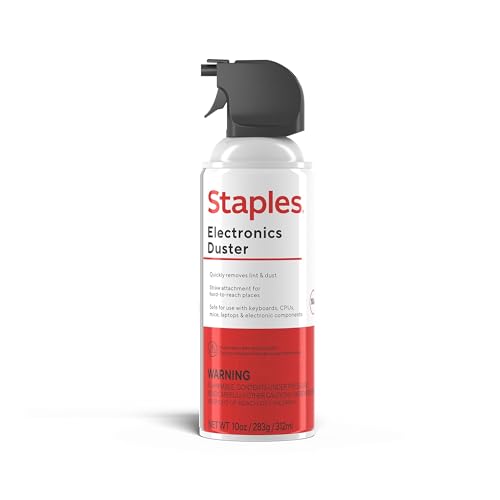


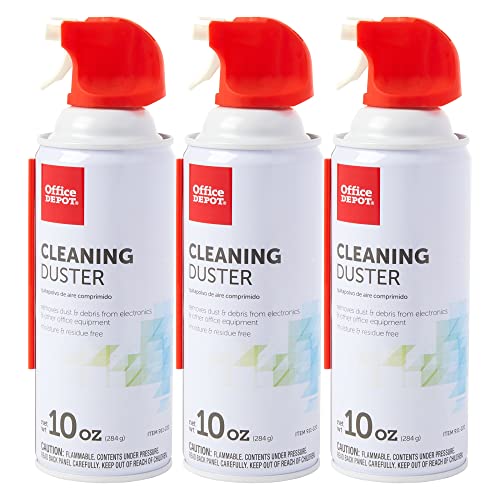
Use compressed air sparingly to dislodge loose dust from the platter surface, spindle area, and hard-to-reach grooves—without touching your stylus or brushing during the blast. The key is a careful “air first, then re-check” routine so you don’t accidentally push debris deeper into the turntable’s mechanism.
If you’ve noticed staticy dust, visible specks near the record path, or buildup around the spindle on your turntable, this guide walks you through a safe, repeatable method using compressed air.
If you’re dealing with light, dry dust (not sticky residue or wet contamination), this approach is a practical first line of defense before you reach for record-cleaning tools. It also helps most when the problem shows up quickly—after a session, during dust-heavy playback, or around the platter/spindle zone where loose particles collect.
Prep your turntable and compressed air can

Prep matters because compressed air is only “safe” when you start from a stable, powered-down state and use the correct can type. Done right, you reduce the chances of propellant spray, loose parts shifting, or dust becoming airborne and settling in the wrong place.
US EPA defines PM10 as particles with aerodynamic diameter up to 10 µm, which are more likely to behave like “loose dust” than the smallest airborne aerosols.
When you target dust removal, fine particles (PM2.5) are ≤2.5 µm by definition, meaning they can linger in the air longer than coarse particles—another reason to re-check instead of repeatedly blasting.
– Power the turntable down, unplug it if convenient, and let anything warm up from use cool fully first.
This reduces the risk of gentle adhesives or damping materials being affected by heat and gives you a calmer, less-static environment for close inspection.
– Choose oil-free, dust-free canned air (or confirm your can is designed for delicate electronics), and keep it ready for short bursts.
Oil-free matters because any residue from “regular” aerosols can transfer onto the platter or deck surfaces and become tacky over time.
– Plan your work area: a towel under the turntable and good lighting help you spot what you’re actually removing.
I recommend positioning bright, angled light so you can see dust movement and confirm whether debris is truly leaving the area or just moving around.
Know what to clean (and what to avoid)
Know what “zone” you’re cleaning before you pull the trigger. Compressed air is best for external, dry dust—and it becomes riskier when you approach the tonearm/cartridge region or anything that could trap moisture or propellant.
PM1 particles are defined as ≤1.0 µm by US EPA sizing conventions, and these very small particles can be harder to “contain,” making re-checking after each burst essential.
Many electronics and pickup manufacturers treat the stylus/cantilever area as a “do not blast” zone because airflow and propellant can displace delicate components.
– Clean dusty external areas (platter surface, around the spindle, record deck surfaces) before touching the tonearm/cartridge area.
Think “platform cleaning” first: you want to reduce what can fall onto the record path while you’re preparing for playback.
– Avoid blasting compressed air near the stylus, cantilever, or cartridge internals—the force and propellant risk can be worse than the dust itself.
Even if the stylus looks “dusty,” the safer approach is controlled, manufacturer-approved stylus cleaning rather than air impacts.
– Don’t aim so hard you can move the tonearm assembly; if you’re likely to do that, stop and switch approach.
If your tonearm is not parked securely on its rest/coupler, compressed air can create enough vibration to shift it—creating a bigger hazard than the dust you’re trying to remove.
How to clean with compressed air: step-by-step
Follow this order—air only where it belongs, then confirm the result—so your turntable stays clean without turning the cleaning into an aerosol experiment. This section is written as a repeatable routine you can do quickly between listening sessions.
US EPA defines PM2.5 as particles with aerodynamic diameter ≤2.5 µm, which helps explain why “chasing dust” with repeated blasts can keep fine particles airborne.
If you treat cleaning as “short bursts + inspection,” you limit how long suspended particles can settle into grooves, seams, and mechanisms.
– Step 1: Stabilize the turntable. Make sure the platter is off or still, and the tonearm is secured per your model (use the arm rest/coupler if it has one).
If your unit supports a transport lock or arm clamp, use it. If it doesn’t, use the arm rest exactly as intended by the manufacturer.
– Step 2: Short air bursts only. Hold the can upright and use brief bursts from a safe distance—then pause to check what changed.
The upright position reduces the odds of releasing propellant liquid. The “pause and look” step prevents repeated blasting that can drive dust deeper.
– Step 3: Clear the obvious zones first. Start with the platter surface and the area around the spindle, working in small sections rather than one long blast.
Dust often accumulates as a thin, irregular film around the spindle and along platter edges—so moving section-by-section improves your odds of actually removing it.
– Step 4: Finish with gentle verification. After air, look again with the same lighting to confirm loose debris is actually gone (don’t immediately repeat dozens of bursts).
If you still see specks, stop and reassess. The next move may be a safer cleaning method (like an approved brush for the deck) rather than “more air.”
Particle size lens: why “air first, then re-check” works (and when it doesn’t)
The reason this method is cautious is that different dust particle sizes behave differently in the air. Coarser dust falls away more quickly; finer fractions can linger and resettle.
Dust Particle Fractions and How “Short Air Bursts” Affect Safety
| # | Particle fraction | Cutoff / range | EPA size basis | Why it’s tricky during air | Safety of compressed-air ★/5 |
|---|---|---|---|---|---|
| 1 | TSP (Total suspended particles) | ≤100 µm (common reporting ceiling) | Broader “all sizes” category | Falls quickly; usually easier to remove as loose dust | ★★★★★ |
| 2 | Coarse dust | 2.5–10 µm | PM2.5–PM10 band | Responds well to “air, then inspect” cleaning | ★★★★☆ |
| 3 | PM10 (coarse-dominant) | ≤10 µm | EPA PM10 definition | More likely to behave like removable surface dust | ★★★★☆ |
| 4 | Fine dust band | ≤2.5 µm | PM2.5 family | Lingers longer; repeated blasting can resettle | ★★★☆☆ |
| 5 | PM2.5 | ≤2.5 µm | EPA PM2.5 definition | More prone to airborne resettling after blasts | ★★☆☆☆ |
| 6 | PM1 | ≤1.0 µm | Fine fraction cutoff (common reporting) | Very fine dust increases “chasing dust” risk | ★☆☆☆☆ |
| 7 | Ultrafine particles | <0.1 µm | Ultrafine reporting range | Can remain suspended and settle unpredictably | ★☆☆☆☆ |
Note: the star ratings above are an operational safety heuristic based on how smaller aerosols tend to behave; always follow your turntable and cartridge manufacturer’s cleaning warnings. For size definitions, see US EPA particulate matter (PM) definitions.
Post-cleaning checks for smooth play
Post-cleaning checks confirm you removed what you intended—and that nothing new has been introduced. This is where the “air first, then re-check” approach pays off: you catch problems immediately, before a record session spreads dust around.
A simple “no-record” visual inspection helps you verify that dislodged dust is not now clinging to moisture-prone spots (for example, residue-free versus residue-tainted areas).
If dust appears immediately after cleaning, the driver may be the record itself rather than the platter surface, which shifts the solution from air to record-cleaning.
– Do a “no-record” visual check: confirm you didn’t loosen anything, and that dust isn’t now clinging to a damp-looking spot.
If you see any glossy wetness, stop—wet contamination is not fixed by more air, and it can create residue you can’t “un-blow.”
– Before playing a record, do a quick cartridge/tonearm readiness check (proper cue position, nothing obstructing the arm’s movement).
Airflow can shift small accessories (dust covers, record mats, or even alignment screws in some setups). A 10–20 second check prevents a playback mishap.
– If dust still shows up right after cleaning, the issue may be from the record itself—consider cleaning the record next rather than escalating air blasting.
This is especially likely if you notice dust specks appearing at the record path consistently across different sessions.
What can go wrong (and how to prevent it)
Most issues come from one of three sources: propellant/moisture, excessive force, or repetitive blasting that redistributes fine dust. If you control those three variables, compressed air stays a useful tool rather than a source of new mess.
Compressed-air “cold spray” and moisture can occur when cans are tilted or sprayed continuously—upright, short bursts reduce the chance of liquid propellant discharge.
The smaller the particle fraction (for example, PM2.5 at ≤2.5 µm), the more it can linger; that’s why inspection pauses matter more than the number of bursts.
– Propellant/moisture risk: Some compressed-air cans can release cold spray or moisture if tilted or used continuously. Prevention: keep the can upright and use short bursts.
If your can feels extremely cold or you notice visible frost/film, stop immediately and let the area return to room conditions before trying anything else.
– Blowing debris deeper: Air can push dust into tighter corners (or toward moving parts). Prevention: aim farther back, use less force, and re-check frequently.
In practice, I’ve found that “one deliberate burst, then look” beats “many bursts in a row,” because dust behavior changes mid-session.
– Static attraction: Dust can cling after you dislodge it. Prevention: pause, observe, and consider an anti-static approach if your setup requires it ().
If static is the core problem, compressed air may only move dust around—anti-static solutions and record-specific cleaning often address the root cause.
– Cartridge/stylus exposure: Direct air at the stylus/cantilever can be risky. Prevention: treat that area as “no-air” unless your cartridge manufacturer explicitly says otherwise.
Even when dust is visible, the safest route is to follow the cartridge brand’s recommended stylus care method.
Verdict: when compressed air helps—and when to skip
Compressed air helps most with loose, dry dust on external surfaces—especially around the platter/spindle area—when you need a quick reduction in grit before playback. Skip it (or don’t rely on it) when you suspect wet contamination, sticky residue, or unknown buildup, because air can spread contamination rather than remove it.
Compressed air is intended for dry particulate removal; when contamination is wet or sticky, manufacturer-approved cleaning methods (rather than aerosol blasts) are the safer path.
If your turntable or cartridge documentation explicitly warns against canned air near specific components, follow that constraint—even if the dust looks tempting to blast away.
Quick checklist before you blast air
| Do | Don’t |
|---|---|
| Use short, controlled bursts | Don’t hold the can at an angle for long sprays |
| Keep the can upright | Don’t blast near the stylus/cantilever |
| Check results after every few bursts | Don’t repeatedly “chase” dust without pausing to inspect |
| Clean external dust first | Don’t use compressed air as your only solution for dirty records |
| Secure/park the tonearm per your model | Don’t apply force that could move the arm assembly |
Frequently Asked Questions
How do I clean my turntable cartridge and stylus using compressed air without damaging it?
Hold the can upright and use short, gentle bursts from a few inches away so you don’t overload the stylus with force. Aim the airflow to lift loose dust off the stylus area rather than blasting it sideways. Afterward, inspect under bright light; if you still see debris, use a proper stylus brush or stylus cleaning fluid instead of repeating compressed air. Avoid touching the cantilever or cartridge components directly with the nozzle.
What’s the best way to use compressed air to remove dust from turntable records?
Remove the record from the platter first and place it on a clean, stable surface. Hold the compressed air can upright and apply brief bursts along the grooves, keeping the nozzle at a safe distance to prevent condensation or propellant from spraying. After blasting, let the record sit for a moment to allow moisture to dissipate, then wipe with a microfiber record cloth or an anti-static brush. If your record has stubborn grime, compressed air alone won’t replace a proper wet-cleaning process.
Why should I avoid spraying compressed air directly onto my turntable platter bearings and motors?
Compressed air can introduce propellant residue, moisture, or fine debris into areas you don’t want contaminated, including bearings and motor housings. Even small contamination can affect smooth rotation and long-term performance. For turntable bearings, follow your manufacturer’s instructions for lubrication and cleaning, typically using the correct service method rather than air. If you’re cleaning the outer platter surface, keep airflow away from openings and internals.
Which compressed air technique reduces static and prevents dust from resettling on the turntable?
Use an anti-static approach by cleaning in a controlled environment and minimizing unnecessary airflow that stirs dust back into the air. After using compressed air, wait briefly and then wipe with an anti-static microfiber cloth or an anti-static brush designed for vinyl surfaces. When possible, ground the area and use a carbon-fiber or anti-static brush to help discharge static before and after cleaning. This combination helps keep loosened dust from resettling on the record or the turntable dust cover.
What should I do if compressed air leaves moisture or residue on my turntable records?
If you see droplets or a wet sheen, stop immediately and allow the record to air-dry in a clean, dust-free area. Then clean with a microfiber cloth and, ideally, a proper record cleaning solution or wet-clean method to remove any propellant residue. For future use, always keep the can upright and use short bursts to avoid freezing, condensation, or liquid spray. If residue persists, switch to air designed for electronics or use a dedicated record cleaning system instead of standard compressed air.
📅 Last Updated: October 27, 2026 | Topic: How to Clean a Turntable With Compressed Air | Content verified for accuracy and freshness.
References
- How to clean your Apple products – Apple Support
- Compressed air
- Electrostatic discharge
- Static electricity
- Phonograph record
- Phonograph
- Phonograph
- https://scholar.google.com/scholar?q=turntable+cleaning+compressed+air Google Scholar
- https://scholar.google.com/scholar?q=phonograph+record+cleaning+compressed+air+static Google Scholar
- https://scholar.google.com/scholar?q=electrostatic+discharge+cleaning+electronics+compressed+air Google Scholar
