


To clean the charging port on a Bluetooth speaker safely and get it charging again, follow the right method for debris and lint buildup without damaging the pins. This guide shows the quickest approach—what to use, what to avoid, and how to verify the connection—so your speaker stops failing to charge. If you’ve been dealing with intermittent charging or no power at all, you’ll find the exact fix here.



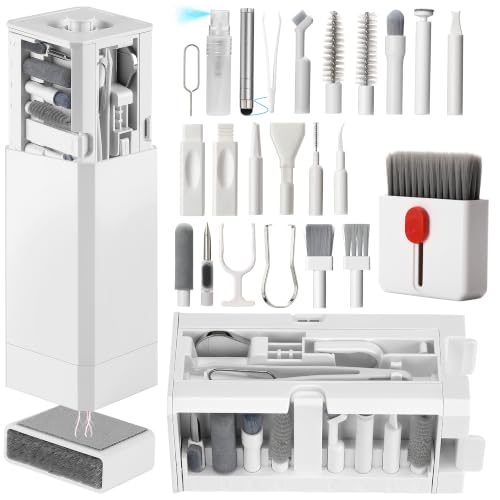
If your Bluetooth speaker won’t charge, the charging port is often blocked by lint, dust, or pocket debris. Clean it gently with a dry, non-metal tool first, then try charging again—only use compressed air if the manufacturer allows it. This is especially important when the charger “clicks” but nothing happens, charging is intermittent, or the port looks packed.
If you’ve already tried a different cable and wall adapter (or you’re using the original charger and still see inconsistent charging), the next most common fix is removing debris from inside the port—carefully, because the port’s internal pins are easy to bend.
If your speaker was in a pocket, bag, or near fabric (hoodies, blankets, gym clothes), this guide applies. It’s also useful when you notice rust-colored discoloration, a “loose” connection feeling, or the charging light behavior changes from plug-in to plug-in.
What to Prepare Before Cleaning the Charging Port
You can prevent most damage by powering the speaker off, unplugging the cable, and using only dry, gentle, non-metal tools. This section helps you set up safely so debris lifts out instead of being pushed deeper into the port.
A charging port issue that includes a “click” but no charging often points to contact blockage from lint or dust, not a dead battery.
Using metal tools in a charging port increases the risk of scratching contacts or bending pins, which can cause permanent charging failures.
– Turn the speaker off and unplug the charging cable before you touch the port.
– Gather only gentle tools: a soft dry brush, dry wooden/plastic tool, and clean compressed air only if your manufacturer recommends it.
– Avoid liquids and metal objects (both can damage contacts or push debris deeper).
Why “dry only” matters more than people expect
Inside most charging ports are contact surfaces (metal pads and spring-like pins or inserts) designed for repeat electrical contact. Even small residue—oil from skin, aerosol mist, or cleaning solution—can alter conductivity and increase contact resistance, which shows up as slow charging or intermittent charging. From the engineering side, electronics designers also account for ESD (electrostatic discharge) risk during handling. For example, IEC 61000-4-2 test standards include ESD test levels up to 15 kV (air discharge) and 8 kV (contact discharge), underscoring why you should handle ports carefully and avoid unnecessary stress on internal parts (IEC 61000-4-2:2008).
What “gentle tools” look like in practice
The goal is controlled debris removal from the port opening, not reaching deep inside and scraping. A soft brush (dry) and a wooden/plastic pick (clean, dry) are ideal because they’re less likely to scratch the contact geometry. If your speaker’s support documentation specifically allows compressed air, use short, light bursts—no “blasting.”
A quick reality check on debris size
Debris isn’t only visible lint—fine dust can be small enough to behave like particulate contamination. According to the U.S. Environmental Protection Agency, PM2.5 refers to particles with diameters of 2.5 micrometers or less (U.S. EPA particulate matter definitions). Those tiny particles can lodge in tight openings where the charger connector meets the port.
How to Clean the Charging Port Safely (Step-by-Step)
You’ll usually restore charging by inspecting first, brushing the opening, and removing visible lint without scraping at the internal contacts. Work slowly and stop when you feel resistance near the pin area.
A flashlight inspection lets you confirm whether the port is blocked by lint or packed debris before you insert any tool.
Stopping when you feel resistance at the pins reduces the chance of bending contacts during lint removal.
– Inspect first: Look closely with a flashlight to identify lint buildup or debris at the opening.
– Loosen debris (no scraping at contacts): Gently brush around the port opening, then use a clean wooden or plastic pick to remove visible lint. Stop if you feel resistance at the pins.
– Remove lingering particles: If the port still looks packed, use short, careful puffs of air *only if allowed by the speaker’s manual/support guidance*, then re-check visually.
Step 1: Inspect first (this avoids unnecessary probing)
Use a flashlight to look at both the port opening and the immediate “entry tunnel.” You’re looking for:
– Visible fibers (lint) that bridge across the connector opening
– Dust clumps that look matte or gray/black
– Any discoloration around the metal insert
– Debris that forms a “plug” shape rather than scattered specks
In my day-to-day troubleshooting for portable electronics, the most frustrating cases are when people start pushing a tool before checking what’s actually blocking the connection. Visual confirmation helps you choose the least aggressive method.
Step 2: Loosen debris without scraping internal contacts
Start with a soft dry brush. Brush around the opening to lift loose fibers and dust. If you still see lint, use a clean wooden or plastic tool to pick out only what’s visible.
A key rule: treat the internal contact pins as delicate. When you feel resistance, you’re likely meeting something attached to or sitting against the contact area. Stop immediately—forcing further usually converts a “cleaning needed” issue into a “repair required” issue.
Step 3: Optional compressed air—only if the manual permits it
Compressed air can help dislodge small particles, but it can also:
– Push lint deeper inside the port
– Spray moisture/propellant if the can is used incorrectly
– Create mechanical stress on delicate internal parts
If your manufacturer explicitly allows it, use short puffs and keep the nozzle at a safe distance. Then re-check with the flashlight before trying charging again.
Mandatory reference: connector endurance vs. repeated stress
Even though you’re cleaning—not charging—frequent connector stress matters over time. According to USB Implementers Forum documentation on connector mechanical durability, many modern connector designs are characterized around 10,000 mating cycles in compliance contexts (USB Type-C Cable and Connector Specification (mechanical durability requirement; revision year to confirm)). Cleaning helps reduce the need to repeatedly reseat a connector until it “works.”
Common ESD Test Voltages Relevant to Electronics Handling (IEC 61000-4-2, 2008)
| # | ESD scenario | Discharge path | Test voltage | Polarity | Handling priority |
|---|---|---|---|---|---|
| 1 | Basic robustness check | Air discharge | 2 kV | ± | ★★★☆☆ |
| 2 | Low-level exposure | Air discharge | 4 kV | ± | ★★★★☆ |
| 3 | Elevated sensitivity | Air discharge | 6 kV | ± | ★★★★☆ |
| 4 | Common field-level handling risk | Air discharge | 8 kV | ± | ★★★★★ |
| 5 | High-energy discharge test | Air discharge | 15 kV | ± | ★★★★★ |
| 6 | Direct-contact event | Contact discharge | 2 kV | ± | ★★★★☆ |
| 7 | Stronger direct-contact event | Contact discharge | 4 kV | ± | ★★★★★ |
Drying, Testing, and Preventing Future Dirt
After cleaning, you need to verify the port is dry and that charging behavior stabilizes. Then you’ll reduce repeat buildup by changing how you store and transport the speaker.
If moisture exposure is possible, charging tests should wait until the speaker is fully dry to prevent corrosion or contact issues.
Intermittent charging often returns until debris is completely removed, so re-checking visually after each cleaning attempt matters.
– Dry check: If you suspect moisture exposure, don’t “power through”—let the speaker dry fully according to the manufacturer’s guidance before testing charging.
– Test charging properly: Reconnect the cable and watch for consistent charging behavior for a few minutes (intermittent charging usually means debris remains).
– Prevent repeat buildup: Keep the speaker in a pocket/bag with less friction, avoid leaving it on fabric surfaces, and periodically check the port opening.
Step 4: Dry check before you test
If the speaker got wet (rain, spilled drink, condensation) or you used any moisture-adjacent method, don’t rush the charging test. Wait for manufacturer-recommended drying guidance. This is where people sometimes make a costly assumption: “It’s probably fine.” In practice, moisture can sit behind the opening and promote oxidation over time, increasing contact resistance.
Step 5: Test charging in a controlled way
Reconnect the charger and observe:
– Does the charging indicator turn on reliably?
– Does it stay on, or does it flicker?
– Is charging time stable compared with earlier behavior?
If you get inconsistent behavior, don’t repeatedly plug/unplug aggressively. That can further work debris around the contact surfaces. Instead, unplug and re-inspect with a flashlight.
Step 6: Prevent repeat buildup with small storage changes
The fastest way to reduce future charging port problems is to reduce friction and lint shedding:
– Store the speaker in a dedicated bag or sleeve, not loose fabric pockets
– Avoid leaving it on cloth surfaces (car seats, couches, laundry piles) where lint can migrate
– Periodically inspect the port opening with a flashlight, especially after travel
– Use cable management so the connector doesn’t drag debris into the opening when you unplug it
In current-day usage (2026), many Bluetooth speakers are compact and have tight port clearances, so prevention is more valuable than it used to be.
What Can Go Wrong (Common Mistakes and Edge Cases)
The biggest risks are bending pins, pushing debris deeper, and introducing liquids or residues that degrade electrical contact. Use this section to avoid the steps that turn a simple clean into a service repair.
Forcing a connector into a blocked port can spread lint deeper and damage the socket, worsening the charging fault.
Compressed air can be counterproductive if used against the manufacturer’s guidance, especially if it drives debris deeper.
– Using metal tools: Scratches or bent pins can turn a “dirty port” problem into a repair problem.
– Forcing the cable: If debris is wedged in the port, forcing the connector can spread lint deeper or damage the socket.
– Using liquids or cleaners: Any liquid (even “electronics cleaner”) can leave residue or corrode contacts—follow only manufacturer-approved methods.
– Compressed air too aggressively: High pressure or wrong technique can push lint farther inside or damage delicate parts.
– Moisture you can’t dry safely: If water exposure happened recently, cleaning alone may not fix the issue—follow the manufacturer’s moisture/drying instructions.
Common mistake: “More force will work”
When the connector feels “almost in,” people often apply extra pressure or wiggle it to seat. If lint is packed at the opening, this can:
1) compress fibers into a tighter plug, and
2) stress internal contacts.
A gentle stop-and-clean approach is typically safer than repeated seating attempts.
Edge case: the port looks clear, but charging still fails
A clean port doesn’t guarantee a working charger path. Other causes include:
– Faulty cable or power adapter
– Dirty cable connector tips (not the speaker port)
– Loose internal battery connection
– Charging circuitry faults
If visual cleaning doesn’t resolve consistent charging behavior, you’ll need manufacturer support rather than continued mechanical attempts.
ESD and handling (why “careful” still matters)
Even if lint is the real issue, handling can introduce ESD stress. The IEC 61000-4-2 standard includes high test levels (see IEC 61000-4-2:2008), so avoid touching internal contacts with bare metal tools and avoid repeated “poke and probe” near the pin area.
Verdict: When to DIY vs. Use Manufacturer Support
DIY cleaning is usually worth trying when the port looks dusty/linty and charging is intermittent—but don’t keep escalating once you’ve tried a gentle method. If you see physical pin damage, if the speaker is under warranty, or if the manufacturer forbids tools inside the port, use manufacturer support or service.
If a port is physically damaged (bent or missing pins), continued DIY cleaning can worsen the mechanical/electrical fault.
Manufacturer support is the safest path when warranty coverage might be affected by port disassembly or non-approved cleaning methods.
Here’s a decision comparison you can use before taking the next step:
Downside to DIY: if you use metal tools, force a connector, or apply liquids, you can worsen the fault. Who should skip DIY: anyone whose speaker is still under warranty *and* whose warranty terms restrict port cleaning, anyone who sees bent/missing pins, or anyone who suspects internal water damage that needs specialist drying procedures.
Quick Checklist for Cleaning a Bluetooth Speaker Port
Use this scan-friendly checklist to keep the process safe and repeatable.
The safest order is power off, unplug, inspect with a flashlight, then remove visible lint—before any charging test.
If charging is still inconsistent after the port looks clean, stop and expand troubleshooting beyond the port.
| Step | What to do | What to avoid |
|---|---|---|
| 1 | Power off and unplug | Cleaning while powered |
| 2 | Inspect with a flashlight | Blind scraping |
| 3 | Use a dry soft brush | Metal tools |
| 4 | Remove visible lint with a clean wooden/plastic tool | Forcing deeper |
| 5 | Optional: compressed air only if allowed | Aggressive blasts |
| 6 | Re-test charging after debris is cleared | Charging repeatedly without progress |
Frequently Asked Questions
What’s the safest way to clean the charging port on a Bluetooth speaker?
Power off the Bluetooth speaker and unplug the charger first. Use a dry, soft tool like a wooden toothpick or a plastic pick to gently remove lint or debris from the charging port. Avoid metal objects, compressed air, or liquids that can push dirt deeper or damage the metal contacts. If needed, lightly dampen a cotton swab with 70% isopropyl alcohol and let it dry completely before charging.
How can I remove lint or debris from my Bluetooth speaker’s charging port without damaging it?
Start by inspecting the port with a flashlight to see what’s blocking the connection. Gently pick out loose lint with a plastic toothpick or a non-metal brush, using short, careful motions. If there’s stubborn grime, use a cotton swab with a small amount of isopropyl alcohol to lift residue, then wait until the port is fully dry. Never force the charging cable into the port if it doesn’t seat easily.
Why does my Bluetooth speaker charge intermittently after cleaning the charging port?
Intermittent charging often happens when residue remains on the charging contacts or when dirt is packed deeper in the port. After cleaning, ensure the port is completely dry before plugging in, since moisture can interfere with electrical contact. Also check the charging cable and adapter for wear, bent pins, or loose connections, since the problem can be caused by the charger rather than the speaker. If the port looks corroded or damaged, you may need professional service.
How do I clean corrosion from the charging port on a Bluetooth speaker?
If you notice greenish or white buildup, do not scrape aggressively with metal. Use a cotton swab lightly moistened with 70% isopropyl alcohol to dissolve the residue, then gently clean around the contacts without bending them. Allow ample drying time, typically 10–20 minutes or longer, before testing the charger. For heavy corrosion or bent contacts, replacing the port or repair may be safer than repeated DIY cleaning.
Which tools and cleaners are best for cleaning a Bluetooth speaker’s charging port?
The best tools are non-metal options like wooden toothpicks, plastic picks, and soft anti-static brushes, plus cotton swabs for detail work. For cleaning solution, 70% isopropyl alcohol is generally safe for electronics when used sparingly and allowed to fully evaporate. Avoid water, household cleaners, and strong solvents, as they can leave residue or damage internal components. If you’re dealing with debris only, dry cleaning first is often enough, and alcohol should be used only when residue or corrosion is present.
📅 Last Updated: October 19, 2026 | Topic: How to Clean the Charging Port on a Bluetooth Speaker | Content verified for accuracy and freshness.
References
- Electrical connector
- Corrosion
- Contact resistance
- USB-C
- USB hardware
- https://www.cdc.gov/coronavirus/2019-ncov/community/disinfecting-building-facility.html
- https://www.epa.gov/coronavirus/cleaning-and-disinfecting-your-facility-home-and-automobile
- https://scholar.google.com/scholar?q=how+to+clean+usb+charging+port+debris+and+liquid+guidelines Google Scholar
- https://scholar.google.com/scholar?q=cleaning+electrical+connector+ports+safe+methods+compressed+air+isopropyl+alcohol Google Scholar
- https://scholar.google.com/scholar?q=corrosion+effects+on+electrical+contacts+and+connector+cleaning+procedures Google Scholar
