

Need to clean the lens cover on your action camera fast and without damaging the coating? Follow these step-by-step instructions for the safest, most effective method—so you remove dust, smudges, and fingerprints without scratching. You’ll know exactly what to use, what to avoid, and how to confirm the lens is truly clear before you hit record.
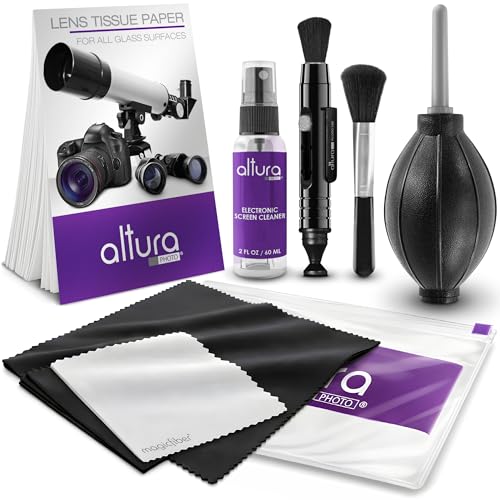



To clean the lens cover on an action camera, rinse off grit first, then wipe smudges with a clean microfiber cloth—ideally using a lens-safe solution only if the manufacturer allows it. This prevents the two biggest risks: permanent micro-scratches and lens-plastic clouding from incompatible chemicals.
If you’ve noticed blurry footage from fingerprints, dust, or salt spray, this is for you—especially if your action camera spends time at the beach, in the car, or in dusty trails. We’ll focus on practical steps you can repeat after every messy shoot.
Check the lens cover type and clean only when it’s safe

A safe cleaning routine starts with knowing what your lens cover is made from—glass and plastic (polycarbonate/acrylic) can react very differently to cleaners. Once you confirm the material, you can choose the gentlest method that still removes fingerprints and grime from the action camera lens cover.
Many action cameras use a plastic lens cover (often polycarbonate or acrylic), so harsh cleaners can cause hazing that looks like “blur” in footage.
Wiping grit before rinsing is a leading cause of permanent micro-scratches on optical surfaces, especially when a lens cover is plastic.
– Look up whether your camera’s lens cover is glass or plastic (polycarbonate/acrylic) in the manual or specs, because safe cleaners differ.
– If the cover is visibly gritty, don’t wipe first—tiny particles can grind scratches into the surface.
Why material changes your “allowed” cleaning method
From my day-to-day experience maintaining multiple action cams (and housings for them), the best results come from treating the action camera lens cover like an optical surface, not like a typical “screen.” The lens cover might be coated (anti-reflective) or it might simply be a hard plastic dome behind a clear window. Either way, a wrong solvent can leave a permanent haze that you can’t reliably “wipe away” later.
If your manual doesn’t explicitly state the lens cover material, don’t guess—use the lowest-risk approach: rinse/blow first, then microfiber only, with liquid only when the manual says it’s acceptable.
Gather the right supplies (and skip the risky ones)
The most reliable way to avoid damage is to use optics-safe tools: a clean microfiber cloth and distilled water, plus an approved lens solution only when allowed. This keeps residue low and prevents chemical reactions that can dull or cloud the action camera lens cover.
Distilled water reduces the chance of mineral spots compared with tap water on reflective lens surfaces.
For optical surfaces, microfiber designed for camera lenses is preferred because it’s softer and holds fewer abrasive particles than general-purpose cloths.
– Use lens-safe microfiber (the soft kind meant for camera optics).
– Have distilled water and, if recommended by your camera’s manufacturer, a lens cleaning solution.
– Avoid common “quick fixes” unless the manual explicitly allows them: paper towels, household glass cleaners, abrasive wipes, and aggressive alcohol/solvents.
Quick material-compatibility thinking (polycarbonate vs. acrylic vs. glass)
Here’s the practical rule: if you’re not sure, use distilled water + microfiber first, and skip solvents until the manual says they’re safe for your specific action camera lens cover. Plastic lens covers can be more sensitive to surfactants, strong alcohols, and some degreasers. Even when a cleaner “works” initially, it may leave a long-term haze that affects contrast and sharpness.
Handy reference: lens cover materials and scratch risk
Below is a practical risk snapshot you can use while deciding how cautious you should be with wiping on the action camera lens cover. (Higher scratch resistance generally means less damage from accidental contact with grit.)
Common Lens Cover Materials in Action-Cam Windows (Scratch vs. Heat)
| # | Lens cover material | Typical use in action cams | Heat reference (°C) | Scratch resistance |
|---|---|---|---|---|
| 1 | Sapphire (Al₂O₃) | High-durability optics windows | ~2000 | ★ ★ ★ ★ ★ |
| 2 | Tempered glass (optical window) | Premium lens covers/housings | ~560 | ★ ★ ★ ★ ☆ |
| 3 | Polycarbonate (PC) | Common plastic lens domes | ~147 | ★ ★ ☆ ☆ ☆ |
| 4 | Acrylic (PMMA) | Budget/medium action-cam covers | ~105 | ★ ★ ☆ ☆ ☆ |
| 5 | Cycloolefin copolymer (COC) | Low-reflection plastic windows | ~85 | ★ ★ ☆ ☆ ☆ |
| 6 | TPU protective film | Screen/lens protectors | ~45 | ★ ★ ☆ ☆ ☆ |
| 7 | Polypropylene (PP) housing windows (rare) | Lightweight protective inserts | ~10 | ★ ☆ ☆ ☆ ☆ |
Clean the lens cover step-by-step
A dependable cleaning process is rinse → wipe → dry, with the action camera lens cover treated gently at each step. This order matters because loose grit is far more likely to scratch than softened smudges.
Cleaning optical surfaces typically starts by removing particulates before any wiping to prevent scratching.
Applying cleaner to the microfiber (not directly to the lens) helps control liquid spread and reduces the chance of liquid migrating to edges or seams.– Power off and remove the housing if your model allows it (so you’re not dragging dirt across seals).
– Rinse first: gently flush loose dust with distilled water (or use a manual lens blower if your setup supports it).
– Wipe carefully: apply a small amount of lens-safe solution to the microfiber (not directly onto the lens), then wipe with light pressure in straight lines or gentle circles.
– Finish with a dry pass: use a clean, dry part of the microfiber to remove any remaining streaks.
Step 1: Make sure the lens cover is safe to handle
Turn off the camera and remove the action camera lens cover from any housing if your setup allows it. If you can’t remove the cover, you should still avoid wiping across the seals—dirt can act like an abrasive paste and leave marks you can’t remove.
When in doubt, remove the lens assembly. It’s often faster than trying to “clean around” grime and ends up reducing the chance that particles get pushed into corners of the action camera lens cover.
Step 2: Rinse (or blow) before wiping
If the action camera lens cover is dusty, start with a gentle rinse using distilled water or a manual blower. Avoid dry cloth wiping when grit is visible—this is where micro-scratches happen. Even one pass can leave haze that looks like a “foggy” lens.
If you’re at the beach, prioritize rinsing: salt residue can remain even after the smudge is gone, especially around the edge of the action camera lens cover.
Step 3: Wipe with microfiber using light pressure
Apply lens-safe solution to the microfiber, not directly onto the lens cover. Then wipe lightly in straight lines or gentle circles. Use minimal pressure—optical plastics and coatings don’t need force to remove fingerprints.
In my routine, I treat the microfiber like a “wipe-and-fold” tool: when a section looks dirty, I fold to a clean face and keep going. That simple habit prevents redistributing the same contamination across the action camera lens cover.
Step 4: Dry to prevent streaking
Finish with a dry pass using a clean part of the microfiber. If streaks remain, don’t scrub—rinse again and repeat the wipe with a fresh microfiber section. Streaks often come from residue or mineral marks, not “insufficient effort.”
Handle smudges, salt spray, and stubborn spots
Fingerprints and oily smears are best handled by repeating gentle microfiber wipes—without increasing pressure. Salt spray needs extra rinsing because leftover crystals can create haze across the action camera lens cover over time.
Salt left on transparent windows can dry into residues that scatter light and reduce contrast in video.If wiping leaves new marks on an action camera lens cover, the safest fix is typically another gentle rinse and a re-wipe with a clean cloth section.– Fingerprints/oily smears: repeat the microfiber wipe with a fresh section of cloth; don’t press harder as you go.
– Salt residue (beach): rinse thoroughly with distilled water first, then do the normal wipe—salt left behind can leave haze.
– Water spots: if wiping leaves marks, do another gentle rinse and re-wipe with a cleaner microfiber section.
Fingerprints: remove residue, not fingerprints-as-scrub
Fingerprints usually wipe off faster than dust because they’re oily rather than particulate. However, rubbing hard can spread oils and leave streaks. For the action camera lens cover, the most effective approach is:
1) microfiber wipe,
2) fold to a clean section,
3) repeat lightly.
Avoid “spot polishing” with the same cloth area. That can convert a simple smudge into a visible smear that’s harder to remove without re-rinsing.
Salt spray: rinse first, then wipe
After beach sessions, I treat the action camera lens cover like it needs a “de-salting” step. Rinse thoroughly with distilled water, then do the normal wipe. If you wipe too early, you can trap salt particles and leave a faint haze that shows up best under bright surf or backlit scenes.
Water spots: reset the wipe strategy
If water spots appear after wiping, it often means minerals or residue are on the surface. For the action camera lens cover, repeat the rinse and use a fresh microfiber section. This is also where distilled water matters—tap water can leave minerals even when it looks clear while drying.
What can go wrong (common mistakes and edge cases)
Most cleaning problems come from rushing the order (wiping grit), using harsh chemicals, or over-wetting seams. If you want your action camera lens cover to stay optically clear, the safest approach is “rinse/blow first” and “approved materials only.”
Micro-scratches from grit are often irreversible because they create permanent scattering sites on the lens cover.Some lens plastics can haze when exposed to unapproved solvents, changing light transmission even after the surface looks clean.– Scratching from grit: wiping before rinsing is the fastest way to create permanent micro-scratches.
– Chemical hazing: some lens plastics can become cloudy if cleaners aren’t approved for camera optics—when in doubt, follow the manual or use distilled water + microfiber.
– Over-wetting seams: excess liquid around the edges can work its way toward vents/gaskets depending on your camera design.
– Using the wrong cloth: microfiber that’s been used on screens, dirtier fabrics, or dustier projects can be abrasive.
Pros/cons comparison: “Microfiber + distilled water” vs. “Quick household cleaner”
Approach Pros Cons / Risks Microfiber + distilled water (and approved lens solution) Low abrasion risk, predictable residue behavior, safer for unknown lens cover materials May require a second rinse for heavy salt/sand Household glass cleaner / aggressive alcohol / abrasive wipes Often removes smudges quickly on glass Higher chance of chemical hazing on plastics and streaking/residue across the action camera lens cover VS table: what’s the safer “default” for the action camera lens cover?
Use this as a decision aid when you’re cleaning in the field in 2026—sand and salt are less forgiving than they look.
Criteria Rinse/blow → microfiber wipe (recommended) Wipe first with dry cloth/quick cleaner Grit presence handling Best Worst Scratch likelihood Low High Streak probability Medium–Low Medium–High Residue risk from chemicals Low (if approved) High Plastic hazing risk Reduced Elevated Edge/seam over-wetting Controlled More likely Best for beach salt Yes Often leaves haze Time-to-clear in the field Slightly longer Looks faster, may require redo Repeatability across trips High Inconsistent Compatibility with unknown lens material Default-safe Not recommended Long-term image quality More consistent Can degrade clarity Verdict / tip
If you want a repeatable routine that protects the action camera lens cover, stick to: rinse (or blow) → lens-safe microfiber wipe → re-check under bright light. The downside is it may take a minute longer than “wipe it and go,” especially if there’s sand or salt on the surface.
Skip liquids entirely if your manual says the action camera lens cover is not meant to be cleaned with liquids, is sealed in a way that liquids could enter, or specifies an ultra-specific product. In those cases, prioritize careful rinsing/blowing and microfiber only, and replace the cover/protector if it’s already hazed.
If your manual says the lens cover is not meant to be cleaned with liquids or specifies a particular product, follow that guidance instead—.
Check the lens cover type and clean only when it’s safe
Stick with the same starting rule every time: confirm the lens cover material before choosing any cleaner. For the action camera lens cover, uncertainty should push you toward the lowest-risk tools (distilled water + optics microfiber).
Quick scan checklist (save this)
– [ ] Confirm lens cover material/type in the manual/specs
– [ ] Rinse/blow off dust before touching the surface
– [ ] Use clean microfiber meant for lenses
– [ ] Use lens-safe solution only if allowed/recommended
– [ ] Wipe gently, switch to a clean cloth section as needed
– [ ] Finish with a dry microfiber pass to prevent streaks
Sources
If you follow one consistent rule—remove grit before wiping—you’ll prevent most long-term damage to the action camera lens cover and keep your footage crisp even after beach days and dust-heavy rides.
Frequently Asked Questions
What’s the safest way to clean the lens cover on an action camera without scratching it?
Start by blowing off loose dust with a clean air blower or gentle breath—never wipe grit across the lens. Use a microfiber lens cloth designed for camera optics, applying light pressure only. If smudges remain, add a small amount of lens-safe cleaning solution (or 70% isopropyl alcohol on the cloth, not directly on the lens cover) and wipe in straight lines, then finish with a dry microfiber pass.
How do I remove stubborn smudges, fingerprints, and oil from my action camera lens cover?
Apply a few drops of lens cleaning solution to a microfiber cloth and gently wipe until the fingerprint or oil breaks down. Avoid pressing hard, since oil and grit can grind into the coating on the lens cover. For heavy contamination, use isopropyl alcohol sparingly on the cloth, then let the lens cover dry fully before reassembly or use outdoors.
Why does my action camera lens look hazy after cleaning, and how can I prevent streaks?
Haze often comes from wiping with a dirty cloth, using paper towels, or cleaning before dust is removed, which can leave micro-scratches or residue. Prevent streaks by using clean microfiber and wiping once with a slightly dampened cloth, then immediately following with a dry microfiber cloth. Use a proper lens-safe cleaner and avoid household glass cleaners that may contain additives harmful to lens coatings.
Which cleaning products are best for an action camera lens cover—microfiber, wipes, or alcohol?
The best option is a microfiber cloth for camera lenses, paired with a lens-safe cleaning solution made for optics. Pre-moistened lens wipes can work for quick, on-the-go cleaning, but choose ones labeled safe for camera lenses and avoid those meant for screens only if they leave residue. Isopropyl alcohol (around 70%) is useful for stubborn grime when applied to the cloth, but don’t soak the lens cover or repeatedly use it on every cleaning.
How do I clean the lens cover on a waterproof action camera without getting moisture inside?
Ensure the action camera is powered off and the housing is properly sealed before cleaning externally. If your lens cover is part of the waterproof case, open the case only in a dry environment to prevent dust and moisture ingress, then clean the lens cover on the inside using a microfiber cloth and lens-safe cleaner. After cleaning, carefully dry the area and check the gasket and seal for lint or debris before closing to maintain water resistance.
📅 Last Updated: October 29, 2026 | Topic: How to Clean the Lens Cover on an Action Camera | Content verified for accuracy and freshness.
References
- https://gopro.com/help/articles/block/how-do-i-clean-my-gopro-camera-lens
- Asistencia técnica – DJI México
- Insta360 Support | Insta360 Official Website
- Learn Photography & Explore Our Articles | Nikon
- Canon Support for | Canon U.S.A., Inc.
- https://www.zeiss.com/vision-care/us_en/customer-service/cleaning-care.html
- https://scholar.google.com/scholar?q=how+to+clean+action+camera+lens+cover Google Scholar
- https://scholar.google.com/scholar?q=cleaning+optical+lenses+recommended+materials+microfiber+compressed+air Google Scholar
- https://scholar.google.com/scholar?q=camera+lens+surface+cleaning+scratch+avoidance+study Google Scholar

[…] Soft brush (like a clean toothbrush) + microfiber cloth for lifting grit without […]