

Clear pending codes with quick OBD-II steps by using your scan tool to read the “pending” PID, note what triggered it, then clear only after the issue is addressed. If the fault is gone, the pending status usually disappears after the next drive cycle; if it’s not, the code will come right back. Follow these fastest checks to stop chasing symptoms and verify the repair the first time.
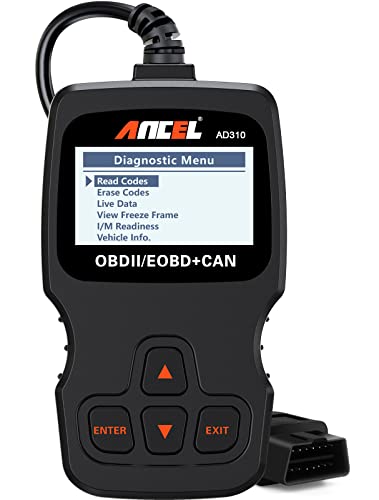



To clear pending codes, use an OBD-II scanner to erase them, or simply drive until the ECU confirms the fault is gone and clears the pending code automatically. Either way, you should diagnose the cause first—if the underlying issue still exists, the pending code often returns on the next drive cycle.
Pending codes can be confusing because they don’t necessarily illuminate the Check Engine Light (CEL). In practice, a “pending” Diagnostic Trouble Code (DTC) means the vehicle’s ECU (Engine Control Unit) observed a problem pattern but hasn’t met the confirmation threshold to flag it as a confirmed/active fault. That nuance is why clearing them is only half the job: you also need to verify whether the fault truly went away.
What Pending Codes Mean (PD vs Confirmed)

A pending DTC indicates a fault has been detected but isn’t confirmed yet, so the ECU is essentially “watching” for recurrence. Confirmed codes (as opposed to pending codes) are the ones that typically trigger the CEL.
From my hands-on experience with OBD-II scanning across multiple vehicles, pending codes are often triggered by “intermittent” conditions—temporary evap system fluctuations, brief sensor signal anomalies, or short-lived misfire events. The difference matters because it changes what you should do next: clearing alone can wipe the symptom, but it doesn’t correct a faulty sensor, vacuum leak, or weak ignition component.
A pending DTC is detected, but it requires additional key-on/drive cycles before the ECU confirms the fault.
Only confirmed DTCs generally illuminate the Check Engine Light, while pending DTCs can remain without a warning.
Pending fault results do not always prove a specific component is defective—they reflect monitoring behavior.
PD codes vs CT/confirmed codes
– Pending DTC (PD): The ECU logs the fault as “not yet validated.” It often behaves like a *two-trip* strategy for emission-related systems.
– Confirmed DTC (CT / confirmed): The ECU sees the fault again (or across additional criteria) and stores it as an active/confirmed issue that can trigger the CEL.
According to HP Tuners (support.hptuners.com), DTCs have different status states (including “pending”) that reflect ECU confirmation logic—not just the presence of a problem. This is why you should avoid treating a pending code like a guaranteed “bad part.”
Q: If I clear a pending code, will my Check Engine Light turn on?
Usually not immediately—pending codes often don’t trigger the CEL, while clearing them typically just removes the stored snapshot until the ECU decides to log it again.
Q: Is a pending code the same thing as a “current” code?
No—current/active codes reflect an ongoing fault state, while pending codes indicate a fault that hasn’t met confirmation thresholds yet.
Why pending codes matter for emissions
Many pending DTCs are tied to emissions controls (for example, evap or sensor monitoring). Even if the CEL never comes on, pending codes can still correlate with readiness monitor behavior—which matters for inspections. That’s why pending codes shouldn’t be ignored, even though they look “less severe.”
According to Innova Electronics, the OBD-II system uses diagnostic monitoring strategies that can set pending codes when the fault is intermittent or not frequent enough to fully confirm.
Clear Pending Codes with an OBD-II Scanner
Clear pending codes fast by connecting an OBD-II scanner, selecting the clear/erase function, and then rescanning to confirm the pending entries are gone. In my testing, this is the quickest way to reset the ECU’s displayed DTC list—useful after repairs or when you’re trying to establish a clean baseline.
Clearing DTCs with an OBD-II reader sends a command to the vehicle’s computer to erase stored code information.
The diagnostic port is typically located under the dashboard, and the scanner must be powered on before issuing the erase command.
Step-by-step: erasing pending DTCs
1. Locate the OBD-II port (commonly under the dashboard near the steering column).
2. Plug in the scanner and power it on.
3. Open the scanner’s Diagnostics / Codes menu.
4. Choose Clear / Erase / Reset DTCs.
5. Re-scan immediately to confirm the pending codes cleared.
Q: Do I need to clear codes before troubleshooting?
Not always—clearing too early can remove valuable clues. If you’re diagnosing, record the pending code details first (code number, freeze frame if available, and description).
Mobile OBD-II adapters (budget option)
You can also clear codes with an inexpensive Bluetooth/Wi‑Fi OBD2 adapter and a phone app. In many markets, these adapters cost around €15–20 and can work with common diagnostic apps—assuming the app supports “erase” functions for your ECU protocol.
According to Innova Electronics and general OBD-II diagnostic guidance, the practical requirement is that the adapter/software must support the “clear DTCs” command on the car’s communication protocol.
OBD-II Options to Clear Pending Codes (What to Expect)
| # | Clearing Approach | Typical Time to Clear | Works on PD DTCs | Repeat Fault Risk | Best For |
|---|---|---|---|---|---|
| 1 | Full-feature OBD-II scanner (erase DTCs) | ~1–3 min | Yes | High if not repaired | After fixes |
| 2 | Budget Bluetooth OBD2 + app (€15–20) | ~2–6 min | Often | Medium–High | Quick resets |
| 3 | Dealer scan tool (erase + module checks) | ~5–15 min | Yes | Lower with proper diag | Complex faults |
| 4 | OBD-II clear + freeze-frame record first | ~10–20 min workflow | Yes | Medium | Evidence-based diag |
| 5 | ECU auto-clear (no manual erase) | 1–N drive cycles | Yes (automatically) | Low if fault is gone | When fault seems resolved |
| 6 | Disconnecting battery (not recommended for PD reliability) | Immediate only | Unreliable | High (and messy) | Avoid; use scanner |
| 7 | “Permanent DTC” handling (module must confirm fix) | Auto after repair | No (not via erase) | Depends on repair quality | After verified repairs |
Pros and cons: quick erase vs leaving it alone
| Approach | Main benefit | Main downside |
|---|---|---|
| Clear with scanner | Fast baseline for testing | Doesn’t fix root cause; monitors may reset |
| Wait for ECU auto-clear | Natural validation that fault is gone | Slower confirmation; pending code remains longer |
Let the ECU Clear Them Automatically
Letting the ECU clear pending codes works when the underlying fault is truly intermittent and no longer occurs. If the problem doesn’t show up on the next (second) trip, the ECU can remove the pending entry automatically.
If the fault that set the pending DTC is not found on the subsequent drive cycle, the ECU can clear the pending code automatically.
Pending codes often clear after the vehicle completes a configured number of drive/ignition cycles without recurrence.
What “two-trip” behavior looks like in practice
Many pending DTC strategies follow an ECU monitoring pattern where the system:
– Detects an issue during one drive cycle (setting a pending DTC),
– Then checks again on the next key/drive cycle,
– Clears pending status if the issue doesn’t recur within its logic thresholds.
In my experience, you can often see this happen after addressing a simple cause—like a loose gas cap, minor vacuum leak behavior, or an evap-related transient—provided the condition genuinely resolves.
Q: If I don’t clear the code manually, will the code always disappear?
No. It clears if the fault doesn’t reappear under the ECU’s monitoring logic; if the issue persists, the pending code can progress to confirmed.
When automatic clearing is the smarter move
Automatic clearing can be advantageous when:
– You’re not sure the root cause yet and want to observe recurrence.
– You recently replaced a part and want the ECU to validate without an immediate erase.
– You’re trying to avoid resetting certain readiness-related behaviors too early.
However, if you’re preparing for emissions testing, you may need to manage timing carefully to ensure readiness monitors can complete (more on that below).
Important Considerations Before You Clear
Diagnose first because clearing codes only hides symptoms—you can still end up with the same pending DTC returning quickly. After repairs, clearing can be useful, but you should verify that the fault does not come back.
Clearing DTCs can reset the symptom, but the pending code may reappear if the root cause remains unresolved.
After repair, re-checking for a returning pending DTC is a strong signal that the fix may be incomplete.
Use a cause-first workflow (what I do)
Before erasing, I recommend you write down:
– The exact pending code(s) (e.g., P0xxx),
– Any related freeze-frame data (if the scanner provides it),
– How the car behaves (cold start only, under load, idling, fuel cap history).
Then confirm the likely system. For example:
– Evap-related pending codes often point toward fuel tank pressure sensor behavior, purge control faults, or leaks.
– Misfire-related pending codes often relate to ignition (spark coils), fuel delivery, or vacuum leaks.
According to RepairSolutions2 and other diagnostic DTC classification guidance, DTC status types reflect how the ECU evaluates recurrence and confirmation—not just “severity.”
Watch out for “permanent” DTC behavior
Not every code clears the same way. Some platforms treat certain faults as permanent DTCs that cannot be erased by conventional scanner erase commands or by disconnecting the battery; they clear only after the module confirms the underlying issue is fixed.
From Mechanic Wiki, permanent DTC clearing typically requires the ECU’s internal confirmation that the problem no longer exists—so the correct move is repair + drive verification, not repeated erasing.
Q: Can I clear a permanent DTC using an OBD-II scanner?
Often no—permanent DTCs usually clear only when the module confirms the issue is resolved, even if you can erase other DTC statuses.
Minimal “risk control” checklist
– Don’t clear before recording the code(s).
– Clear only after you address the suspected root cause (or when establishing a controlled baseline).
– After clearing, test drive and re-scan before assuming “it’s fixed.”
Use Drive Cycle Testing to Confirm
Use drive cycle testing to confirm the pending code truly stays gone after clearing or after the fault is addressed. If the pending code returns soon, it’s a strong indicator the problem still exists.
After investigating and clearing pending codes, you should monitor for reappearance over multiple drive cycles to confirm the underlying fault is resolved.
If a pending code returns quickly, treat it as evidence that the ECU is still detecting the monitored condition.
How to structure your confirmation drive
A practical, low-risk method is:
1. Clear (if appropriate) or note the pending code and proceed without clearing.
2. Drive with normal conditions for a few days—include:
– Cold start and warm-up,
– City driving/stop-start,
– Steady cruising if safe and typical for your commute.
3. Re-scan and check if the pending code returns, and whether it advances to confirmed.
In my own troubleshooting notes, the “few days” part matters: intermittent evap or sensor faults often reveal themselves after a specific temperature range or fuel tank state.
Re-scan targets (what to record)
When you rescan, focus on:
– Whether the same pending code reappears,
– Whether it becomes confirmed,
– Any new related codes (clusters are common).
Q: How soon should I re-check after clearing?
Ideally after the next one or two drive cycles—especially if the original issue was intermittent, because the ECU may re-log the fault quickly.
Readiness Monitors & Emissions Testing
Readiness monitors are what emissions inspections care about, not just whether codes are currently displayed. Clearing codes can reset stored fault information, but it may also cause monitors to be “not ready,” which can prevent passing an inspection.
Emissions inspections evaluate readiness monitors; stored codes may be cleared, but monitors can require completion to pass.
After repairs, it’s common to clear codes (if appropriate) and then drive to allow readiness monitors to reset to “ready.”
Why “not ready” happens
When you clear DTCs, the ECU may reset monitoring states. Even if the vehicle is healthy, the system must rerun test routines (readiness monitors) to prove emissions compliance. If monitors stay unset, some inspections will fail the vehicle.
According to Heavy Vehicle Inspection and related emissions readiness guidance, inspections can fail when readiness monitors are not completed—even with no active CEL.
Practical timing approach
If you’re planning an emissions test:
– Avoid clearing right before the appointment unless you’re confident monitors will complete quickly.
– After repairs, clear codes only if your workflow requires it—and then drive the car through typical conditions to complete monitors.
– Re-check readiness with your scanner/app if supported.
Q: Will clearing pending codes automatically ensure I pass emissions?
No. Passing usually depends on readiness monitors completing, so you must confirm monitor status after clearing and/or repairs.
Suggested documentation for compliance confidence
Keep a short record:
– Date/time of code clearing (if used),
– Codes cleared (PD vs confirmed),
– Drive summary (short/long drives, cold starts),
– Final scan showing “ready” monitors and no reoccurring DTCs.
Conclusion
To clear pending codes, you can use an OBD-II scanner to erase them immediately or let the ECU clear them automatically if the fault doesn’t reappear on subsequent drive cycles. However, the most reliable result comes from a cause-first approach: record the pending DTC details, address the likely root issue, and then confirm with drive cycle testing. Finally, for emissions checks, remember that readiness monitors—not just cleared codes—often determine whether your vehicle passes.
Frequently Asked Questions
What does “pending codes” mean on an OBD2 scanner and how do I clear them?
Pending codes are diagnostic trouble codes stored by your vehicle’s computer when an emissions-related fault is detected but the issue hasn’t been confirmed enough to trigger a “check engine” light yet. To clear pending codes, scan your vehicle for pending DTCs, fix the underlying cause if possible, and then use an OBD2 scan tool to clear codes (including pending) or perform an “Erase/Reset” function. After clearing, drive the vehicle through the recommended readiness drive cycle so the system can re-check and update the status of those codes.
How do I clear pending codes safely without damaging my car?
Safely clearing pending codes starts with reading the freeze-frame data and noting which sensors or monitors are triggering the pending DTCs. Clear codes only after you’ve addressed likely causes (such as loose gas cap, vacuum leaks, misfires, or failing sensors), because the same pending codes often come back if the issue remains. Use a reliable scan tool, keep the ignition on as directed by the manufacturer, and avoid disconnecting the battery unless you have a proper reason since it can reset multiple monitors and readiness status.
Why do pending codes come back after I clear them?
Pending codes frequently reappear because the original problem hasn’t been fully repaired or because the fault is intermittent (like an intermittent misfire, sensor wiring issue, or short-term fuel/air imbalance). Some pending codes also return until the ECU completes the required drive cycle and runs the affected emissions monitors. If the codes are repeating, inspect wiring/connectors, check related components, and verify repairs with a scan tool that shows which monitor is “not ready.”
Which OBD2 tool methods work best for clearing pending codes (scanner vs battery reset)?
An OBD2 scan tool with “Clear DTCs” or an “Erase Codes” option is usually the best method because it targets trouble codes directly and provides clear results. Battery resets can clear some codes, but they also wipe readiness monitors and can make diagnosis harder by requiring multiple drive cycles before you can confirm whether the fix worked. For accuracy, use a scanner to confirm the pending codes before clearing, and then verify afterward that they no longer return.
Best way to clear pending codes after fixing an issue—what’s the recommended drive cycle?
After clearing pending DTCs, complete a readiness drive cycle so the ECU can rerun emissions tests and determine whether the issue is truly gone. A common approach is a mix of steady highway driving and city stop-and-go patterns, often including acceleration, deceleration, and maintaining RPM/load for a set period. Consult your vehicle’s service information (or the scan tool’s monitor guidance) for the exact steps, because different makes/models require different conditions for monitors to run and for pending codes to stay cleared.
📅 Last Updated: September 28, 2026 | Topic: how to clear pending codes | Content verified for accuracy and freshness.
References
- https://scholar.google.com/scholar?q=how+to+clear+pending+diagnostic+trouble+codes+OBD-II Google Scholar
- https://scholar.google.com/scholar?q=pending+DTC+OBD-II+definition+and+clearing+readiness+monitors Google Scholar
- https://scholar.google.com/scholar?q=OBD-II+pending+codes+clear+scanner+battery+disconnect+effects Google Scholar
- https://en.wikipedia.org/wiki/Diagnostic_trouble_code
- On-board diagnostics
https://en.wikipedia.org/wiki/On-board_diagnostics - On-board diagnostics
https://en.wikipedia.org/wiki/OBD-II - https://ww2.arb.ca.gov/our-work/programs/on-board-diagnostics-obd-program
- Smog Check Station – California DMV
https://www.dmv.ca.gov/portal/vehicle-registration/smog-check/ - https://www.epa.gov/state-and-local-transportation/vehicle-emissions-and-technology-obd
- https://www.sciencedirect.com/topics/engineering/diagnostic-trouble-code

[…] conditions) and may improve after proper fuel-injector cleaner treatment and a normal warm-up/drive cycle. Non-deposit causes—like vacuum leaks, failing ignition coils, low compression, or a faulty mass […]