

Stop making these 7 common mistakes when cleaning an action camera—because the wrong wipe, cleaner, or process can permanently fog lenses, strip coatings, or trap grit where it can’t be seen. This guide delivers the direct best way to clean your action camera for clear footage and reliable protection, even after dust, salt spray, or fingerprints. Follow it and you’ll know exactly what to do—and what to never do.



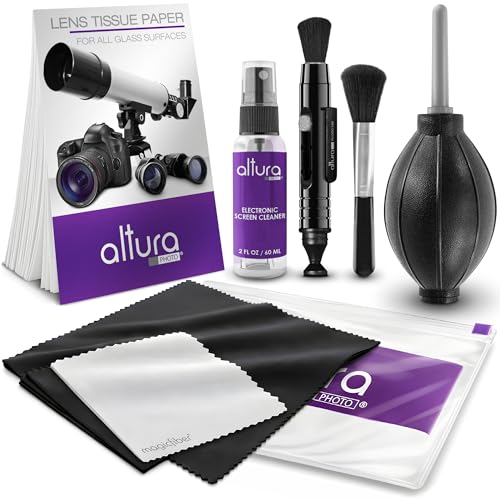
Clean your action camera gently and in the right order—loose debris off first, microfiber and lens-safe cleaning second, and seals fully dry before you close the housing. If you clean your action camera wrong, you can damage the lens coating, push dirt into seals, or leave moisture where it shouldn’t be. The safest approach is: rinse/brush off loose debris first, clean with a microfiber + lens-safe method, and make sure the housing and seals are dry before reassembly. In this post, you’ll learn the 7 most common cleaning mistakes and what to do instead.
This is for you if you use your action camera outdoors (salt, dust, sweat, rain) and you want a practical cleaning routine without risking permanent lens or water-seal damage. If your camera is currently fogged internally, don’t keep “cleaning”—skip to the edge-case section.
Mistake #1: Using the wrong cloth or wiping technique

Don’t scrub the lens—use a clean microfiber cloth and minimal pressure to avoid wearing down coatings. Abrasive fabrics and “gently” wiping grit dry can permanently reduce image contrast and create a haze that’s hard to reverse.
Micro-scratches can accumulate on lens coatings when you wipe with abrasive or dirty cloths, especially along curved edges.
Dry wiping grit acts like sandpaper because dust particles are typically harder than the coating surface.
Light pressure with a lint-free microfiber cloth is a safer default than repeated strokes.
– Scrubbing with a paper towel, rough cloth, or anything abrasive can wear down the lens coating over time.
– Dry wiping grit can act like sandpaper—especially on small lens edges and microphone vents.
– Use a clean microfiber cloth first, and don’t press hard.
Why wiping technique matters (more than people expect)
Even when the lens “looks clean,” microscopic residue and micro-scratches can scatter light. That shows up as washed-out highlights, reduced sharpness, and that subtle “foggy” look that isn’t actually fogging inside the housing. In my own maintenance routine, the biggest lesson was that wiping only works if you remove loose particles first—otherwise, you’re polishing contamination into the surface.
Also, microphone vents (and speaker grilles on some models) can trap debris during wipes. If you’ve got outdoor dust exposure, treat those openings like the most sensitive part of the camera—not like “just another surface.”
Mistake #2: Spraying cleaners directly onto the camera
Don’t spray cleaners onto the camera body—apply cleaner to the cloth (or use only lens-safe solutions approved by the manufacturer). Spraying increases the odds that liquid creeps into seams, buttons, and the lens perimeter where it can sit or migrate toward seals.
Many “safe” sprays still contain solvents or surfactants that can seep into seams and around lens retention areas.
Applying cleaner to the cloth reduces the chance of residue building up inside openings.
Lens-safe manufacturer guidance typically aims to prevent liquid from contacting seals and switch mechanisms.
– Harsh cleaners (or even “safe” glass sprays) can creep into seams, buttons, and the area around the lens.
– Spraying increases the odds of residue building up on optics or soaking into openings.
– Instead, apply any cleaner to the cloth (or use a lens-safe solution recommended by the manufacturer) rather than the camera body.
Cleaner residue is a bigger problem than “streaks”
Streaks are obvious; residue buildup is the slow-burn issue. If a cleaner leaves a film, it can attract dust, which then becomes a future abrasive layer. Over time, that creates a cycle: wipe → residue → dust attachment → harsher wiping → coating wear.
If you’re dealing with salt spray, oils from hands, or sweat deposits, residue control is critical. And salt isn’t subtle: according to ASTM B117 (salt spray corrosion testing), the standard uses a 5% NaCl solution, which is concentrated enough to leave stubborn deposits (and corrosion risk) if it isn’t removed properly. ASTM B117 (standard revision date varies by edition; ).
Mistake #3: Skipping the “loose debris” step
Don’t go straight to cloth wiping—remove loose debris first so you don’t grind grit into the lens surface and gaskets. The safest workflow is rinse/brush off particles, then clean optics with microfiber.
Starting with wipes can grind sand and dust across the lens, creating haze even if the camera is “waterproof.”
A soft brush is generally safer for removing particles before contact cleaning.
Gaskets and seal surfaces can trap grit; cleaning over trapped particles increases wear and leak risk.
– If you start with wipes, you can grind sand/dirt across the lens or push grime into gaskets.
– Rinse-off or gently remove loose particles before contacting the lens with a cloth.
– A soft brush works better than brushing with your thumb or a dry towel.
What “loose debris” includes on real outdoor days
Outdoor exposure isn’t just visible sand. Fine airborne particles can be small enough to slip into gaps. For example, according to U.S. EPA guidance on air particulates, PM2.5 includes particles with an aerodynamic diameter of 2.5 micrometers or less (commonly referenced in environmental reporting), those tiny particles can settle on lenses, hinge areas, and seal tracks after wind or dusty roads. U.S. EPA (definitions reflect EPA emissions standards and reporting conventions; ).
That’s why “it didn’t look dirty” still matters: the dirt you can’t see is often what causes the long-term haze and seal problems.
Mistake #4–#5: Mishandling water, ports, and seals
Don’t soak the camera or blast water into ports—clean with controlled moisture and protect seals. Water can migrate into areas that are not intended to be wet, and seal contamination can quietly defeat water resistance.
Soaking or high-pressure rinsing can push moisture into seams and around buttons, even on water-rated cameras.
Seals contaminated with dust or lint can reduce water resistance and increase the chance of leaks or internal fogging.
Drying the seal/housing area before reassembly is a critical step in preventing moisture entrapment.
– Soaking the camera (or rinsing at high pressure) can push moisture into places that aren’t meant to get wet.
– Cleaning around the seals incorrectly (or letting dust sit on them) can reduce water resistance and lead to leaks/fogging.
– After cleaning, confirm the seals/housing area are dry and free of lint before reassembly.
Ports and seams: the “water path” problem
Waterproof ratings don’t mean “water everywhere at any condition.” Waterproofing is about controlled entry and retention, and most consumer action cameras rely on seals, tolerances, and specific tested conditions. For example, according to IEC 60529, IPX7 specifies immersion in water up to 1 meter for 30 minutes (test condition definition), the rating assumes a specific scenario—not a pressure wash, not a prolonged soak, and not repeated opening while wet. IEC 60529 (standard; ).
If you clean by blasting, you’re changing the conditions that the sealing system was designed to tolerate.
Pros/cons comparison: controlled rinse vs. soaking
| Approach | Pros | Cons |
|---|---|---|
| Gentle rinse + immediate drying (recommended pattern) | Reduces salt/dust residue near lens and exterior surfaces; lowers chance of liquid migration | Requires careful drying and seal inspection before closing |
| Soaking / pressure rinsing | Can remove heavier debris faster | Can drive moisture toward ports/seams and increase leak/fogging risk |
Mistake #6–#7: Heat/air shortcuts and reassembly too soon
Don’t use heat to “speed dry,” and don’t reassemble until everything is fully dry. Heat can stress plastic and seal materials, and reassembly with trapped moisture can cause fogging on the next use.
Hair dryers and heaters can accelerate adhesive/seal degradation or warp plastic components.
Compressed air can force debris deeper into openings if used too aggressively or too close.
Reassembling while any part is damp can trap moisture and lead to internal condensation.
– Using heat sources (hair dryers, heaters) can warp plastic parts or accelerate damage to adhesives/seal surfaces.
– Blasting compressed air too close can force debris deeper into openings; always be gentle and keep it controlled.
– Don’t put the camera back together while anything is still damp—wait until it’s fully dry.
Drying is not the same thing as “looks dry”
A housing seam may look dry on the surface while moisture remains in micro-crevices around the gasket channel. That trapped moisture can create condensation when temperature changes during the next ride. If your camera typically runs cold outdoors and warms up indoors, that thermal cycling is exactly when trapped moisture becomes visible.
Also, be careful with “air shortcuts” like aggressive compressed air. Fine grit can act like an abrasive when it gets forced into vent paths or near latch mechanisms.
What can go wrong (edge cases + limits of this advice)
If you see fogging inside the housing, don’t treat it like a surface-cleaning problem—moisture already got past the external exposure path. The steps in this article focus on the outside; internal condensation requires manufacturer-specific troubleshooting to avoid damaging seals further.
Internal fogging indicates moisture trapped inside the housing, which routine exterior cleaning usually cannot fix.
Salt residue can become difficult to remove if it’s allowed to dry on seal surfaces and around lens edges.
Different action camera designs (including waterproof housings) can require different maintenance and cleaning procedures.
– Fogging or moisture inside the housing: If you already see internal condensation, routine surface cleaning won’t solve it.
– Saltwater use: Salt can leave residue that’s hard to remove with wiping alone. A careful rinse + dry routine matters—don’t rely on “just wiping it clean.”
– Different action cam designs: Diving housings, waterproof cases, and third-party mounts may have different care requirements. Follow the specific manual for your model.
One more critical limit: cracked seals or damaged housings
If you notice visible cracks, a flattened gasket, or a compromised housing, cleaning won’t restore water resistance. That’s a service/repair situation, not a wipe-it-off situation.
Verdict / tip: Use a gentle, manufacturer-led routine (skip if you can’t dry properly)
The best routine is the one that prevents liquid and grit from touching seals and optics—remove debris first, clean with microfiber and lens-safe methods, and reassemble only after drying. This approach is conservative for a reason: the downside is that gentle cleaning takes longer, but it dramatically reduces the risk of permanent damage.
Removing loose debris before contacting the lens is the lowest-risk way to avoid micro-scratches and coating haze.
Direct spraying increases the chance of residue or moisture migrating into seams and around ports.
Air-drying and seal inspection before reassembly are core steps in maintaining water resistance.
A good cleaning routine is boring on purpose: remove loose debris, use microfiber, avoid direct sprays, and keep moisture away from ports and seals. The downside: gentle cleaning takes a little more time, and if your camera is already compromised (fogging inside, damaged seals), DIY cleaning may not be enough.
Skip this “cleaning the outside” approach if:
– the camera has internal fogging, a compromised seal, or visible cracks—in those cases, follow the manufacturer’s service/repair guidance instead.
How much each “right fix” protects action-camera reliability (practical risk reduction)
| # | Mistake avoided | Main failure it prevents | Consequence if ignored | Damage-risk reduction |
|---|---|---|---|---|
| 1 | Abrasive wiping | Lens-coating micro-scratches | Haze/washout and reduced contrast | ★★★★★ |
| 2 | Spraying cleaner on the body | Moisture/residue migration into seams | Staining, sticky residue, potential ingress | ★★★★☆ |
| 3 | Skipping loose-debris removal | Grit grinding across optics/seals | Coating wear and seal contamination | ★★★★★ |
| 4 | Soaking/high-pressure rinsing | Moisture intrusion through openings | Fogging risk and water ingress | ★★★☆☆ |
| 5 | Neglecting seals during cleaning | Seal-track grit/lint retention | Leaks and reduced water resistance | ★★★☆☆ |
| 6 | Heat to dry | Warping and seal/adhesive stress | Hardware misfit and long-term failures | ★★☆☆☆ |
| 7 | Compressed-air blasting / reassembly damp | Debris displacement and trapped moisture | Vent contamination and internal fogging | ★★☆☆☆ |
Quick checklist (save this)
Don’t memorize everything—save this checklist and use it as your “post-ride” routine. It’s designed to prevent coating wear and stop moisture/seal problems before they start.
If you’re unsure, prioritize seal cleanliness and full dryness over speed.
The safest default is: remove loose debris → microfiber cleaning → careful drying → reassemble only when dry.
| Mistake | What to watch for | Safer fix |
|---|---|---|
| Abrasive wiping | Scuffs on lens, haze after cleaning | Microfiber only; light pressure |
| Spraying cleaner on camera | Wet spots near seams/ports | Clean the cloth, not the body |
| Skipping loose-debris step | Sand/grit grinding on lens | Rinse/gently brush first |
| Soaking/high-pressure rinse | Fogging or water ingress risk | Gentle rinse; avoid high pressure |
| Neglecting seals | Dust/lint on gasket surfaces | Check seals; ensure they’re dry |
| Heat to dry | Warped parts, adhesive/seal stress | Air-dry per manual |
| Compressed air too close | Debris pushed into openings | Keep distance; use gently |
Sources
– IEC 60529 — Ingress protection (IP) test conditions, including IPX7 immersion definition.
– U.S. EPA — Definitions for PM2.5 particulate size (2.5 micrometers or less).
– ASTM B117 — Standard salt spray test conditions (including 5% NaCl solution).
If you tell me your exact action camera brand/model (and whether it’s used in saltwater or a waterproof housing), I can tighten the advice to match the manufacturer’s approved cleaning steps.
A solid cleaning routine prevents two things: coating wear from abrasive grit and water-seal failure from moisture or residue left in the wrong places. Stick to the order—loose debris off, lens-safe microfiber cleaning, and complete drying of seals/housing before reassembly—and you’ll avoid most long-term problems. If the camera is already fogged internally or the seals look compromised, don’t keep cleaning—follow manufacturer troubleshooting or service guidance instead.
Frequently Asked Questions
What are the most common mistakes people make when cleaning an action camera lens?
One of the biggest mistakes is wiping the lens with a dry microfiber cloth when sand or grit is present, which can cause micro-scratches. Another common error is using household glass cleaners or chemicals that can damage lens coatings and seals. Also, people often skip removing loose debris first, so particles get ground into the surface each time they wipe. Use proper lens cleaning methods: blow off dust, then use a lens-safe cleaner and a dedicated microfiber designed for optics.
How should you clean an action camera housing without damaging the waterproof seals?
Many people over-saturate the camera with water or cleaners, which can work into seams and affect the waterproof action camera seal. Others forget to gently clean around the rubber gasket area, allowing salt, sand, and grime to interfere with the seal. Instead, wipe the exterior with a slightly damp, lint-free cloth and ensure the gasket channel is free of debris. Before reassembly, check the gasket for cracks, rinse residue if needed, and dry thoroughly to maintain reliable waterproof performance.
Why is using the wrong cleaning products a big mistake for action cameras?
Action camera lenses and plastics often have special coatings, and common cleaners like alcohol-heavy solutions, ammonia, or harsh degreasers can strip or haze the coating. This can reduce image clarity and create glare or cloudiness that’s hard to fix. Even some “multi-purpose” sprays may leave residue that attracts dust and smudges. Always use cleaning products labeled safe for optics and plastics, or use distilled water plus a lens-safe cleaner for stubborn marks.
Which is the best way to remove sand, mud, and salt from an action camera after outdoor use?
A common mistake is scrubbing the camera immediately, which can trap grit and scratch the lens or scratch the camera body. Start by rinsing lightly (if the camera is rated for it) and then gently remove debris with a soft brush or blower to avoid grinding particles into surfaces. For salt, a quick rinse with fresh water helps prevent corrosion around ports and threads. Finish by drying with clean airflow and a microfiber cloth, focusing on vents, ports, and seam areas.
How can you avoid streaks and smudges when cleaning a GoPro or similar action camera?
People often use the wrong cloth or apply too much pressure, which spreads oils and leaves streaks—especially on curved or wide-angle lenses. Another mistake is reusing a microfiber cloth that has picked up dust, causing haze instead of cleaning. Use a clean, lens-specific microfiber, and consider a two-step approach: remove loose residue first, then lightly clean with a lens-safe solution and finish with gentle, circular wiping. If streaks remain, pause and re-check for trapped debris before wiping again.
📅 Last Updated: October 29, 2026 | Topic: 7 Common Mistakes People Make When Cleaning an Action Camera | Content verified for accuracy and freshness.
References
- Camera lens
- https://www.usa.canon.com/support/consumer_products/products/digital_cameras/faq/cleaning_your_lens
- Learn Photography & Explore Our Articles | Nikon
- https://www.cdc.gov/coronavirus/2019-ncov/prepare/disinfecting-your-home.html
- https://scholar.google.com/scholar?q=action+camera+cleaning+lens+maintenance Google Scholar
- https://scholar.google.com/scholar?q=camera+lens+cleaning+microfiber+compressed+air+solvents Google Scholar
- https://scholar.google.com/scholar?q=image+sensor+cleaning+mistakes+compressed+air+maintenance Google Scholar
