

You should clean your headphones about once a week if you use them daily, and once every two to four weeks if your use is lighter. That schedule prevents sweat, skin oils, and earwax buildup from dulling sound quality and irritating your ears. This easy cleaning routine tells you exactly how often to wipe, sanitize, and deep-clean—based on how much you listen.


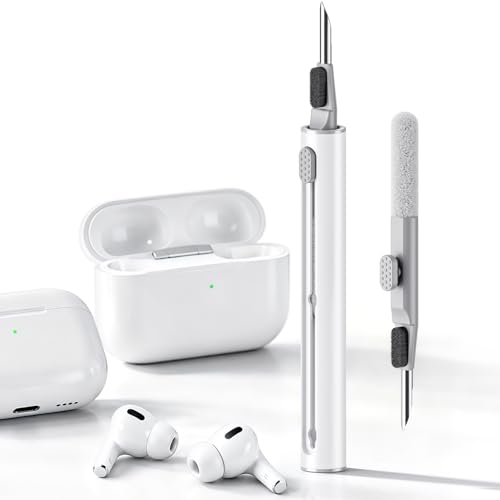

Clean your headphones by wiping them down after heavy use, then scheduling a deeper clean every 1–3 months. Ear pads need the most attention because sweat, oils, and earwax residue build up fastest where your skin contacts the headphones and where sound passes through vents and grilles.
If you share headphones, wear them while exercising, or use them for long daily sessions, you’ll need a tighter routine. This schedule helps you clean pads, headbands, microphones, and charging areas without soaking materials or risking damage to electronics.
You should wipe your headphones down after heavy use (especially workouts and commuting) and do a deeper clean every 1–3 months. The exact frequency depends on how much sweat, earwax buildup, and skin contact you get. This guide will help you pick the right cleaning cadence for each part—pads, headband, and microphones—without damaging finishes or electronics.
If you share headphones with others, use them while exercising, or wear them for long daily sessions, you’ll need more frequent cleaning. If you rarely wear them, you can stretch the timeline—just don’t ignore visible buildup, odor, or reduced audio quality from clogged vents.
Quick wipe vs deep clean: what “cleaning” really means

A quick wipe is the fast hygiene step that prevents sweat and oils from building up, while a deep clean removes residue from the areas that affect comfort and audio. In other words, the goal isn’t “getting them spotless”—it’s keeping headphone surfaces and airflow paths functional and odor-free.
A quick wipe removes skin oils and sweat before they dry and bond to headphone pads and outer surfaces.
A deep clean focuses on earwax and residue around headphone grilles and vents, where buildup can change how the audio vents breathe.
If headphones look greasy or smell, the routine has likely moved from quick wipe territory to deep-clean territory.
– Quick wipe (minutes): Removes skin oils, sweat, and surface grime before it soaks in.
– Deep clean (longer): Targets earwax/residue in/around pads, grilles, and vents where buildup can affect comfort and sound.
– Rule of thumb: If it looks/feels dirty or starts smelling, that’s your cue to switch from wipe to deep clean.
Quick wipe vs deep clean at a glance
How often should you clean your headphones? (realistic schedule)
Clean headphones on a cycle driven by how often they contact skin and how much grime they collect—more sweat and longer daily sessions mean more frequent cleaning. For most people, that means quick wipes every 1–2 weeks, plus a deeper clean every 1–3 months.
CDC guidance on hygiene emphasizes that regular, friction-based cleaning prevents buildup—this is the same principle you apply to headphone pad surfaces.
IEC 60529 defines IPX4 as protection against splashing water, not safe wet-soak cleaning for headphones.
When headphones start sounding muffled, blocked vents and grilles are a practical cue to move from wipe to deep clean.
The schedule that matches real headphone use
– After sweaty or high-contact sessions: Wipe ear pads and the headband every time you work out or wear them in dusty/dirty conditions.
– Every 1–2 weeks (typical personal use): Do a quick wipe of pads and outer surfaces to prevent oil buildup.
– Every 1–3 months (deeper cleaning): Clean ear pads more thoroughly and clear visible grime from grilles/vents per manufacturer care guidance.
– Immediately when you notice buildup: If you see flakes/residue, feel slick pads, or hear muffling from blocked openings, clean sooner than your usual interval.
Why moisture tolerance matters (especially for “damp wipe” decisions)
A big reason headphone cleaning feels inconsistent is that moisture tolerance varies by model and materials. For context, IEC 60529:2013 defines IPX4 as protection against splashing water, which is very different from soaking or aggressive wet cleaning. IEC 60529:2013 (IP code definitions) Also, CDC notes that soap-and-water handwashing guidance targets at least 20 seconds of contact time for skin hygiene; headphones need far less “wet contact time” and should be dried immediately after wiping. CDC Guideline for Hand Hygiene in Health-Care Settings (2002)
If you’re tempted to use alcohol, use caution: CDC also discusses that effective alcohol-based hand rubs typically fall in the 60–95% range for disinfection. CDC Guideline for Hand Hygiene in Health-Care Settings (2002) That’s great for hands, but it can still degrade some headphone coatings and faux leather over time—so for headphones, follow the manufacturer’s cleaning limits instead of copying hand-disinfecting logic.
Water-Resistance Classes That Inform Safer Headphone Wiping (IEC 60529)
| # | IP class (water) | What it tolerates | Why it matters for cleaning | Damp-cloth safety |
|---|---|---|---|---|
| 1 | IPX0 / no rating | No water protection specified | Treat as “avoid moisture” near vents and seams | ★☆☆☆☆ |
| 2 | IPX2 | Directly falling water (light) | A brief exterior wipe may be tolerated if dried fast | ★★☆☆☆ |
| 3 | IPX4 | Splashing water from any direction | Exterior damp wiping is usually safer; avoid wet-soak cleaning | ★★★★☆ |
| 4 | IPX5 | Water jets from a nozzle | Higher tolerance for moisture; still keep liquids away from ports | ★★★★★ |
| 5 | IPX6 | Powerful water jets | Moisture resistance helps; electronics and pads can still be damaged | ★★★★★ |
| 6 | IPX7 | Temporary immersion (time/conditions specified) | Damp cleaning is typically safer; follow manufacturer instructions for ports | ★★★★★ |
| 7 | IPX8 | Continuous immersion beyond IPX7 conditions | Most moisture-tolerant class; avoid cleaning shortcuts that trap liquid | ★★★★★ |
How to clean different parts safely (so you don’t damage them)
Clean each headphone part differently because sweat and earwax sit in different places—and each material reacts differently to moisture. The safest approach is “least moisture first,” then escalate only if your manufacturer explicitly allows it.
Ear pads are the highest-contact area on headphones, so they usually require the most frequent cleaning and the gentlest moisture control.
Grilles and vents should start with dry cleaning; pushing debris deeper can worsen muffling.
Charging contacts should be treated as “keep liquids away,” since corrosion can start invisibly.
Ear pads: where residue builds up first
Ear pads are where most people notice the first signs of buildup: slickness, odor, discoloration, and decreased comfort. Wipe with a lightly damp, lint-free cloth—and avoid soaking seams where moisture can linger.
– Wipe with a lightly damp, lint-free cloth; avoid soaking seams.
– If your pads are removable, follow the manufacturer’s cleaning instructions for pads specifically.
Cleaning technique tip: Use short strokes and change cloth sections often so oils don’t smear across the cushion. After wiping, let the pads fully air-dry before using the headphones again.
Headband and outer shell: protect finishes
Headbands and outer shells collect oils from hands and hair products. Use a barely damp cloth for oils, then dry immediately with a soft towel.
– Use a barely damp cloth for oils; dry immediately with a soft towel.
– Don’t let liquid seep into hinges or seams.
Microphones, grilles, and vents: keep airflow paths clear
Microphone openings, speaker grilles, and vent holes are designed for acoustics—not liquid washing. Start dry: a soft brush (clean, dry, and gentle) or a careful wipe around openings.
– Use dry methods first (soft brush, gentle wipe around openings).
– If the manufacturer allows it, lightly damp cloth may be used—otherwise, keep moisture out.
Charging contacts (if applicable): treat as “dry only”
For headphones with charging cases or port contacts, corrosion risk is real. Keep them dry and only wipe if your manual explicitly permits.
– Keep them dry; wipe with a dry cloth if your manual permits.
– Avoid liquids near contacts to prevent corrosion.
What can go wrong (common mistakes and edge cases)
Most headphone cleaning problems come from applying too much liquid, using harsh chemicals, or cleaning vents in a way that pushes debris deeper. If you want consistent results, avoid “kitchen-cleaning behavior” on speaker components and focus on controlled, dry-first methods.
Over-soaking headphone pads can create trapped moisture that leads to lingering odor and material breakdown.
Alcohol, bleach, and abrasive wipes can degrade coatings and discolor leather or faux-leather headphone pads.
Even when a headphone model is water-resistant, moisture limits don’t automatically mean vents and charging interfaces are safe to wet-soak.
– Over-soaking pads or forcing liquid into seams: This can cause lingering odor, loosening materials, or internal damage.
– Using harsh cleaners: Alcohol, bleach, or abrasive wipes can discolor materials or degrade coatings (especially on leather/faux leather).
– Cleaning too aggressively at grilles/vents: Pressing debris deeper can worsen muffling.
– “It’s waterproof, so it’s fine” thinking: Many headphones handle splashes but aren’t meant for wet-soak cleaning—check your exact rating/specs.
– Shared or medical sensitivity: If you have skin irritation or wear them in sensitive environments, consider more frequent wipes and avoid residue buildup.
Quick mistake-to-fix comparison
Edge cases worth adjusting for
– Skin sensitivity or eczema: If you notice irritation, prioritize more frequent quick wipes on pads and headband, and avoid leaving residues from cleaners.
– Gym sweat + high humidity: Increase wipe frequency immediately after workouts; sweat can accelerate grime bonding to materials.
– Odor without visible dirt: Odor is often residue plus trapped moisture. Switch to a careful deep clean rather than repeating quick wipes alone.
Verdict / tip: the safest approach (and who should skip this schedule)
Use a simple routine: wipe after heavy use, do quick wipes every 1–2 weeks, and schedule a deeper clean every 1–3 months, adjusting sooner when you see buildup or smell. This cadence balances hygiene with material longevity for most headphone types.
A low-risk routine for headphones is minimizing moisture, cleaning contact surfaces often, and deep-cleaning airflow areas only on a timed interval.
If you hear muffling or notice flakes, don’t wait for the next scheduled deep clean.
The headphone manual should always override general cleaning habits, especially for pads, adhesives, and microphones.
Downsides: very frequent deep cleaning (especially with moisture) can wear out pads faster, and some models have strict moisture limits. Skip or slow down if your headphones’ manual warns against liquids for your specific materials, or if you’re unsure how removable parts/pads are designed for your model.
Save this headphones cleaning checklist
| What to clean | How often | Best method |
|---|---|---|
| Ear pads (outer surfaces) | After workouts/high-contact use | Light wipe with a barely damp, lint-free cloth |
| Ear pads (buildup control) | Every 1–2 weeks | Wipe + gentle cleaning per pad material |
| Headband/outer shell | Every 1–2 weeks | Dry or lightly damp cloth; dry right after |
| Microphone areas + grilles/vents | Every 1–3 months (or when muffled) | Dry brush/gentle wipe around openings |
| Charging contacts (if applicable) | Only if dirty (stay dry) | Dry wipe only, if permitted by the manual |
Sources
– Manufacturer care/support documentation for your specific headphone brand and model (cleaning instructions, moisture limits, and pad-removal guidance):
– Official product specifications for water/dust resistance ratings (if applicable):
Clean headphones on a schedule that matches your use: wipe pads and the headband after workouts and commuting, then do quick wipes every 1–2 weeks and a deeper clean every 1–3 months. If you notice odor, residue, or muffled audio, clean sooner—while keeping moisture controlled around vents, microphones, and charging contacts. When in doubt, your headphone manual is the final authority on what’s safe for your exact model and materials.
Frequently Asked Questions
How often should you clean your headphones?
Most people should clean their headphones at least every 2–4 weeks, especially if you wear them daily or in environments with dust and sweat. Wipe down the ear cushions and headband weekly with a soft, slightly damp cloth to prevent buildup. Do a deeper clean (removing ear pads if possible and cleaning mesh grilles) every 1–3 months, or sooner if you notice odor or visible grime.
What’s the best way to clean headphones without damaging them?
Start by unplugging or powering off the headphones and removing any detachable parts like ear pads. Use a microfiber cloth and a small amount of isopropyl alcohol (60–70%) on the cloth, not directly on the drivers, to clean smudges and oils. For mesh areas, use a dry soft brush or a cotton swab lightly; avoid soaking the speakers or getting liquid into ports, buttons, and seams.
How often should you clean wireless earbuds and the charging contacts?
Wireless earbuds often collect earwax and skin oils faster than over-ear headphones, so a quick wipe after each use is a good habit, with a more thorough cleaning every 1–2 weeks. Charging contacts should be checked and cleaned regularly—about once every 1–4 weeks—using a dry or lightly alcohol-damp cotton swab to ensure reliable charging. If you experience intermittent charging, clean the contacts first before troubleshooting battery issues.
Why do headphones start to smell, and how does cleaning help?
Headphones can develop odor because earwax, sweat, and skin oils build up on ear pads and grilles, creating a surface where bacteria can thrive. Regular cleaning reduces that buildup and helps maintain better hygiene, sound clarity, and comfort. If you notice persistent bad smells, consider deep-cleaning removable ear cushions and checking for trapped moisture or debris in vents.
Which headphone parts need the most frequent cleaning?
The areas that contact your skin—ear pads, ear tips, and the headband—typically need the most frequent attention, usually every week for wiping and every 1–3 months for deeper cleaning. Mesh grilles and microphone openings should be checked regularly because they collect fine debris that can affect audio quality and call clarity. For in-ear models, clean ear tips more often (weekly or after heavy use) to prevent wax buildup that can alter bass response.
📅 Last Updated: October 19, 2026 | Topic: How Often Should You Clean Your Headphones? | Content verified for accuracy and freshness.
References
- headphones cleaning disinfection – Search Results – PubMed
- earbuds microbiome contamination cleaning – Search Results – PubMed
- Headphones
- Headphones
- Earwax
- Otitis externa
- https://www.nidcd.nih.gov/health/swimmers-ear
- https://scholar.google.com/scholar?q=how+often+should+you+clean+headphones Google Scholar
- https://scholar.google.com/scholar?q=earbud+cleaning+frequency+study Google Scholar
- https://scholar.google.com/scholar?q=microbial+contamination+of+headphones+earphones+cleaning+disinfection Google Scholar
