

Use this wireless earbuds cleaning checklist for beginners to get a safe, effective clean without damaging your speakers or charging case. Follow the simple step-by-step order—quick daily wipe, deeper weekly clean, and how to handle wax, grime, and earbud tips—so you know exactly what to do and when. If you want the fastest way to restore sound quality and hygiene with minimal risk, this is the clearest path.
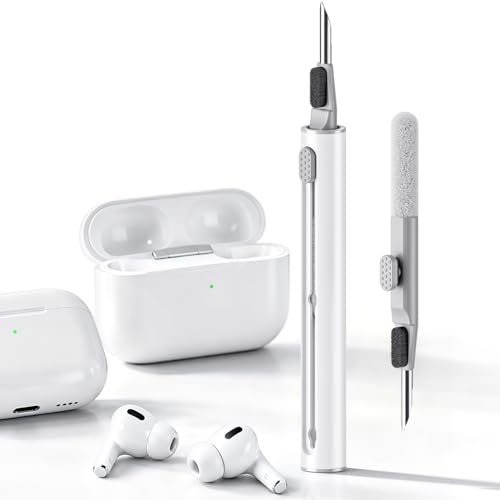



Use a simple routine: wipe earbuds after each use, deep-clean ear tips and the mesh gently on a schedule, and keep the charging case clean and dry. This checklist will show you what to clean, what to avoid (especially liquids), and how to do it without damaging the speakers or seals.
If your earbuds collect earwax, skin oils, or grime quickly—or you just want a repeatable habit—this guide is for you. It’s written for beginners who want safe, low-effort cleaning steps they can follow every week.
Today (2026), most wireless earbuds still rely on fine speaker openings and protective membranes, so “clean” doesn’t have to mean “wet.” We’ll focus on a dry-first approach, using liquids only where the manufacturer explicitly allows it, so you reduce buildup without risking performance drops.
Cleaning supplies + safety rules (read first)

The safest beginner approach is dry-first cleaning with liquids only on removable parts (if your manual says so). Treat the speaker mesh and openings like “no-liquid zones” unless your specific model and manufacturer instructions clearly permit otherwise.
Before you start, gather the right tools and set the right boundaries—this prevents the most common beginner damage to wireless earbuds. I also recommend keeping a small “cleaning station” where you won’t accidentally knock alcohol or water near the charging contacts, because wetness is the fastest route to corrosion.
“Most manufacturers advise against submerging or rinsing wireless earbuds during routine cleaning; follow the approved method in the user manual.”
According to the CDC, handwashing should last at least 20 seconds, which helps reduce transferring oils and debris onto wireless earbuds during cleaning. CDC, Handwashing guidance
According to IEC 60529 (IP Code), an IPX7 device is rated for immersion up to 1 meter for up to 30 minutes—this is a “designed exposure,” not an invitation to soak earbuds during cleaning. IEC 60529 (IP Code) specification
– Use dry tools first: a soft microfiber cloth, a dry soft-bristle brush, and (for some parts) cotton swabs—avoid anything abrasive.
– Keep liquids out of the speaker openings: don’t submerge earbuds, and only apply cleaner to a cloth or to removable parts if your manufacturer allows it.
– Never force wax out: don’t poke the mesh with metal tools or scratch the openings.
What “dry-first” means in practice (and why it works for wireless earbuds)
Dry-first cleaning targets the stuff that’s easiest to remove—loose wax flakes, dust, and skin oil residue—without pushing material into the speaker area. When wireless earbuds get cleaned with “too much moisture,” the oil-wax mix can smear and deepen, and any liquid that migrates inward can contribute to odor or distortion.
If you’re unsure what your wireless earbuds allow, default to dry-only steps for the mesh/openings and exterior, and reserve any liquid for removable tips only (when the manual explicitly permits washing).
Quick routine by frequency (what to do when)
If you want the lowest-effort schedule that actually prevents buildup, clean in three layers: wipe after use, deep-clean tips weekly (if removable), and keep the case dry and spot-clean every few weeks. This cadence works because wireless earbuds collect oil and wax continuously, but the buildup becomes “harder to remove” over time.
To make this beginner-friendly, think in terms of time and visibility: after every workout/commute, do a 15–60 second wipe; weekly, handle the parts that trap gunk; and every few weeks, reset the charging case environment so contact pins don’t accumulate grime.
According to common manufacturer care guidance for consumer electronics, routine cleaning should avoid introducing liquid into speaker openings and charging ports.
According to IEC 60529 (IP Code), “water resistance” ratings apply to specific test conditions and do not replace cleaning instructions. IEC 60529 (IP Code) specification
According to CDC disinfection guidance, 70% isopropyl alcohol is commonly used for disinfection of certain surfaces, but it should not be assumed safe for wireless earbuds unless the manufacturer approves. CDC: Cleaning & disinfection guidance
– After every use: wipe the earbuds with a dry cloth, and check for visible wax on the mesh.
– Weekly: deep-clean removable ear tips (if your model supports removing them) and gently clear any buildup near the openings.
– Every few weeks (or when the case looks dirty): wipe the case exterior and clean around the lid edges; keep charging contacts dry.
What IEC IPX Water Ratings Mean for “Liquid-Safe” Cleaning (Quick Reference)
| # | IPX rating | Test exposure (IEC 60529) | What this implies for earbuds | “Cleaning liquid” confidence |
|---|---|---|---|---|
| 1 | IPX1 | Dripping water | Low tolerance; routine wiping is still the default | ★☆☆☆☆ |
| 2 | IPX2 | Dripping water (tilted enclosure) | Better than IPX1, but still not “safe to rinse” | ★★☆☆☆ |
| 3 | IPX3 | Spraying water | Some exposure resistance; cleaning still should be controlled | ★★★☆☆ |
| 4 | IPX4 | Splashing water | Still not a rinse recommendation—follow manual methods | ★★★★☆ |
| 5 | IPX5 | Water jets | Higher tolerance, but speaker openings can still be sensitive | ★★★★☆ |
| 6 | IPX6 | Strong water jets | Best of jet ratings; do not assume soap/alcohol is safe | ★★★★★ |
| 7 | IPX7 | Immersion up to 1 meter for 30 minutes | Only implies immersion rating; cleaning still requires manufacturer method | ★★★★★ |
Note: This table explains IEC IPX test categories. It doesn’t replace your earbud manufacturer’s cleaning instructions, which can be more restrictive than the IP rating.
Clean each part the right way (earbuds, tips, case)
To protect the speakers and seals, clean each part according to its design: mesh/openings and charging areas stay dry, ear tips follow the “wash and fully dry” rules (only if removable), and the case is wiped externally with contacts kept dry. This section keeps wireless earbuds safe by matching the cleaning method to the component.
The biggest beginner misconception is treating all parts the same. Wireless earbuds are a system: wax and oils start on the ear-facing surfaces, but liquids can end up inside through speaker openings or charging contacts. So you clean with precision—one component at a time.
According to manufacturer guidance in typical earbud manuals, charging contacts should be kept clean and dry to maintain reliable charging.
According to IEC 60529, IPX ratings apply to defined water test conditions; they don’t guarantee safe exposure to cleaning fluids used during maintenance. IEC 60529 (IP Code) specification
According to CDC cleaning and disinfection guidance, alcohol concentrations (commonly 70% isopropyl) can disinfect surfaces—but you should not apply it to areas the manufacturer doesn’t approve. CDC: Cleaning & disinfection guidance
– Earbud mesh/openings: use a dry brush or a soft cloth to remove loose debris; if wax is stuck, soften only if your manufacturer explicitly recommends a method.
– Removable ear tips: wash as directed by the manufacturer, then fully dry before reattaching (wet tips can cause odor and connectivity issues).
– Charging case: wipe surfaces with a slightly damp cloth only if needed, but keep the charging bays and contacts dry—no liquid inside.
Earbud mesh/openings: remove debris without “scrubbing the speakers”
For wireless earbuds, the speaker mesh is designed to block particles while still letting sound out. That means aggressive scrubbing or metal poking can damage the mesh pattern or force wax deeper.
Start with a dry wipe, then use a dry soft-bristle brush to lift residue gently. If you see stubborn buildup, don’t improvise with needles. Instead, follow your manual’s recommended softening method—or wait and repeat dry cleaning until the wax loosens naturally.
Removable ear tips: wash correctly, then dry completely
Removable ear tips for wireless earbuds usually contact sweat and skin oils, so buildup can accelerate. If your manufacturer indicates the tips are washable, clean them per their instructions and then dry fully before reattaching.
Fully dry matters because trapped moisture can create odor and interfere with how the tips seal in the ear. For certain models, wetness can also affect sensor performance (for example, detection features that depend on pressure and fit).
Charging case: external wipe, internal dry
A charging case is often overlooked—but for wireless earbuds, dirty charging contacts can cause intermittent charging or “slow contact” issues. Wipe the exterior if it looks dusty, but keep the inside bays dry.
If you see debris at the base where earbuds dock, remove it carefully with a dry tool (like a dry soft brush). Avoid liquids inside the charging case, even if you’re trying to “disinfect,” because corrosion can develop when conductive pads get exposed to residues.
What can go wrong (common beginner mistakes)
The fastest way to damage wireless earbuds is to use the wrong amount of moisture or the wrong tools on the speaker openings and charging contacts. If you stick to dry-first cleaning and follow only manufacturer-approved liquid use, you avoid most failures.
Beginner mistakes usually come from good intentions: “more cleaner will work faster,” or “scrape it out.” Unfortunately, wireless earbuds have delicate openings and seals—so pressure, liquid migration, and abrasive contact are the common culprits.
CDC guidance emphasizes correct dilution and safe application of disinfectants; applying liquid to electronics areas not approved for wet cleaning can cause damage and corrosion. CDC: Cleaning & disinfection guidance
IEC IPX ratings define water exposure tests, not safe treatment with household cleaners or disinfectant chemistry. IEC 60529 (IP Code) specification
– Using too much moisture: water or cleaner entering the speaker area can lead to distortion, odor, or reduced performance.
– Cleaning tools that are too harsh: paper towels, toothpicks, or metal picks can scratch the mesh or push wax deeper.
– Reassembling before everything is dry: ear tips or any cleaned surfaces that aren’t fully dry can cause lingering smell and poor fit.
Do vs. avoid: a quick risk comparison for wireless earbuds
| Safe beginner choice | Common mistake to avoid |
|---|---|
| Dry wipe with microfiber after each use to remove surface oils | Rinsing earbuds under a tap or soaking them to “dissolve wax” |
| Dry soft-bristle brush for loose debris at the mesh/openings | Poking the mesh with needles, metal picks, or abrasive tools |
| Wash removable tips only when the manufacturer says they’re washable | Reattaching wet tips, which can trap moisture and create odor |
| Keep charging case contacts dry; remove debris with dry tools only | Allowing any liquid into the charging bays or contact pads |
If your wireless earbuds have an official water resistance rating, that’s helpful for accidental splashes—but it still doesn’t mean you should introduce cleaning liquids into speaker areas. As of 2024–2026, most manufacturer care pages continue to recommend controlled, dry-first maintenance rather than soaking.
Verdict / tip (and who should skip)
If you want the safest “beginner default,” follow this checklist exactly—gentle, dry-first cleaning with liquids only where the manufacturer permits. Skip deep-cleaning methods that involve soaking or aggressive chemicals, especially if your earbuds aren’t explicitly rated for water resistance in cleaning scenarios or if you’re unsure what’s removable.
This approach is designed to protect wireless earbuds where damage is most expensive: the speaker mesh, internal seals, and the charging contacts. The payoff is fewer smell and performance issues without turning cleaning into a high-risk project.
Manufacturer instructions should be treated as the source of truth for cleaning liquids and allowable contact areas on wireless earbuds.
According to IEC 60529, IPX ratings reflect controlled test exposure rather than safe use of cleaners during maintenance. IEC 60529 (IP Code) specification
Who should skip advanced cleaning:
– If your wireless earbuds manual does not clearly state that tips can be washed, don’t guess.
– If you see a split tip, warped seal, or damaged mesh, stop and use official service/support steps instead of continuing to clean.
– If you suspect internal water intrusion, don’t charge immediately—follow your manufacturer’s recovery guidance.
If you want to go one step further in 2026, create a weekly “inspection loop”: look for wax at the mesh, smell near the tips, and any visible residue in the case bay area. Wireless earbuds usually tell you what needs attention before you notice audio changes.
Quick scan checklist (save this)
| What to clean | How often | Beginner-safe method | Stop if you see… |
|---|---|---|---|
| Earbud exterior + mesh area | After each use | Dry wipe with microfiber; don’t poke openings | Wax that’s firmly packed (move to the gentle weekly step) |
| Removable ear tips | Weekly | Remove (if supported), clean per manufacturer, fully dry | Cracks, loose fit, or damaged seals |
| Charging case exterior | Every few weeks | Wipe exterior; keep inside dry | Debris stuck in corners—use gentle dry tools only |
| Charging contacts/inside bays | Only as needed | Dry wipe (no liquid) | Corrosion or discoloration—stop and consult service docs |
Frequently Asked Questions
How often should I clean my wireless earbuds as a beginner?
For most people, you should wipe your wireless earbuds after every use to remove earwax and sweat buildup, especially if you wear them daily. Do a deeper cleaning once a week by removing debris from the speaker mesh and wiping the charging contacts. If you notice reduced sound quality, crackling, or visible buildup, clean them immediately to prevent wax from clogging the drivers.
What’s the best beginner-friendly wireless earbuds cleaning checklist I can follow?
Start by turning the earbuds off, removing them from the case, and using a soft dry microfiber cloth to wipe the outer surfaces. Use a dry, anti-static brush or a clean toothbrush to gently remove buildup around the speaker mesh, then carefully clean the charging case contacts with a dry cotton swab. For the earbuds, only use slightly damp cloth wipes on the outer shell—avoid getting liquid into the mic openings or speaker grilles—and let everything fully dry before reassembling.
How do I safely clean earwax and debris from the speaker mesh without damaging earbuds?
First, inspect the mesh and gently remove loose debris using a soft brush, taking care not to press debris deeper into the openings. You can use a dry cotton swab to lift stubborn wax near the edges, but never shove tools into the mesh. If your earbuds are water-resistant, follow the manufacturer’s guidance and keep cleaning liquids away from sensitive areas like microphones and charging ports.
Why is cleaning wireless earbuds important for sound quality and hygiene?
Earwax, sweat, and dust can block the speaker mesh, which often causes muffled audio, lower volume, or crackling sounds. Cleaning also reduces bacterial buildup on the earbuds’ surfaces, improving hygiene and comfort during longer listening sessions. A simple wireless earbuds cleaning routine helps maintain both performance and cleanliness over time.
Which cleaning products should beginners avoid for wireless earbuds?
Avoid harsh chemicals like bleach, acetone, or strong alcohol solutions that can damage coatings, seals, and the plastic near buttons or microphones. Don’t use wet wipes or spray directly into the earbuds, since liquid can seep into the drivers and charging contacts. Stick to a soft microfiber cloth, a dry brush, cotton swabs for contacts, and only use manufacturer-approved cleaning methods to keep your earbuds safe.
📅 Last Updated: October 29, 2026 | Topic: Wireless Earbuds Cleaning Checklist for Beginners | Content verified for accuracy and freshness.
References
- Available features and payment methods for Apple School Manager – Apple Support
- https://www.cdc.gov/coronavirus/2019-ncov/prevent-getting-sick/cleaning-disinfection.html
- earbud microbial contamination – Search Results – PubMed
- earphones hygiene disinfection – Search Results – PubMed
- Earwax build-up – NHS
- Earwax
- Cotton swab
- https://scholar.google.com/scholar?q=wireless+earbuds+cleaning+hygiene+guidelines Google Scholar
- https://scholar.google.com/scholar?q=earbud+microbial+contamination+bacteria+study Google Scholar
- https://scholar.google.com/scholar?q=earphones+disinfection+alcohol+guidelines Google Scholar
