

Find the action camera cleaning checklist for beginners you can follow without guesswork. This step-by-step guide shows the exact order to clean your lens, body, mounts, and ports so you remove grime and salt without damaging coatings. If you want a simple routine that actually keeps footage sharp after every ride, hike, or dive, start here.



If you’re new to action cams (or you’ve only done quick wipes), this is for you—whether your camera lives on a helmet, a bike mount, or a dive housing. It’s also useful if you’ve noticed smears on the lens or “mystery” spots after sand, saltwater, or muddy rides.
Quick Setup: Tools and Safe Cleaning Rules

If you want to clean an action camera safely, start by preventing grit from grinding across the lens. The fastest way to do that is a gentle blower first, then lens-safe microfiber wipes, and only then any targeted cleaning of buttons and ports.
A gentle blower should come before any cloth wipe because sand and dust particles can act like abrasive “micro-sandpaper” on camera optics.
Cleaning an action camera with the power off reduces the chance of accidental button presses and helps you avoid moisture-related issues near electronics and ports.
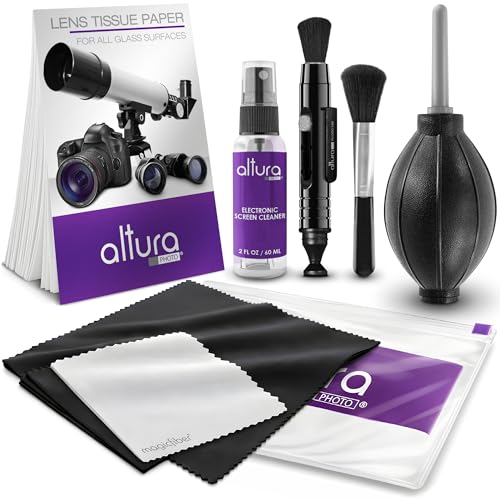
Before you touch the action camera, set up a clean workspace with good light. I keep mine on a small towel so I don’t accidentally set the lens down on a dusty surface. Then gather the following “starter kit” items:
– Lens-safe microfiber cloth (dedicated for optics—never use a towel that’s been used for screens, paint, or grease)
– Gentle blower (hand blower or bulb style; the goal is to dislodge, not blast water)
– Dry cotton swabs (for seams and port edges; only lightly dampen if your manual explicitly allows it)
– Slightly damp microfiber (for the body; water on the cloth, not sprayed onto the camera)
– Fresh water (only when your manual allows rinsing—especially for salt or mud)
A few safety rules will keep your action camera’s lens, seals, and port doors in good shape:
– Avoid harsh cleaners: Don’t use window glass sprays, abrasive cloths, or strong solvents unless your manufacturer/manual explicitly allows it. Many lens coatings (anti-reflective, hydrophobic) can be damaged by alcohol-heavy or solvent-based products.
– Don’t soak the body: Water should not be sprayed or pooled near buttons, cable ports, or door seams. If moisture gets near a seal, pause and let it fully air-dry later.
– Check housing compatibility: Cleaning rules differ between a bare camera and a waterproof housing. Follow your camera/housing manual for approved methods.
Also, remember a practical reality: during outdoor rides and beach days, the action camera lens typically collects two things—film (oil/sunscreen/smudges) and particles (sand/dust). The order of operations matters because wiping particles before removing them increases the risk of lasting lens scratches.
Clean the Lens and Front Housing
To protect an action camera lens, remove debris first, wipe from the center outward, and use only manufacturer-approved lens cleaning steps if needed. This sequence is the best defense against scratches and haze that can show up days later.
Many outdoor contaminants remain on the lens surface as either loose grains or oily film; removing grains first prevents scratching during wiping.
Wiping optics in a center-to-edge direction helps lift smudges rather than pushing them into surrounding rings of dust.
Step-by-step lens order (the “scratch-minimizing” flow)
1. Power off and inspect
– Turn off the action camera, then look for visible grit around the front glass and any housing window.
– If you see sand at the edges of the lens/housing, assume it can scratch once you start wiping.
2. Blow off debris (before cloth contact)
– Use your gentle blower to push loose particles away.
– For stubborn grit near corners, use short bursts—avoid aggressive squeezing that can scatter particles back onto the glass.
3. Wipe with lens-safe microfiber
– Apply light pressure with a lens-safe microfiber.
– Wipe center-to-edge in gentle strokes. Rotate to a clean section of cloth as it picks up grime.
– If the lens looks “streaky,” don’t keep rubbing the same spot—re-blow or switch to a cleaner cloth portion.
4. If needed: manufacturer-approved lens cleaner method
– If you truly need extra help (smears, sunscreen residue, salty film), use only the method your manufacturer allows.
– Key rule: use small amounts—never flood the lens.
If you remove the lens/housing window
For many action camera housings, the inside-facing surfaces can be cleaned separately. Clean these carefully:
– Use only non-abrasive tools and avoid touching the glass with anything that could shed fibers or grit.
– If the inside window fogs easily, that’s often a ventilation/seal issue—cleaning alone won’t fix it if the seal or door alignment is wrong.
To ground why this matters: outdoor “grit” is not just sand—it’s often fine particle sizes that cling to lens surfaces. For example, atmospheric PM10 is defined as particulate matter with aerodynamic diameter up to 10 µm—small enough to smear and trap during wiping if you don’t remove it first (U.S. Environmental Protection Agency (EPA), particulate matter definitions, 2024). Fine particles are a major reason streaks and “mystery haze” show up after beach or dusty rides.
Common Beach/Dust Minerals and Mohs Hardness (Scratch Potential)
| # | Grit mineral (often found in sand/dust) | Typical Mohs hardness | Where it shows up | Scratch potential |
|---|---|---|---|---|
| 1 | Quartz | 7 | Beach sand, crushed rock, construction dust | High ★★★★★ |
| 2 | Olivine | 6.5 | Volcanic rock dust, some coastal sediments | High ★★★★☆ |
| 3 | Feldspar | 6 | Granite sand, roadside dust | Medium-High ★★★★☆ |
| 4 | Magnetite | 5.5 | Dark sand, soil dust | Medium ★★★☆☆ |
| 5 | Hematite | 5.5 | Iron-rich dust, some beaches | Medium ★★★☆☆ |
| 6 | Calcite | 3 | Limestone dust, some coastal sediments | Lower ★★☆☆☆ |
| 7 | Halite (rock salt) | 2.5 | Salt spray residue, beach mist deposits | Lower ★★☆☆☆ |
This data table helps explain why the “blow first, wipe second” habit protects action cameras: even when grit feels small, the minerals in it can be hard enough to mark lens surfaces under friction—especially if you wipe before you dislodge particles.
Clean the Body, Buttons, and Ports
To clean the action camera body without causing access issues later, use damp microfiber on the surface, swabs only at seams, and keep ports dry. Then let everything air-dry before reconnecting cables or closing doors.
Moisture near port edges can migrate into seals during door closure, increasing the risk of fogging or corrosion later.
For action camera ports and buttons, “water on the cloth, not on the camera” is safer than spraying liquid directly into openings.
What to clean (and what not to)
– Body surfaces: Light grime, fingerprints, and light dust buildup.
– Buttons and controls (around, not under): Focus on edge grime that prevents smooth operation.
– Port edges and door seams: Remove residue so the door can seal correctly.
How to do it
1. Wipe the body with slightly damp microfiber
– Put a small amount of water on the cloth (or use a barely damp cloth).
– Avoid soaking areas near buttons, vents, and connector panels.
2. Use dry cotton swabs for edges
– Swabs work well at seams and around button borders where dust collects.
– Only lightly dampen swabs if your manufacturer explicitly permits it.
3. Keep cable/port areas dry
– If you see moisture, stop. Let the action camera air-dry completely before reopening/closing doors or reconnecting accessories.
From my own routine, I’ve learned that the “mystery spots” after dusty rides often aren’t on the lens at all—they’re residue and film around the housing window frame. That’s why cleaning the body and seam-adjacent areas is part of a complete action camera cleaning checklist, not an optional extra.
After Beach, Saltwater, Sand, or Mud
The fastest way to recover an action camera after beach, saltwater, or muddy conditions is to follow a rinse-and-dry rule that your manual approves—then fully dry before closing anything. Different contaminants call for different steps: salt wants fresh-water control and thorough drying, while sand wants debris removal first.
Salt residue can leave conductive deposits; fully drying before closing waterproof doors reduces the risk of later corrosion and fogging.
Dust and sand should be dislodged before wiping because fine particles can smear into films and increase scratch risk.
After saltwater
– Rinse exterior parts as allowed by your manual (often fresh water only).
– Do not assume “more rinse is better.” Follow manufacturer guidance for which parts can be rinsed and how.
– After rinsing, dry thoroughly before closing doors. Salt can trap in seams if the door is sealed while damp.
After sand/dust
– First, focus on dislodging particles (blower first).
– Then wipe with lens-safe microfiber.
– If you wipe immediately while sand is still present, you’re more likely to scratch—especially on the housing window rim, where grit collects.
One reason sand can be so problematic: particle size matters. According to USDA NRCS soil texture guidance, silt is typically 0.002–0.05 mm in diameter (2018), meaning some particles are small enough to cling to surfaces and create visible smears when rubbed (U.S. Department of Agriculture (USDA) / NRCS, soil texture classifications, 2018). That’s why blow-off before wipe is not just a habit—it’s physics.
After mud/grease
– Remove visible residue gently (wipe or rinse only when your manual allows).
– Use only manufacturer-approved cleaning products for affected surfaces.
– Avoid “kitchen degreasers” near lens coatings, ports, or seal areas.
What Can Go Wrong (Common Mistakes)
Most action camera cleaning problems come from skipping the order of operations or using the wrong liquid near seals. If you correct those two areas—debris removal first, and fully drying before sealing—you prevent the majority of lens and waterproofing failures.
Scratches usually originate from abrasive grit; wiping without first blowing off particles can create permanent lens marks.
Trapped moisture in doors and ports is a common cause of later fogging and corrosion—even if the camera “seems fine” right after cleaning.
Common mistakes that damage action cameras
– Scratches from grit
– Wiping sand across the lens/housing before blowing it off is the quickest way to add permanent marks.
– Moisture trapped in doors/ports
– Cleaning without fully drying can lead to fogging or corrosion later (days later, not immediately).
– Damaged seals
– Over-cleaning gasket areas, using the wrong chemicals, or stretching seals can reduce water resistance.
– Wrong cleaner for coatings
– Some lens coatings don’t respond well to alcohol/solvents; follow your manual’s guidance.
Quick comparison: “Do this” vs “skip this” on action cameras
- Do: Blow off grit → wipe lightly → air-dry
- Minimizes scratching and reduces trapped moisture risk at ports and door seams.
- Skip: Wipe first when sand is present
- Increases friction and grinding, which can permanently damage lens and housing window surfaces.
- Do: Use slightly damp microfiber on the body
- Keeps surfaces clean without forcing liquids into buttons and ports.
- Skip: Spray cleaners directly onto the device
- Can wick into seams and seals, creating later fogging/corrosion issues.
Also note: some failures are not “cleaning problems” at all. If water intrusion seems likely (cloudy lens that doesn’t clear, recurring fogging, or a seal that doesn’t sit correctly), cleaning may temporarily mask the symptom—but it won’t fix the root cause.
Beginner Verdict: Do This, But Skip These Cases
For most beginners, the safest approach is this order: debris → lens-safe wipe → full dry before closing anything. That sequence is designed to protect action camera lenses, seals, and port doors while minimizing scratch risk.
Beginners benefit most from a consistent cleaning sequence because it reduces the chance that abrasive grit touches lens glass.
Fully air-drying before sealing is critical for waterproof action cameras, since trapped moisture can cause delayed fogging or corrosion.
What works well for beginners
– This checklist focuses on order-of-operations, which is the most controllable factor in scratch prevention.
– It scales from helmet mounts to bike setups to waterproof housings—same core rules, different rinse allowances.
Downsides you should expect
– It takes a few extra minutes compared to a quick wipe.
– Drying can be slower after saltwater, spray mist, or wet mud conditions—especially around door seams.
Who should skip DIY cleaning (or switch to service/manual guidance)
Skip DIY handling and follow service/manual direction if:
– The lens is cracked (wiping can worsen damage).
– The seal looks torn, flattened, or improperly seated.
– You suspect water intrusion you can’t dry out or the lens remains foggy after full drying.
Also, remember that action camera waterproof performance depends on correct seal placement and door alignment—not just on “having cleaned recently.”
Action Camera Cleaning Checklist (Scan/Save)
| Step | Do it when… | What to use |
|---|---|---|
| Power off + inspect | Every clean | Clean workspace, good light |
| Blow off debris | After sand/dust | Gentle blower (per manual) |
| Wipe lens/housing | Smudges, streaks | Lens-safe microfiber |
| Clean body surfaces | Light grime | Slightly damp microfiber (no soaking) |
| Address seams/buttons/ports | Grime around edges | Dry/lighly damp cotton swabs (only if allowed) |
| Rinse (if needed) | Saltwater/mud (only if allowed) | Fresh water only (check manual) |
| Dry fully | After any moisture | Air-dry time until completely dry |
| Check seals/doors | Before re-sealing | Ensure gasket/seal sits correctly (no stretching) |
Sources
– U.S. Environmental Protection Agency (EPA), particulate matter (PM10/PM2.5) definitions and basics, 2024
– U.S. Department of Agriculture (USDA) / NRCS, soil texture classifications (sand/silt/clay particle size ranges), 2018
A beginner-safe action camera cleaning routine is all about the right order: remove loose grit first, wipe with lens-safe materials, and dry completely before you close ports or doors. Use the checklist above for each outing, and keep your lens and seals protected from sand and chemicals. If you want fewer smudges (and fewer headaches later), print or bookmark this page and follow it every time—especially after beach or saltwater days.
Frequently Asked Questions
What’s the best beginner action camera cleaning checklist for after every shoot?
Start by powering off the action camera and removing the battery if you need to. Use a microfiber cloth to wipe off dust, salt, and fingerprints, then gently clean the lens with a dedicated lens wipe or lens pen. If the camera got wet, rinse the exterior (not the ports) with clean fresh water and let it dry fully before closing housings or reinstalling the mount. Finish by checking the lens seal, ports, and seams for trapped debris before storing the camera.
How do I clean an action camera lens without scratching it?
Use a blower first to remove grit, since the biggest cause of scratches is particles you rub across the glass. Apply lens cleaner to a microfiber cloth or use pre-moistened lens wipes rather than spraying directly onto the lens. For stubborn smudges, wipe in gentle circular motions and stop if you feel resistance. Let the lens dry completely before using the camera again to avoid streaks.
How should I clean the action camera housing and seals after saltwater or dust?
Rinse the housing exterior with fresh water and gently remove sand from seams using a soft brush or microfiber edge. Inspect the O-ring and sealing surfaces for debris, then wipe them clean and dry before reassembly. Avoid petroleum-based cleaners on seals, and don’t use sharp tools that could nick the rubber. Store the camera with the housing opened when possible so trapped moisture doesn’t damage seals or connectors.
Why is it important to clean my action camera connectors and ports before storage?
Salt, sand, and moisture can build up in charging ports, waterproof seals, and contact points, leading to corrosion or unreliable connections. After each day of shooting, check for debris, then clean lightly with a dry microfiber and a blower—don’t force anything into the ports. Let everything dry fully before charging or closing waterproof cases. This simple action camera cleaning routine helps prevent long-term damage and improves battery and data reliability.
Which cleaning products are safest for action cameras, and what should I avoid?
Safest options include a microfiber cloth, a blower, lens wipes, and a camera-safe lens cleaner. If you use any liquid, apply it to the cloth first and use minimal pressure to protect coatings on the lens. Avoid household glass cleaners, alcohol-heavy solvents, abrasive pads, and compressed air directly on seals, as these can damage coatings or push grit deeper. Stick to manufacturer-recommended products for the action camera cleaning checklist to keep waterproof performance intact.
📅 Last Updated: October 29, 2026 | Topic: Action Camera Cleaning Checklist for Beginners | Content verified for accuracy and freshness.
References
- https://www.cdc.gov/hygiene/cleaning-disinfection/index.html
- https://www.cdc.gov/coronavirus/2019-ncov/community/disinfecting-building-facility.html
- https://www.epa.gov/coronavirus/how-clean-and-disinfect-your-facility-home
- https://www.who.int/publications/i/item/cleaning-and-disinfection-of-environmental-surfaces-in-the-context-of-covid-19
- Microfiber
- Camera lens
- https://www.osha.gov/coronavirus/safework/cleaning-disinfecting
- https://scholar.google.com/scholar?q=action+camera+cleaning+checklist+for+beginners Google Scholar
- https://scholar.google.com/scholar?q=lens+cleaning+microfiber+compressed+air+guidelines Google Scholar
- https://scholar.google.com/scholar?q=disinfecting+electronics+CDC+WHO+guidance Google Scholar
