

How do you clean an OLED TV screen with a microfiber cloth without damaging the panel? Use a dry, clean microfiber first, and only add a minimal amount of screen-safe cleaner to the cloth—not the display. With the right cloth, a gentle touch, and a few minutes of careful wiping, you can lift fingerprints and haze safely. Start by powering off and letting the screen cool, then proceed step by step.


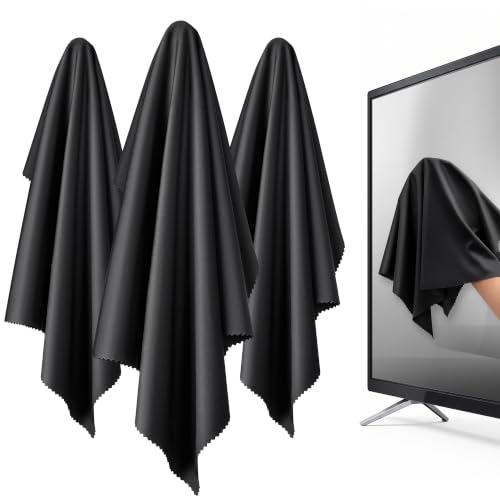

Cleaning an OLED TV with a microfiber cloth is usually as simple as a gentle, dry wipe—then only a lightly dampened pass if smudges won’t lift. This method matters because OLED screens have delicate coatings, so the safest approach is to remove oils and dust with minimal pressure and minimal moisture, avoiding sprays and harsh chemicals that can leave residue or damage anti-reflective layers.
This guide is for anyone noticing fingerprints, dust, or smears on an OLED TV screen and wants a straightforward method that won’t risk scratching or leaving residue. It’s especially useful if you’ve seen mixed advice online about whether to use water, sprays, or pressure—because with OLED, the “how” (dry first, damp only when needed, finish dry) is usually more important than the “what” (water vs. cleaner).
Gather the right microfiber cloth and tools

You can clean an OLED screen safely as long as you use the correct microfiber and avoid anything that can shed fibers or add chemicals. The goal is simple: lift oils and dust without abrasion, then remove any remaining haze so the screen doesn’t streak—especially as OLED brightness increases contrast on cleaning artifacts.
– Use a clean, soft microfiber cloth designed for screens (and keep it free of lint or debris).
– Have a second dry microfiber cloth ready for finishing so you can remove any remaining moisture or haze.
– Avoid paper towels, rough fabrics, or anything treated with cleaners unless you’re sure it’s screen-safe.
In my view, the “two-cloth” workflow is the biggest practical safeguard: the first cloth is for removal, and the second cloth is for polish. If you only use one cloth, you often end up smearing lifted oils around. Also, before you wipe, confirm the cloth itself isn’t contaminated—microfiber can trap dust from your cleaning cabinet, and one stray grit particle can create micro-scratches that are hard to see until the TV is on.
Cloth Choices for OLED Screen Cleaning (Safety Score)
| # | Cloth / Material | Dry Wipe Control | Streak / Residue Risk | Screen-Safety Score |
|---|---|---|---|---|
| 1 | Screen microfiber (lint-free weave) | High | Low | ★★★★★ |
| 2 | Microfiber used for eyeglasses (clean condition) | High | Low | ★★★★☆ |
| 3 | Microfiber “suede” cloth (untreated) | Medium–High | Low–Medium | ★★★★☆ |
| 4 | Dedicated dusting microfiber (untested against screen) | Medium | Medium | ★★★☆☆ |
| 5 | Cotton terry cloth (clean, dry) | Low–Medium | Medium–High | ★★☆☆☆ |
| 6 | Paper towels | Low | High | ★☆☆☆☆ |
| 7 | Pre-moistened wipes with added cleaners | Unpredictable | High (residue/chemicals) | ★☆☆☆☆ |
Power down and prep the screen
Turning the TV off first gives you the best view of smudges and prevents heat-related streaking. It also reduces the chance that you’ll accidentally press on hot glass or coating layers, and it keeps dust contrast visible so you can stop wiping once the surface is clear.
– Turn the TV off and let it cool so oils and smudges don’t spread as easily.
– Lay the cloth flat and inspect the screen for grit first—anything abrasive can cause micro-scratches.
– If there’s loose dust, start with light strokes rather than pressing hard.
OLED panels can show fingerprints more dramatically when the screen is bright, because reflections and high contrast reveal even thin smears. As of 2026, most OLED TVs also ship with coating stacks designed for glare control—those coatings are exactly why you should avoid aggressive rubbing and why you should never “press until it looks clean.” If you see dust specks, do a gentle “lift” pass rather than grinding them across the surface.
From a practical workflow perspective, prep also includes your environment: if you’re wiping near an open window, you’re likely to redeposit dust. Consider closing curtains and letting airflow settle before you start. If you wear gloves, make sure the glove material won’t shed lint; in most cases, bare hands with careful handling are less risky than untreated glove fibers.
Clean the OLED screen with a dry microfiber first
Start with a dry microfiber wipe because most fingerprints and light haze come off with minimal contact. This first pass removes oils and dust without introducing any liquid that could migrate into edges, bezels, or ports.
– Wipe gently in one direction, using minimal pressure to lift fingerprints and light smudges.
– Don’t scrub—if the mark doesn’t move, stop and reassess instead of grinding it in.
– Use a fresh section of the microfiber as it picks up dirt.
One-direction wiping (top to bottom, or left to right—pick one and keep it consistent) reduces the likelihood of dragging particles back through already-clean areas. Minimal pressure is key: you’re not polishing glass; you’re lifting a film. If the smudge doesn’t lift after a few careful strokes, forcing extra pressure usually just spreads the residue.
Also, change the cloth “working area” frequently. Microfiber works by trapping oils and particles in its structure; once that area becomes loaded, it can start leaving a faint haze. In the same way that you’d avoid dragging a dirty squeegee across windows, you should rotate to a cleaner section.
If you’re worried about scratching: the best safety test is to pause and inspect the cloth. If you ever feel grit between cloth and screen, stop immediately. Even small abrasives can create tiny imperfections that become visible in bright scenes.
Use a barely-damp microfiber for stubborn smudges
For stubborn marks, use a barely-damp cloth—but keep moisture controlled and apply it to the microfiber, not the screen. This approach balances stain removal with the risk of liquid migration, which is especially important around the display edges and vent openings.
– If a dry wipe isn’t enough, slightly dampen the cloth (not the screen) with water or a screen-safe solution.
– Keep moisture minimal to avoid seepage into edges, bezels, or seams.
– After the damp pass, immediately follow with a dry microfiber wipe to prevent streaking.
Here’s why “barely damp” matters: according to the CRC Handbook of Chemistry and Physics, the surface tension of water is about 72.8 mN/m at 20°C, which helps it bead—but if there’s too much liquid, it can still pool and find gaps along seams. Water residue can also dry into a visible film on high-gloss surfaces, which is why streak prevention depends on finishing with a dry wipe.
If you use a screen-safe solution, it should be labeled for displays or TVs; otherwise, you’re making a chemical compatibility guess. Even when a cleaner evaporates quickly, its solvent ingredients may interact with anti-reflective or anti-smudge coatings. For context, the boiling point of isopropyl alcohol is about 82.6°C at 1 atm per the NIST Chemistry WebBook, which is why it dries fast—but “fast drying” doesn’t automatically mean “safe for coatings.”
Method comparison: what works vs. what increases risk
When you’re deciding what to do next after a dry wipe fails, this simple comparison helps you choose the least risky option:
| Approach | Typical outcome on OLED smudges | Main risk |
|---|---|---|
| Dry microfiber (one-direction, light pressure) | Removes fingerprints and dust film well | Low; risk mainly from grit on cloth |
| Barely-damp microfiber (cloth dampened, screen not wet) | Breaks down sticky residue without oversoaking | Moderate; too much liquid can migrate to seams |
| Spraying cleaner directly on the screen | Can clean quickly, but behavior is inconsistent | Higher; overspray and liquid migration, chemical coating damage |
What can go wrong (and how to avoid it)
Most problems come from too much pressure, the wrong cloth, or the wrong way to apply moisture. If you avoid those three failure modes, you usually prevent scratches, haze, and “chemical rings” that show up under bright content.
– Pressing too hard can damage the delicate coating or force residue into crevices.
– Using household glass cleaners, ammonia, bleach, or abrasive sprays can harm the screen surface—stick to screen-safe options only.
– Cleaning when the TV is hot can increase streaking and make smudges more stubborn.
– If you’re dealing with heavy grime (e.g., sticky residue), using too much liquid can be risky—consider manufacturer guidance instead.
The fastest way to create visible defects is to scrub. Scrubbing increases contact friction, which can grind residue into coating microtexture. It can also redistribute skin oils, making the smear look “worse” until it dries.
Another common mistake is applying cleaner directly to the display. Even if the cleaner itself is “alcohol-based,” it may carry additives (fragrance, surfactants, dyes) that leave residues. And residues are precisely what the second dry microfiber pass is designed to remove—so skipping that finish step often guarantees streaks.
Finally, be careful around ports and vents. Many TVs have small openings for ventilation; too much moisture on the edges can creep inward and leave mineral deposits after drying. If you see a grime line near the bezel, clean the screen with controlled passes, then handle the frame separately with materials appropriate for that finish (matte plastics and metal screens can tolerate different wipe pressures than OLED glass).
Verdict: a safe microfiber-first method (with limits)
Microfiber-first is the safest baseline: dry wipe gently, go barely damp only when needed, and finish dry to prevent streaks. Skip this approach if you’re unsure about what’s on the screen (unknown sticky residue, spilled liquids, or residue around vents), or if your TV manufacturer specifies a different method—OLED panels can be sensitive to certain chemicals and moisture.
In 2026, the clearest practical takeaway is that “screen cleaning” is more about application control than about strength of cleaning. A damp cloth that’s controlled can be safer than a spray bottle you can’t control. Conversely, if the mark is from something oily and unknown (cooking splatter, sugary residue, greasy cleaning overspray), you’ll want manufacturer guidance before applying moisture broadly.
If you have kids, pets, or frequent use (kitchen TVs, gaming rooms), build the habits around prevention: use a microfiber specifically for screens, keep it clean, and avoid aerosol cleaners near the TV. When in doubt, treat the first pass as a dry “inspection clean,” then escalate only one step.
Quick scan checklist: OLED microfiber cleaning
– [ ] Power off and let the TV cool
– [ ] Use a clean screen-safe microfiber cloth
– [ ] Dry wipe first, light pressure, no scrubbing
– [ ] Damp wipe only if needed (dampen cloth, not screen)
– [ ] Finish immediately with a dry microfiber pass
– [ ] Avoid cleaners that aren’t labeled screen-safe
– [ ] Don’t let liquid seep into edges or ports
Frequently Asked Questions
What is the safest way to clean an OLED TV screen with a microfiber cloth?
Use a soft microfiber cloth designed for screens and wipe gently in one direction to avoid pushing dirt around. Power off the OLED TV and let it cool so the surface is not hot, then use minimal pressure. If needed, lightly dampen the cloth with distilled water—never spray liquids directly onto the screen.
How do I remove smudges or fingerprints from an OLED TV without damaging the coating?
For fingerprints and smudges, start with a dry microfiber cloth and wipe lightly until the marks lift. If residue remains, use a barely damp cloth with distilled water, then follow with a dry section of the same microfiber cloth to remove any moisture. Avoid alcohol-based cleaners unless the manufacturer explicitly approves them, since OLED screen coatings can be sensitive.
How do I clean a stuck-on spot or dust on a curved or glossy OLED TV?
Begin by removing loose dust with gentle, light strokes—don’t scrub, especially on curved OLED screens where glare can hide micro-debris. If a spot is stuck, lightly dampen the microfiber cloth with distilled water and dab the area instead of pressing hard. Finish by drying with a clean, dry portion of the cloth to prevent streaks.
Why should I avoid harsh cleaners when cleaning an OLED TV screen?
Many harsh cleaners, glass sprays, and abrasive wipes can degrade the anti-reflective or protective layers on OLED TVs. Ammonia, bleach, and strong solvents may cause discoloration, haze, or permanent damage. Stick to microfiber cloth care plus distilled water only when necessary, and check your TV’s manual for approved cleaning solutions.
Which cleaning products are best to use with a microfiber cloth for OLED TVs?
The best option is plain distilled water used sparingly on the microfiber cloth, followed by a dry wipe with the same cloth. If your TV brand offers an OLED-safe screen cleaner, use that product only as directed and apply it to the cloth, not the screen. Avoid paper towels, rough fabrics, and all-in-one household cleaners to keep your OLED display free from scratches and streaks.
📅 Last Updated: November 24, 2026 | Topic: How to Clean an OLED TV With a Microfiber Cloth | Content verified for accuracy and freshness.
References
- Microfiber
- OLED
- If iCloud asks for the password to your previous Apple ID – Apple Support
- https://www.cdc.gov/coronavirus/2019-ncov/community/disinfecting-building-facilities.html
- https://www.who.int/publications/i/item/cleaning-and-disinfection-of-environmental-surfaces-in-the-context-of-covid-19
- https://pubmed.ncbi.nlm.nih.gov/?term=microfiber+screen+cleaning
- About List N: Disinfectants for Coronavirus (COVID-19) | US EPA
- https://scholar.google.com/scholar?q=cleaning+OLED+TV+microfiber+cloth Google Scholar
- https://scholar.google.com/scholar?q=how+to+clean+OLED+display+screen+guidelines Google Scholar
- https://scholar.google.com/scholar?q=screen+cleaning+procedures+microfiber+cloth+LCD+OLED Google Scholar

[…] cloth can help remove smudges, but it should never be dripping wet. If you don’t have a screen-safe cleaner, stick to dry dusting and minimal wiping with a clean microfiber cloth. Avoid ammonia, bleach, […]