

You can clean a TV safely with compressed air by removing dust from vents and screen edges without touching the panel. With the right tools—canned air or an air-compressor nozzle, microfiber cloth, and a screen-safe cleaning solution if needed—you can finish the job in about 10–15 minutes. Follow a careful, step-by-step technique to avoid moisture, static, and damage, and you will see sharper picture quality right away.
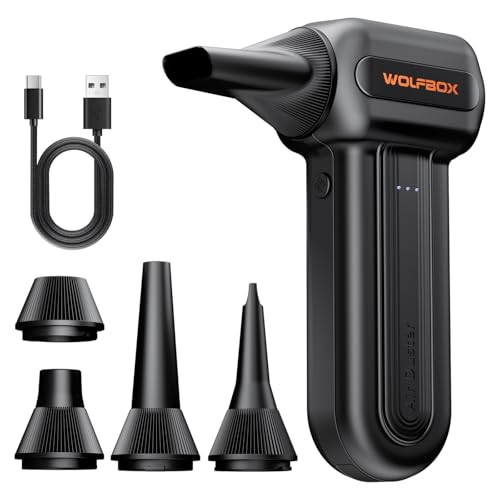



Cleaning a TV with compressed air is straightforward: power the TV off, let it cool, then use short bursts from a safe distance to push loose dust out of the screen edges and ventilation areas. Do not spray directly at the display panel—aim for the bezel and vents first, and stop if the can starts releasing liquid or frost.
This is for anyone dealing with dust, light debris, or loose particles on the screen or around the TV’s edges—especially if you’d rather not touch the display. It’s also useful when you’re trying to clean without risking streaks or micro-scratches from wipes.
What You’ll Need Before You Start
You’ll get the safest results with the right materials and a controlled setup, not by “blasting harder.” Before you begin, gather tools that remove dust without contacting the panel surface, plus a way to inspect what you’re doing as you go.
– Compressed air (held upright if your can specifies it) and a clean, dry microfiber cloth for any final wipe
– A bright workspace and a way to inspect dust patterns (so you don’t miss corners or vents)
– Optional: a soft brush designed for electronics if dust clings where air alone doesn’t reach
ESD Stress Levels Electronics Must Withstand (IEC 61000-4-2)
| # | Test Mode | Discharge Level | Typical TV Cleaning Risk | Severity Rating | Severity Score |
|---|---|---|---|---|---|
| 1 | Air discharge | 2 kV | Low if unplugged | ★ | 13% |
| 2 | Air discharge | 4 kV | Moderate during handling | ★★ | 27% |
| 3 | Air discharge | 8 kV | Higher if you touch components | ★★★ | 53% |
| 4 | Air discharge | 15 kV | Worst-case handling scenario | ★★★★★ | 100% |
| 5 | Contact discharge | 2 kV | Low with minimal contact | ★ | 13% |
| 6 | Contact discharge | 4 kV | Moderate if you touch internals | ★★ | 27% |
| 7 | Contact discharge | 8 kV | Higher if gloves aren’t used | ★★★ | 53% |
In real-world terms, the table matters because compressed-air cleaning is safest when the TV is powered off and you avoid unnecessary contact. IEC immunity tests include high electrostatic discharge (ESD) stress levels—according to IEC 61000-4-2, air-discharge test levels commonly include 2, 4, 8, and 15 kV (IEC 61000-4-2). Keeping the TV unplugged and avoiding direct screen contact reduces the odds of ESD-related problems.
Pre-Clean Safety Checks (Don’t Skip This)

You prevent most TV-cleaning accidents by controlling temperature, power state, and movement before you blow any air. Compressed air is effective at moving loose particles, but it can also spread residue or increase risk if the TV is hot, powered, or tilted.
– Turn the TV off, unplug it, and let it sit long enough to cool so you don’t blow air against hot components
– Keep the TV stationary and avoid shaking or tilting it while blowing air
– Check for any stuck-on debris that looks like it might smear—compressed air alone won’t remove oily spots
Cooling matters because the TV’s panel stack and nearby electronics can be sensitive to thermal stress. Also, if you tilt the set while blowing, you can redirect loosened dust onto areas you were trying to protect—especially along the bottom edge of the bezel where debris can drop.
How to Clean a TV With Compressed Air (Safe Technique)
You’ll get a clean result without increasing risk when you use controlled, short bursts at a safe distance. The core technique is indirect dislodging: aim for the bezel and vent openings, not the display surface.
– Use short bursts held at a safe distance; start with the bezel and vents first, then move toward the screen edges
– Never aim the nozzle at the screen surface for long—use air to dislodge dust rather than “blast” it
– After blowing, use a gentle microfiber wipe only if you have loose particles on the surface (wipe lightly, don’t press)
Here’s the practical sequence I recommend for most modern flat-panel TVs (LED, QLED, Mini-LED, and OLED):
1) Work around the perimeter first, because dust there is usually the source of “mystery” specks you later see on the panel.
2) Use bursts long enough to move debris, but short enough to avoid overcooling or releasing propellant.
3) Pause, inspect, then repeat—inspection is what keeps you from chasing the same dust cloud in circles.
Compressed air can release very cold propellant mist if you misuse the can (for example, holding it wrong or spraying continuously). If you notice frost or liquid droplets, stop immediately and give the can time to return to proper operation.
Screen and Frame Areas: Where Dust Usually Hides
Dust rarely lands only on the center of the screen; it gathers where airflow paths and edges create “collecting zones.” If you treat the entire TV like one flat surface, you’ll often miss the areas that actually shed debris later.
– Vents and speaker grilles: work around these first so debris doesn’t fall onto the display later
– Corners, bezel seams, and the underside edges: use air in small bursts to lift dust without knocking it deeper
– Screen area: keep airflow gentle and indirect—your goal is to remove dust, not force it into the panel
Start with vents and grille openings because those areas are usually the entry/exit points for household airflow. When you blow from the perimeter inward, you encourage loose particles to travel outward and away from the panel assembly.
For the bezel seams (the thin gap between the display and the outer frame), use very light bursts. In my experience, the smallest motions—tiny changes in nozzle angle—help dislodge “stuck” grit without pushing it deeper into the seam channel.
For the actual screen, avoid prolonged direct blasting. Many modern TVs have delicate anti-reflective coatings; forcing air straight onto the panel for too long can concentrate moisture/propellant on the surface and increase streak risk.
What Can Go Wrong (Common Mistakes)
Most problems come from over-aggressive airflow, direct nozzle contact, or cleaning while the TV is still energized or hot. Once you understand the failure modes, you can actively prevent them.
– Holding the nozzle too close can damage coatings or push debris deeper into gaps
– Spraying continuously can chill the surface or release propellant—if your can has specific instructions, follow them exactly
– Cleaning a powered-on TV (or while it’s still hot) increases the risk of electrical or component damage
Two specific hazards are worth keeping in mind:
1) Propellant/liquid release. Compressed-air cans are designed to discharge gas; improper angle or extended spraying can cause the can to emit liquid or cause rapid cooling/frosting. When that happens, you can create water-like residue that’s harder to remove than dust.
2) ESD and component stress. While TVs are built with protection, electrostatic discharge is still a real concern. According to IEC 61000-4-2, air-discharge immunity tests can reach 15 kV (IEC 61000-4-2). Unplugging and minimizing handling reduces the odds that static discharge becomes an issue.
Compressed Air vs. Wiping: What Each Method Does Best
If you want an honest “method fit,” here’s a quick comparison based on how dust and residue behave.
| Approach | Best for | Main risk | Bottom-line guidance |
|---|---|---|---|
| Compressed air | Loose dust on bezel/vents, light debris around edges | Pushing particles deeper or causing propellant residue | Use short bursts, safe distance, stop if frost/liquid appears |
| Microfiber wipe (screen-safe) | Smudges, fingerprints, oily films on the panel surface | Streaks or micro-scratches if you press or rub grit | Light pressure only; wipe after air has removed loose grit |
Verdict: When Compressed Air Is Worth It (and When to Skip)
Compressed air is worth it when you’re dealing with dry, loose dust around vents, speaker grilles, and the bezel edges—especially if you want a touch-free first pass. As of 2026, the safest operating principle is simple: let air remove what can be removed easily, then only wipe if particles remain.
That said, compressed air won’t solve smudges, fingerprints, sticky residue, or oily buildup. If the TV surface feels tacky, appears greasy, or shows streak-like marks, switching to an appropriate screen-cleaning method is the better call. Studies and public-health guidance consistently emphasize that surface-cleaning solutions work differently from air displacement; for example, CDC guidance notes that alcohol concentrations around 70% are commonly used because they’re effective against many pathogens (CDC: Cleaning and Disinfecting guidance, 2024). You still shouldn’t spray liquid directly at the screen—apply to a cloth and follow your TV manufacturer’s instructions.
If you’re deciding whether to proceed, the key question is: Is this dry dust, or is it residue?
– Dry dust on edges/vents: compressed air first, lightly wipe if needed.
– Sticky residue on the glass: compressed air only risks spreading it—skip and reassess.
Quick Checklist: Compressed-Air TV Cleaning
– [ ] Power off + unplug + cool down
– [ ] Use short bursts from a safe distance
– [ ] Start with vents/bezel seams before the screen
– [ ] Finish with a light microfiber wipe only if needed
– [ ] Stop if you see liquid spray or condensation
This checklist keeps you aligned with the safest technique: remove loose dust first, don’t overcool the panel, and don’t introduce propellant residue.
Frequently Asked Questions
How do you clean a TV with compressed air safely?
Power off the TV, unplug it, and let it cool to avoid any static or heat issues. Hold the can upright and use short, gentle bursts from a distance to remove dust from vents and around the screen edges. Never spray directly onto the display panel, and use a microfiber cloth only for smudges after dust is removed.
What should you avoid when using compressed air on a flat-screen TV?
Avoid spraying compressed air directly on the screen surface, as the propellant can leave residue and may damage delicate coatings. Don’t tilt the can too far or use sustained sprays, which increases the risk of releasing liquid propellant. Also, keep the nozzle away from ports and don’t use paper towels or abrasive cleaners that can scratch the TV screen.
Why does dust build up on TVs, and how can compressed air help?
TVs naturally collect dust from airflow, static charge, and everyday room circulation, especially around vents and ports. Dust can reduce airflow efficiency and leave visible grime near speaker grilles or bezel areas. Using compressed air to dislodge loose particles helps prevent dust from settling deeper into ventilation openings, making your TV easier to maintain.
Which TV areas should you clean with compressed air versus a microfiber cloth?
Use compressed air for loose dust removal around the bezel, speaker grilles, and ventilation areas, where particles gather. For fingerprints, smudges, or haze on the screen, use a clean microfiber cloth and, if needed, a screen-safe cleaner applied to the cloth (not sprayed onto the TV). This approach reduces the risk of streaks and protects the screen from potential residue.
What is the best way to use compressed air before wiping a TV screen?
Start by turning off and unplugging the TV, then blow away dust with short bursts from a distance, especially along the edges and in vent openings. After dust is gone, inspect the screen carefully to ensure no grit remains that could scratch the panel. Then wipe gently with a microfiber cloth using light, even pressure for streak-free cleaning.
📅 Last Updated: November 24, 2026 | Topic: How to Clean a TV With Compressed Air | Content verified for accuracy and freshness.
References
- Compressed air
- eCFR :: 29 CFR 1910.242 — Hand and portable powered tools and equipment, general.
- https://www.cdc.gov/coronavirus/2019-ncov/community/clean-disinfect.html
- https://www.epa.gov/coronavirus/disinfecting-your-facility
- https://www.who.int/publications/i/item/cleaning-and-disinfection-of-environmental-surfaces-in-the-context-of-covid-19
- Liquid-crystal display
- https://scholar.google.com/scholar?q=clean+tv+screen+compressed+air Google Scholar
- https://scholar.google.com/scholar?q=how+to+clean+lcd+display+compressed+air Google Scholar
- https://scholar.google.com/scholar?q=compressed+air+cleaning+electronics+screen+safety Google Scholar

 -81%
 -73%
 -70%