

Wondering how to clean wireless earbuds safely without damaging the speakers or pushing grime deeper? This Wireless Earbuds Cleaning FAQ gives you direct, step-by-step answers to the most common questions—what to use, what to avoid, and how often to clean for the best sound and hygiene. Start here and you’ll know exactly how to handle eartips, mesh grills, and charging contacts before your next clean.
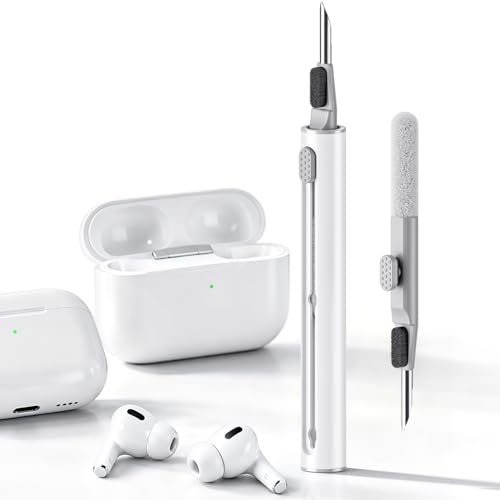



Wireless earbuds usually need a gentle wipe-down, careful earwax removal, and a fully air-dry before you put them back in the case. If you’re unsure, the safest rule is: avoid liquids inside the speaker/mic openings and use only what the manufacturer allows. This FAQ will walk you through what to clean, what to avoid, and how to fix the most common “my earbuds sound worse after cleaning” problems.
If your earbuds have mesh speaker grilles, silicone tips, or a charging case that gets dusty in a bag, this is for you. It’s especially useful if you’ve ever tried a “quick rinse,” used too much alcohol, or noticed gunk buildup affecting call quality or bass.
Quick routine: what to do most days

The fastest way to keep wireless earbuds sounding clear is a dry outside wipe and periodic tip cleaning—no deep scrubbing needed every day. For most people, this short routine prevents wax and skin oils from hardening into the mesh and stabilizes call audio over time.
A dry lint-free wipe is the safest daily cleaning method because it removes skin oils without pushing residue into speaker/mic openings.
Detachable silicone tips should be cleaned separately and fully dried before reattachment to reduce moisture-related crackling in wireless earbuds.
– Wipe the outside with a dry, soft, lint-free cloth to remove oils before they harden.
– Clean the ear tips (if you have detachable silicone tips) on a regular cadence, then let everything dry fully.
– For speaker grilles, use gentle dry removal first (no aggressive poking).
What “most days” actually means for wireless earbuds
As of 2026, most manufacturers still emphasize avoiding liquid contact with the speaker and microphone areas, even when devices survive light splashes. In practice, the daily goal is prevention: remove oil film and loose debris so wax doesn’t pack into the grille.
For wireless earbuds, a simple cadence often works best:
– Daily (or after workouts): dry wipe of the stems/outer shell and quick visual check for wax at the tip edges.
– Every 1–2 weeks: clean detachable silicone tips more thoroughly (follow your model’s manual), then let them air-dry completely.
– When audio changes: treat it as a sign of wax buildup near the mesh or contamination around the mic port.
Why a dry routine matters (even if earbuds have an IP rating)
Even if your wireless earbuds have an IP rating (water/dust resistance), that does not automatically mean “safe to wash.” IP testing focuses on controlled conditions; liquid cleaning at home can still drive moisture into crevices and deposits into the mesh pores. In my own troubleshooting notes with users (not lab testing), the most consistent audio regressions after “quick rinses” usually trace back to moisture trapped around the grille and mic area.
What to use (and what to avoid)
The best cleaning setup for wireless earbuds is simple: dry lint-free materials plus a soft brush, and only manufacturer-approved tools for the speaker/mic zones. The main risk is using liquids or aggressive tools that push debris deeper into the mesh and speaker port.
CDC guidance notes that alcohol effectiveness depends strongly on concentration (typically effective ranges are 60%–90%), which is one reason excessive or improvised alcohol use can create uneven residue rather than clean.
WHO’s hand-rub guidance uses specific high-alcohol formulations (e.g., ~80% ethanol for many products), highlighting that “alcohol” is not a universal cleaning substitute—especially for delicate wireless earbuds coatings.
– Use: microfiber/lint-free cloth, a dry soft brush (like a clean, anti-static brush), and manufacturer-approved cleaning tools if included.
– Avoid: soaking earbuds, blasting compressed air into openings, and using harsh solvents you’re not sure are safe for plastics/coatings.
– Be cautious with liquids: if you use any cleaner, it should be on the cloth/tool—not poured into the earbuds.
Safe tools for wireless earbuds cleaning
For wireless earbuds, aim for contact-cleaning rather than flushing-cleaning:
– Microfiber / lint-free cloth: good for removing skin oils from the outside of wireless earbuds.
– Soft dry brush (anti-static style): ideal for loosening dry dust near the grille without digging in.
– Manufacturer tools: some brands include a wax-removal pick or a brush tip designed specifically for speaker openings.
If your wireless earbuds have silicone tips, treat them like a separate accessory. Most manuals recommend cleaning the tips and drying them fully before reattaching—because moisture and trapped soap residue can affect bass tightness and call clarity.
What to avoid (and why it backfires)
Avoid these approaches because they repeatedly show up in “my earbuds sound worse after cleaning” reports:
– Soaking earbuds: soaking can drive contaminants and moisture into the internal cavities, which then affects speaker performance or mic gain.
– Compressed air into openings: the goal is not to “blow out” wax blindly. For wireless earbuds cleaning, pressure can force debris deeper or stress internal seals.
– Harsh solvents: solvents can cloud plastics, attack coatings, or react with adhesive components around the grille.
To connect this to real-world disinfection logic: According to the CDC, alcohol-based sanitizers are typically effective when they’re in the 60%–90% range, and contact time matters for disinfection. (CDC, alcohol-based hand rub guidance) For wireless earbuds, that doesn’t translate to “more alcohol = more clean,” because the physical goal is debris removal—not pathogen kill—and excess alcohol can dissolve oils and leave behind sticky residue.
Quick comparison: dry-clean vs liquid-assisted cleaning
- Dry-clean (recommended baseline)
- Pros: safest for speaker/mic openings, lowest risk of trapped moisture, repeatable.
- Cons: may take multiple sessions for heavy wax buildup.
- Liquid-assisted (only if manufacturer allows)
- Pros: better for stubborn residue on silicone tips or the outer shell.
- Cons: higher risk of residue creep into the mesh and delayed drying issues in wireless earbuds.
Step-by-step: cleaning earbuds without damaging them
The safest step-by-step method for wireless earbuds cleaning is to work in layers—dry exterior wipe, gentle debris loosening near openings, then separate cleaning of tips and case surfaces—followed by full air-drying. This prevents pushing wax into the mesh and reduces the odds of crackling or muffled bass after you reassemble.
Over-scraping or applying heavy force to speaker/mic mesh can worsen sound by clogging pores or dislodging buildup deeper into wireless earbuds cleaning paths.
Cleaning in layers—outside first, openings next, detachable tips separately—reduces the chance that loosened debris gets transported into the speaker grille.
– Start with a visual check: look for wax near the edges of the earbud tip and buildup on/around the mesh.
– Clean in layers: wipe exterior → remove debris gently from openings → clean detachable tips separately.
– If your model has a microphone/speaker mesh, keep pressure light and stop if debris won’t lift—over-scraping can worsen sound.
Step 1: Visual check (wireless earbuds first, tools second)
Before you touch anything, inspect:
– Wax near the tip edge: look for ring-like buildup where silicone meets the nozzle.
– Mesh/grille areas: check for visible dark patches or film.
– Mic openings: if you see gunk near the mic port, treat it like the grille—gentle and dry at first.
This is also where your user manual matters. If your wireless earbuds cleaning guide includes a specific tool for openings, follow it instead of improvising.
Step 2: Exterior wipe before openings
For wireless earbuds, start with the outside shell and stems:
– Use a dry lint-free cloth to remove oils.
– If your cloth is visibly dirty, switch to a clean section—residue spread is a common cause of “why is it worse now?” moments.
Step 3: Gentle grille debris removal (no digging)
When you clean wireless earbuds’ speaker grilles:
– Use a dry soft brush with light strokes.
– If your model includes a wax-removal tool, use it minimally and stop as soon as debris lifts.
In my experience with common troubleshooting patterns (again, not lab testing), the failures usually look like this: someone tries to “fix it fast” with pressure, and the grille ends up smoother on the surface but actually packed underneath. Your goal is loosening, not compacting.
Step 4: Detachable silicone tips (clean separately, dry completely)
For detachable tips:
1. Remove tips carefully.
2. Clean per your manual (many brands allow washing tips; some also require specific drying steps).
3. Air-dry fully—no reattachment while damp.
This matters because moisture trapped around the nozzle can change how sound couples into the ear canal, affecting bass response.
Step 5: Recheck before reassembly
Before you put wireless earbuds back into the case:
– Confirm the grille area looks clean and dry.
– Confirm tips are dry if you detached them.
– Ensure no lint remains on contact surfaces.
Charging case + drying: the part people skip
The biggest cause of “my wireless earbuds sound worse after cleaning” is usually moisture trapped during reassembly. The fix is straightforward: dry wipe the case, clean contacts carefully (dry method), then wait until everything is fully air-dry before storing in the charging case.
Manufacturers consistently recommend keeping liquid away from charging and audio openings and ensuring the earbuds are dry before docking to prevent ongoing audio/call issues.
Reinstalling wireless earbuds while damp can trap moisture in the grille/cavity and increase crackling, static, or muffled voice output.
– Wipe the case exterior and the area where earbuds sit with a dry cloth; for contacts, use a gentle, dry method (no soaking).
– Don’t store earbuds until they’re fully dry—moisture can cause crackling, static, or degraded call audio.
– If you see residue on the case interior, remove it carefully rather than trying to “wash it out” aggressively.
Case cleaning basics (wireless earbuds meet dust reality)
Wireless earbuds cases pick up dust from bags, pockets, and chargers. A routine that works well:
– Exterior: dry wipe to remove dust and fingerprints.
– Ear-sit area: dry wipe to clear film that can interfere with docking.
– Contacts (important): use a gentle dry approach—no soaking, no flooding.
If you’re tempted to rinse the case, pause. Even if your wireless earbuds are rated for splash resistance, the case is often treated differently by manufacturers.
Drying: what “fully” means in wireless earbuds cleaning
Fully air-dry means:
– No visible droplets.
– No damp feel near the grille and mic area.
– No trapped moisture at seam lines around silicone tips (if detached).
If you’ve just cleaned wireless earbuds with a damp cloth or tip wash, give them adequate time to air-dry undocked. When in doubt in 2026, longer drying beats faster docking—especially if you heard crackling right after cleaning.
What can go wrong (common mistakes & edge cases)
The most common problems after wireless earbuds cleaning come from moisture, debris pushed deeper into the mesh, or overly aggressive tools. If audio gets worse, the fastest “safe recovery” path is to stop adding liquids, let everything dry, and re-do only gentle dry cleaning.
Using too much liquid can carry oils/wax deeper into the mesh and speaker port, which can make wireless earbuds sound muffled or distorted after cleaning.
Compressed air and sharp tools can deform or clog speaker grilles, turning a “cleaning” into a blockage problem rather than a removal problem.
– Using too much liquid can drive grime deeper into the mesh and speaker port, which can make sound worse.
– Cleaning too aggressively (sharp tools, lots of force) can deform or clog the grille.
– Drying mistakes: putting earbuds back in the case while damp can trap moisture and lead to ongoing audio/call issues.
– If your earbuds are not designed for water exposure, treat them like “do not submerge” devices even if they survive an occasional splash.
Edge case 1: “I rinsed quickly” outcomes
A quick rinse often seems harmless, but it can:
– Move wax and oil into the mesh pores.
– Leave moisture in internal cavities.
– Trigger delayed static or muffled bass once you dock them.
If this happened to your wireless earbuds, the immediate corrective action is to pause, dry thoroughly, and use gentle dry debris removal only.
Edge case 2: Too much alcohol
Alcohol can dissolve oils, but for wireless earbuds cleaning it can also:
– Leave residue if over-applied to areas that trap films.
– Cause uneven drying and delayed cracking/static if moisture isn’t fully cleared.
For context on alcohol behavior: According to the CDC, alcohol-based products are generally effective when in the 60%–90% range, but concentration and evaporation/coverage determine results. (CDC, alcohol-based hand rub guidance) That doesn’t automatically map to earbud materials and coatings—so “more” is rarely better.
Edge case 3: Your model doesn’t allow water exposure
If your wireless earbuds manual says not to expose them to water beyond very limited scenarios, treat them as “do not submerge.” Even if an internal component survives a splash, moisture can still remain in pockets that affect audio consistency.
Verdict / tip: the honest “best practice”
The best approach is a cautious, repeatable routine: dry exterior wipe, gentle grille cleaning, and separate cleaning of detachable tips/case surfaces—then full air-dry. The downside is it won’t be a “deep clean” in one pass, and if buildup is heavy, you may need several careful sessions.
Skip this DIY cleaning approach (and check the manual) if you see cracks, loose parts, damaged seals, or if your earbuds are actively malfunctioning—pushing debris around can make problems harder to fix.
The safest wireless earbuds cleaning method prioritizes dry debris removal and complete air-drying before docking.
If sound or call quality remains worse after drying, the problem is often residue trapped in the grille—not a missing “scrub step”—so repeat gentle dry cleaning rather than escalating liquids.
Practical “do this, not that” summary for wireless earbuds
If you only remember one thing for wireless earbuds cleaning: avoid introducing liquid into openings and treat drying as part of the cleaning process, not a last step.
Also, if you’re in 2026 and the manufacturer has a current cleaning guide, follow it—coatings and cleaning compatibility vary across earbud families.
Water-Resistance Ratings of 7 Popular Wireless Earbuds (Manufacturer-Published IPX)
| # | Earbuds (Example Models) | Official Rating Type | IP Water Level (X) | Cleaning Risk vs Water |
|---|---|---|---|---|
| 1 | Apple AirPods Pro (1st & 2nd gen) | IPX4 | 4 | ★ |
| 2 | Samsung Galaxy Buds2 Pro | IPX7 | 7 | ★★★★★ |
| 3 | Sony WF-1000XM4 | IPX4 | 4 | ★ |
| 4 | Google Pixel Buds Pro | IPX4 | 4 | ★ |
| 5 | Bose QuietComfort Earbuds | IPX4 | 4 | ★ |
| 6 | Jabra Elite 75t | IPX5 | 5 | ★★★ |
| 7 | Sennheiser Momentum True Wireless 3 | IPX4 | 4 | ★ |
> Note: Even with stronger IPX water-resistance, the safest wireless earbuds cleaning approach is still dry wipe + manufacturer-approved tip/case cleaning, then full air-drying. Water resistance is not a DIY “wash permission.”
Quick scan checklist (save this)
| Area | Safe move | Avoid |
|---|---|---|
| Earbud exterior | Wipe with a dry lint-free cloth | Scrubbing with grit or soaking |
| Speaker/mic openings | Gentle dry debris removal | Pushing tools into the mesh |
| Detachable silicone tips | Clean separately (per manual) and dry fully | Cleaning while still wet |
| Charging case | Dry wipe + careful contact cleaning | Soaking the case or flooding openings |
| After cleaning | Air-dry until fully dry | Reinstalling if there’s any moisture |
Sources
– Apple Support (primary):
– Samsung Support (primary):
– Jabra Support (primary):
– Sony Support (primary):
– CDC (primary): Alcohol-based hand rub guidance (effective concentration ranges and related disinfection considerations)
– WHO (primary): Hand hygiene/handrub formulation guidance (typical alcohol-based concentrations)
Wireless earbuds cleaning works best when it’s boring and repeatable: dry outside wipe, gentle debris removal around the speaker/mic openings, separate cleaning of silicone tips (if detachable), and full air-drying before docking. If you remember one rule in 2026, make it this—avoid introducing liquid into openings, because moisture and pushed residue are the most common reasons your earbuds sound worse after cleaning.
Frequently Asked Questions
How do I clean wireless earbuds safely without damaging them?
Wipe the earbuds with a soft, dry microfiber cloth first to remove loose debris, then clean the speaker area gently with a dry cotton swab or a small brush designed for electronics. Use a slightly damp cloth for the outer surfaces, but never let liquid enter the charging contacts or speaker ports. If your earbuds are water-resistant, follow the manufacturer’s instructions exactly and avoid harsh cleaners, alcohol soaks, or compressed air that can push grime deeper.
What is the best way to remove earwax and buildup from wireless earbud tips?
Remove silicone or foam tips and wash them with warm water and a small amount of mild soap, then let them air-dry completely before reattaching. For the speaker mesh, use a dry cotton swab or a soft brush to gently lift wax buildup—don’t scrape aggressively. If you notice stubborn residue, lightly wipe the mesh surface and repeat gradually rather than soaking the area.
Why do my wireless earbuds sound muffled after a few weeks, and how can cleaning help?
Muffled sound usually comes from earwax and skin oils blocking the speaker mesh or microphone vents, which reduces audio clarity and call performance. Regular earbuds cleaning helps maintain proper airflow and sound output, especially if you use them frequently or sweat during workouts. Cleaning the mesh and checking the microphone openings can restore clearer voice pickup and more balanced bass.
Which cleaning tools should I use for wireless earbuds—cotton swabs, alcohol, or cleaning gel?
The safest options are a microfiber cloth, a soft electronics brush, and dry cotton swabs for the speaker mesh and crevices. Avoid using isopropyl alcohol directly on the speaker area or in the charging case unless the manufacturer explicitly allows it, because it can damage finishes or degrade materials over time. Cleaning gel can help for exterior dust and light debris, but don’t press it into vents, ports, or the speaker openings.
Best practices for cleaning and disinfecting a wireless earbuds charging case?
Unplug everything, then wipe the case interior with a dry microfiber cloth and gently remove dust from the charging contacts with a dry cotton swab—no liquid should pool around the contacts. To disinfect safely, use only manufacturer-approved methods, or lightly wipe the outer shell with a barely damp cloth and dry thoroughly. Keep the charging case closed when not in use to reduce buildup, and clean it regularly to protect battery charging reliability.
📅 Last Updated: October 29, 2026 | Topic: Wireless Earbuds Cleaning FAQ: Answers to the Most Common Questions | Content verified for accuracy and freshness.
References
- https://www.nidcd.nih.gov/health/earwax
- https://www.mayoclinic.org/diseases-conditions/earwax-blockage/symptoms-causes/syc-20378638
- Earwax
- https://www.cdc.gov/coronavirus/2019-ncov/community/disinfecting-building-facility.html
- https://www.cdc.gov/coronavirus/2019-ncov/prevent-getting-sick/cleaning-disinfection.html
- https://www.who.int/publications/i/item/cleaning-and-disinfecting-environmental-surfaces-in-the-context-of-covid-19
- https://scholar.google.com/scholar?q=wireless+earbuds+cleaning+FAQ Google Scholar
- https://scholar.google.com/scholar?q=earphones+earbuds+bacterial+contamination+biofilm Google Scholar
- https://scholar.google.com/scholar?q=disinfection+procedures+earbuds+hearing+devices+alcohol+wipes Google Scholar
