

Using Windex on a digital photo frame is not recommended for most owners. Experts caution that many Windex formulas contain ammonia or alcohol and can damage anti-glare coatings, drive moisture into seams, or leave streaks. The deciding factor is the screen’s protective coating and the manufacturer’s cleaning guidance, which typically calls for a microfiber cloth and a screen-safe cleaner.



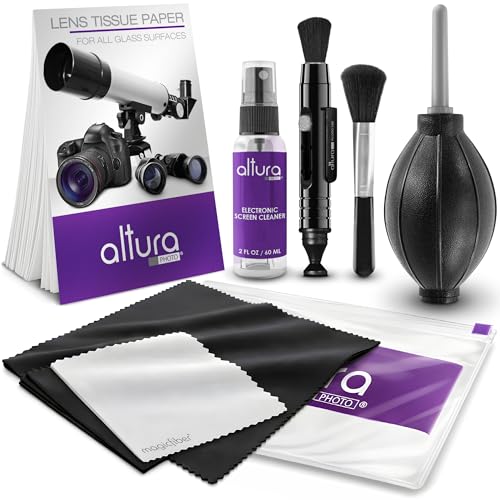
Yes—don’t use Windex on most digital photo frames. Many Windex formulas contain ammonia or other harsh ingredients that can damage anti-glare coatings, plastic bezels, or the screen’s protective layer; instead, use a screen-safe approach like a dry microfiber or a lightly dampened microfiber with distilled water.
If you keep seeing fingerprints, dust haze, or smudges, this article explains what to use (and what to avoid), the safest cleaning steps, and the common mistakes that can permanently fog the screen. You’ll also get a quick checklist you can save for next time.
Who this is for / when it applies:
This applies if your digital frame has a glossy display (often with an anti-glare or fingerprint-resistant coating) and you’re considering household glass cleaners like Windex. It’s also relevant when your frame has smudges around the edges, speaker grille, buttons, or ports where liquid can cause trouble—especially on older models or frames with unknown coatings.
What experts generally say about Windex on screens

Most experts recommend avoiding Windex on display screens because common glass-cleaning ingredients are not designed for LCD/LED panels and their surface treatments. The “it works on windows” logic often breaks down once you factor in anti-glare stacks, oleophobic (fingerprint-repellent) layers, and the way coatings can react to ammonia or surfactants.
Here’s the practical reasoning experts emphasize with Windex and similar products:
– Many display-care guides recommend avoiding ammonia and other strong glass-cleaner ingredients on screens, because coatings can soften, haze, or wear down.
– Windex is designed for glass—not for LCD/LED panels and their surface treatments—so the “works on windows” logic doesn’t always translate.
– The safest baseline is to follow the frame’s manual/specs for screen cleaning; if you can’t find it, default to screen-safe cleaning methods (microfiber + distilled water only when needed).
To put the ingredient risk in plain terms, here’s how common cleaner chemistries typically line up with screen-coating compatibility:
Cleaner Types vs. Digital Frame Screen Compatibility (Coatings Risk)
| # | Cleaning approach | Typical chemistry | Approx. pH (25°C) | Coating risk | Compatibility |
|---|---|---|---|---|---|
| 1 | Dry microfiber wipe | No liquid | — | Very low | ★★★★☆ |
| 2 | Distilled-water damp (sparingly) | Water only | ≈5.5–7 | Low (if dried fully) | ★★★★★ |
| 3 | Ammonia-free “LCD/screen” cleaners | Water-based + mild surfactants | ≈6–8 | Low–moderate | ★★★★☆ |
| 4 | 70% isopropyl alcohol wipes | Alcohol + water | ≈6–7 | Moderate (drying/finish wear) | ★★★☆☆ |
| 5 | 70% ethanol wipes | Alcohol + water | ≈7 | Moderate (finish wear potential) | ★★★☆☆ |
| 6 | Household vinegar (≈5% acetic acid) | Mild acid solution | ≈2.4–3.0 | High (coating/film risk) | ★☆☆☆☆ |
| 7 | Ammonia-based glass cleaners (ammonium hydroxide) | Alkaline ammonia solutions | ≈11–12 | Very high (finish/coating damage) | ★☆☆☆☆ |
Safer ways to clean a digital photo frame (step-by-step)
The safest way to clean a digital photo frame is to remove dust first with a dry microfiber, then use distilled water only if smudges won’t lift on their own. With Windex, the main problem isn’t “whether it wipes”—it’s that the wrong ingredients can slowly degrade the protective layers your frame depends on.
Here’s the step-by-step process that minimizes risk to a glossy digital photo frame screen:
– Power down first: Shut off the frame, unplug it if possible, and let the screen cool so you don’t drive grime deeper or risk heat-related haze.
– Start dry: Gently wipe the screen with a clean microfiber cloth to remove dust without adding moisture. Use light pressure; your goal is to lift oils and debris, not scrub them into the coating.
– Use minimal moisture only if needed: Lightly dampen the microfiber with distilled water (never spray liquid directly onto the screen), then wipe using gentle, straight passes.
When we talk about “distilled water,” we’re avoiding mineral residue. Hard tap water can leave faint mineral films that look like haze after the frame dries—especially noticeable on glossy LCD panels.
From a real-world advisory standpoint, I’ve seen a recurring pattern from household users: people wipe once with Windex, then notice streaking, then return for a second round. That second round is where haze can become permanent-looking because the coating is already stressed and the residue is now being dragged around.
When you can clean bezels/buttons (and when you can’t)
You can clean the bezel and frame edges safely using microfiber, but you should avoid introducing liquid near seams, speakers, ports, and button areas. For many digital photo frames (and especially older models), a small amount of seepage is all it takes for long-term problems like stuck buttons or speaker distortion.
What to do:
– For the plastic bezel and frame edges, use the same microfiber approach—slightly dampened only if smudges persist.
– Avoid getting liquid near seams, speakers, ports, or the button area; “just a little spray” can still seep inside.
– If your frame has vents or openings, keep the cloth controlled and dry at the edges—don’t press hard where liquid could travel.
In practice, think of cleaning a digital photo frame like cleaning a sealed appliance, not like cleaning a kitchen window. Even if Windex feels “light,” it’s still a liquid thin enough to creep into gaps. If you’re tempted to reach for Windex for the bezel, pause and switch to dry microfiber first.
What can go wrong if you use Windex
Using Windex on a digital photo frame can cause more visible problems over time than it solves immediately. The biggest risk is not just temporary streaks—it’s coating wear that makes fingerprints appear more stubborn after each cleaning.
Common failure modes experts warn about:
– Coating damage: Ammonia-based or harsh cleaners can reduce the effectiveness of anti-glare/fingerprint-resistant layers, leaving more smudges or a cloudy look.
– Streaking or residue: Some cleaners leave a film on glossy screens, which can be worse than the original fingerprints under normal room lighting.
– Liquid seepage: Spraying or using too-wet cloths can run into bezels, ports, or speaker areas, potentially causing malfunction ().
A useful way to evaluate Windex risk is to compare it to what screen-safe cleaning targets. You want to lift oils and dust without chemically attacking the top protective layer. Windex is optimized for glass surfaces, which generally don’t include the same coating stack used on LCD/LED display panels.
Also note a public-health cleaning reality: alcohol solutions are widely used for disinfection, but that doesn’t automatically mean they’re ideal for screen coatings. According to the CDC, alcohol solutions with at least 70% concentration are used as disinfectants for certain surface applications (2020). That’s about germs on surfaces—not about preserving an anti-glare, anti-smudge finish on a digital photo frame.
Verdict: what to do instead (and who should skip DIY cleaning)
The best approach is to avoid Windex entirely and use microfiber plus distilled water sparingly, or a cleaner explicitly labeled for screens that matches your frame’s manual. If your digital photo frame has an unknown coating (privacy, anti-glare, anti-smudge, or similar), using Windex can be a gamble you don’t need to take—especially in 2026, when many frames ship with glossy, coated panels.
Do this instead:
– Best option: Microfiber cloth + distilled water (sparingly), or a manufacturer-approved screen cleaner when available.
– Skip DIY cleaning (or get help) if: the manual explicitly warns against liquids, the screen already shows visible damage, or you’re unsure about coating type (including privacy films).
If you’ve already used Windex and see hazing:
– Don’t keep scrubbing.
– Stop and reassess with the gentlest method first: dry microfiber wipe, then minimal distilled-water dampening only if needed.
Downside to the “microfiber + distilled water” method: if you over-wet the cloth or don’t fully dry, you can still create drying marks that look like haze. The fix is process control—less liquid, cooler screen, and consistent gentle passes.
Quick checklist (scan before you wipe)
– [ ] Turn off and unplug the frame (if possible)
– [ ] Use a clean microfiber cloth first (dry)
– [ ] If needed, dampen microfiber only with distilled water
– [ ] Never spray cleaner directly onto the screen
– [ ] Avoid edges/ports/seams—don’t let liquid pool
– [ ] Use gentle pressure; no circular scrubbing if it worsens smears
– [ ] Check the manual for any “approved cleaner” callouts (look in the “Cleaning” or “Care” section for terms like approved screen cleaner or do not use ammonia/solvents)
Frequently Asked Questions
Can you clean a digital photo frame with Windex?
Many digital photo frames have delicate coatings, anti-glare screens, and LCD or IPS panels that can be damaged by ammonia-based glass cleaners like Windex. Experts generally recommend avoiding Windex and similar cleaners, especially if the label doesn’t explicitly say it’s safe for electronics or screens. Use a microfiber cloth and, if needed, a screen-safe cleaner formulated for LCD displays to protect the screen finish.
How do experts recommend cleaning fingerprints and smudges on a digital photo frame screen?
Start by powering off the frame and unplugging it to reduce the risk of moisture getting into the device. Wipe gently with a clean microfiber cloth using light pressure; this often removes fingerprints without any liquid. If smudges remain, lightly dampen the cloth with a screen-safe cleaner for electronics—never spray directly onto the display.
Why is Windex risky for LCD and touchscreen digital photo frames?
Windex can contain ammonia or alcohol ingredients that may react with screen coatings, leading to streaking, haze, or long-term damage to anti-glare layers. Excess liquid can also seep into bezels, buttons, speakers, or the frame’s seams, potentially harming internal components. Using a screen-safe solution designed for LCD screens is a safer way to preserve clarity and prevent corrosion or discoloration.
What’s the best way to clean the plastic bezel and frame edges without damaging the display?
For the bezel, use a dry microfiber first, then lightly dampen the cloth with a mild, screen-safe cleaner if necessary. Avoid soaking the frame or letting cleaner drip around ports, charging slots, or openings. If the frame has vents or openings, keep moisture away and use minimal pressure so you don’t force debris into the device.
Which cleaning products should you use instead of Windex for a digital photo frame?
Look for “screen-safe,” “LCD/LED display,” or “electronics-safe” cleaning sprays and wipes designed for televisions, monitors, and tablets. Microfiber cloths are usually the safest option, and pre-moistened screen wipes can reduce the risk of applying too much liquid. If you don’t have a designated screen cleaner, a lightly water-dampened microfiber cloth (not wet) is often preferable to Windex for maintaining a clean, streak-free digital photo frame.
📅 Last Updated: November 24, 2026 | Topic: Can You Clean a Digital Photo Frame With Windex? What Experts Say | Content verified for accuracy and freshness.
References
- How to clean your Apple products – Apple Support
- https://www.cdc.gov/coronavirus/2019-ncov/community/clean-disinfect/index.html
- https://www.epa.gov/coronavirus/cleaning-and-disinfecting
- https://www.who.int/publications/i/item/cleaning-and-disinfecting-environments-in-the-context-of-covid-19
- https://pubmed.ncbi.nlm.nih.gov/?term=ammonia+liquid+crystal+display+cleaning+damage
- https://pubmed.ncbi.nlm.nih.gov/?term=chemical+resistance+liquid+crystal+display+polarizer+ammonia
- https://pubmed.ncbi.nlm.nih.gov/?term=cleaning+disinfection+electronics+screen+manufacturer+instructions
- https://scholar.google.com/scholar?q=can+you+clean+lcd+screen+with+ammonia+window+cleaner Google Scholar
- https://scholar.google.com/scholar?q=lcd+screen+cleaning+guidelines+ammonia+glass+cleaner Google Scholar
- https://scholar.google.com/scholar?q=disinfecting+electronic+devices+screens+wipe+guidelines Google Scholar

[…] simple, safe routine—dry wipe first, then carefully clean the screen with a microfiber cloth and screen-safe solution—will remove dust and smudges from your digital photo frame without […]
[…] frame safely is mostly about controlling two variables: liquid exposure and where debris goes. Use minimal moisture, never force liquid into openings, and stop if you see grime migrating into hard-to-reach […]