

Cleaning a projector lens is crucial for maintaining optimal image quality and prolonging the life of your projector. Dust, smudges, and fingerprints can obscure clarity and affect color accuracy, leading to a disappointing viewing experience. By following a systematic approach to lens cleaning, you can ensure that your projector continues to deliver sharp, vibrant images. In this article, we’ll provide a comprehensive step-by-step guide on how to clean a projector lens effectively, along with tips for maintenance and troubleshooting.



Understanding the Importance of Lens Cleaning

Regular cleaning of a projector lens significantly enhances image clarity and brightness. Over time, dust and smudges accumulate, which can lead to a dull and distorted picture. These obstructions can cause color distortion and focus issues, severely impacting the viewing experience. For instance, a projector used in a business presentation may leave a negative impression if the image appears blurry or lacks vibrancy. Keeping the lens clean not only improves visual performance but also helps to avoid unnecessary repairs and replacements, thereby extending the life of the projector.
Materials Needed for Cleaning


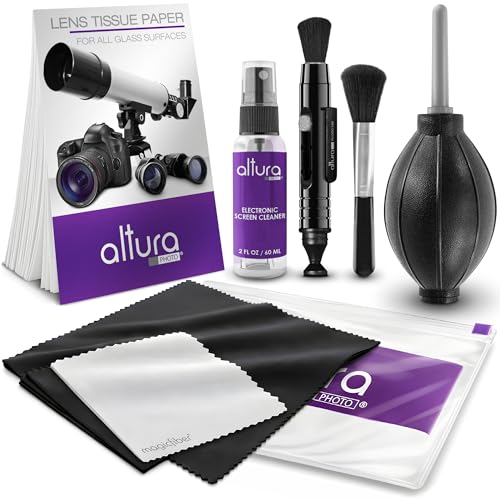
Before you start the cleaning process, it’s essential to gather the right materials to avoid damaging the lens. Here’s what you’ll need:
– Microfiber cloths: These are soft, lint-free cloths that help prevent scratches on the lens surface. They are ideal for absorbing oils and dust without leaving residue.
– Lens cleaning solution: It’s important to choose an alcohol-free and non-abrasive solution specifically designed for optical lenses. This ensures that no harmful chemicals damage the coatings on your projector lens.
– Compressed air: This tool is effective for blowing away loose dust and debris from the lens and surrounding areas before wiping. Compressed air helps prevent scratches that might occur from wiping dust directly.
Step-by-Step Cleaning Process

To clean your projector lens properly, follow these steps carefully:
1. Turn off and unplug the projector: Always ensure that the projector is completely powered down and unplugged from any electrical source to prevent electrical shock or damage during cleaning.
2. Use compressed air: Hold the can of compressed air upright and gently blow air across the lens to remove loose dust and debris. Keep a safe distance from the lens to avoid moisture from the canister.
3. Dampen the microfiber cloth: Lightly spray the lens cleaning solution onto a microfiber cloth. Avoid oversaturation as this can lead to liquid seeping into the projector housing, which can cause damage.
4. Wipe the lens: Using the dampened cloth, gently wipe the lens in a circular motion, starting from the center and moving outward. This technique minimizes the risk of creating streaks on the lens surface.
5. Dry the lens: If any moisture remains, use a dry microfiber cloth to gently buff the lens until it is completely dry and clear.
📋 DATA
Top 7 Projector Lens Cleaning Products (2024)
| # | Product | Type | Size | Price |
|---|---|---|---|---|
| 1 | Zeiss Lens Cleaning Kit | Spray + Cloth | 50ml | $15.99 |
| 2 | Epson Lens Cleaner | Liquid | 250ml | $12.50 |
| 3 | Cleansing Wipes by Kodak | Wipes | 100 wipes | $8.99 |
| 4 | Hama Lens Cleaning Kit | Spray + Cloth | 60ml | $13.50 |
| 5 | LensPen Lens Cleaner | Brush + Cleaner | 1 unit | $9.99 |
| 6 | B+W Lens Cleaning Fluid | Liquid | 100ml | $14.00 |
| 7 | Vanguard Lens Cleaner | Spray + Cloth | 40ml | $10.99 |
Proper Wiping Technique
Using the right wiping technique is vital to avoid damaging the lens. Here are some effective practices:
– Circular motion: Gently wipe the lens in a circular motion, applying only light pressure. This technique minimizes the chances of leaving streaks or marks, which can occur if you wipe back and forth.
– Avoid high pressure: High pressure can scratch the lens surface or damage the lens coating. Always be gentle to maintain the integrity of the lens.
– Multiple passes: If necessary, repeat the circular wiping motion with a clean section of the microfiber cloth to ensure that all smudges and dirt are removed.
By adhering to these techniques, you can maintain the clarity and functionality of your projector lens.
Tips for Maintaining Lens Cleanliness
Preventive measures can significantly reduce the frequency of lens cleaning. Here are some tips to maintain lens cleanliness:
– Store the projector properly: When not in use, store the projector in a dust-free environment. A dedicated case or bag can help protect it from dust and debris.
– Use a lens cap: Always place a lens cap on the projector lens when it is not in use. This simple step can prevent dust accumulation and protect the lens from scratches.
– Schedule regular cleanings: Depending on how frequently you use your projector, create a cleaning schedule. For instance, if you use it weekly, consider cleaning the lens every month. If used less frequently, quarterly cleaning may suffice.
🔀 COMPARISON
Best Projector Lens Cleaning Solutions
| Feature | ⭐ Zeiss Lens Cleaning Kit | Epson Lens Cleaner | Hama Lens Cleaning Kit |
|---|---|---|---|
| Type | Spray + Cloth | Liquid | Spray + Cloth |
| Size | 50ml | 250ml | 60ml |
| Price | $15.99 | $12.50 | $13.50 |
| Effectiveness | ✅ High | ✅ Medium | ✅ High |
| Safe for Coated Lenses | ✅ Yes | ✅ Yes | ✅ Yes |
| Residue-Free | ✅ Yes | ❌ No | ✅ Yes |
| Quick Drying | ✅ Yes | ❌ No | ✅ Yes |
| Eco-Friendly | ❌ No | ✅ Yes | ❌ No |
| Availability | ✅ Widely Available | ✅ Widely Available | ✅ Limited |
| 🏆 Best For | Versatile Users | Budget-Conscious Users | Professional Cleaners |
Troubleshooting Common Issues
Even after cleaning, you may encounter issues with your projector’s image quality. Here are some common problems and solutions:
– Blurry image: If the image remains blurry after cleaning, check for other issues like lens misalignment or focus settings. Sometimes, the lens may need to be recalibrated or refocused.
– Persistent smudges: If smudges do not come off with your cleaning efforts, they might be due to residues from previous cleaners or damage to the lens coating. In such cases, consider consulting a professional for a more thorough cleaning.
– Color distortion: If colors appear distorted even after a thorough cleaning, it could indicate a problem with the projector’s color settings or an underlying hardware issue.
Being proactive in troubleshooting these issues can save you time and potentially costly repairs.
In summary, cleaning your projector lens is a straightforward process that can significantly enhance performance. By following the steps outlined above, you can ensure that your projector delivers clear and vibrant images. For best results, make lens cleaning a regular part of your projector maintenance routine. With the right materials, techniques, and preventive measures, you can enjoy an optimal viewing experience for years to come.
Frequently Asked Questions
What is the best way to clean a projector lens?
The best way to clean a projector lens is to use a microfiber cloth and a lens cleaning solution specifically designed for optical surfaces. Gently wipe the lens in a circular motion to avoid scratching the glass, ensuring you remove any dust, fingerprints, or smudges effectively without damaging the lens coating.
How often should I clean my projector lens?
You should clean your projector lens every few months or more frequently if you notice a decline in image quality. Regular maintenance prevents dust buildup and ensures optimal performance, which is especially important for projectors used in bright environments or for presentations.
Why is it important to clean a projector lens?
Cleaning a projector lens is crucial because dust and smudges can significantly affect image quality, leading to blurry or distorted visuals. A clean lens ensures that the light can pass through unobstructed, providing clear and vivid projections, which is essential for both home theaters and professional presentations.
Which materials should I avoid when cleaning a projector lens?
Avoid using paper towels, rough fabrics, or any abrasive materials when cleaning a projector lens, as these can scratch the surface. Additionally, never use window cleaners or household cleaners that contain ammonia, as they can damage the lens coating and reduce image clarity.
How do I safely remove stubborn stains from my projector lens?
To safely remove stubborn stains from your projector lens, first, dampen a microfiber cloth with lens cleaning solution and gently dab the stained area. If the stain persists, let the lens cleaning solution sit for a minute before wiping it again in a circular motion, ensuring you do not apply excessive pressure to avoid damaging the lens.
References
- https://www.lifewire.com/how-to-clean-a-projector-lens-1856977
https://www.lifewire.com/how-to-clean-a-projector-lens-1856977 - You searched for how to clean projector lens – Newegg Insider
https://www.newegg.com/insider/how-to-clean-projector-lens/ - https://www.electronics-tutorials.ws/io/io_7.html
https://www.electronics-tutorials.ws/io/io_7.html - https://www.uw.edu/uwit/tech-tips/cleaning-projector-lenses/
https://www.uw.edu/uwit/tech-tips/cleaning-projector-lenses/ - https://www.purdue.edu/learning/cleaning-a-projector-lens.html
https://www.purdue.edu/learning/cleaning-a-projector-lens.html - Google Scholar Google Scholar
https://scholar.google.com/scholar?q=clean+projector+lens - Google Scholar Google Scholar
https://scholar.google.com/scholar?q=projector+maintenance+care - Google Scholar Google Scholar
https://scholar.google.com/scholar?q=projector+lens+cleaning+techniques - Google Scholar Google Scholar
https://scholar.google.com/scholar?q=how+to+clean+a+projector+lens - how to clean a projector lens – Search results
https://en.wikipedia.org/wiki/Special:Search?search=how+to+clean+a+projector+lens
